This Track is Not Available in Your Country.. But it Is.

Plan
Premium
Country
United States
Device
MacBook Pro (13-inch, 2017, Four Thunderbolt 3 Ports)
Operating System
High Sierra Version 10.13.3
My Question or Issue
I have previously been able to share songs easily with coworkers and friends through Slack by selecting "Copy Song Link" and pasting the link directly in the Slack channel. Ever since about three weeks ago, we've all been seeing the error "This track is not available in your country." Meanwhile, the song in question is playing on the Spotify app without issue. What could be causing this? Anything I can do on my end to fix? I've reinstalled the app and contacted Slack (who blames y'all).
Accepted answers
All comments

I am having the exact same problem! I previously could share Spotify tracks, embedded in Basecamp, with my co-workers (we're musicians). Now they ALL say not available in your country. Chatted with Spotify customer service yesterday, and they say it's not on their end. Talked to Basecamp and my IT guy. BOTH says it IS Spotify!!
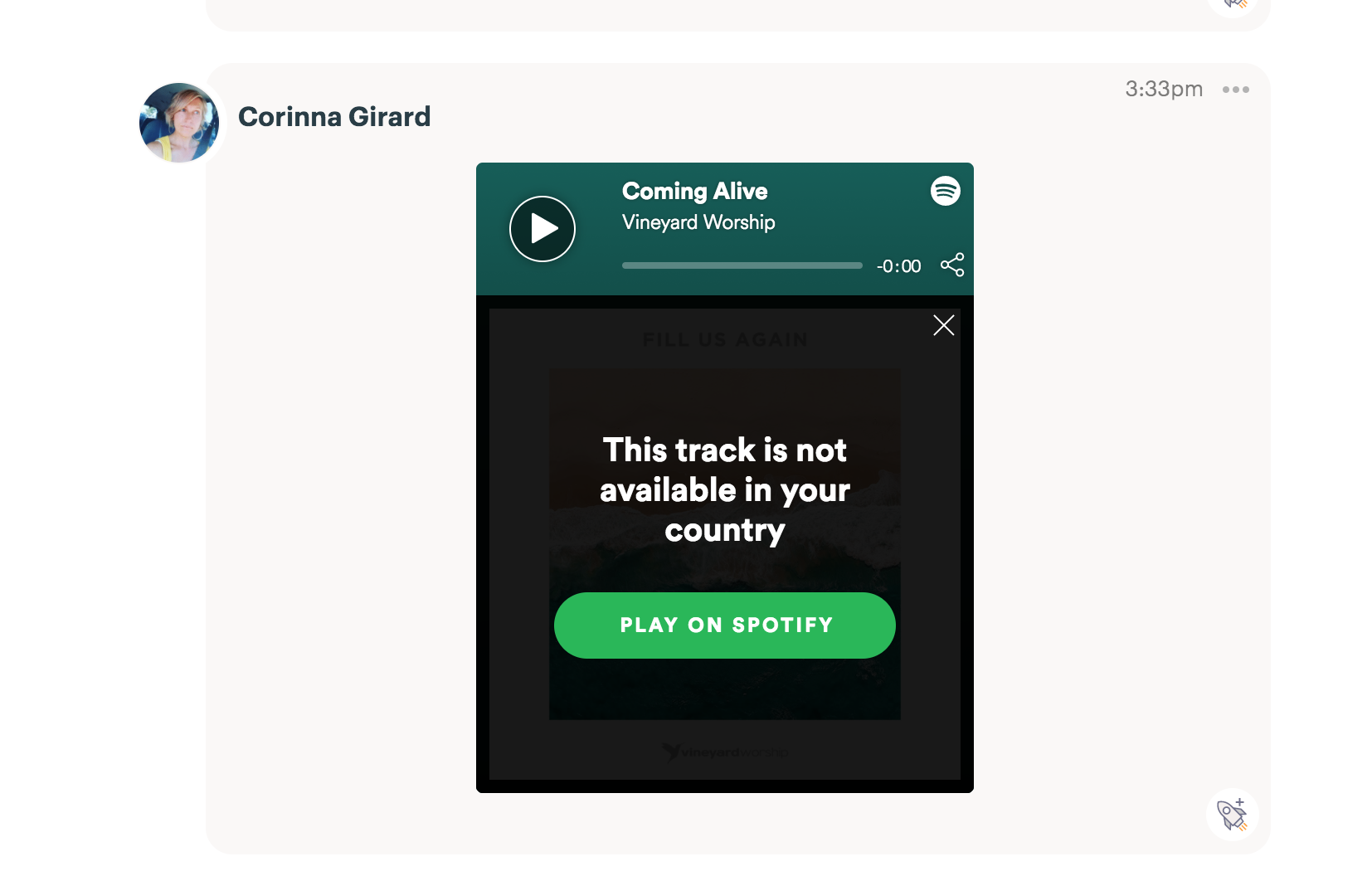

Seeing the same issue on both my work and private Slack workspaces. Re-installing both apps has not fixed it.

I've had this issue for a month now on tumblr, they said they'd look into it... but when?

I am living in a country outside of the US and frequently come across songs that aren't available. I'm okay with the song not being available (I get why it's happening), but what's really annoying is that if I'm playing a playlist with one of these unavailable songs, all of a sudden the music just stops randomly and doesnt start again unless I manually skip and play another song. It would be great if Spotify could detect that this song is unavailable and automatically skip to the next song. I get in a flow listening to music at work and when it all of a sudden stops it really disrupts my concentration/workflow.

Still seeing this happen - the docs here are great but then the unexpected happens -
https://wordpress.com/support/audio/spotify/#embedding-via-the-wordpress-block-editor
"This track is not available in your country"
The purpose of embedding is to listen to the track instantly - All parties should get paid when broadcasting like this, and Im assuming thats why this happens? Regardless, I would pay a fee to stream music from my site or clients sites.

Hey there folks,
Thanks for reaching out about this in the Community.
First of all could you let us know if you're using any sort of Company VPN? This may cause issues with the content availability.
We'll be on the lookout for your replies.
Hi Alex,
Thanks for your reply! Better late than never. I was not using the corp VPN at the time of this issue. Neither were any of my coworkers, at least 10 others, that I asked. Unfortunately for the purposes of this thread, I no longer work at this company, so someone else here will have to work with you on troubleshooting.
Hoping y'all can come up with a solution for everyone.


Hey there @Tappioca,
Thanks for getting in touch with us and welcome to the Community 🙂
Does the issue occur when a friend of yours, who lives in the same country, tries searching for a specific song? That way we can check if it's an account-related issue.
You can also send us a screenshot of the error message. We'll investigate this further.
Keep us posted! If you have questions, you know where to find us.

I have also been experiencing this issue the past few weeks. We have a Slack channel where we post songs at work. I can hear the embeded player snippets that everyone else posts from Spotify, but when I post one, anytime I click it I get this error. Seems my coworkers can listen fine to my snippet though, so strange. I tried logging out and back in. Restarting my computer. Not using a VPN and i'm in the US.
Hey there @skyloser,
Thanks for reaching out to us 🙂
Can you check if firewall or anti-virus software is affecting the performance of the app? It's also a good idea to check if the firewall is up-to-date.
Keep us in the loop! If you have questions, we are here for you.

I got the same message, I copied the "Copy Playlist Link" and pasted it into a page on my website. I did the same thing with a SoundCloud link and it works fine. Something on Spotify seems to be incorrectly triggering this block.

I've started to get this as well recently, it worked fine before.
No VPN on, no change in firewall settings, no change in anti-virus... nothing on my end has changed. This happens in all of my Slack groups now, i've tried multiple devices on different networks with the same result.
I can play the song perfectly fine in Spotify, but the preview in Slack always errors with "This track is not available in your country" now.
Something's bugged out on Spotify's end.

Here to +1 the embed issue. Here's a good example:
https://www.brides.com/story/how-to-make-the-best-wedding-reception-dance-playlist
Outside of the US this embed will play in the browser itself, but in the US it forces you to use the client, and be logged in.

Hey everyone,
thanks for reaching out.
@rowingentropy and @jet71dl, could you give it a go with another internet connection and letting us know if the issue still comes up? Perhaps using a mobile hotspot could be a convenient way to test this. Keep in mind that updates of the anti-virus and firewall can cause a change in the settings. Because of this we'd appreciate it if you double check that Spotify is added as an exception.
@roytruelove note that it makes a difference which method you use to share your music. If you use the Spotify URI when opening it, others will get a prompt asking whether they want to use the app or the web player. If you share with the Spotify link on the other hand a player should get embedded in your post.
Keep us posted, we'd love to investigate this further.
Mihail,
Regarding your suggestion:
If you use the Spotify URI when opening it, others will get a prompt asking whether they want to use the app or the web player. If you share with the Spotify link on the other hand a player should get embedded in your post.
Just to clarify - the issue isn't whether or not the embedded player shows up; it shows up in both cases for us. The issue is that outside of the US this embed will play in the browser itself, but in the US it is still embedded, but it says "This Track is Not Available in Your Country" and forces you to login using the client, after which the track _is_ available in that country.
Hey there folks,
Thanks for your replies.
One of the possible reasons you might be getting error messages when trying to open a song from an embed link in third party apps is that when you open a song from the app itself it will try to locate and automatically redirect to an available playable version of this in the database, whereas the embed doesn't have that functionality as it points to one exact track which may not be available for streaming.
@roytruelove, some features of the app work differently in different countries. This is why the embed play automatically in the Browser outside of the US, but requires the Desktop app when used in the country.
Hope this helps.
Mihail -- As I stated in my original post, i've already tried multiple networks. This issue is on Spotify's end. It seems random as well, some songs will play but others won't.
@Alex -- This makes the most sense in debugging the problem.
Although, I would argue that this was an addition or regression that Spotify added which is causing it, as this wasn't a problem in the past. If I get a share link from Spotify, share said link in Slack, click the preview, then it should still play a preview as I never changed regions. There is no logical reason it should prevent playback with a message of "This track is not available in your country".

Hey @jet71dl,
Thank you for your reply in this thread.
Can you try to log in with another account - such as a friend's or a family member's to see if the issue persist?
It would also be great if you can let us know which version of the app you have?
We'll keep an eye out for your reply.
Cheers!

RE playlist embedded on web page - some songs unavailable in your country
I am experiencing the same problems described above. In my case, all the songs on the Playlist are performed by / produced by / belong to my client, and there is no discernible reason why certain of the songs should be unavailable in the USA.
We are in different states, using iPhone, Android, and laptop. We have different accounts. The same songs are unavailable throughout.
Responses by Moderator have been unhelpful. The issue is nothing to do with VPN or anti-virus software. Please refer this matter to somebody who can provide us with a helpful response. Thank you.
Hello? Please will somebody from Spotify please provide an explanation / solution to this issue?
The songs in question play from the Spotify App but not when embedded on a web page. Why are we seeing, "Not available in your country" - this is clearly not an accurate error msg so what is the real problem?

Hi everyone,
Thanks for keeping us in the loop.
In case you get an error message when opening an embedded track in a third party app this means the app is trying to open an available playable version of the song in our database. The embedded content, on the contrary, doesn't work the same way as it connects to the exact song version which might not be available.
Keep in mind that some Spotify features work differently across different countries. If the embed plays automatically in a browser outside your country, it may still require the Spotify desktop app when used within your country of residence.
We'll be here if you have any questions.
I don't know anything about Spotify. I made the web site and I have embedded Spotify's own player to the page using an iframe. The code looks like this: https://open.spotify.com/embed/artist/284V...etc....
8/10 USA-produced songs by my USA-based client are fine. It's only 2 USA songs that are shown as unavailable ..in USA. Why those 2?
Are you saying that my client is placing into the Playlist the wrong copies of those 2 songs?
Does Spotify provide the user a way to choose the right version for the majority of the world?
Thank you for providing a little better understanding of the problem. A solution would be better still. How exactly do we arrive at a Playlist that works for most people who visit the web site?

Hey there @chuckupd,
Thanks for keeping in touch. We'll be happy to shed some light on this.
Depending on where the tracks/links are added from and how one navigates to the sources, different versions of the same track might actually be linked. In the background, the app then tries to find the version of the track available for the person logged in at the time, if there is one. This won't be noticeable in the user experience, though.
On another note, if you're using our API in part to develop a website, we suggest reaching out to our Spotify for Developers team, who might be able to further assist you with this. It can be via Twitter @SpotifyPlatform or in the dedicated board on the Community.
We hope this helps. If you need anything else, give us a shout.
Cheers!

I am having the same issue. I have a website that uses many Spotify links. I have users in the U.S. reporting that it is saying "this track is not available in your country."
This page https://www.biblevox.org/song/hope-in-the-lord/ was created by inserting the URL https://open.spotify.com/track/19lHhFcXKfIrarE93XzJOV?si=iiABsDysTpSReRwdwAKCHw into my Wordpress site, hosted with Kinsta.com. Wordpress/Spotify autogenerates a player. The player displays, but when you click on it, it says "this track is not available in your country." If I click "play on spotify," it takes me to the correct link in my Spotify application. So the problem is not that it is linked to the incorrect file. The problem does not seem to be Wordpress, because the embedded player is being sourced from Spotify. It seems the problem is with Spotify.
I get this error when I am on my home network wifi network on a mac. I get the identical response on my iPhone when I am off wifi and am just using my cell service. The track is available in my country, and I am using no VPN in any of these instances. so the error appears to be on Spotify's side.
Ironically, I get the identical error below on community.spotify.com for this very post I am writing. I have attached screenshots.

I'm also having this problem. Is "Yep it's broken, sorry" the official response from Spotify?
Is there a way to replace songs in a playlist with the correct playable song link, or find the correct playable direct song link somehow?
It blows my mind that lookups work like this under the hood. No wonder my smart devices are always randomly stopping in the middle of a playlist.
@Jeremy
I do not have another account that I can try. The Spotify version I get the sharing link from is 1.1.48.625.g1c87c7f7 on a Mac. But the issues is in the preview for it on Slack, which i'm on version 4.12.0 on a Mac. This issue still persists randomly today.
For example:
I shared this link on Slack and the auto preview played just fine,
I then shared this link on Slack well after the one above and the auto preview gives the not available in your country error, even though i'm literally listening to it on Spotify and not on a VPN.
EDIT: Lol, it even does it for the previews on this forum.

Another person experiencing this problem here! I am logged in both via the web (obviously as I'm posting here) and via the Windows app and can play songs all day long but suddenly, my site embed says the music is not available in my country (US). I've tried using a plugin to embed it, tried embedding using the direct embed code, the built in WordPress Spotify embed app, and the manual embed code. All result in the same error. This did NOT happen previously and thus it is obvious something has in fact changed. This needs to be corrected and not just explained away.


Hey there folks,
Thank you for your replies in this thread.
We've taken a closer look backstage and this is expected behavior.
We're always testing things by adding or removing features to make Spotify better overall and we’re constantly aiming to improve our features. We’re sorry that this means you’re not able to use Spotify like you wish to do at the moment.
You can read more about how your feedback reaches Spotify here.
Once again - thanks for the feedback, we appreciate it. Let us know if we can help you with anything else.
Take care!