Amazon Echo name changed to some serial number

Plan
Premium
Country
Hungary
Device
Amazon Echo Dot 3gen
Operating System
Windows 10
My Question or Issue
Since yesterday when I request the available devices via API Reference, I receive this:
"id": "d0e0c8da-1a4b-4b72-b7ff-4f089fd41d92",
"is_active": true,
"is_private_session": false,
"is_restricted": false,
"name": "d0e0c8da-1a4b-4b72-b7ff-4f089fd41d92",
"type": "Speaker",
"volume_percent": 36
However when I open spotify app on my phone or the windows app on my computer, then the name is correct. (It should be "Echo Dot")
I have tried to rename and device and deregister the device and reconfigure in the alexa app, but it did not help.
Accepted answers
All comments
Dear Hubo,
Thank you for your reply!
No, It just happaned yestarday before. My Home Assistant (connected to Spotify) are managing my speakers and plays music according to where I am located.
Suddenly it notified me, that an echo dot is not available. I look into it, and noticed that it was renamed. This change was made that day, otherwise I must have been noticed earlier.
Laszlo

The spotify API is reporting name = id, but the Spotify App is showing the right name...
It started 2 or 3 weeks ago as my homeassistant start showing the id instead of name...

Hi,
I think it's related to the latest Echo Dot firmware version.
I have 3 Echo Dot's, one of them tuned off since some days ago.
I realized the wrong name in Home Assistant, and when I turned on the third Echo Dot, the name was correct.
I checked the firmware version, and it was different from the other two. After a while, the third Echo updated, and then the name also appeared wrong in HA.
Hi,
So, maybe we should post the same kind of topic to an Amazon community forum as well...

Hi
I'm facing the same problem here
With Echo show I don't have this behaviour
And with former version of Echo dot doesn't happen also
The problem is with the new Echo firmware
I already send a message to Amazon Engineer but nothing until now
I will post here If they answer

Hi, this is what I got from Amazon Support yesterday
Hi there,
Thank you for following up.
As much as I would like to help, the Spotify API is not owned or supported by Amazon. Unfortunately, we are unable to provide information regarding this issue. Please follow up with Spotify support for more details.
So, please Spotify, check this!!
Well, it looks it’s an issue related to Amazon, not Spotify. Before the firmware update, it was working ok, and it’s also working properly in other devices.
I guess we’re not going to have success if they blame each other.
And here in the company we pay to use the Amazon support (almost $30 per month) and they answered this
It's awful

Any news on this?
I'm also facing this problem. I'm getting the users active devices in an Alexa Skills and now receiving sometimes the serial-numbers / IDs of the devices at its names.
This is annoying because I'm "saying" the device name to the customer via the skill and now it is reading the number..
I didn't changed anything in the code and it is only on some devices, not all.
Best wishes
Hi Bart1909
Same here! In my opinion it's a Echo firmware bug because with the previous version this doesn't occurs
We are facing serious problems with our costumers

Chiptune,
I believe it's on both side (Amazon and Spotify)
Why Amazon?
Because with previous firmware of Echo doesn't happen
Why Spotify?
I don't know how, but they have the 'names' of the Echo's otherwise they woulnd't show the correct names in their app
We've been trying a workround here but nothing until now
WazoAkaRapace,
I think we should contact them, but I don't have the path
If anyone knows please tell us

Thanks for reporting this. I've raised this with the team and they are investigating. I'll report back once we learn more.
Tks!!
Ohej,
Unfortunately didn't solve. We have to play using Spotify app... then the API return s the correct name of the Speakers.
But if we restart Echo Dot for instance... the randon number appers again.
Last week we sent a video for your team explaning how our solution works and why is important the correct name for us
Please tell me if you need more information about
I'm looking forward to hearing from you!
Tks
Fixed for me, thanks !
WazoAkaRapace
If you try to play on Echo Dot for instance after an restart it shows the correct name? Or do you need to play using Spotify app before?
I need to start playing on the echo one time before it get the right name yes (by the app, or by telling the echo to start playing music)
Same here, but if you turn off and turn on Echo again you will have to do these steps again... unfortunately
Ohef,
Unfortunately, today started showing the id number in the "name" again...
I would like to suggest to return the same fields that open.spotify uses...
If we debbug from the Open Spotify I could notice that we get this JSON
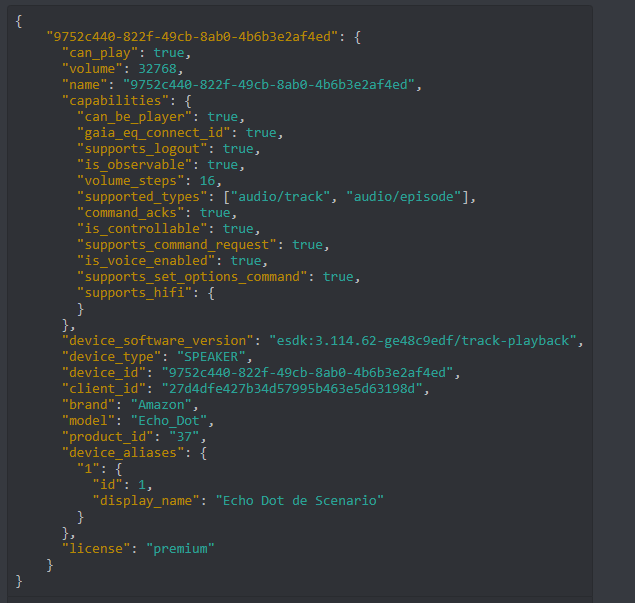
We have "device_alises" there.
If you add to the current API I believe will solve because in the web browser the wrong behaviour never happen
Tks for your attention
Any update? Still getting ids in name for Echo gen3+

Hi! While this isn't exactly the same issue that I've been experiencing with my 4th Gen Echo Dot (which has been reported at https://community.spotify.com/t5/Spotify-for-Developers/v1-me-player-devices-doesn-t-return-Amazon-Echo-Dot-devices-4th/td-p/5213016), there's reason to believe that there might be a correlation between these issues: they all seem to stem (at least initially) from the 'available devices' API request, and I believe that's the reason @ohej pointed me to this topic.
In my case, though, instead of getting the serial number, my 4th Gen Echo Dot just won't be brought up by the request at all unless I open the Spotify app.
Could anyone else confirm if they've also experienced this? Thanks!
Hmm, let's look at what's going on. Did this recently change or is this something that happened as long as you've used the API? Also, is there any other parameter that gives the correct name of the device in the response? Keep me posted!
Have a great day,
Hubo