[Desktop][Other] Return the option to hide media keys overlay

There have been a convenient setting in the previous version of the desktop app which allowed to hide overlay while using media keys. But, for some reason, it was removed in the latest version of the app (using 1.1.55.498.gf9a83c60-a currently). I sincerely cannot understand the reason of removing this option, so I suggest returning it to the latest desktop app.
Comments

Please spread this as much as possible, previous requests for this are closed after 3 months if they don't accumulate more than 50 votes...

Are the people at Spotify out of their minds? I am forced to have this **** overlay covering my top left part of screen, covering my work every time i adjust volume?? I AM PAYING FOR THIS SOFTWARE AND SERVICE, DON'T REMOVE NECESSARY FEATURES.

I'm with you. That freaking overlay should dissapear from my screen. If you need a soldier, I'm here.

It definitely needs to be brought back! Without it, bluetooth headsets have issue when using pause / play button, it mutes all audio, not only in spotify, but from every other application, that has some audio. Disabling this option solved this issue and right now I cannot use media buttons to switch from spotify to listen to YT, because it also mutes YT.
More info here: https://www.reddit.com/r/Windows10/comments/ji8ywj/how_to_fix_an_elusive_bluetooth_mute_issue_in/

Was it really too much for the design and dev teams to leave this option available? What a great idea to upset the customers who make your job possible.
Someone showed a easy way to get back the classic user interface:
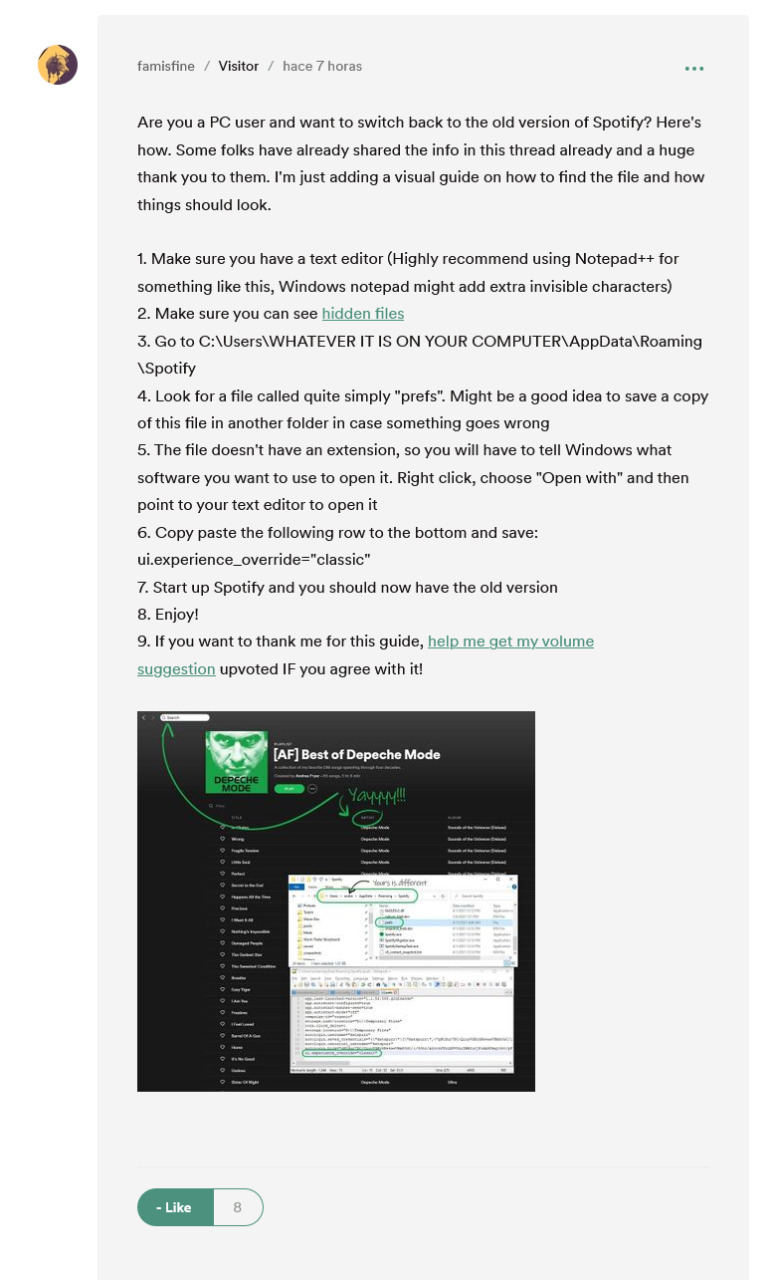
It worked for me but that prefs file was in this folder: C:\Users\YOUR USER\AppData\Local\Packages\SpotifyAB.SpotifyMusic_zpdnekdrzrea0\LocalState\Spotify
For the guy with the media keys pausing YouTube problem, here is how you dissable that in Firefox: https://support.mozilla.org/en-US/questions/1301997 . If you use other browser, search an equivalent setting.
contain the word Spotify.

Has anyone seen any updates elsewhere in the Community about if this will be fixed? Or if the dev team is even aware? It is driving me absolutely INSAIN! I'm approaching the point of ending my subscription after almost five years of being a loyal premium customer because of this (along with some of the more common complaints about the update).
The option is available once again. Thank you!
Hey @SpotMike1 are you sure you are on the new desktop app? Mine is still missing the option. What is your version/build number?
I noticed an update available today in the Windows desktop app.

Updated on 2021-05-02
Hello and thanks for bringing your feedback to the Idea Exchange. We've marked this as 'New Suggestion'.
Spotify Staff will look into this idea once it reaches the necessary amount of votes.
More information about how the Spotify Idea Exchange works can be found here.
Updated on 2021-06-28
Hey! Looks like that your idea is growing up fast and it's amazing! We are going to change its status to 'Good Suggestion' now and we hope it continues to be supported by more and more users.
Thanks again for your idea. We really appreciate it 🙂
More information about how the Spotify Idea Exchange works can be found here.

Updated on 2021-06-30
Hey folks,
We just wanted to provide you with an update on this idea:
We've spoken to the relevant teams and they've confirmed that this feature has already been implemented - this is why we're updating the idea's status to Implemented.
However, it seems that users are still experiencing an issue with the feature. This is an issue which we're aware of and which we've already reported to the right folks.
If you're experiencing the issue as described in this Ongoing Issue thread, make sure to head over there, leave a +VOTE and subscribe to the thread to receive the latest on our progress.
If you're experiencing a different issue to the one in the Ongoing Issue thread linked above, make sure to start a new thread in the relevant help board here and we'll get back to you there.
Cheers!

But it does not solve the issue with Bluetooth devices stopping all audio sources. Previously, this feature disabled the hardware media key handling which was a blessing for those devices. Idk how this feature is already implemented, the option is absent and there is no other way to disable hardware media key handling.
Other apps allow to disable this, Spotify don't. So, if I run YouTube and Spotify at the same time and pause Spotify, YouTube will mute. Please help.
Related: https://community.spotify.com/t5/Desktop-Windows/How-to-disable-Hardware-Media-Key/
Spotify doesn't*
No staff member has addressed this yet. Are they purposefully ignoring this issue? Will the new spotify app be this invasive and unusable?