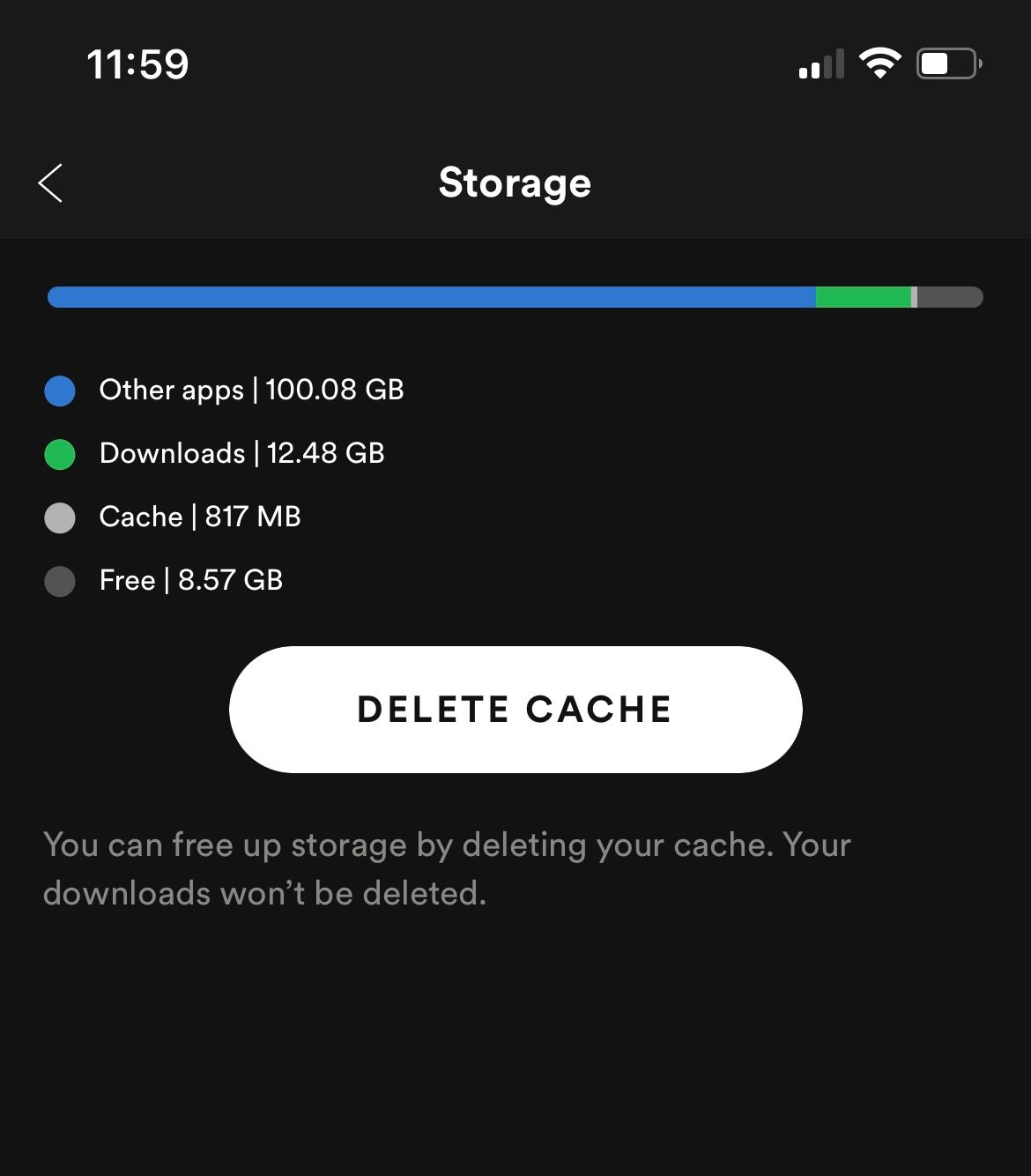
Storage, other apps. Incorrect Gig in Spotify

Plan
prem
Country
England
Device
(iPhone 12 pro
Operating System 14.4.1
(iOS 10, Android Oreo, Windows 10,etc.)
My Question or Issue
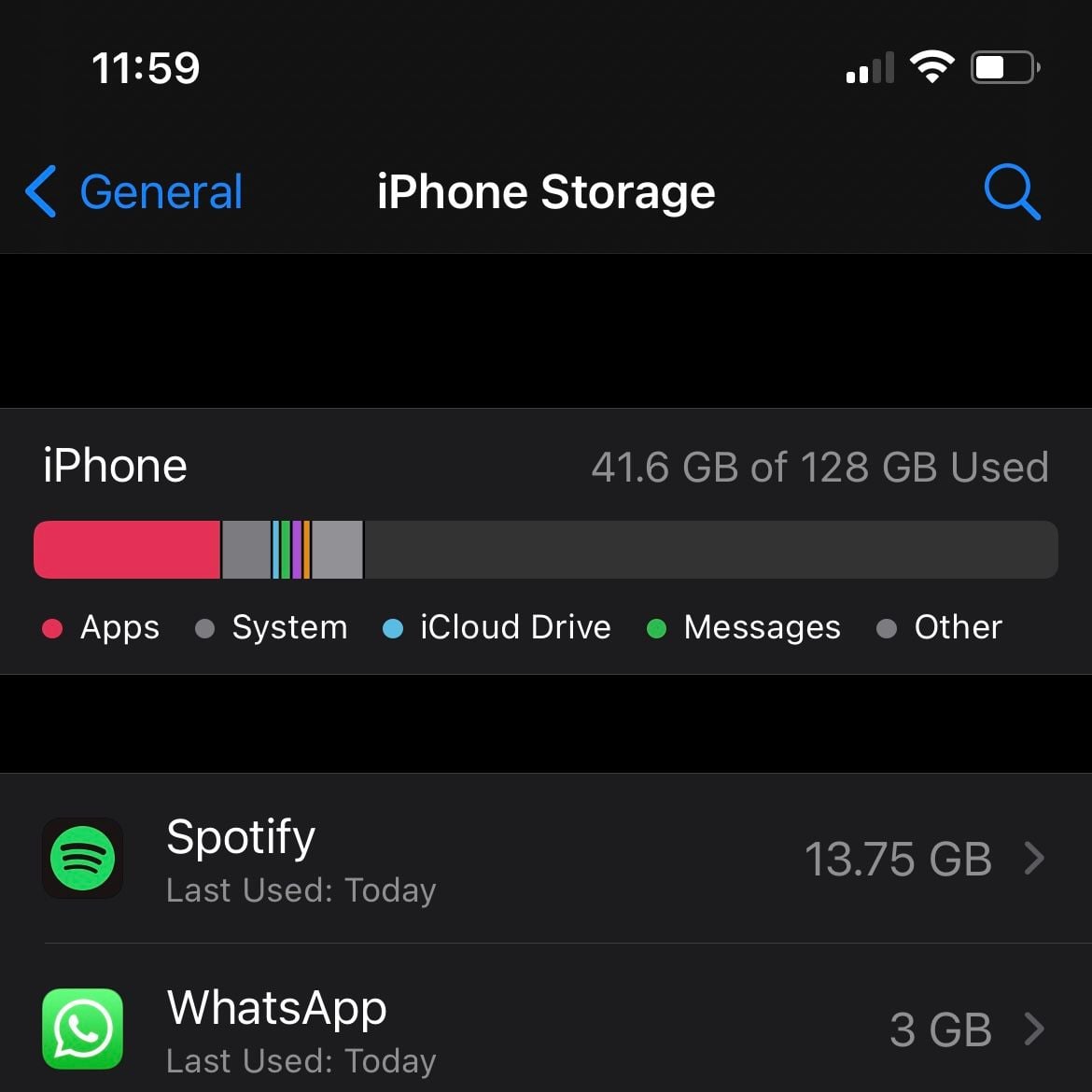
After getting my new phone and auto installing all apps from the iPhone backup I cannot download any songs because the Spotify storage says that other apps is full. As can be seen from the two photos, this is not the case and my phone has lots of memory available. I have followed various advice on this forum, deleted cache, offloaded app, deleted app, reinstalled many many times but it is the same every time I reopen it. Please help.
Accepted answers
All comments
Thanks Ver, I had already found and tried this answer from Katerina. My pics were taken after doing this. For the sake of completeness I have tried again, no change.
what next please expert helpers......?

Hi @Hightower2571,
Thanks for getting back to us.
Could you ask a friend or a family member to log in to their personal account to see if they can replicate this?
You could also try performing a soft reset on your phone.
Keep us posted.

This is a dealbreaker for me as I can't download any songs to my device because of this bug.

Hey there @egodestruct,
Welcome to the Community and thanks for reaching out about this.
In this case, we suggest that you check if the OS of your device is up-to-date.
Additionally, could you let us know if this issue started happening after a specific event such as an update?
We'll be on the lookout.
Not sure when it started happening. One day I noticed that my downloaded content was no longer on the device, and when I try to redownload it it errors out because Spotify thinks there isn’t any space (I have over 100GB free on the device)

Hi there @egodestruct,
Thank you for your reply and confirmation.
Can you let us know if the same thing happens if you log in with another account on the device - such as a friend's or a family member's? This will help us understand if it's account related or not.
We also suggest that you perform a soft reset of the device.
Keep us posted 🙂
Cheers!
A soft reset on the phone did not fix the issue. My ipad with the latest ipadOS installed does not have the issue and is logged in to the same account.

Same here.. on an iphone 12
pls fix
Hi there folks,
Thank you for your replies and screenshots.
Can you confirm if you're experiencing this after using the backup option and the apple cloud?
Also, does you're old phone have less storage?
It can be that the cache settings are being transferred via the cloud, so it would be great if you can disconnect from cloud and try reinstalling again.
Keep us posted 🙂
Cheers!

I’m having the same problem. Did anyone get it resolved and how? Thanks.


Hi there @Huskies,
Thanks for reaching out and welcome to the Community.
Can you let us know which troubleshooting steps that were mentioned in this thread you've tried so far? This is to avoid repeating anything and it will help us narrowing down the possible cause of the issue.
Keep us posted. We'll be on the lookout.
Hey @Hightower2571,
Thanks for getting in touch with us 🙂
Could you try these steps and run a clean reinstall to see if anything changes? This one is more thorough than the usual one.
Keep us in the loop! We'll be right here if you have any questions.