Doubleclicking on a playlist won't play a random song from it

Before the update I could play a random song from a playlist if I just doubleclicked it on the left panel (i highlighted it on my screenshot). After the UI update, that feature stopped working. Now if I doubleclick on a playlist, it will just pause the song that's currently playing, and won't play a random song like before. It seems like my friend also had this problem after updating (he updated the app before me), but he says that one day it just started working again. I wonder if I can do something to make this feature working again.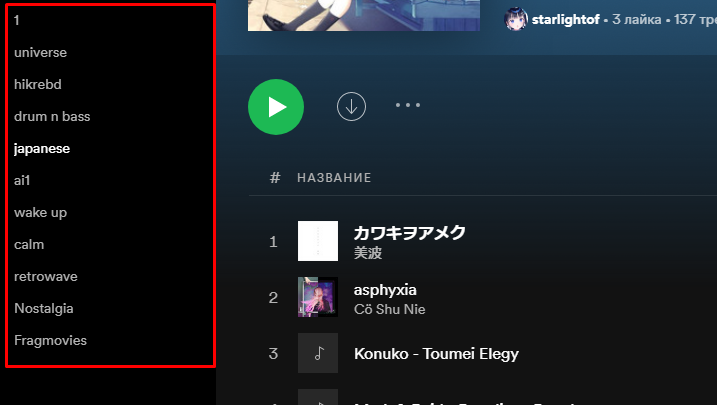
Plan
Free
Device
PC
Operating System
Windows 10
Accepted answers
All comments

Hey there @starlightof,
Thanks for reaching out to the Community, and welcome 🙂
Would you mind letting us know if you've already tried performing a clean reinstall of the app? This is often an overlooked step, but it can be helpful to get rid of any cache that might be causing trouble.
If this doesn't do the trick, could you let us know if the same thing happens when you use the web player?
We'll keep an eye out for your reply.

Hey @starlightof,
Thanks for trying and keeping in touch.
Just to confirm, is the playlist that you're double-clicking the one that you're currently playing? If so, in the newest interface of the app it's the expected behavior that the song is paused/played when double-clicking on the playlist title.
However, if you try to play a different playlist than the one being played, it should start a random song from it.
Hope this clears things up. We'll be right here in case you have any questions 🙂

Hi @starlightof
You're welcome! We appreciate you taking the time to share your feedback with us and will make sure to pass it onto the right team, as we always strive to improve your experience.
If you ever need anything else, we're just a post away.
Have a good one!
Hey @starlightof,
Thanks for trying and keeping in touch.
Just to confirm, is the playlist that you're double-clicking the one that you're currently playing? If so, in the newest interface of the app it's the expected behavior that the song is paused/played when double-clicking on the playlist title.
However, if you try to play a different playlist than the one being played, it should start a random song from it.
Hope this clears things up. We'll be right here in case you have any questions 🙂