Spotify doesn't work properly with Amazon Echo Dot 4th Generation

Plan
Premium Family
Country
Brazil
Device
Amazon Echo Dot 4th Generation
My Question or Issue
Hi, I've been having issues connecting to my Amazon Echo Dot (4th Gen). I use it often as a speaker for Spotify along with my other Amazon devices (namely other 3rd Gen Echo Dot), and recently I've noticed that when I try using the 'Play' command through the Spotify API to start streaming on my 4th Gen, there's simply no answer.
I've checked my Amazon Alexa settings to make sure that the Spotify skill was properly linked to my account (it was), and I have also noticed that it's only when I try opening the "Connect to a device" screen on my Spotify app and leaving it open for a few seconds that my 4th Gen Echo Dot shows up and becomes available for selection. This particular behavior gives me the impression that this proccess of searching for devices "wakes" the Echo Dot up, and only then makes it available for streaming.
Again, this seems to be a problem exclusively related to the 4th Gen, as this behavior is not observable in any of my other devices (i.e the 3rd Gen Echo Dot).
Accepted answers
All comments

Hey there @QAScenario,
Thanks for getting in touch about this here in the Community.
First up, it's well worth running a clean reinstall to get rid of any cached files that might be causing trouble. This one is more thorough than the usual one.
Additionally, we suggest that you restart your router to check if that does the trick.
Lastly, could you let us know if this issue started happening after a specific event such as an update?
Keep us posted on how it goes.
Hi, @Eni, thank you for providing support.
Unfortunately, after trying all of your recommendations, the referred behavior still persists.
I do have some more info that might help describing the issue more accurately:
I currently work with a company that integrates Spotify with one of our products. Our application relies on retrieving a list of the user's available devices through the Spotify API.
The problem is that, apparently after some time, the 4th Gen Echo Dot speakers (and exclusively the 4th Gen ones) stop being retrieved by this process. The only way to make these speakers 'available' again is through the method already mentioned in previous posts: it's necessary to open the Spotify app and go to the device selection screen.
This is a problem for us because, as stated before, we rely on this list of 'available devices' that are retrieved through the API to provide our users with complete integration without having to leave our own app.
Based on the behavior we've been observing, we postulate that when performing this procedure (opening the Spotify app and waiting for the available devices list), the 4th Gen Echo Dots receive a 'wake up' command of some sort, and if that's the case, we would be interested in learning what the specific command is.
Hi @QAScenario,
Thanks for getting back in touch.
If you have any doubts about the integration you're developing for your company, we suggest that you head over to the developer board. You can can find more info about this here.
However, we can help you here to find out what's going on with your Amazon device.
Would you mind checking if the firmware of your device has any pending updates?
Additionally, we suggest that you try unlinking and linking your accounts again to check if that makes any difference.
Lastly, you mentioned that you're able to use the device via Connect, could you let us know if you can use the voice commands after that?
We'll be on the lookout for your reply.
Hi @Eni, I'll be sure to check the developer board, thank you for the suggestion.
Regarding the device:
Last I checked, the device's firmware was up to date and we did try linking and unlinking the accounts several times, but the issue kept happening anyway.
And yes, the device works fine when paired via Connect, including voice commands (albeit it does present a slight delay of a few seconds to become 'available' for selection).
It's only when I try retrieving the devices through the API command that the 4th Gen Echo Dot in particular seems to be unresponsive.
Once again, thanks for the response.

I have the same problem. I was in contact with Amazon, but they reject any guilt. supposedly the problem is with Spotify. is there a solution in the meantime? what i don't understand why it only echoes the 4th. Generation concerns. Funnily enough, Amazon cannot understand the matter itself
Pls Spotify help us
😉

Hey @Stephan73!
Thanks for reaching out on the Community
Could you confirm for us if you're trying to start playback on your Echo dot directly via the API or are you using the app Spotify itself and aren't able to connect even when using the Connect device picker?
Keep us in the loop here.
Hi, sorry for chiming in, but I believe I might be able to provide a bit of info regarding your questions:
- As I've gathered on other threads at the developer boards, it seems that establishing a connection with the Echo Dot via Spotify Connect device picker works just fine, the problem arises exclusively when trying to retrieve the devices through the API request (more specifically, through the /v1/me/player/devices endpoint).
Something curious we've noticed is that after connecting to the Echo device through the Spotify Connect, there is a short time frame where the API request will work as intended in retrieving the available devices, including the Echo Dot. This only happens shortly after using the Spotify Connect and only lasts for a short amount of time before not being able to retrieve them anymore.
Some time ago I've opened a thread about this over at the developer boards, if you're interested in retrieving more details: https://community.spotify.com/t5/Spotify-for-Developers/v1-me-player-devices-doesn-t-return-Amazon-Echo-Dot-devices-4th/td-p/5213016
We've been eager to have this looked at by someone for some time. If you have any more questions, feel free to ask and I'll do my best to give any details that you think might be of some help towards fixing this issue. Thanks!

As we can see, there are definitely problems with 4th generation Amazon Echo devices.
For me it is also the case that the device seems to fall asleep after a short period of inactivity and it is no longer possible to operate it via the Spotify app.
the device only wakes up when the app is restarted, or alexa command " Alexa start Spotify"
This is for sure a problem, which i cannot solve myself.
I was already in contact with Amazon about this, but they say Spotify must take action.

Hi folks,
@QAScenario, thanks for the details you've submitted. No need to be sorry as welcome all info.
From what we can see in the linked dev thread and what @ohej has also linked to, it seems there are several issues with newer firmwares on the Echo devices. We as moderators aren't too familiar with the API, but that we'll get in touch with ohej, to see if he has any updates on the matter and ask him to post again in the linked dev thread 🙂
@Stephan1973, this issue is already being discussed on the dev boards and the right folks at Spotify are aware of it. Without wanting to pass the ball, it really does sound as something in the newest firmware and the 4th gen echoes has caused issues to appear, as no other devices seem to be experiencing this. This is outside of our control to rectify. All we can do is check our API for any optimization opportunities.
Hope you find this info helpful. Don't hesitate to reach out again if you have questions.
Hi @Alex, thanks for being so helpful.
I understand that this info might not be available for you to disclose, but we'd really like to know if there's any sort of deadline towards fixing these issues that were raised. I ask this because, as you might've noticed back at the thread @ohej linked, they seem to have some idea of what might be causing these problems (back in June they've already pointed out this faulty Echo Dot firmware hypothesis), but since then we've had no real follow-up. I say this in the nicest way possible because we really like and appreciate the platform, but it's been over three months and we're still trying to find ways to work around this issue without success.
Hi Alex
first of all I want to say thank you for your help,
and I am glad that things (hopefully) are moving forward now.
By the way, when it comes to firmware, I'm with you.
I suspect that too, but I'm not a software specialist.
Am**on won't be entirely innocent 🤔
API optimization sounds good and is urgently needed anyway.
This will be the next thing we get on your nerves with 😁
but that should not be the topic here
One after the other.
just that there is no boredom 😃
Please stay tuned and don't give up💪👨🔧
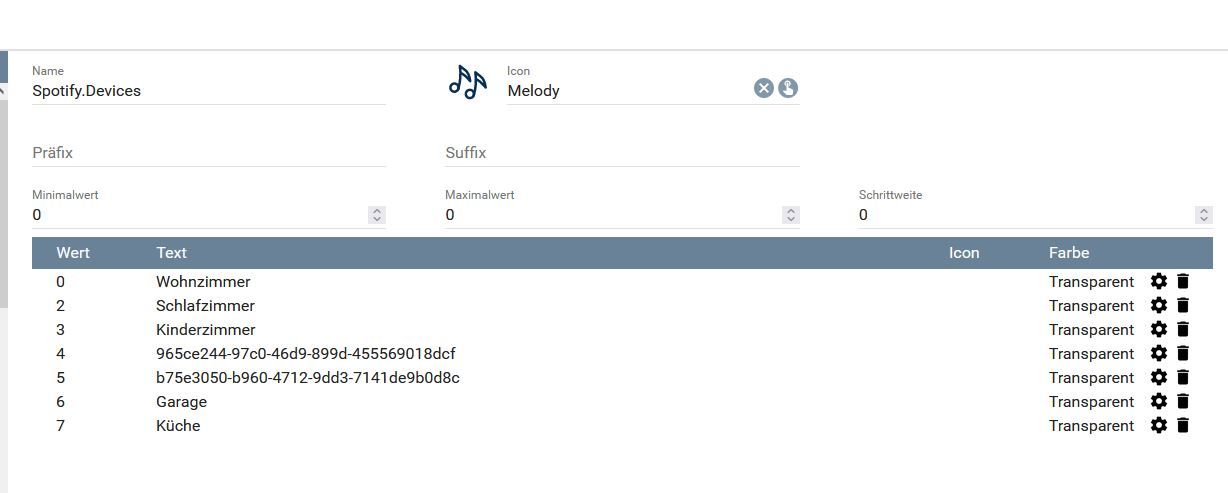
when can a solution be expected?
it's getting embarrassing
also for Amazon
with every new software update, the hope flares up in me, that I will finally be able to use my Spotify the way I want it to be.
5 minutes later, this little **bleep**ing device list brings me back to earth. ">😫
c´mon Spotify, iam sure you can fix this! pls
looks like the user is a solo entertainer here.😞
Hello Spotify here is a customer who pays monthly
even real money, and no buttons.

I have the same problem but reading trough this thread it does not seem that Spotify or Amazon care too much about this issue. So that's a bit sad.
embarrassing is better.😂
what Amazon probably says, that their devices cannot be used in connection with Spotify
I can also play games👺
Spotify Free works just as badly as Spotify Premium works.
So why pay?
And just as a reminder of how sloppy work is being done at Spotify, the following upload.
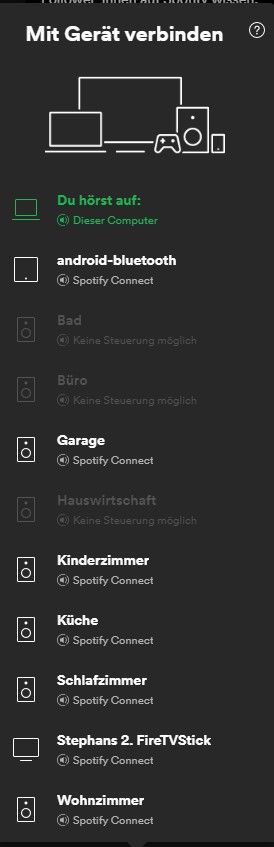

I have similar issues. I can only use spotify on browser and phone app. I have 3 different generations of echo devices and they all just stopped working within the past 3 days. My firmware was not updated on 8 different devices in the past 3 days... I have cleared cache etc, and also disabled spotify skill, then i enabled and re-linked etc. It see's all the devices but cannot play on any of them.

I too am experiencing this issue...Its been driving me nuts as I recently upgraded my router thinking that was to blame. I have done countless resets, deregistered the device, connected it another access point, delete the pairing between spotify and amazon. Now to come across this thread makes me sad I have been beating up my new router !! Anyway, I can see this thread is months old and still no resolution. I have lots of other Echo devices of varying age and can confirm it happens on none of the older variants either...Its just the Echo Dot 4th Generation its happening on....
So fyi for me, I just rated the Spotify skill at 1 star yesterday. Within 3 hours, all my echo devices work fine again. I am not saying the Unapproved rating did anything, but I will say either Spotify or Amazon fixed "the glitch". All my devices work and play music fine now. I hope now when everyone un-links and re-links, your music works again.
*** UPDATE, the one issue is that even though the echo devices do play spotify, once pausing or stopping music and continuing on another device, it starts the playlist over instead of resuming where the music left off.
The more I study this the more perplexing it becomes... I would say the new Echo Dot Generation 4 has some form of sleep function on its network and the spotify connect part of the app detects it in sleep mode and goes offline after 10 minutes of the connect dialogue appearing .....when the spotify connect icon is refreshed the Echo Dot Generation 4 wakes up again for a period of 10 minutes until it goes back into unavailable again....So now not sure where the domain of responsibility lies.....is it Spotify to alter their API to keep the device alive or Amazon to tweak their network firmware ??
I am not sure as I do not have any Gen 4..
I'm starting to think someone is playing games here.
The customer is the fool
apparently Spotify is overwhelmed or unable to solve the problem with 4th generation Amazon Echo devices.
If that doesn't work with Amazon devices, then Google gets a chance now.
Does anyone have experience with the Google speakers in connection with Spotify
maybe it will help solve the problem?
I unplugged all my Echo devices today.
All devices are now offline
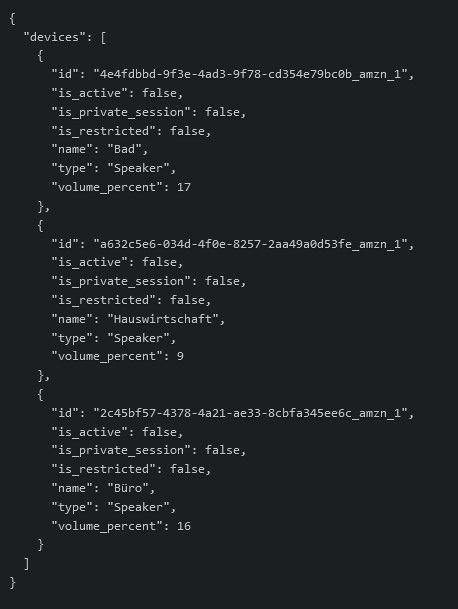
Now when I open the API Console and search for devices,
then the devices of the 4th generation are displayed as available.
But the devices are offline!
I wish you success
Insanity
We've been asking for a solution for over a year.
happy first birthday, Spotify.

I also encountered the same problem as this one.
At first it was only affecting 2 of my echo dot 4th gen devices.
But I performed logout/login in of alexa/spotify, clear cache for alexa/spotify, clean installed alexa/spotify, logout everywhere alexa/spotify, disabled the show local network devices only in spotify setting, gave all the permissions to alexa/spotify even though they didn't asked me, provided alexa access to read everything on phone screen in accessibility settings, disabled alexa integration in spotify desktop browser/disabled spotify integration in alexa app, ran lower version apk of alexa/spotify, disabled spotify skill in alexa app then reenabled, logged in to 2 separate alexa and 2 separate spotify accounts and mix and matched the 4. None of the above worked.
After performing all troubleshooting steps above, I ended up breaking my remaining two 3rd gen echo dot devices too and I went rock bottom because all 4 of my echo dot devices were no longer getting detected by Spotify even after repeating all the steps above.
After a week of troubleshooting via trial and error method, watched more than 10 youtube videos, read more than 15 articles, I found a workaround that worked for me.
I say a workaround, because I honestly have no idea what caused the issue and I am not sure if this will also work for you guys.
What I did was open Amazon via desktop browser and went to alexa devices and deregister each of the devices on my Amazon account. After derigstration, i added the devices and they were automatically detected by Spotify immediately.
I hope the issue does not reoccur but because Spotify and Amazon cannot explain well what caused the issue, I am not confident that this wont happen again.
Link for where to deregister the echo devices https://www.amazon.com/hz/mycd/digital-console/alldevices
Link to the 2019 youtube video that worked for me https://www.youtube.com/watch?v=O7v0u1PTZaM
You are probably the only person on this planet who has found a solution for themselves in this.
Or you just don't understand the problem.
I can only report that nothing has changed.
I don't know if Spotify doesn't want to deal with the problem or if they're just too braindead for it.
I expect nothing more here.
pitiable
the stupidity of this company is seen in the fact that they constantly get on my balls and ask me to go back to premium.
Hello?
anyone home?
Have you tried either of these?
A.
1. Deregister that device here https://www.amazon.com/hz/mycd/digital-console/alldevices
2. Once echo dot 4th is ready to for setup, add that device again but instead of going to Alexa via smartphone setup method. Go to Alexa via browser from a laptop or desktop w/ wifi card on the same network/vlan as the echo dot 4th gen.
Alexa Web URL (Use Firefox): http://alexa.amazon.com/
That website will allow you to setup the echo dot 4th gen using the web interface method.
B.
1. Rename Echo Dot 4th Gen to any name inside Alexa App.
2. Deregister that device here https://www.amazon.com/hz/mycd/digital-console/alldevices
3. Once echo dot 4th is ready to for setup, add that device again but instead of going to Alexa via smartphone setup method. Go to Alexa via browser from a laptop or desktop w/ wifi card on the same network/vlan as the echo dot 4th gen.
Alexa Web URL (Use Firefox): http://alexa.amazon.com/
That website will allow you to setup the echo dot 4th gen using the web interface method.
I've recorded a video to further demonstrate the issue:
https://photos.app.goo.gl/yPmtg6yqd9pdngxQ9
As you can see, there's a slight delay while the Spotify app is trying to search the network for available speakers. During this time-frame, it's possible to see that the 4th Gen. Echo Dot ('Echo Dot de Tiago') is being listed, but it's not available for selection, as it stays greyed out for a couple seconds. Note that this happens exclusively with the 4th Gen: the 3rd Gen ('2º Echo Dot de Tiago'), in turn, does not display such behavior.