[web player] Always fail playing first 5 songs ("502 Bad Gateway" and multiple "400 Bad Request")

Plan
Premium
Country
Sweden
Device
Firefox 84.0.2 (64-bit)
Operating System
Linux
My Question or Issue
When I click "play" on a song in a playlist, then it fails to play the song, jumps to the next song 5 times. The 5th song starts to play successfully but stops after 10 seconds.
I can reproduce this problem 100% of the time, regardless of playlist used (tested my own playlists and spotify created playlists) and regardless of song position in the playlist.
I have saved a HAR-file for the whole session where I reproduce this error, but I don't want to upload it publicly as it may contain sensitive information. Reach out to me on my email if you want me to send it over.
However, I've provided some screenshots of the console and network tab of the Firefox developer tools where you can get an overview of what requests fail and what errors/warnings I have.
Looking at other problems people have reported, this problem seems to be something that has occurred on/off for a couple of years. All the other tickets have been marked "fixed" and the most recent one is 5179515.
Accepted answers
All comments

I got the exact same issue.
Plan
Premium
Country
Denmark
Device
Firefox 86.0.1 (32-bit)
Operating System
Windows 10


this started yesterday for me as well. using the web player on Firefox 89.0 - Linux.
Hey @unseenlarks,
Thanks for getting in touch about this.
Could you let us know if the same happens in case you're using a different browser?
Additionally, would you mind trying if the issue persists using a different internet connection?
We'll keep an eye out for your reply.
it's quite odd as it will always skip five tracks, doesn't matter which one i choose on the playlist, and continue playing from then on.
Hi again @unseenlarks,
Thanks for getting back to us.
In this case, would you mind clearing your browser's cache and cookies to check if that does the trick?
Additionally, we suggest that you turn off the VPN if in use.
Lastly, could you check if this happens on a different PC as well?
Keep us in the loop.
no, clearing the browser cache and cookies didn't help.
i do not use a VPN, and unfortunately don't have the luxury of a different PC to test with.

Hey @unseenlarks,
Thanks for the reply.
You can try to remove any entries containing Spotify from your host files. Follow the instructions here.
This may cause such issues on some PCs.
Keep us posted!

Hi,
I have the same problem since the latest firefox update.
My OS: Kubuntu for 32 bit, therefore I also use firefox for 32 bit.
Clearing the cache and other browser data did not help.
Using a different browser did not work, because I did not find a 32bit browser, that is compatible with the spotify web player. (When I use chromium the player says that I should activate DRM-content. But that already was activated. When I use the falkon-browser the player says: "please use a compatible browser".)
Hey folks,
Thanks for your replies and the info.
Since Linux and Ubunto are not officially supported systems, we can't guarantee that the app and web player would work as expected on them.
Some users have shared workarounds to similar issues here. Check if those help.
Don't hesitate to reach out again if you have questions.

~
~
As stated earlier I'm on Windows 10, and none of your solutions like cleaning the cache or running in private mode works.
I also tried to use Chrome browser and at first it seemed like it had the same issue, but then I tried to change the device from "Web Player (Firefox)" to "This webbrowser)" and then it works.
It looks like it doesn't matter which version of Firefox you are running or if it is 32-bit or 64-bit, Windows or Linux.

Hey folks,
Thanks for the info 🙂
In case you're using any ad-blockers, we'd suggest you turn them off to see if anything changes.
It's also important to make sure that your browser is up-to-date.
Keep us posted.
The weird thing is that it consistently skip the first 5 tracks and then only plays 9 seconds of the 6th track before it stops.
This is for both albums and playlists and even if you start at track 3 it still skips the next 5 and plays 9 seconds of the 6th before it stops.
Is it working on Firefox for you?
According to your "System requirements" page (https://support.spotify.com/us/article/spotify-system-requirements/) that requirement only applies when using the Spotify app.
The requirements for the web player does not say anything about operating system, it only says that the web browsers Chrome, Firefox, Edge, Opera and Safari are supported.
Follow up to all the suggestions above:
- I'm not using any type of adblocker or similar plugin when I encounter this problem on Firefox
- I have cleared the cache, cookies, local storage, etc. without it solving the problem
- Internet connection problems and computer related problems can be ruled out since I don't have this problem on Google Chrome (Version 90.0.4430.85 64-bit) using the same computer and OS
I'll return with results from trying Firefox on my Windows 10 computer.
Edit: After trying to reproduce the problem on my Windows 10 computer I can confirm that I don't have this problem using Firefox (89.0 64-bit) on that computer.

Update: I think I was just able to confirm a licensing issue: I my case, the version of the Widevine DRM plugin is 4.10.1582.2 which is EOS by end of May (https://www.widevine.com/news) - Installing the latest Firefox beta (90.0) Version which installs Widevine version 4.10.2209.1 and voilà, it works.
Just discovered this seems to be a licensing issue @ancide can you confirm this behavior? (See screenshot)
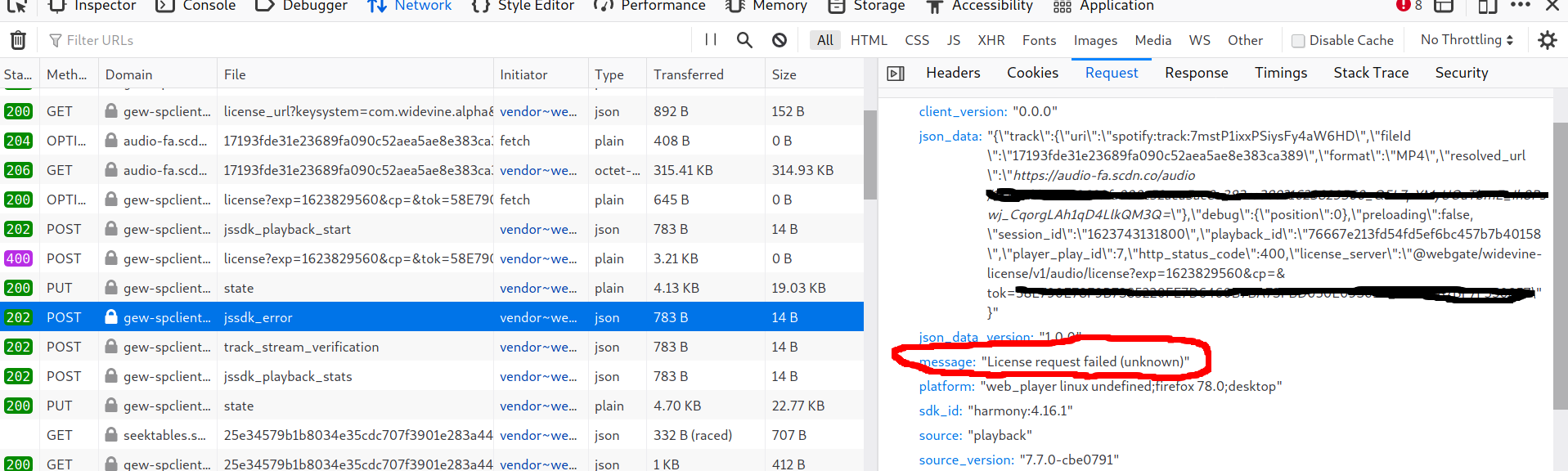
And last but not least, this seems to be a reoccurring issue, just to pick a few:
I've also tested on a Windows 10 Client with Firefox 89 x64, in my case the problem was apparent though...
Yes, I can confirm that behavior. I also have a bunch of POST requests to "https://gew-spclient.spotify.com/melody/v1/msg/jssdk_error" which responds with a JSON payload that contain "message": "License request failed (unknown)". Here's the whole payload for one of those responses:
{
    "source":"playback",
    "source_version":"7.7.0-cbe0791",
    "type":"EME_LICENSE_REQUEST_FAILED_WITH_STATUS",
    "message":"License request failed (unknown)",
    "stack":"\"Te@https://open.scdn.co/cdn/build/web-player/vendor~web-player.bd68288a.js:1:1476284\\n_handleLicenseResponse@https://open.scdn.co/cdn/build/web-player/vendor~web-player.bd68288a.js:1:1504639\\npromise callback*_onMessage@https://open.scdn.co/cdn/build/web-player/vendor~web-player.bd68288a.js:1:1503913\\nr@https://open.scdn.co/cdn/build/web-player/vendor~web-player.bd68288a.js:1:88739\\nEventListener.handleEvent*72060/ze</e.prototype._wrapEventTarget/</<@https://open.scdn.co/cdn/build/web-player/vendor~web-player.bd68288a.js:1:95403\\nI/</</</<@https://open.scdn.co/cdn/build/web-player/vendor~web-player.bd68288a.js:1:58700\\ncreateSessionWithParams/<@https://open.scdn.co/cdn/build/web-player/vendor~web-player.bd68288a.js:1:1508560\\ncreateSessionWithParams@https://open.scdn.co/cdn/build/web-player/vendor~web-player.bd68288a.js:1:1508184\\n_requestLicense/<@https://open.scdn.co/cdn/build/web-player/vendor~web-player.bd68288a.js:1:1567925\\npromise callback*_requestLicense@https://open.scdn.co/cdn/build/web-player/vendor~web-player.bd68288a.js:1:1567691\\nr@https://open.scdn.co/cdn/build/web-player/vendor~web-player.bd68288a.js:1:1566233\\n_dispatchFromStore@https://open.scdn.co/cdn/build/web-player/vendor~web-player.bd68288a.js:1:950121\\nemit/<@https://open.scdn.co/cdn/build/web-player/vendor~web-player.bd68288a.js:1:951429\\na@https://open.scdn.co/cdn/build/web-player/vendor~web-player.bd68288a.js:1:948731\\nt@https://open.scdn.co/cdn/build/web-player/vendor~web-player.bd68288a.js:1:949199\\n\"",
    "json_data":"{\"track\":{\"uri\":\"spotify:track:3M89zvwwb1jtDUDKYNsdiA\",\"fileId\":\"b399beb6a485c2c565725819cc41870bd39de40e\",\"format\":\"MP4\",\"resolved_url\":\"https://audio-ak-spotify-com.akamaized.net/audio/b399beb6a485c2c565725819cc41870bd39de40e?__token__=exp=***~hmac=***\"},\"debug\":{\"position\":0},\"preloading\":false,\"session_id\":\"1623404064932\",\"playback_id\":\"1e4a3f4de43854941ea94c54670e3c13\",\"player_play_id\":1,\"http_status_code\":400,\"license_server\":\"@webgate/widevine-license/v1/audio/license?exp=1623490479&cp=&tok=***\"}",
    "json_data_version":"1.0.0",
    "sdk_id":"harmony:4.16.1",
    "platform":"web_player linux undefined;firefox 84.0;desktop",
    "client_version":"0.0.0"
}
I can also confirm that I have the same Widewine version (4.10.1582.2) bundled with my Firefox installation.
Ive just updated to the latest Firefox stable (89.0) - Disabled the DRM plugin and the setting "Play DRM content", browsed to the spotify web player, the message "You must enable DRM...." appeared, clicked on "Enable DRM" and the newest (4.10.2209.1) DRM plugin was installed and now it works 🙂
Interestingly, clicking the "Check for updates" in the plugin manager had no effect.

Hi there folks,
Thank you for your replies in this thread.
@axbkbsf76repwsk - it's really nice of you to share what worked for you 🙂
Can the rest of you try the work around that @axbkbsf76repwsk provided?
We'll be on the lookout for your replies.
Cheers!
Hey folks,
Thanks for the info.
In this case we'd suggest you contact the Firefox support. The folks there can look into this further and give you more information about it.
If you need anything else, the Community is here for you.
Multiple people said it did not resolve the problem, but this this was accepted by the moderators as the solution.
But who cares if the problem was actually solved? The important thing is that the KPI's look good!
agreed. i have tried on a fresh installation of both OS and browser, issue persists.
this was said to be a problem with Firefox and not Spotify, and we were even told to contact their support instead. however, using an earlier version of Firefox (from before the issue started) doesn't work. so we can't pin it on Firefox updating and breaking something either. the problem started out of the blue for me anyway, not after a Firefox update.


I had the same problem, but after logging out and then logging in, the problem was solved.
It's so simple that it may not be useful for people who are really having trouble, but I'll share it as a general solution.
Ive just updated to the latest Firefox stable (89.0) - Disabled the DRM plugin and the setting "Play DRM content", browsed to the spotify web player, the message "You must enable DRM...." appeared, clicked on "Enable DRM" and the newest (4.10.2209.1) DRM plugin was installed and now it works 🙂
Interestingly, clicking the "Check for updates" in the plugin manager had no effect.