Options to make a playlist public or secret not available

Plan
Free
Country
UK
Device
Desktop & Samsung Galaxy mobile
Operating System
Windows 10 & Android
My Question or Issue
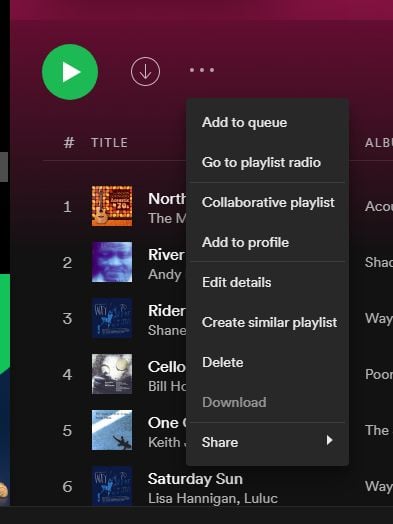
I've made a new playlist on my desktop app but when I click the dropdown menu there is no option to "make public" or "make secret" (see image below). Weirdly the app on my phone does shows the option to "make private", even though the playlist isn't showing as public. I've made hundreds of playlists without this issue arising, is it just a glitch?!
Accepted answers
All comments

Hey @themoonloungers
It could be a glitch - does the same still happen when you create another playlist on your desktop client?
Also, make sure that your desktop Spotify is properly up to date, and if this still happens to you, I recommend reinstalling the app.
Let me know how it goes 🙂

I've just experienced the same issue. I downloaded the updated version of the desktop app a few days ago because my Release Radar playlist had not been updating. (It still hasn't been updated from the playlist I received two Fridays ago.) I no longer have the option to make a playlist public or private on the desktop version, and when I checked a new playlist I'd made on my phone (iOS) app, the option was to make the list private. It had defaulted to making it a public playlist, which is the first time that has happened, and is not a nice feature. Playlists shouldn't be made public by default.
Thanks for replying. I've tried creating another playlist with a different account, tried re-installing the desktop app, no luck. Hopefully it's a glitch...

i was just looking it up, but i figured it out.
for some reason, the spotify team has decided to change the option to "remove from profile" instead of "make private"
and "add to profile" from "make public"
this decision is completely silly. i have no idea what warranted this change from the team. if it aint broke, don't fix it.


It *is* completely silly because now all of my playlists have defaulted to "hidden" from my profile. I do not understand if this means the playlists are "private". Does this mean other users cannot view them? If this is the case, I will have ahead of me the extremely inconvenient task of going through a hundred or so playlists to manually add each of them back to my profile.
I see! So they made that change and assumed we'd all just figure it out. Completely silly indeed. Thanks for your reply!
i was just looking it up, but i figured it out.
for some reason, the spotify team has decided to change the option to "remove from profile" instead of "make private"
and "add to profile" from "make public"
this decision is completely silly. i have no idea what warranted this change from the team. if it aint broke, don't fix it.