Fullscreen album cover/media control fade away after a few seconds

Plan
Premium Family
Country
Australia
Device
Desktop
Operating System
Windows 10
My Question or Issue
So I've only just discovered the fullscreen option recently and this has become how I like to listen to Spotify now as I was able to throw it up on my second monitor and just see what song is currently playing and the media control. Like so
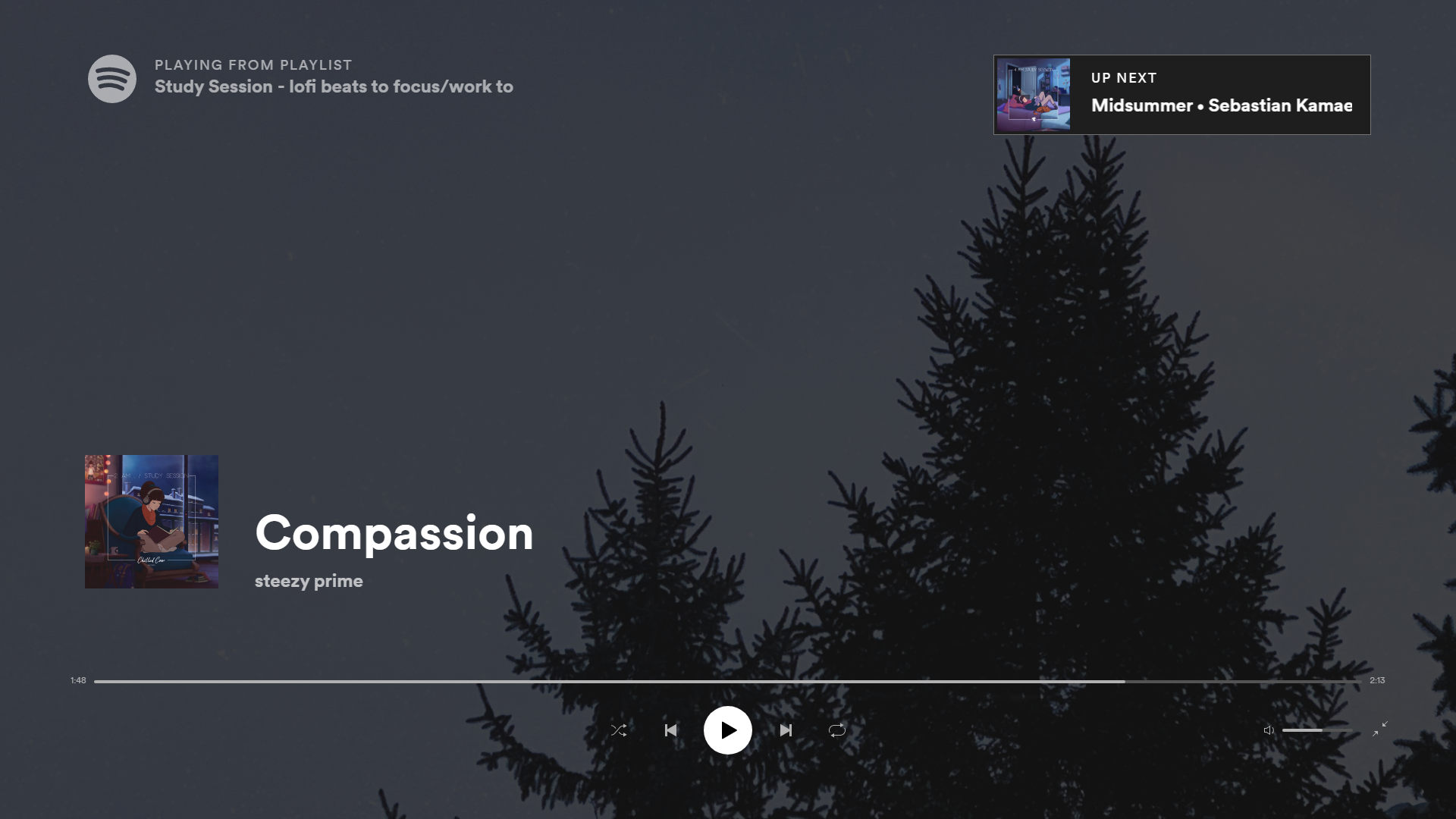
But just now I've gone fullscreen and after a couple seconds all of this just fades away to show just a background image. If I move my mouse it all comes back. I'd like to be able to see all this info just there without having to do anything.

Accepted answers

Hey everyone!
Coming to this thread with an update on this. As mentioned in the Idea thread this functionality should be back now!
We appreciate your comments and support for the idea. If you're not able to see the title and artist you can post a new thread in our Help boards and we'll do our best to help out.
Have a lovely day!
All comments

I also would like to be able to switch this off, because I'm not a fan of only the fullscreen cover.

I'm also experiencing this issue. I hope it gets fixed soon!
Plan: Premium Family
Country: Serbia
Device: Desktop
OS: Windows 10

Plan
Premium
Country
Australia
Device
Desktop
Operating System
Windows 10
also started to experience this a couple of days ago, (I think after I updated Spotify)
would really like this to get fixed because it is so infuriating, my friend doesn't have this problem for some reason
Hey folks!
Thanks for reaching out on the Community about this.
We'd like to report that to the teams but we'll need a bit more info on this.
Could you send us your Spotify versions and your OS versions if you already haven't?
We'll take it from there.

I am using the latest version of the Spotify app from the Microsoft store on two laptops running Windows 10 (one running windows 10 home and one running windows 10 pro)
A third machine is running the Spotify web player in the latest version of Firefox on Windows 10 home.
All three systems have this annoying behaviour

I was told that this is not a bug but a feature to show off possible art of the band that is playing.
But in my case, more often than not, it just ends up displaying an empty screen of a solid color because, I'm guessing, there is no artwork to show.
Either way, I really dislike this new feature and would prefer to at least have a choice. Make people be able to just "lock" the information on screen like it used to be anyway. It seems to make much more sense not only to me but to a lot of other users.
- Matt
I found a website where you can download previous versions of Spotify:
https://spotify.en.uptodown.com/windows/versions
I download the version released on the 22nd of July:
https://spotify.en.uptodown.com/windows/download/3786366
works well now, only the media control fade away. I still keep all the info
be careful tho as I'm not sure if the website is safe or not, however, I seem to be fine
I am also using the latest version on windows 10 pro + web player, however, I reverted to an old version to 'fix' the issue

Same issue.
Very Frustrating
Windows 10 - Desktop App
CANADA

It's also happening to me. However I prefer that all information remains in full screen.
On here:
Windows 10 Pro V. 21H1 - CSO: 19043.1165
Spotify Desktop V. 1.1.66.580.gbd43cbc9-a

Also happening to me, and I very much would like the text to appear at all times, as it used to prior to a recent update.
Win 10. Spotify v. 1.1.66.580.gbd43cbc9-a

Plan
Premium
Country
Poland
Device
Desktop
Operating System
Windows 10
Spotify version
1.1.66.580.gbd43cbc9-a
Ditto. I hope it gets fixed soon. It just drives me crazy...

Plan
Premium
Country
FI
Device
Desktop
Operating System
Windows 10
Spotify version
1.1.66.580.gbd43cbc9-a
Previously the idea was to show big album artwork/image, now there is only some mysterious blurry background with no info at all. I'm curious what is the point of this ? And why and when should I use this option ? And again this shows some kind of rush to release new version as this is not tested at all (results can be seen in 5 seconds). Hopefully this is fixed to like it was in the good old days: quality album image (big) and playing track infos.

Basically, when you press fullscreen, it shows the time correctly, the album art, song name/artist(s) correctly. But after about 5 seconds it fades and shows the artist's background image and doesn't show the UI until you move your mouse around.
YOU NEED TO FIX THE FLIPPING FULLSCREEN. EVERY TIME IT IS UPDATED IT SEEMS TO BREAK. Yall also need to make a visualiser built in. Ya kinda boring if ya dont.
Cheers lads.

This is not useful at ALL: At least leave the information, album art, progress/time bar, and play/pause "status".

It happens on Mac and Windows

Hi there folks,
Thank you for your replies and the provided information.
We've passed this on to a relevant team that will have a closer look into this.
We'll update you in this thread as soon as we have any information regarding this.
Once again, thanks 🙂

I reported this issue on Saturday and the agent claimed this was "by design"
5eb1471e-4511-4fd0-b282-3bebe2d1308c
It took ~40 minutes of wasted troubleshooting before I was able to file a bug report.
What build did you install to correct the issue?
Dear uMpumelelo,
1. don't know what that useless information is supposed to bring to the table, it fades away after a couple of seconds of inactivity, don't know what's so hard to understand, but it's a bit unfair of me to assume that you have a moderate cognitive ability, my apologies. ya see when a mouse is inactive as in not moving on the y or x-axis it is what we call "inactive" kind of like your neural pathways, in other words, if you are not moving your mouse by using one of your two hands (i assume you at least know what hands are) all the information that you so perfectly described won't be present. I mean you seem to be having the same problem but I just wanted to make sure yk (:
2. if the post you are referring to (i assume the main post) isn't useful what exactly does that make yours??🤔
enjoy the rest of your day sir/mam
Hi there folks,
Thank you for all of your replies.
Can you confirm if the media controls don't return after it fades away when you try to change a song for an example?
Keep us posted 🙂
Cheers!
Train_Guy
I would love an inbuilt visualizer as well would be dope! whatever they end up doing in the future I just hope that they add them as settings so that people can revert to those setting which they refer, everyone having their own settings for visualizers and/or the fullscreen player would really encapsulate the diversity among the Spotify community
-EnchantedBread
Hi Jeremy,
In my case there were no bugs or anything, I was using the latest version until I reverted, but the problem is that we want the information to stay, there were no issues with the media controls (other than an occasional delay when using a separate device to play the music but that's always been a thing, for me at least)
so we, or I would like there to be an option to keep the media info rather than have it fade away, it is my understanding that most if not all users in this thread appreciate the media information to stay on screen rather than just having the background which ins some cases is just a solid colour.
Regards,
EnchantedBread

I'm on Win10 Pro on Spotify version 1.1.66.580.gbd43cbc9-a
I can no longer see any track/album/playlist information at a glance like I used to in the fullscreen mode. Seeing a fullscreen blank background/color is laughable and actively takes away a critical feature seen even on car radios from 30+ years ago.
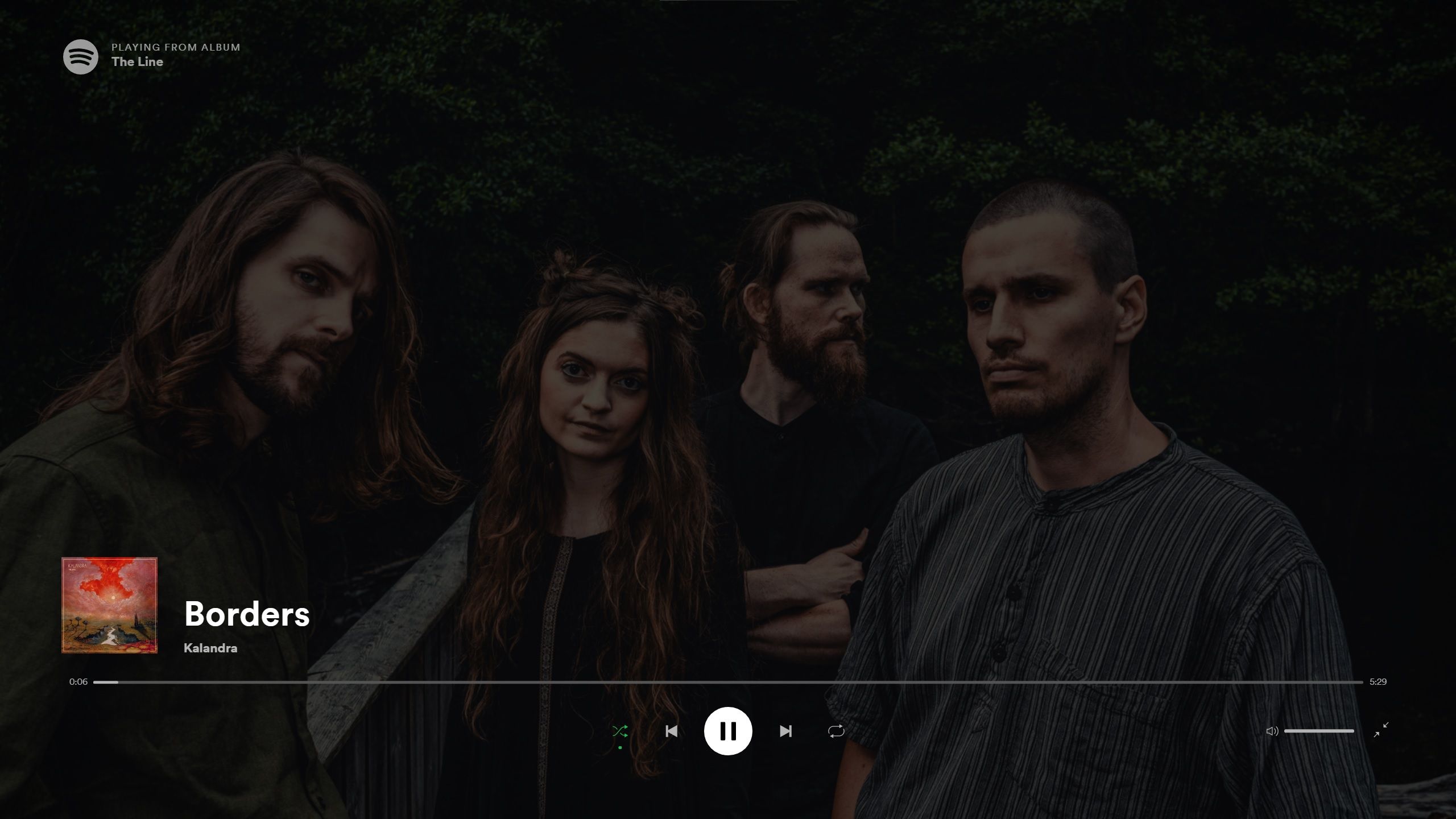

The media controls and album art return as soon you use your mouse actively in the fullscreen Spotify instance. As well as when it changes songs. They disappear within 5ish seconds of a new song starting as well as when the mouse isn't actively moving on that monitor.
What everyone here is requesting is that the album art, song progress and such don't disappear at all. Like they used to be a few updates ago.
Hi there folks,
Thank you for your replies.
We've checked backstage and it's expected that they fade away after sometime and then return when you for an example touch the mouse.
We're always testing things by adding or removing features to make Spotify better overall and we’re constantly aiming to improve our features. We’re sorry that this means you’re not able to use Spotify like you wish to do at the moment.
You can read more about how your feedback reaches Spotify here.
Thanks for the feedback, we appreciate it. Let us know if we can help you with anything else.
Take care!
I cannot imagine who thought, "You know, these controls and other useful information are in the way of the blurry artist images, I should hide them".
There are already a couple of thread going on this issue.
https://community.spotify.com/t5/Live-Ideas/Desktop-Other-Let-us-choose-to-pin-or-don-t-the-song-details-on/idi-p/5251462

The fact that the artist image doesn't even come into full focus and stays dim just shows how half-assed this "feature" was. I don't know anyone who would want it to look like that if they even wanted this functionality.
This makes no sense. Are the marketing department ok with this? It is a simple fix to offer a toggle switch in settings to make it not fade out.
Thousands of screens all over the world used display what's currently playing, which allows Spotify branding to be visible and allows people to see song info.
Now you have lost all of that free advertising by having some vague "artwork" and at times, where there is no artwork, just a single colour on the screen.
Sounds like a poorly thought out and badly implemented feature.
I was merely trying to illustrate that this "feature" adds no value especially when the artist artwork is just a nondesript color.
Please vote in the suggestion thread here to get this functionality returned to the way it used to be. I didn't start the suggestion but I have voted it. It seems Spotify are a bit lost with this one at the moment.
https://community.spotify.com/t5/Live-Ideas/Desktop-Other-Let-us-choose-to-pin-or-don-t-the-song-details-on/idi-p/5251462