Fullscreen album cover/media control fade away after a few seconds

Plan
Premium Family
Country
Australia
Device
Desktop
Operating System
Windows 10
My Question or Issue
So I've only just discovered the fullscreen option recently and this has become how I like to listen to Spotify now as I was able to throw it up on my second monitor and just see what song is currently playing and the media control. Like so
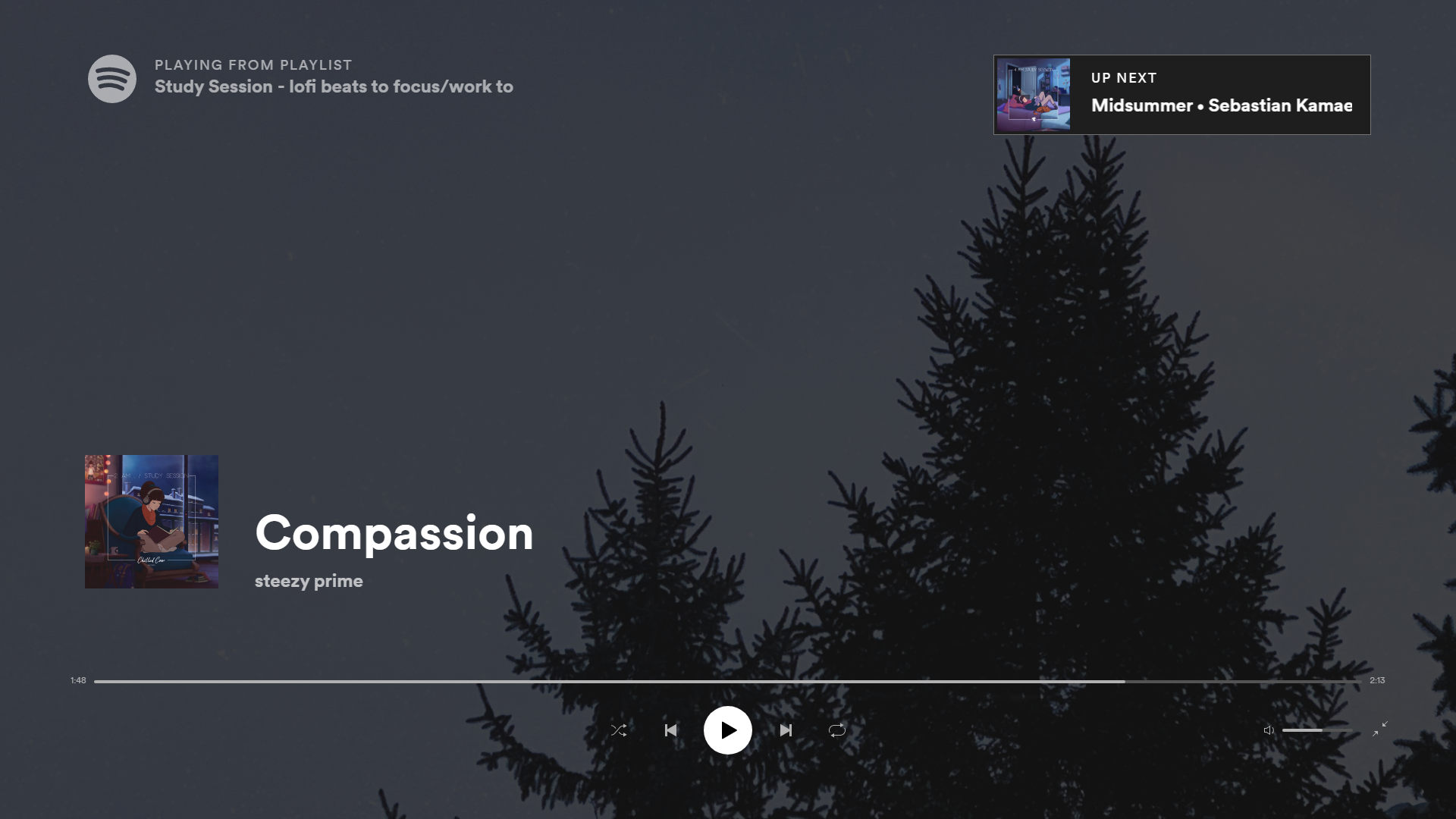
But just now I've gone fullscreen and after a couple seconds all of this just fades away to show just a background image. If I move my mouse it all comes back. I'd like to be able to see all this info just there without having to do anything.

Accepted answers

Hey everyone!
Coming to this thread with an update on this. As mentioned in the Idea thread this functionality should be back now!
We appreciate your comments and support for the idea. If you're not able to see the title and artist you can post a new thread in our Help boards and we'll do our best to help out.
Have a lovely day!
All comments

I agree with the majority of people here - the fact that users immediately reported this 'update' as a bug shows how bad the update really is. The fullscreen option is pretty much useless at this point, especially when it comes to artists without a background image.
Even if the developers really stand behind this update, at least add the option to disable the fade-out effect, for the people who aren't happy with the update (which is, from what I've seen, the majority of users).

Same problem here ...

The media controls do appear, this works "perfectly". Your question gives the impression that you're not understanding the burning issue here. It's not about "when you try to change a song", it's about when you're NOT trying to change a song, but merely trying to SEE/CHECK(with your eyes not your hand or cursor) what song is playing. A lot of people use multiple displays and therefore they will have a sub-optimal experience and even encounter this a lot!:

Life before update: I hear a song that interests me, I glance at the other display and read the information
Life after update: I hear I song that interests me, I stop what I'm doing & move mouse to other display and if you're playing music in the background from another machine, you're **bleep** because you need stop what you're doing.
It doesn't make sense that you've added motor-load and increased the interaction cost required to "check" what song's playing. Users should be able to toggle this on and off.

Plan
Premium
Country
Canada
Device
Desktop
Operating System
Windows 10
If this is an intentional change then I'm completely puzzled that any single member of the development team could have looked at it and thought it added to the listener experience in any way. It wouldn't be so bad (though still pretty bad) if it only displayed the album art in the background, but the fuzzy artist image (if there even is one) tells you practically nothing. Is this a ploy to force users to interact with Spotify so that they can get the disappeared information back on screen for another 5 seconds? Seriously, I'm genuinely interested in a non-judgmental way - would anyone from Spotify care to come here and state their reasons for why they considered this to be a good idea?
@Evilwhistler "Is this a ploy to force users to interact with Spotify" - This exact thought crossed my mind. The Product owner for the Community is probably measuring engagement levels and not user frustration, inconvenience etc.. They are probably thrilled with the "high engagement levels" right now, this has even been added as a "suggested feature" that you can vote for in another thread.

Please vote in the suggestion thread here to get this functionality returned to the way it used to be. I didn't start the suggestion but I have voted it. It seems Spotify are a bit lost with this one at the moment.

Workaround: Use software that simulates a tiny mouse movement every 3 seconds.
- I used the free Move Mouse app from the Microsoft Store:
https://www.microsoft.com/en-us/p/move-mouse/9nq4ql59xlbf - Configured it as in these screenshots. Trial and error gave me this as the best config.
https://ibb.co/4NSNmdq
https://ibb.co/wyR7pQ4
https://ibb.co/3Sk3JfS
Good thought. I had already done this, and I see it's currently at 34 votes. Does anyone know what the tipping point number is for Spotify to "look into this idea"?


Plan
Premium
Country
USA
Device
Windows 10 PC
Operating System
Windows 10
My Question or Issue
In full screen mode, the artist artwork shows up but the title of the song and the artist/album are hidden after a couple seconds and dont show up until you move the mouse. The titles used to display all the time, so something in a recent update caused this bug.

Same here, really annoying. Hope this get fixed in an update soon.
"Let's spend resources to mess up the listener experience and see how much noise they make, our usage metrics/data are more important than user frustration. Also, if those who are frustrated aren't bothered to come and engage on our community platform then they don't matter."

why did you remove such a nice feature? Destroying something this useful is NEVER a good idea, and everyone agrees with this. I can understand making it a toggle, but not removing it completely. Bring that back.
- Do you want to see the song info at all times when fullscreen is enabled?
· Yes: 97%
· No: 3%
Yet they chose to disable that. It's so infuriating.
I am starting to wonder if it is some weird commercial decision. Like maybe they don't have to pay some fee if they don't show the song name and title in fullscreen mode? It is the most bizarre UI decision for a long time. Completely unnecessary and easy to fix and they're sticking to it making themselves look foolish. Money usually drives such odd decisions.
Speaking as a web developer, it seems like a bug to me. In the old version, after a couple seconds of no mouse movement, the play bar, pause, rewind and fast forward controls would all fade away but the title and artist would still show. Now in this current version everything fades away leaving only the album art. I don't think this is an intentional decision, it would serve no purpose. Its probably one line of code that someone overlooked and just needs to be reverted. The problem IMO seems to be a disconnect between the support team here and the development team. Its an unacceptable level of support to let bugs like this sit with vague responses for as long as this has, especially for a 44 Billion Dollar company.
I still can't help but wonder if marketing stumbled across this they would be like "uh why is our product failing to show the free advertising of our own product, on itself, in fullscreen on TVs and monitors all over the world?"
Devs: *shrug*
Support: *closes ticket*

Hi folks,
Thanks for your posts and feedback.
As previously mentioned, this is expected behavior of the current client release.
If you have any ideas on how to make the app better and think other users might also like it, go ahead and create an idea on the relevant idea board. We always take new ideas and feedback into consideration to improve the app. Here you can read more on how ideas work. We also suggest checking this help article for useful tips on how to submit an idea. As a heads-up, it's good to know that the higher the number of votes an idea gets, the more likely it is for the idea to be implemented.
@casewindow, as Community moderators, we have access only to official information released by Spotify. We help the developer teams by gathering user feedback regarding app issues and developments. We've reached out to the developer teams and have been informed that this is not an issue with the app, but a designed feature.
Hope this helps. Let us know if you have any more questions.

Reminder to others, voting location here:
https://community.spotify.com/t5/Live-Ideas/Desktop-Other-Let-us-choose-to-pin-or-don-t-the-song-details-on/idi-p/5251462
according to the 'ideas exchange guidelines' ( https://community.spotify.com/t5/FAQs/Idea-Exchange-Guidelines-How-does-my-feedback-reach-Spotify/ta-p/5171177/redirect_from_archived_page/true )
Live Idea
so hopefully looked at soon as we are already at 228 at time of writing since opening on 2021-08-23 🙂
more votes the better though! and hopefully we'll get a toggle to remove this 'feature' 😄

What I honestly do not understand... In cases like these, why isn't a feature treated as an OPTION (for example, in Preferences) rather than an imposition? Developers would save a lot of time in this way.
Hey everyone!
Coming to this thread with an update on this. As mentioned in the Idea thread this functionality should be back now!
We appreciate your comments and support for the idea. If you're not able to see the title and artist you can post a new thread in our Help boards and we'll do our best to help out.
Have a lovely day!
Please vote in the suggestion thread here to get this functionality returned to the way it used to be. I didn't start the suggestion but I have voted it. It seems Spotify are a bit lost with this one at the moment.
https://community.spotify.com/t5/Live-Ideas/Desktop-Other-Let-us-choose-to-pin-or-don-t-the-song-details-on/idi-p/5251462