Spotify friends activity empty/not updating

Plan
Premium
Country
Finland
Device
Pc
Operating System
Windows 10
My Question or Issue
For several months (pretty much years at this point), my Spotify friends feed has not been updating, it only shows 1 friend I have, while it should have a dozen others. This has been going on for far too long for it to be a problem on my end as I have changed my devices, settings, and other things to try and fix it. I have reinstalled Spotify and my OS but nothing helps. I also see no friends through my Facebook integration even after disconnecting and reconnecting my Facebook profile multiple times. All my settings are the same as my friends and he can see his friend activity but I can't. I already posted about this problem once, and was told it would fix itself but that was months ago. This is very infuriating as it has been going for so long.
Accepted answers
All comments

Hello, my friends activity is not updating properly with the new 2021 desktop update. It is super delayed and i have to quit the app, get back on to be able to see what my friends did listen to, and after it does not update again. Im also having trouble with the desktop app not saving where i left off on my playlist. If i scroll down lets say to the center of my playlist, and i exit that playlist and return to it, it resets my place back to the top of the playlist unlike before where it would remain where i left it. I have tried everything multiple times, on multiple days. Sign in/out, uninstall/reinstall, turn pc on/off, internet etc. Nothing works. Please help!

Hi there @goblin064,
Thank you for your post here in the Community.
We suggest that you perform a clean reinstall of the app. This will make sure there's no old cache files causing this.
The Friend Activity can sometimes experience minor delays, but if it’s not updated in over a week the following can help fix it:
- Check the app is up-to-date.
- Check your device’s operating system is up-to-date.
- Restart the app.
- Log out of Spotify, then back in.
Note: You'll need to redownload any offline music after reinstalling.
Let us know how everything goes 🙂
Take care!

Hey @goblin064,
Thanks for reaching out.
It seems that other users also requested that the back and forth button bring up the respective page in it's previous position and posted this idea. We recommend that you +VOTE it to show your support. We'll share any updates on the matter there, as soon as there are any, so it's worthwhile that you also subscribe.
As for the Friend feed not updating, it looks like you're experiencing a case of this Ongoing Issue we're having right now. You can upvote it and subscribe to it as well if you haven't already. We'll post any developments in the Status Update there.
Hope you find this useful. Keep us posted if you have any questions.

This has been happening to me too! I didn't notice until many months after when my friend brought it up, but I know for a fact that my listening activity had been available for others to see before April, and it hasn't been working for months. Has there been a solution? I've tried everything: clean reinstalls, shutting off and on, facebook privacy, and going to the mac host file.
It's been super buggy but has gotten better in a way too. It still has a lot of the same issues as before though 😕

I have discord and it shows live spotify activity, so I know for a fact that spotify friends activity has always been delayed since the feature was introduced.

Hey folks,
Thanks for your messages.
As @Mihail mentioned, we're aware of an Ongoing Issue causing the behavior that you describe. Keep in mind that the right teams are looking into this, but we can't commit to a specific timeline for a fix.
We'd suggest leaving your info in the Ongoing Issue thread if you haven't already and keeping your app up to date. Any updates that we might have will be posted there.
If anything else comes up, the Community will be here.
Cheers.

Hi from the US! I'm not able to see activity either. I've always been able to see who is listening to what - I get some music inspo from them as well, and now I don't see anything. Some people are ones I've followed over the years who I'm not connected to on Facebook

Hi @121010559,
Welcome and thank you for posting on the Community!
In addition to what @Novy explained, there are a couple of things you can try in the meantime. To start, let us know if you've already tried performing a clean reinstall of the app. This one is more thorough than a regular one and can be helpful to get rid of any cache that might be causing trouble.
If this doesn't do the trick, please clear your Hosts file with these steps.
Let us know how this goes.
I've already done both a clean reinstall and gone through the host file, no luck.
Hey @añgié,
Thanks for reaching out.
We appreciate the troubleshooting you've done so far! Another troubleshooting step you can try is connecting to a different internet network. If that still doesn't resolve things, it would seem like you're indeed experiencing a case of this Ongoing Issue. We recommend that you upvote and subscribe to if, if you haven't yet. As soon as we have any news to share, we'll post a new Status Update there.
Thanks for your understanding.

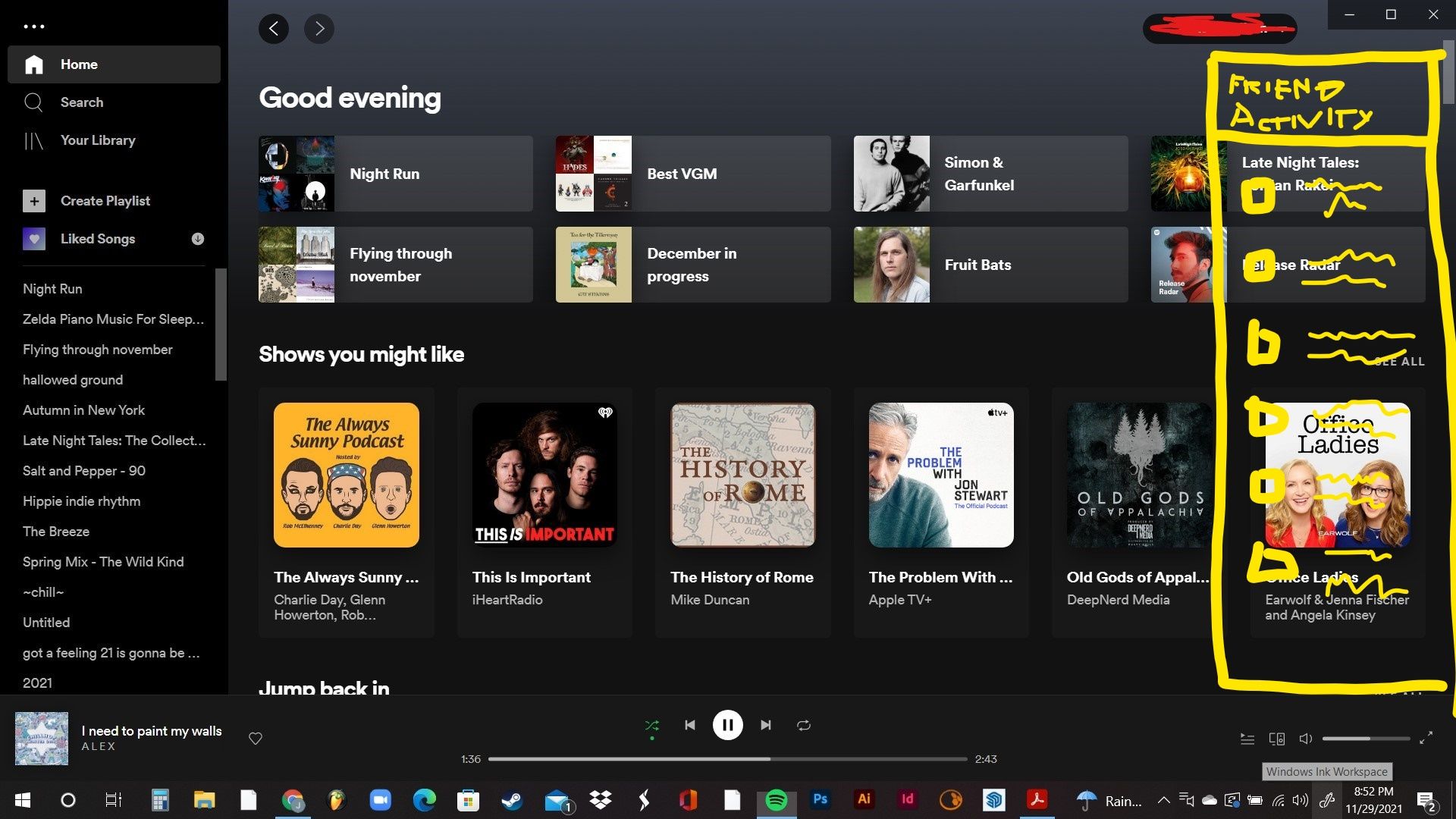
It appears that the display on the right that shows what your friends are playing has been removed with my most recent update. Its just gone. In my settings, there is a toggle that says "See what your friends are playing", but even though its green/on, there is no section on my Spotify desktop player that's displaying my friends.
Please don't take this away; I have discovered more music this way than any other way on Spotify, or really anywhere. See my attached photo to see what I mean. (Yes, my window is expanded to the maximum size, and yes it was displayed there before my update.
EDIT: 12/18/2021 - Many users are experiencing an issue with the way their friends activity is being displayed. Even after turning on my own sharing activity, opting in to display my friends activity, and after contacting friends to do the same, the following issues are occurring:
- Friend activity display is not displaying all friends that are being followed
-Friend activity is not updating live (friend icons no longer swap to top when a friend starts a new song for example. Songs they are listening to are also not changing).
- Blue dot is showing next to the active users, but the "music bars" to the right are not animating.
I'm sure there are other issues people are having, but these are the most noticeable ones to me.
Edit: 12/26/2021
Spotify, since this idea has gained over 100 votes and includes nearly 100 passionate and thoughtful responses, please add it to the list of “trending ideas”. I think the consensus is that we understand the privacy concern but the way it was implemented was sudden and jarring. It would be best to send a pop up notification to users telling them that their sharing is now off but they can turn it on with a simple switch that is displayed readily on the main Spotify page where the friend activity list is located. This is a feature that sets Spotify apart from its competitors; please make this change more transparent and easier to adjust. Thank you.
Edit: 1/7/2022: Friend activity is now completely gone. I was given a guide for how I can I share my activity and how to view the activity of friends, but when I make the suggested changes, I still see nothing but the instructions.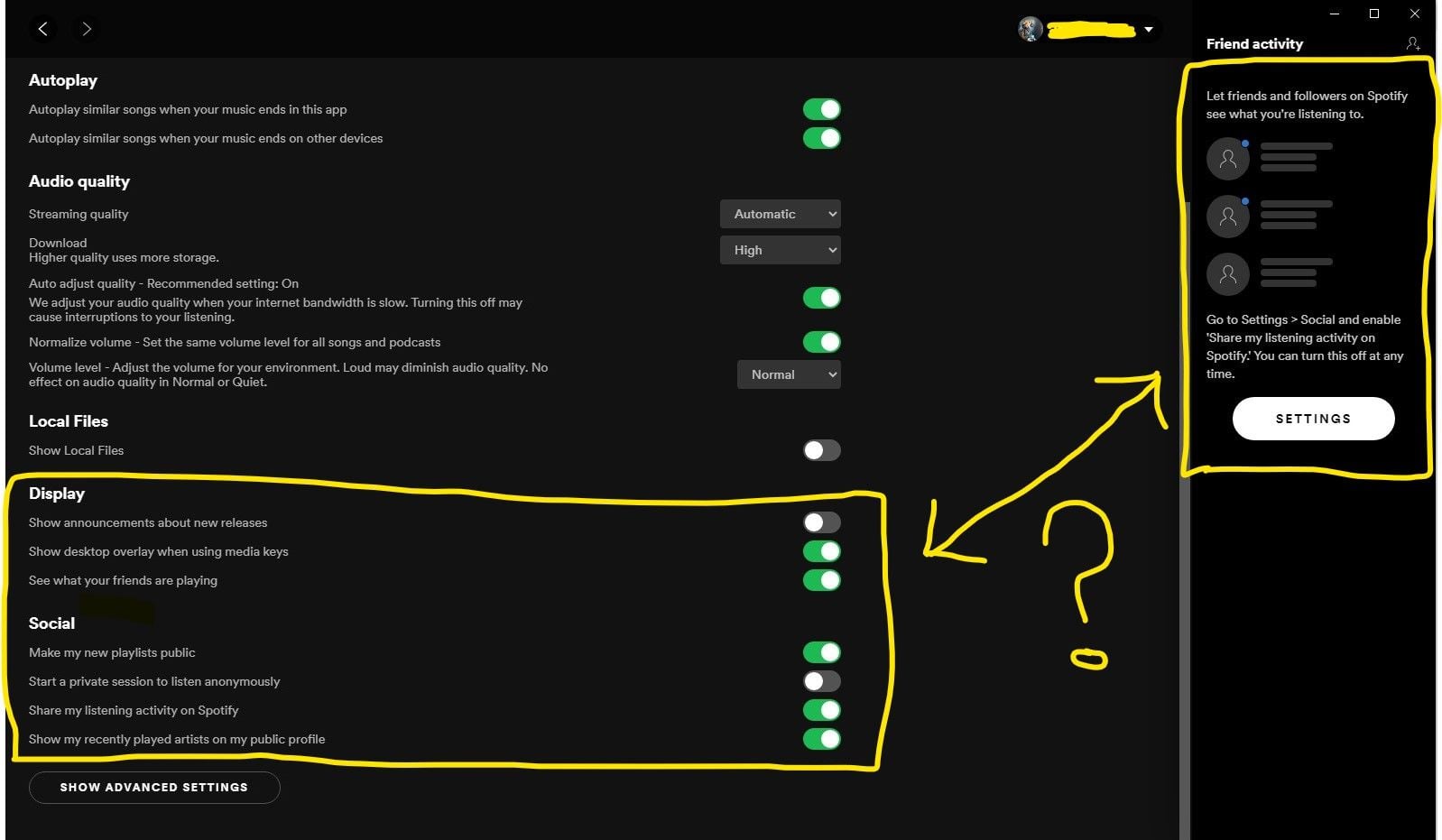 1/7/2022 - Friend activity completely gone.

Hey @jrham,
Thanks for posting here on the Community 🙂
No worries. We can confirm that we haven't removed the feature.
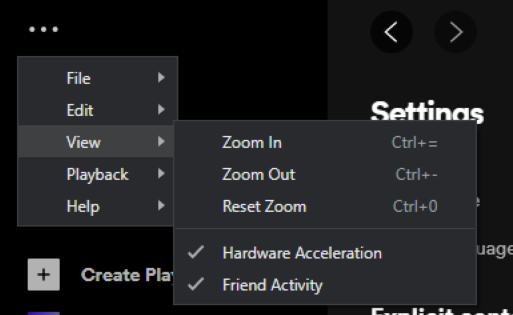
In order to see the Friend Activity Feed, you will need to first enable the feature as it's no longer enabled by default.
You can give these steps a go to make the changes:
- Click on the three dot menu in the upper left corner
- Choose View
- Turn on Friend Activity
You can also share your listening activity with your friends when you:
Click on Settings>Turn on Share my listening activity on Spotify

By default, these settings are now set to off, so your friends will need to enable them manually (if not done so in the past) as well if they want to share their listening activity. This could mean that you might not see some of your friends in the feed, until they do so.
Hope this sheds some light on the matter. If you need anything else, the Community is here for you.

Hi @Ver - I'm currently experiencing this issue. It appears as though only 5 out of 35 people I follow have been listening on Spotify, and everyone else hasn't been listening for 1-3 days. Including folks I've asked who have listened to music on Spotify today.
I don't appear to have any Spotify updates pending or software updates pending on my Mac OS. I've also tried reinstalling the app and checking to see if I'm running into the same issue on Windows.
When I first noticed this issue, I did notice that my own "Share my listening activity on Spotify" setting had been turned off, but I did not do this myself. I was able to confirm with a friend that it appeared on their end it was appearing as if I had been listening to music 1 day ago.
I'm wondering if there was a glitch where some people's "Share my listening activity on Spotify" setting had been turned off automatically like mine had?

Hi @gg996,
Thanks for getting in touch about this.
First up, we'd recommend logging out and then logging back in two times in a row. It sounds a bit odd, but it forces a sync between the account and your device.
If this doesn't do the trick, you mentioned that you've already reinstalled the app, but would you mind going through the steps of a clean reinstall, as it's more thorough than a normal one?
If the issue still persists after following these steps, could you let us know the exact make/model, operating system and Spotify version of your device?
We'll be on the lookout.

My spotify cannot see friends' activity after i listened the music through private session. It shown me their activities on 2 or 3 days ago. That was during i listened music on private session last time. I also cannot see they online or not the spotify. When they're online, i cannot the what music they're listening and also cannot see they online. I already uninstall the spotify for many times but still doesn't work. Also, i tried to unfollow and follow them back but still same. My windows version is up to date, same goes to my spotify. Please help me out to fix this issue 😭🙏
Hi Eni - I just did a clean reinstall and the issue still remains. Here are the details you requested:
Make/Model: MacBook Air
Operating System: macOS Monterey (Version 12.0.1)
Spotify Version: Spotify for macOS (Apple Silicon) 1.1.73.517.gbef50fdb
Thanks! I hope this can be resolved.

Any ideas why?

The exact same thing is happening to me after a private session. It’s showing all my friends updates from 2 or 3 days ago except for 1 friend for some reason. I have logged out, deleted and redownloaded the app, and closed and re-opened plenty of times and it’s still the same.

It is due to the newest update. They have set by default that users' activity won't be shared on the Friends activity bar. The only method is to manually change it from the settings. To be honest, I am quite frustrated with this update as well. No one was notified when this setting was changed.

Hey everyone,
Thanks for reaching out on the Community! We've moved your posts to a relevant Help Board where they fit better.
We can confirm that the default setting for sharing your listening activity with friends was changed to off with recent releases. This means that those who had it on before without explicitly setting it on, now have it switched off. This would explain why they aren't in your feed any more.
You can let your friends know of this change and ask them to turn it on in their settings if they want to share their listening activity.

Hope this clears things up. If you have any questions or need anything else, the Community is here for you.

Plan
Premium
Country
United States
Device
HP Laptop
Operating System
Windows 10
My Question or Issue
Friend activity is my favorite part of Spotify, but it hasn’t been working for the past few days. It won’t update, though I know for a fact that music is being listened to. Some friends have disappeared altogether and aren’t private. I’ve signed in and out, un and reinstalled, un and refollowed, and nothing has worked.

This is happening to me as well. However, I'm on a MacBook Pro - macOS Mojave, with the most recent update of Spotify.
Plan: Free --- Country: United States
Some friends are updating when they've just listened to a song, while others have gotten stuck in the friend activity "without having listened" for days. After a "week," they just disappear, even though I know they've listened as I can see it on Discord, and know they're not on private mode either. And they don't reappear after listening.
This is happening for a large handful of people on the list, whereas about another half is updating normally; there is a divide in their hearing times, one with 11 hr and the one right underneath as 2 days then 4 days and 6, which I know is not right. 10 friends have been put as having listened "4 days ago."
I've already restarted my device, reinstalled a clean version of Spotify, signed in and out, turned activity on and off, followed and unfollowed, and nothing is working. Please fix whatever bug this might be! Friend activity is one of the best parts of the desktop version!

This is happening to me too. I am using Spotify Windows (the app), and half of my friends are updating, the others are all showing "4d" or over (these friends have all been listening to Spotify recently). I've already tried re-installing Spotify, turning off and on friend activity, unfollowing and following, and nothing is working.
I hope someone can fix this problem promptly, thank you!

Happening to me as well. So far shows all friends haven't listened to music in the past 4 days. Even though their recently played artists updates in real time on their profile. I did everything the help article said to do and still nothing.

It seems that you're not the only one that's facing this problem, i've noticed that too since their last update on 29/11 something there went wrong, i only can see activity of friends who are listening on pc but for those listening on mobile their activity wasn't updated since 4 days now.




Hi @gg996,
Thanks for your reply.
As @Ver mentioned, these settings have been set to off by default. We recently updated the Friend Activity default to private so that users have greater control over how their listening activity is shared with others on Spotify. Users that want to make their listening activity public, can turn sharing on in the Settings menu. If you want to see what your friends are playing, they need to enable that feature on their end as well.
Hope this clears things up. If you have any questions or need anything else, the Community is here for you.
Cheers!
Hi @CarlosE - Unfortunately I think several people are unaware of this new update. I believe Spotify had sent out an email communication, but I know I didn't see it myself as well as folks I know personally. The social features on Spotify were the main reason for me to switch over from Apple Music, but now I'm not sure I see the same value if the default is set to 'off'. It seems like many others also share this sentiment - for example: https://community.spotify.com/t5/Other-Podcasts-Partners-etc/Friend-Activity-not-updating-correctly-on-desktop-working-for/m-p/5309031#M83701. And I've seen this elsewhere in the Community as well as on Twitter and Reddit. I hope your teams take this feedback into consideration and reverse this!
We have seen the reports of people saying Friend Feed is not working for them, and we are happy to investigate specific cases, because as far as we are aware, there are no issues with Friend Feed working.
Firstly, it’s important to restate that ALL users had “Share my listening activity on Spotify” turned off as default - so users you followed and saw in your Friend Feed in the past, will no longer show in your Friend Feed, UNLESS they turned “Share my listening activity on Spotify” back on.
Also worth noting that you don’t need Facebook set up for Friend Feed to work.
Having said that, all of the below must be true for users to show in your Friend Feed:
If all of this is true for you and your friend and they don’t show up in your Friend Feed, then:
Once we have this we can do some checking. Thanks all.