Playlist folder album art missing

Plan
Premium
Country
New Zealnd
Device
Desktop
Operating System
Windows 10
My Question or Issue
Album art stops showing within seconds when switching to new playlist, then it appears again after clicking on the album.
Attachment 2: As soon as switching to Playlist
Attachment 1: Losing all album art within a few seconds
Accepted answers
All comments

Thanks for your reply @grumpy_1.
Just to confirm, have you noticed this behavior on other sections of the app, or just with the cover of playlists within a folder? If you can send us a video where we can see what happens would be really useful. Just attach the video to your next response to us by using the Insert Video option in the post editor. This way we can take a closer look at the issue.
Lastly, let us know the Make, model and OS of the affected device along with the Spotify Version you're running. You can find the app's version with these steps.
Keep us posted.
Hi there Julian
PC, Windows 10, pbtech.co.nz (GGPC) proprietary model - fast gaming pc with GTX2070 etc.
Spotify Just downloaded from Windows Paly Store - 1.1.67.586.gbb5ef64e
BTW - this is a "new" phenomena - it started about a year ago - never had issues before and I have been a Premium subscriber for a long time.
Trying to get the vid to load - cannot - will reply on your email.

Thanks @grumpy_1 for that video.
I have exactly the same problem that you describe there.
ADDITION: When I right-click on an album in such a folder, the cover-image reappears and seems to stay. But this is definitely a bug, I hope in the next update it will be fixed.

My is my exact issue too and its driving me crazy to be honest. Its been a week now.

The same phenomenon happens to me. I have a Mac mini and I use Spotify (desktop, latest version).
I tried to uninstall and reinstall but the problem remained.

Hey folks,
Thanks for the info 🙂
We've passed your info on to the right team so they can look into this further.
We'll keep you posted once we have more info regarding this.
The Community is here for you if there's anything else!
There was an update today but the problem described above has not been fixed.

Hi @tomriddle,
Thanks for getting back in touch.
We tested it on our end with the latest update and couldn't replicate it. Could you let us know the exact make/model and OS of your device along the Spotify version you're currently running so we can pass it on to the team investigating this?
We'll be on the lookout.
Hi Eni
With all respect to your request to @tomriddle
Why does he have to supply you with those results if you have not solved my issue in the first place...and many others it seems.
Seems to me more like a stall tactic than solving the issue.
Desktop PC with Windows 10 Pro, Spotify version: see attachment.
The Spotify app still behaves exactly as seen in the video by user grumpy_1 above. The cover icons disappear seconds after opening a folder with playlists. Sometimes not all of them disappear, but I culdn't recognize a pattern in this behaviour.

Hi folks,
Thanks for the posts.
The right folks at Spotify are investigating why this might be happening currently.
We'll let you know here as soon as we have more info.
Cheers.
Sorry to be a pain in the a...
But this is not just "happening currently"...its been happening for over a year and a half!
Hey folks!
Thanks for all the info you've sent so far.
Could you create a brand new folder and add a bunch of playlists inside to check if you're seeing the cover images disappear as you add playlists in? If they don't disappear, please continue adding until the issue appears. This will help us understand if it's related to a certain amount of playlists or if is just in general.
Additionally, we'd like to know how many playlists you're adding to the affected folders.
We'll be waiting for your replies.

Right-clicking appears to fix it for the current session but when you close and re-open the problem is back. 😭
This issue has not been resolved. I reinstalled the operating system a few days ago. The Spotify re. The problem remained
Nope. Not resolved yet.
I have given up on running Spotify from my PC, and just run it either through the web browser or from my phone.
AND...it is even happening on Windows 11 as well!
Hi folks!
Thanks for keeping us in the loop.
Could try the steps we've sent previously to check if this is related to a certain amount of playlists? This will help us investigate further.
We'll keep an eye out for your replies.


Hello, I have some feedback to give here because it's a problem I'm facing from the introduction of folders, I've faced it on Windows 10, Windows 11 in both Windows Store and downloaded version, in Linux too and now I'm facing it also in the web version.
Replication
The bug only happens in folder with many playlists (~25 or more), also I've only managed to replicate it in folders with playlists originally created by you, especially the one made by right clicking an album -> add to playlist -> add to new playlist (I will call these album playlists).
Web Version
Seems to be the least susceptible to this bug, I have a folder with >300 album playlists, this folder behaves normally when opened but whenever I click a single album (both right click and left click and come back) all the covers are gone and they don't come back, I tried everything.
Desktop
Seems like it has been documented this problem which has 2 main behaviours:
- The random behaviour (like the one documented in this video https://youtu.be/DbarKTO4Q3o ), mostly happens in very big folders (~50 or more). This consist in all the covers disappearing after a period of time which is ~5 seconds
- The replicable behaviour. Open the folder, all seems "fine", then click on an album to open it, come back to the folder and most of the covers are gone, but not all (I think this has something to do with the cache). Right clicking or opening and closing an album cover that disappeared makes it come back. You can even exit on another folder and come back but still the same covers are loaded. This is the video of this behaviour: https://youtu.be/fn-VFoB2chM
Thx for commenting Alex.
Just a note from me, as Spotify asked that we need to let them know whether it is dependent on quantity albums in the folder, and you mention more than 50, I can reply that it happens to me when there are more than 12.
I have even seen it once with 7 albums in the folder.
It is VERY inconsistent, as sometimes folders with 20+ does not do it, then sometimes with 12+ do.
Sometimes this happens (mostly), but sometimes not. I would say 9/10 times it happens...but not always, and not in every folder.
Hey folks,
Thanks for the info 🙂
We passed it on to the right team. We'll keep you posted, once we have news.
The Community is here for you if there's anything else!
Even doing now online, not just the App!!
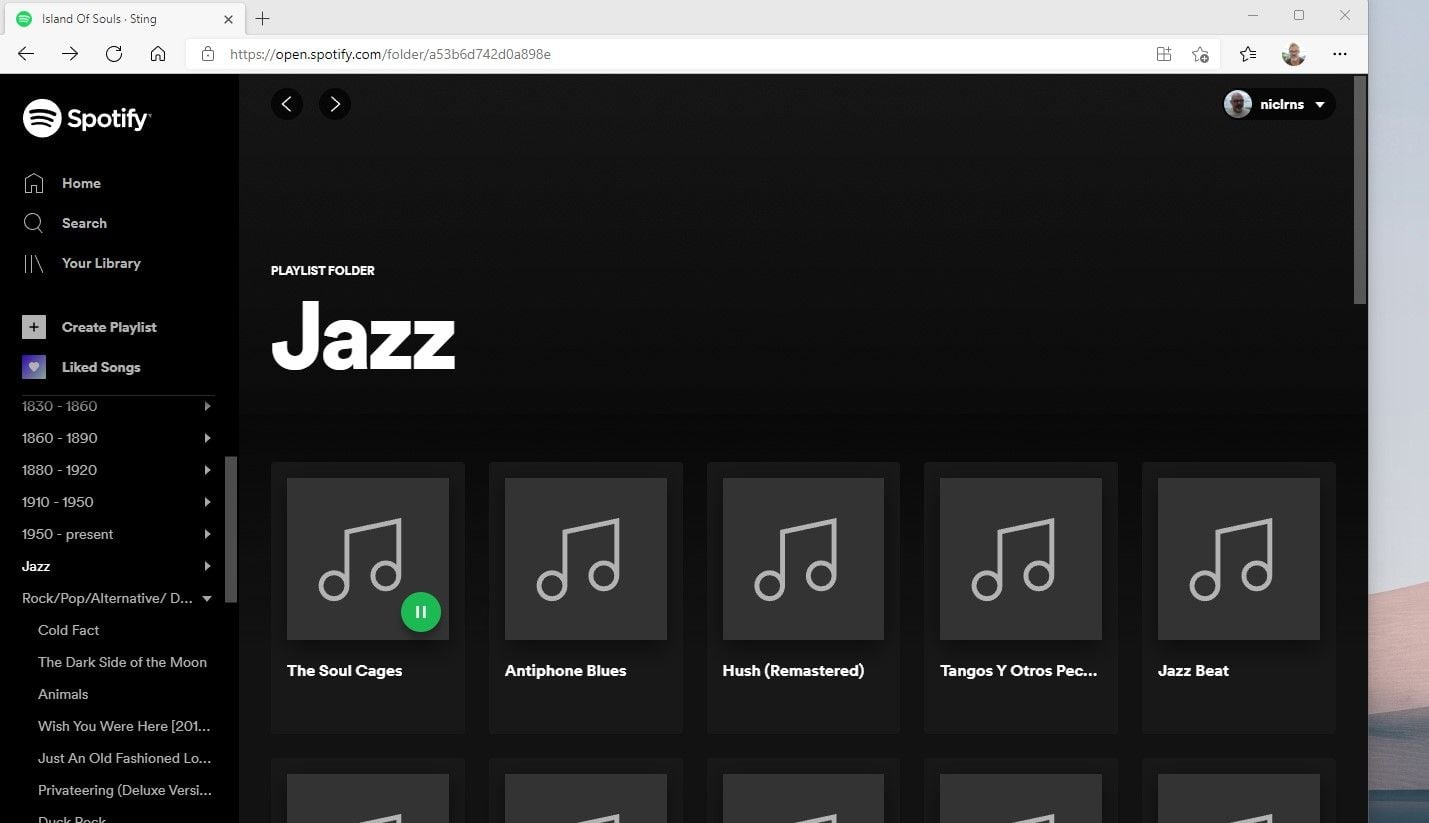
Hey @grumpy_1,
Thanks for the post and the screenshot.
We've passed this on to the team investigating this issue.
Cheers.
Any news on this?
Hey @grumpy_1,
Thanks for the post!
Try running a clean reinstall of the app, as described here.
Let us know if that fixed the issue 🙂