[Desktop][Connect] Remove the facebook panel

This is now mandatory for people who aren't interested in using it. Clicking the button opens a facebook login page which facebook uses to track, even if you are not a facebook member.
My idea is to remove this forced feature from spotify. At the bare minimum make it opt-in only. When we first open the app, ask if we want to connect to Facebook in the pane, then have the pane go away if we decline. In the options have a setting for facebook login that will re-enable this pane if anyone wants to use it.
Accepted answers

Also you can remove the Facebook frame here:
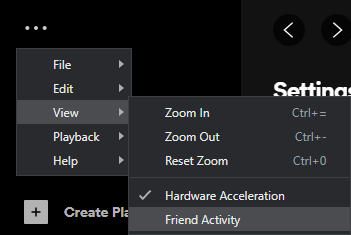
[...] > [View] > [Friend Activity]

Just in case this bothers anyone, Desktop app -
••• menu > View > (uncheck) Friend Activity
This got rid of this insanely stupid design choice for me 🙂
All comments

Plan
Premium
Country
USA
Device
Custom Desktop, Intel i7 CPU, Nvidia GPU, Solid-state hard drive
Operating System
Windows 10
My Question or Issue
I have canceled my premium membership because the Facebook panel on the desktop was too f’n annoying. I f’n hate facebook.
Signed up for premium. Less than half an hour later I was canceling. I wanted music, not f’n Facebook.

Hey there @DanielAlejandro,
Thanks for reaching out here in the Community 🙂
We're sorry to hear that you feel like this. Keep in mind that you can hide the Friends Activity tab following the steps you'll find here.
If anything else comes up, we're always a message away.
Cheers.

**bleep** thank you so much
Also you can remove the Facebook frame here:
[...] > [View] > [Friend Activity]

Just to be clear, this does work but I assume I am not the only person who likes seeing with their friends/followers IN Spotify are playing, but do not want to be pestered to connect with facebook..
Given the very well documented ways Facebook abuses ANY data they are given I am baffled that people not wanting this 'feature' is a surprise. Please give the ability to remove this while retaining the ability to view friend/follower activity with other spotify users.
As I said in another thread, some people WANT to see activity from friends/followers we have IN Spotify, and do not want to have to turn that completely off just to get rid of this Facebook prompt.
Facebook is WELL documented at abusing data they have access to, no one should want them to have even more information about them, and we should be able to opt out of that without impeding other functionality.


Hi,
But how is it possible to remove the "connect with Facebook" but still see friends activity? I would like to see the activity of those friends that I have chosen to follow in Spotify not FB friends.

Hey @minnmann,
Thanks for posting here 🙂
You can turn on the Show Friends Activity option in the setting with these steps.
If you're following your friends on the app and they're sharing their listening activity on Spotify, you will able to see what they're listening to. You don't need to connect your account to Facebook.
Hope this helps. The Community is here for you if there's anything else!


Hey @astrobird,
Thank you for posting on this thread.
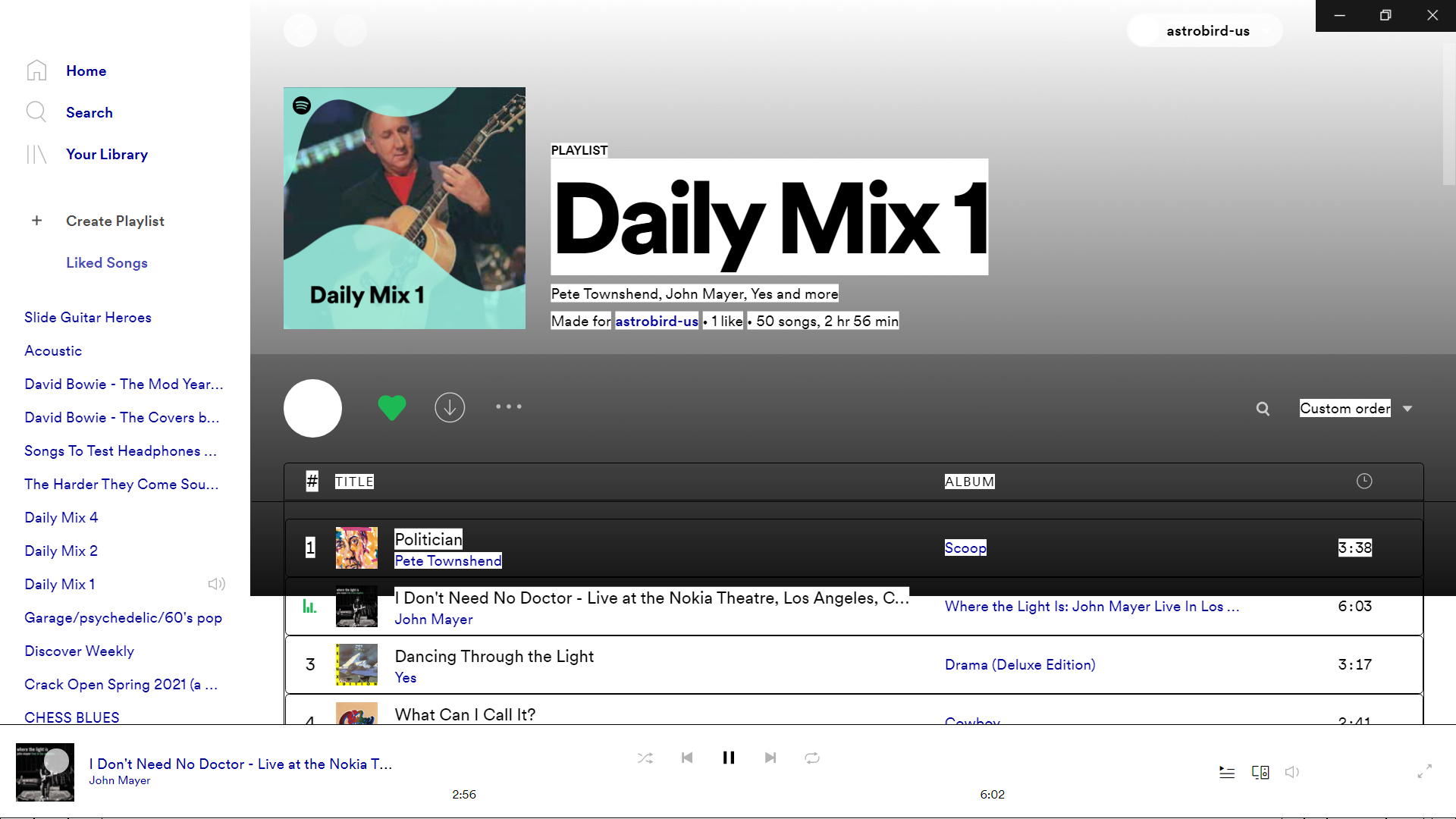
Could you let us know if you followed the steps shared by @Eni to toggle off the Friend activity sidebar?
If you already did it, please send us a screenshot of how your app looks. This way we can take a closer look at the issue.
We'll be on the lookout!
I got it to go away,not sure how.
Hi @astrobird,
Thanks for letting us know that everything is working fine now.
Remember to always keep your app updated, so you don't miss any fixes or new features. Don't hesitate to give us a shout if you have more questions.
Have a great day!

There's some nuance that isn't being addressed in this thread and it may indeed affect privacy regulation (GDPR/CCPA/et. al.)
Several contributors to this thread have suggested "hiding the friend feed" as a meaningful course toward resolution. While this is fine, it doesn't address the root problem of removing programmatic access from Facebook to Spotify. In GDPR terms, this is the Right to Erasure. This is especially true since the connection, once established, cannot be explicitly removed and is being used for more than mere authentication (i.e. how I'm interacting with the Spotify app when it's shared meets every requirement of personal data.) Also, once a user "hides the friend feed," they should be prompted to re-grant Facebook the necessary privileges. This is especially true with accounts that do not have a "Sign-in with Facebook" requirement (that use Facebook as an OAuth 2 provider), but also supported (technically) for accounts that do.
I hope that Spotify as a company will take some time to reevaluate such broadly sweeping permission as a business practice and provide meaningful ways of allowing users to separate from a partner that, clearly, many subscribers may no longer be interested in.
You make an excellent point, and one I had not considered as in the US we do not have a federally mandated regulation like the GDPR (I wish we did).

Hi folks,
@byce and @mmccaughan, thank you for sharing those insights in this thread.
To have more clarity about the data that Spotify collects you can review this article that explains it, along with your user rights and privacy settings.
There is also this page with the detailed information that Spotify is required to provide under GDPR. It also includes instructions on how to obtain a copy of your personal data.
Take into account that while GDPR is a European Union regulation, Spotify will adhere to these regulations for users across all countries.
Cheers.
Just in case this bothers anyone, Desktop app -
••• menu > View > (uncheck) Friend Activity
This got rid of this insanely stupid design choice for me 🙂


The thing is, i Want to see activity of the ones i am following. But now because of this facebook thing, i can either remove the whole panel or bear it. There is no option for seeing my friends activity. Just remove this so called "Feature" and let us see the activity panel of the ones whom i am following

Hi there @aa267,
Thank you for your reply in this thread.
Can you disconnect your Facebook account to see if the issue persists?
It would also be great if you can let me know which version of the app you have?
We'll keep an eye out for your reply.
Take care!

I WANT to see my friend activity like before, but I don't want to be forced to connect via Facebook to do that. Hiding friend activity does not achieve what I, or most other people want.
Hi @Zaandros,
Thank you for posting on this thread.
You can see your friend's activity even if you don't have a Facebook profile connected.
If you already follow other users in Spotify, you can see their activity instead of the Facebook banner by clicking on this back arrow.

Don't hesitate to reach out again if you have questions.

4th Attempt at this because apparently Spotify can't even get their support forums to work correctly. And why would they? Can't complain about it not working if you can't post!
I want something very very very simple: I want the sidebar to see what other people are playing but NOT the giant and distracting Connect to Facebook button. And I don't want to connect Facebook.
Look up WCAG 2.0 accessibility standards for the internet. While not legally binding, I'm sure you'll find some helpful information there, like the distracting and contrasting color of the Facebook button is an actual issue with accessibility for people with mental disabilities. Making your app accessible is a great thing to do, and if you don't care about that - it avoids potential lawsuits (I'm not threatening, but someone could).
Seriously, just let people play music without shoving Facebook down their throat.
Hi @Zudane,
Thank you for sharing your post in the Community.
If you experience issues trying to post, we suggest you open an incognito window or try with a different browser.
About the sidebar, you can dismiss the "Connect to Facebook" button and see what your Spotify friends are playing. Just click on the back arrow and it will show your Friend's activity.

Hope this clears things up. Don't hesitate to reach out again if you have questions.

Premium member here. It's absolutely unacceptable that Spotify is consuming so much of my screen space with this Facebook advertisement that has no immediately apparent, quick and simple way to get it off my screen. It's absolutely unacceptable that I need to spend time and energy searching for and visiting this page to educate myself on the convoluted process you've implemented to remove this nonsense from my vision. Now that I've been bluntly made aware that Spotify and Facebook are engaged in a partnership, I'm much less likely to continue using your services in the future. I make efforts to get Facebook off of my computer systems and network, and for some reason Spotify is making efforts to counter my efforts. Spotify Premium benefits include: "Listen to music ad-free." Well let's not try to pretend that plastering CONNECT WITH FACEBOOK across 20% of my screen isn't an advertisement. Facebook disgusts me and now you have associated Spotify with that emotion, and presumably some of the money that's paid for my membership is finding is supporting Facebook financially. Continue plastering the name of Facebook on my screen and I'll make efforts to ensure it never happens again by taking my business elsewhere.
Thank you for your time and consideration of my feedback.


Hi, just to follow up, I also want to see activity of my friends I follow on Spotify without the disturbing Facebook ad, but there is no way to get rid of Facebook and still keep their activity visible. When I disable the See what your friends are playing, I don't see anything, when I enable it, I can only see the Facebook ad. Please advise on how to remove Facebook and keep friends activity visible. The steps you mentioned above doesn't offer this solution.
Thanks!

I think I found a solution guys; I had the same inescapable facebook pop-up, but I did not want to get rid of my friend's activity by turning it off completely like the moderator suggested. All I did was follow an account which had recent listening activity then the facebook pop-up disappeared and the friends tab reappeared again. unfollowing them and closing the app seems to still have the friends tab back instead of the facebook one. idk if it this is replicable but I'll leave my profile if anyone wants to try it. best of luck to everyone <33 https://open.spotify.com/user/bozsa
I think I found a solution guys; I had the same inescapable facebook pop-up, but I did not want to get rid of my friend's activity by turning it off completely like the moderator suggested. All I did was follow an account which had recent listening activity then the facebook pop-up disappeared and the friends tab reappeared again. unfollowing them and closing the app seems to still have the friends tab back instead of the facebook one. idk if it this is replicable but I'll leave my profile if anyone wants to try it. best of luck to everyone <33 https://open.spotify.com/user/bozsa



Hey @bozsa,
Thanks for posting in the Community!
We are happy to hear that the issue has been resolved for you, and that you shared the steps of your workaround with the Community 🙂 We hope this would do the trick for other users as well.
If you need a hand with anything else, the Community is here for you.
Hey there @GubmentCheez,
Thanks for reaching out about this here in the Community!
If you don't want to see the Friend Feed you should be able to switch it off completely in the app Settings:
Hope this helps. Let us know if you have any further questions 🙂