Spotify desktop app not filling screen / small gap on Windows 11

Device
PC
Operating System
Windows 11
My Question or Issue
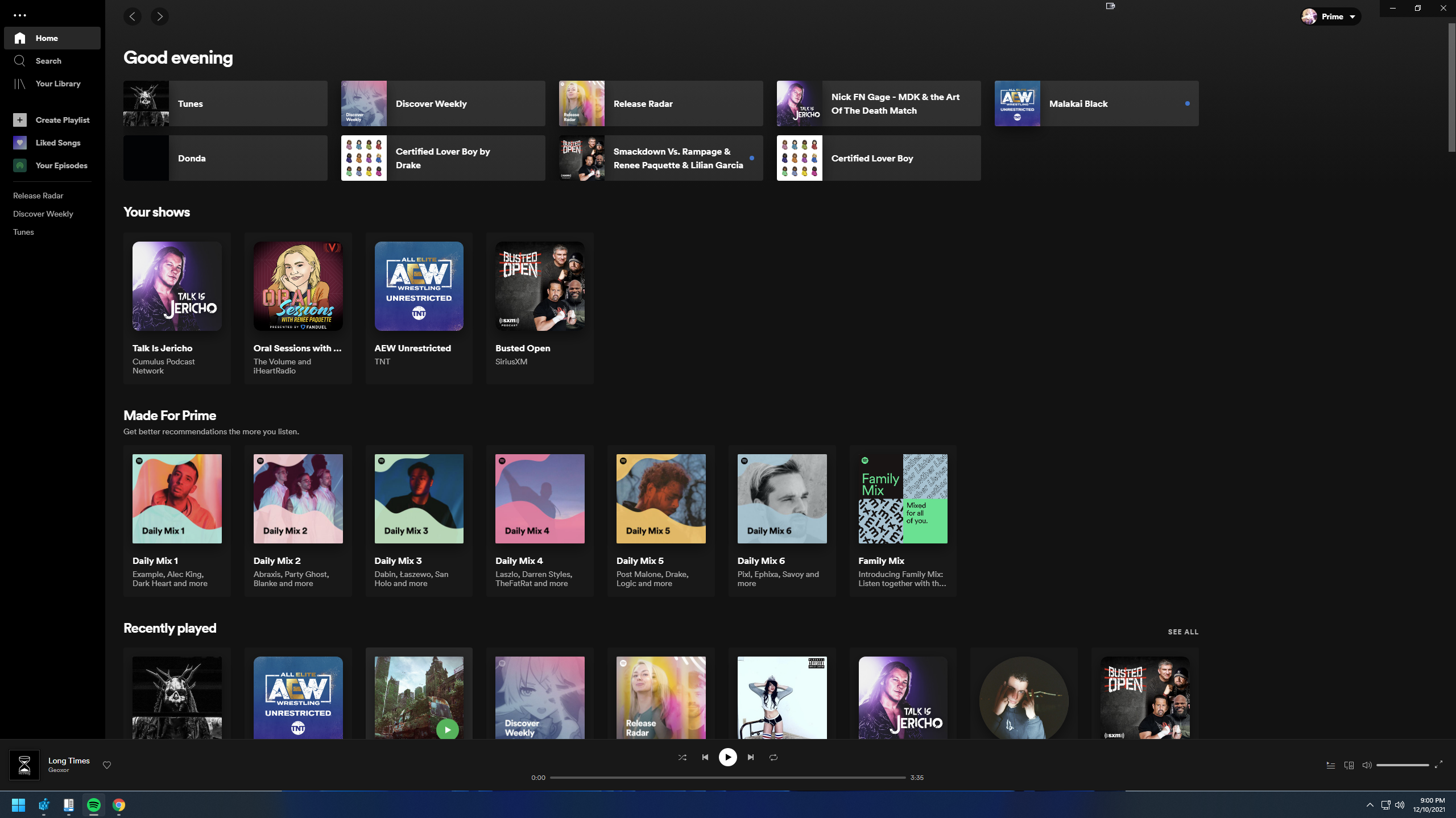
When I maximize Spotify there's a thin gap left over at the bottom which is slightly annoying. You can see it just slightly above the Windows taskbar.
Accepted answers

I can't believe this is finally happened.
Just got Spotify () for Windows 1.2.4.912.g949d5fd0 and it's fixed 🎉
All comments

When you maximize the Spotify app window, there is some gap between the bottom of the window and the taskbar. The background content is clearly visible through that little gap. This doesn't happen with any other app I'm using on Windows 11. The reference image is attached.

Hi @Abhishek2609,
Thanks for the post.
We'd recommend running a clean reinstall of the app, following this guide. This will assure that there are no corrupted app data files and that you're running the latest version.
Note that since Windows 11 is fairly new, some apps like Spotify might not yout be fully optimized for it.
Keep us posted on how you get on.
Cheers.

Hey there @Primeeey,
Thanks for reaching out to the Community.
To confirm, does it disappear if you manually adjust the window size?
Additionally, could you let us know your monitor's resolution?
Keep us posted.
fullscreen with no thin gap
Hey @Primeeey,
Thanks for that info.
We've gone ahead and reported it to the right folks. However, since this may be related to a non-standard screen size or a driver issue, we can't promise that it'll be fixed.
If you need anything else, the Community is here for you.
Cheers!

I have the same problem with my Spotify and I don't think it can even fit the desktop window.
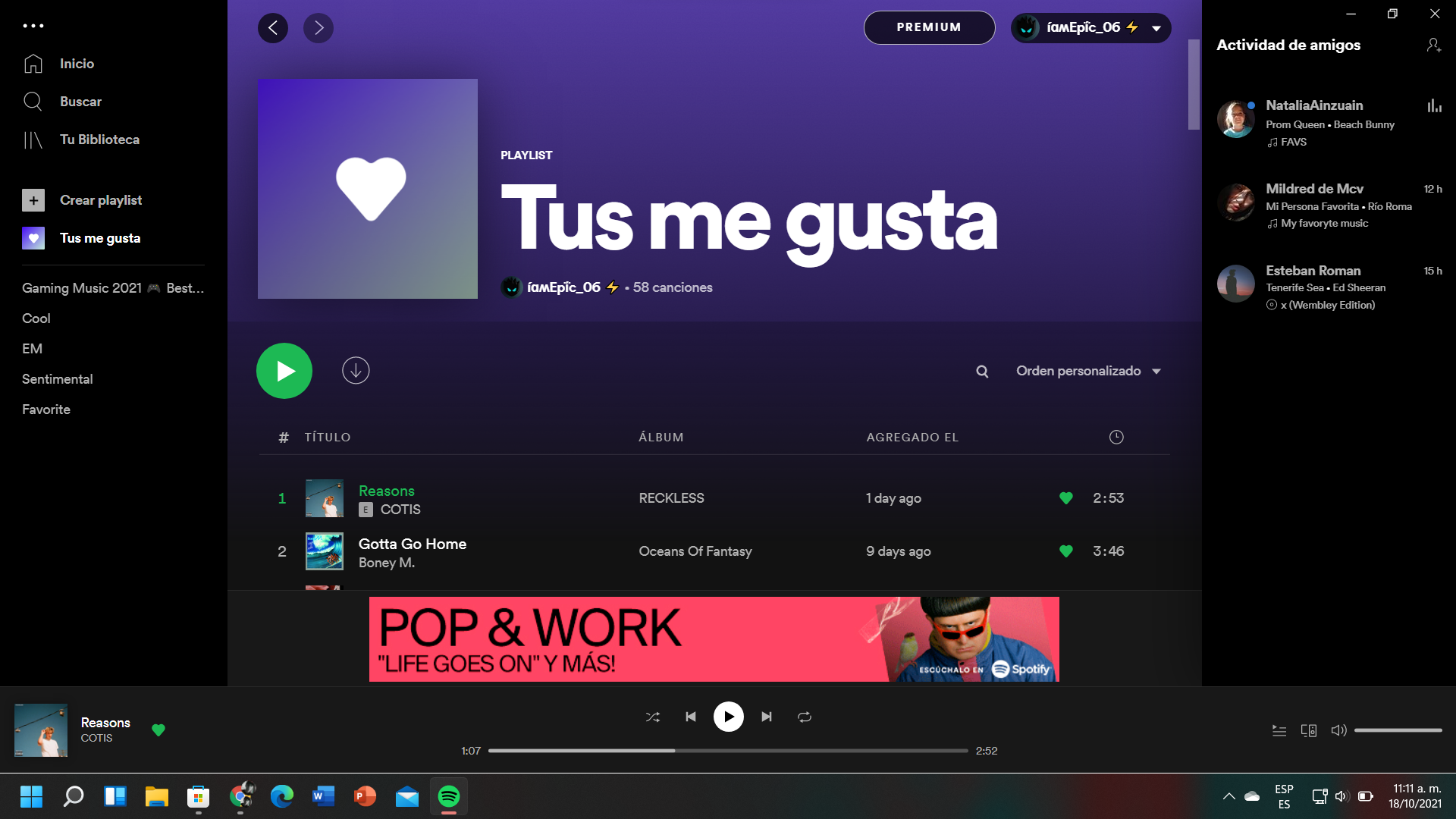

I wasn't aware of this thread so I posted a separate one here. I have the same issue on a screen with a regular full HD 1920*1080 resolution.

The app is a mess on Windows 11. The animations aren't working and the "pixel size gap" is something you just can't unsee if you notice it. Please fix the app guys.

I too have this problem on Windows 11, my screen is a standard 1920x1080. It really is frustrating to look at
Same issue after upgrading to Windows 11.
Regular full HD 1920*1080 resolution.
@drkmen wrote:Same issue after upgrading to Windows 11.
Regular full HD 1920*1080 resolution.
There we go CarlosE. 1920*1080 is standard, it should display fine at that resolution.

I have the same issue on both my 1080p and 1440p monitors. It started when I upgraded to windoes 11.
Attached is the issue on both monitors with a white background, clearly showing the issue
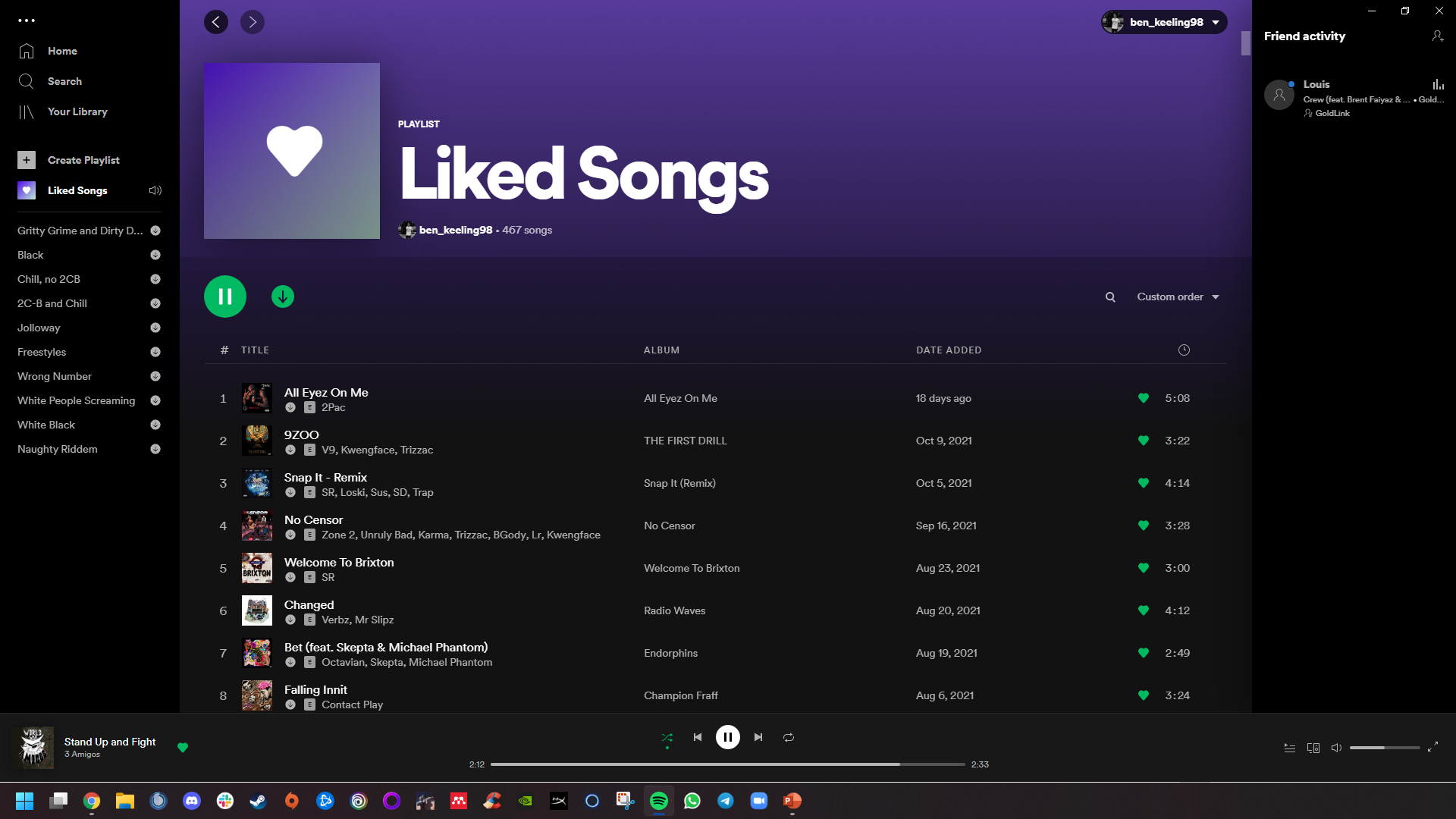

Same issue, really annoying since it's been weeks now. Standard screen sizes (1920x1080).

Plan
Premium
Country
United States
Device
Desktop PC
Operating System
Windows 11
My Question or Issue
When maximized there is a small gap between the bottom of the Spotify window and the top of the Windows 11 taskbar. (Not as obvious with a dark wallpaper background, but very obvious with a lighter wallpaper background.)

Plan
Premium
Country
Germany
Device
Desktop
Operating System
Windows 11
My Question or Issue
Spotify does not maximize properly. That issue has existed on Windows 10 and still exists on Windows 11 many months later. I have to use a dark background just so it won't drive me crazy, could you guys PLEASE fix that damn issue? It's extremely annoying to me, I can't stand seeing that gap between the window and the taskbar.. The desktop app doesn't seem to get any love outside of background fixes, it's a shame.
It seems like the issue is not Windows 11 related. My friend had the same issue on Windows 10 when I was using the Windows 11 dev build.
Perhaps, but it's funny that the issue only started after I upgraded to Windows 11. It was perfectly fine beforehand.

Same exact issue here on 4k on Windows 11. Strangely, it doesn't appear when it's on my second monitor (1440p).

I have same problem. You can see red line easly
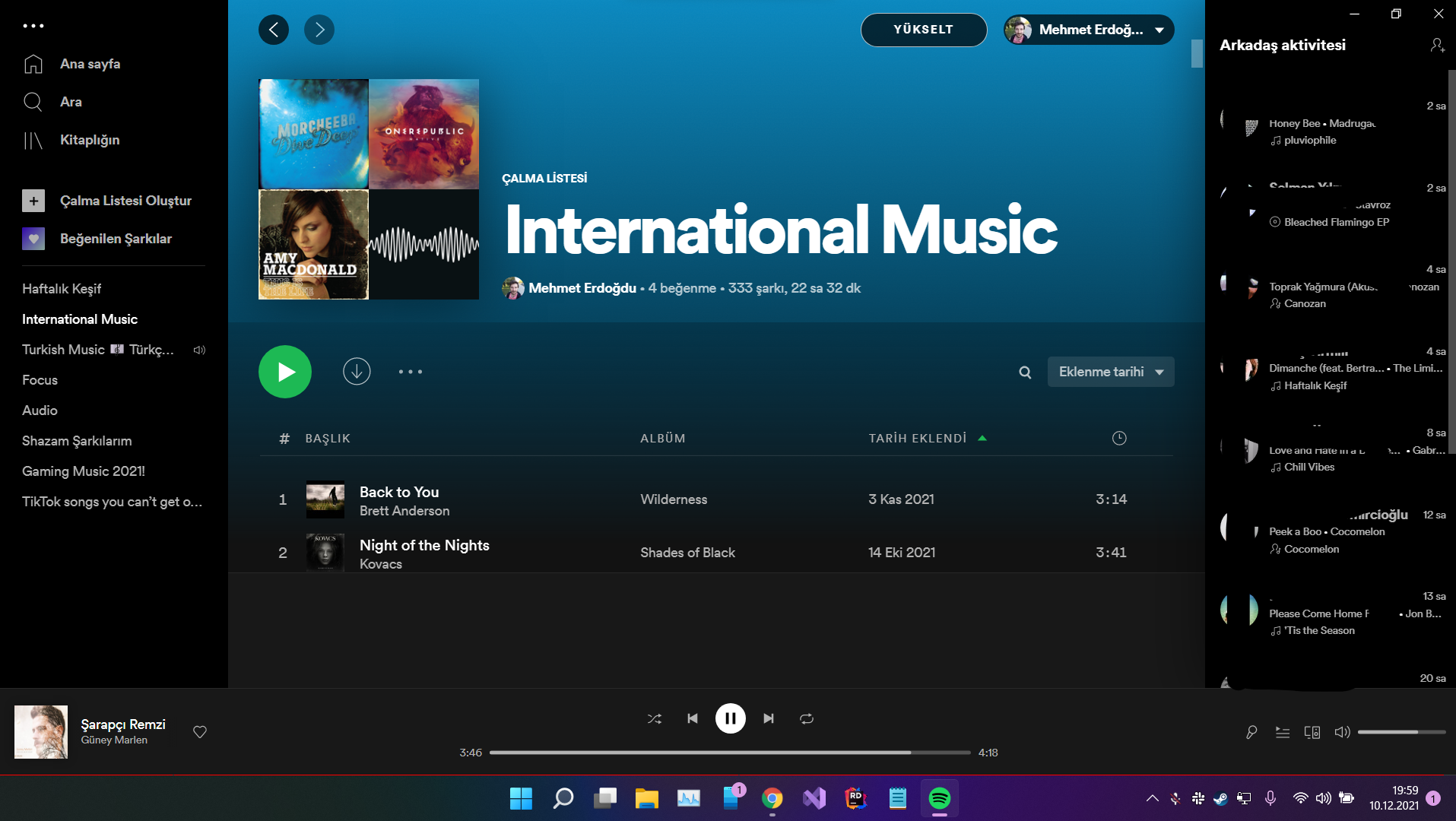

Also have same problem
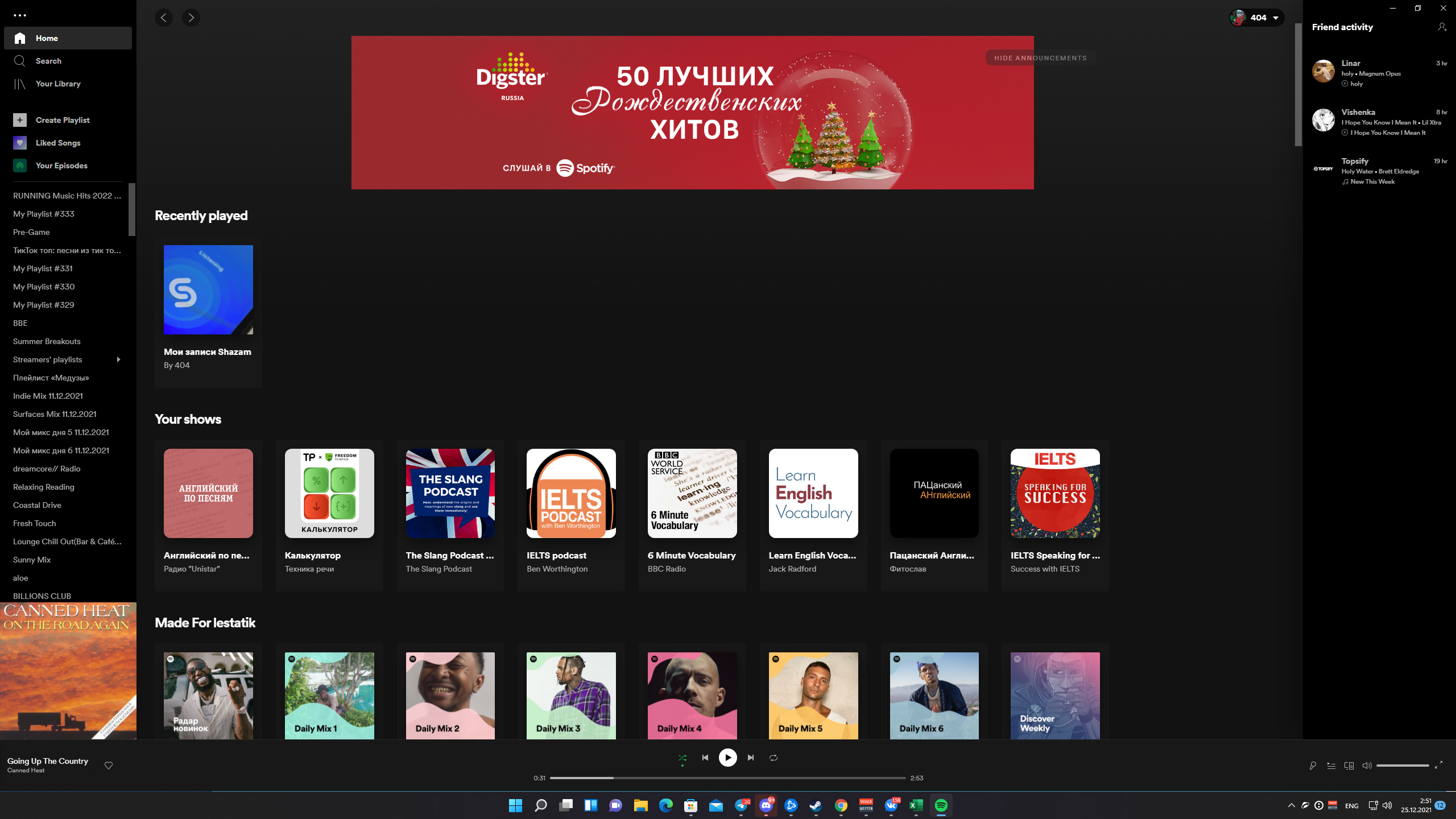

Same here after updating to windows 11, everything was fine on windows 10
Just wondering, how many replies do you guys need to solve it?


This problem has persisted for quite some time now. I subscribed to Spotify Premium for over 3 years now but I am considering cancelling my plan once and for all after seeing how the Spotify team has failed to fix this problem after a considerable amount of time.
I had this problem since the first Windows 11 Dev build, and I was hoping that this problem would get fixed eventually, but we are now in 2022 and no fix has been released. I am not even using an "unusual" resolution or graphics driver. I am literally using a 1080x1920 screen with an arguably popular integrated GPU. (Ryzen 5 2500U, Vega 8 iGPU)
I think that the Spotify development team should consider deprecating Electron entirely and use native builds instead. Windows 11's fluent design for UWP is very awesome and I am looking forward for a native release of Spotify.

Same problem, fresh win 11 install (didn't had this problem on the same PC with win 10).
Problem persist on my 2 screens (2560x1440, landscape and portrait) see green line
Any ETA on a fix ?

I have same problem, im using windows 11 for 3 months and its still not fixed sooooo annoying.
I have same problem, im using windows 11 for 3 months and still not fixed soooo annoying.

There is always a small white space/line between the the Spotify player and the Windows 11 taskbar. Please get rid of it.


Same problem on Windows 11. Noticed it for the first time in October-November 2021, around the time I upgraded to an early build of Windows 11. Tested with 2 external 24" 1920x1080p monitors, my laptop's 15" 1920x1080p screen and a 49" 3840x1080p super-ultrawide monitor, same issue with all of them. The bottom of the app can't be grabbed when it's full-screened automatically, and if I try to use windowed mode and just manually stretch the app to the full screen, I can get rid of the gap on the bottom, but then the white/light gray 1px border that comes from having the app in windowed mode is visible on all the other sides of the screen, and sometimes there's even a similar gap on top border of the app 😒
Haven't noticed similar issues with any other programs. Auto-hiding the taskbar seems to make full-screen mode work properly, but not everybody will want to do that just to make Spotify work correctly, so it isn't really a great fix.
Woohoo 🎉
Finally this issue seems to have been fixed in version 1.2.4.893
Only took since 2018 to get it properly fixed. Now let's just hope this fix is permanent this time around.