Spotify friends activity empty/not updating

Plan
Premium
Country
Finland
Device
Pc
Operating System
Windows 10
My Question or Issue
For several months (pretty much years at this point), my Spotify friends feed has not been updating, it only shows 1 friend I have, while it should have a dozen others. This has been going on for far too long for it to be a problem on my end as I have changed my devices, settings, and other things to try and fix it. I have reinstalled Spotify and my OS but nothing helps. I also see no friends through my Facebook integration even after disconnecting and reconnecting my Facebook profile multiple times. All my settings are the same as my friends and he can see his friend activity but I can't. I already posted about this problem once, and was told it would fix itself but that was months ago. This is very infuriating as it has been going for so long.
Accepted answers
All comments

Hi, I have the same problem and I can assure you that all my friends have the Friend activity turned on.

Same problem 😞

Same problem here, still not fixed


My friend activity also disappeared after wrapped 2021 but they can see what I'm listening to and they haven't changed their settings. I can see 4/20 friends activity I normally see. I've re-installed the app and made sure everything was up to date? What is happening? I like seeing what my friends are listening to

They’re gonna hear from me today if nothing happened yet, enough getting mooched to be tortured

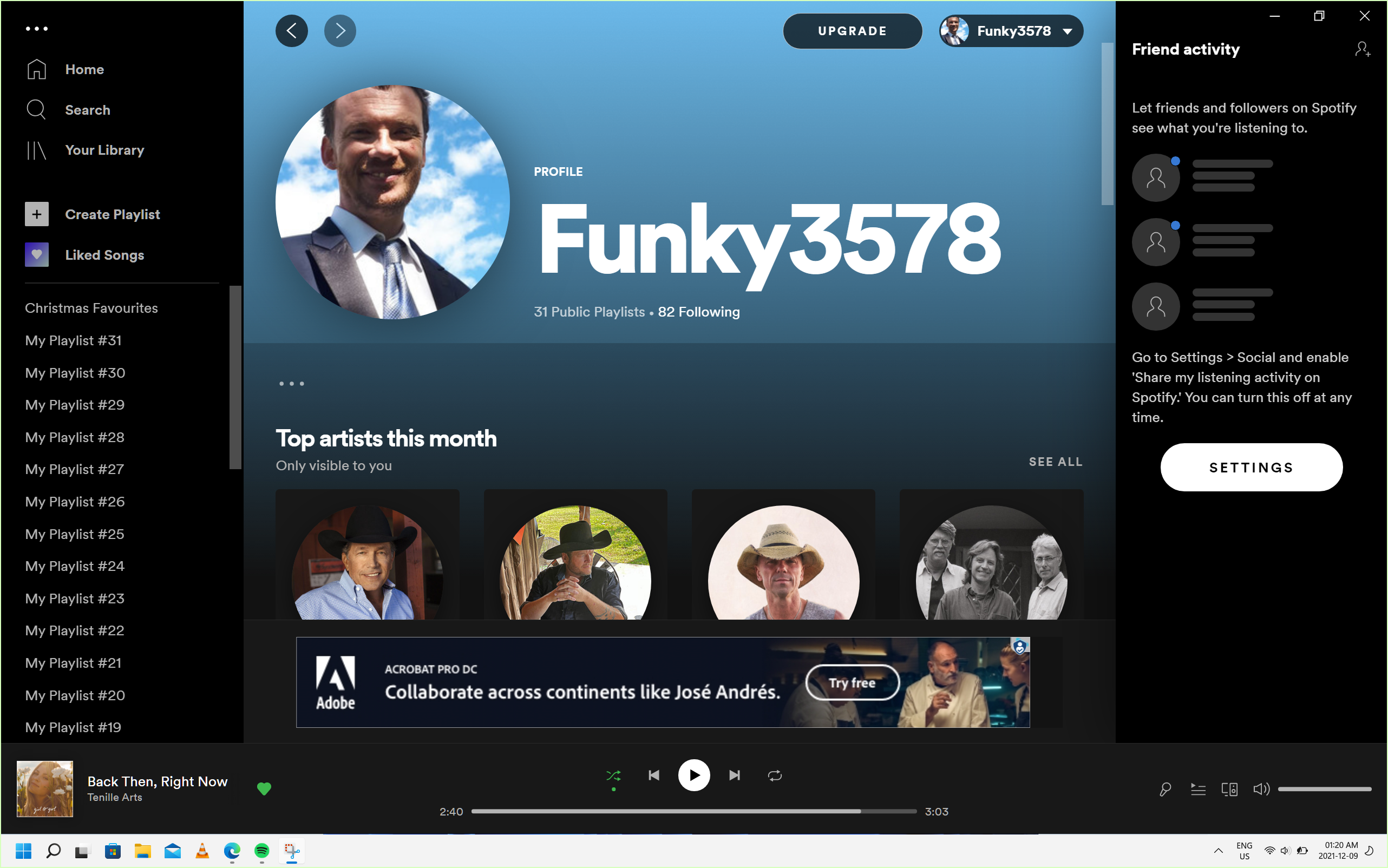 Friend activity is greyed outRecently I have noticed that in my friend Activity bar to the right all my friends activity is all greyed out. I have tried going into settings but when I do what it says in settings this function is on as green. So I also tried to re download and installed the lasted version of spotify from the Microsoft store.
I should mention that I did try to login to facebook through spotify but my friend activity bar is still grayed out.
The plan that I am on is the free version of spotify
Windows 11 home 64 bit operating system
This is an issue.

some IMPORTANT points i have copied from people who have commented on this post……
“I sure hope Spotify considers making listening public by default again. It would be a lot more convenient and frankly a lot less weird than reaching out to each friend one by one to ask them to make their listening public again..”
“I know they've suggested informing your friends about the update so they can go into their settings and readjust them so they're visible again, but you don't necessarily have contact with everyone you're following. Please return to how it was previously, because should anyone want to have a private listening session they always had that option anyway…”
“It would have been so much better had you sent out a push notification saying "Take control of your privacy: Check your sharing settings now" and take users to the relevant setting so they could have disabled it if they wished to; most users wouldn't have done that. Simply deactivating sharing silently removed a huge chunk of value from your app, and frankly: That was just a bad product management decision driven by fear…..”
“It’s really ashame that this feature is now put on private as default. Many users don’t use this option as it’s only available on PC en not on the phone. So they don’t care. I discovered lots of music this way by different people I am following. It is not possible to get into contact with all those users I follow to ask them to put this feature on. Really ashame. Please bring it back!!! If people want to use private option it’s always possible to switch it off…..”

The same

Hey @adioscompanieros,
Thanks for your post and welcome to the Community!
The toggling of the switch in Settings to on will make your personal listening activities visible to the people who follow your profile in Spotify.
To see other users' profiles and their listening activities in the Friend Activity pane (you can enable it from the View menu on the desktop client), you'd need to follow their profiles and also they need to have enabled the same setting for themselves, as prompted in the screenshot you've sent.
Hope this helps clarify things. Don't hesitate to give us a shout if there's anything else we can help with.

So this message shows up because none of my friends have this option turned on?

Plan
Premium
Country
Brazil
Device
Lenovo Thinkpad T14 and Lenovo Flex 5i
Operating System
Windows 10 on Thinkpad; Windows 11 on Flex 5i.
My Question or Issue
I've been with issues on Friend activities since Spotify turned off the activity to everyone as default. Even though some of my friends have it turned it on, I still can't see them. I tried to do all the cleaning, deleted and installed Spotify again, logout and login, nothing works. How can I solve this?

Same, this is causing me more stress during finals week
Hi, I have the same problem. My friend feed is greyed out instead of showing what my friends are listening to. I checked the settings and I'm sure I have enabled the "share my listening activity" setting. I also asked my friends and they confirmed that they have enabled the same setting for themselves and are able to see what I'm listening to as normal.
This has beyond upset me. Now I have to ask people to turn it on. I should be studying, but no I have to deal with this
I have the same problem on Windows 10. I tried deleting and reinstalling the app multiple times and also tried deleting the host but it didn't fix it.

Yeah I have the same problem

Hi there folks,
Thank you for your replies and feedback.
Every user who currently uses the Friend Activity Feed to broadcast their listening activity, and has not explicitly opted-in to do so, will have their broadcasting reverted to ‘off’. They would need to opt-in again for you to experience the Friend Activity Feed.
We suggest that you double check this with your friends.
Keep us posted.
Take care!
Hi there, I asked my friends and they all say that they have the "share my listening activity" enabled and are able to see what every one else is listening to, including me. It seems that I'm the only one of my friends having this particular issue. Can I do anything else to fix this?

Hi there @funky3578,
Thanks for reaching out about this here in the Community.
The behavior you're seeing on your Friend Feed is expected and this is caused by a change that was made to the listening activity setting.
Please head over to this thread which explains this in full detail.
If you have any questions, just let us know.
I've read that thread but all my friends have the "share my activity" option enabled and are able to see what each other is listening to. I'm the only one having this issue.

Hi @oikawa,
Thank you for reaching out to the Community!
To start assisting you, we'd like to make sure what is the exact issue your Friend Feed is presenting.
Is it not showing your friends profiles? Or is it showing them but the last connection is outdated?
If you could send us some screenshots showing what you see, it would help us help you better.
Keep us posted.
Hi folks,
Thank you for keeping in touch.
We understand this may not be ideal, but we've performed these changes in order to keep protecting each user's privacy and give them the choice to display their activity or not. So if your feed hasn't updated for multiple days, most likely is due to these changes.
@tsamius Could you share with us a screenshot showing how your feed looks? This way we can take a better look at the issue.
Keep us posted.
It looks like this. My friends can see what I'm listening to.


Hi, have a similar issue. Currently running Spotify on Windows 10 desktop, am also a premium user though I dont believe that's relevant.
I noticed that all the people I follow on Spotify hadn't listened to anything in more than 10 days, which I knew was incorrect as I have been speaking to these people.
I then proceeded to logout and reinstall the application, however when I logged back in on the fresh install it now only tells me how I can allow my followers to see my listening activity which has always been active. Additionally when I go to add friends it just tells me to connect Facebook.
Hopefully these screenshots help


We have seen the reports of people saying Friend Feed is not working for them, and we are happy to investigate specific cases, because as far as we are aware, there are no issues with Friend Feed working.
Firstly, it’s important to restate that ALL users had “Share my listening activity on Spotify” turned off as default - so users you followed and saw in your Friend Feed in the past, will no longer show in your Friend Feed, UNLESS they turned “Share my listening activity on Spotify” back on.
Also worth noting that you don’t need Facebook set up for Friend Feed to work.
Having said that, all of the below must be true for users to show in your Friend Feed:
If all of this is true for you and your friend and they don’t show up in your Friend Feed, then:
Once we have this we can do some checking. Thanks all.