Connect - Autoplay DISABLED, but still ACTIVE

Plan
Premium
Country
Germany
Device
Samsung Galaxy A51, Windows 10 notebook
Operating System
Android 11, Windows 10
My Question or Issue
I'm listening on several Sonos speakers via Connect. Recently, Spotify has started playing other music once the album I listen to has finished - i.e. it's using the Autoplay feature. Problem is: Autoplay is DISABLED on all devices, but it's still being used. How do I fix this? (I've already reinstalled Spotify on all devices.)
Accepted answers
All comments

I guess whilst Spotify are dragging their feet fixing this "deliberate bug", I'll look at making playlists that consist of consecutive albums that I want to listen to. But the convenience of spinning up a single album and then having some aural relief is still dead. Spotify remind me a lot of my country's government!

I listened to a 24 track album, 2 hours 42 min, on the web player and it went to autoplay again. So even the workaround stopped working around?
Incredible
I only came to the message boards because there was that time Spotify removed the specific album length information (like, literally why lol) and us people on the boards were able to bully them into putting it back very quickly. Was hoping bullying would work again but I guess not.

Glad to see they're finally listening and implementing change their users want. For anyone wondering why they'd make this by default? Gotta pump those stream numbers up! It's advantageous for Spotify for you to stream more.

A perfecly good service ruined. Thankfully my subscription ran out today and now with Tidal, never to return.

I can't believe a team at Spotify came up with this idea, experimented with it, and then shipped it. Yes - now you force people to listen to more music but at the cost of alienating your hardcode listeners. Shame on your PMs and engineers.

Every artist who appears in Autoplay and who is not my artist is blocked!

Sveinolsvik, you would blame yourself this way by blocking artists you like. I have canceled my Family subscription and as Spotify notified me, now I am actually a Free listener 🙂 I hope Premium and Family customers will get their free playing experience back soon!
Deezer offered me a first year subscription for 10 euros/month as a wecome offer. its regular fee of 15 euros/month is a little bit less expensive than the similar offer of 16 euros/month from Spotify. The Web Player is a little different, it works fine and it has a clearer interface and of course, it stops just right when my playlist or the album I chose to play by myself ends. One feature that I will be missing it the Spotify Connect feature for playing tracks from one place on another device or to continue a former play session on another device when logging in on that another device. Maybe a similar Connect feature is around there in the Deezer player and I will discover it later. What I appreciate is that I have not to set my playing session as private everytime I start the app or the Web Play like I was forced to with Spotify: this choice is ser forever in Deezer till you change it on your own. Cool.

This bug was resolved for a while but it is happening again, could the team at Spotify fix it properly?
still happening

Hey everyone,
A new announcement has been posted in the idea here but I will explain it in more detail below:
[AutoPlay] Option to toggle Autoplay on/off across all devices/platforms
In the new Spotify desktop app version 1.1.74 there is a NEW setting to turn OFF autoplay on connected devices and the Web Player. A connected device is a device you play to and control through the Spotify app with the Connect feature. (like a speaker) This setting is currently only available in the desktop app, but it will be coming to the mobile app too in a future update. You can enable / disable it in the desktop app right now and it will work the same in the mobile app for connected devices.
The setting acts as a global account setting. Once you enable or disable it in either the desktop app or the mobile app, it will apply to your account and any app you use to play music to connected devices should update to use the same desired setting.
This is what the setting looks like in the desktop app:
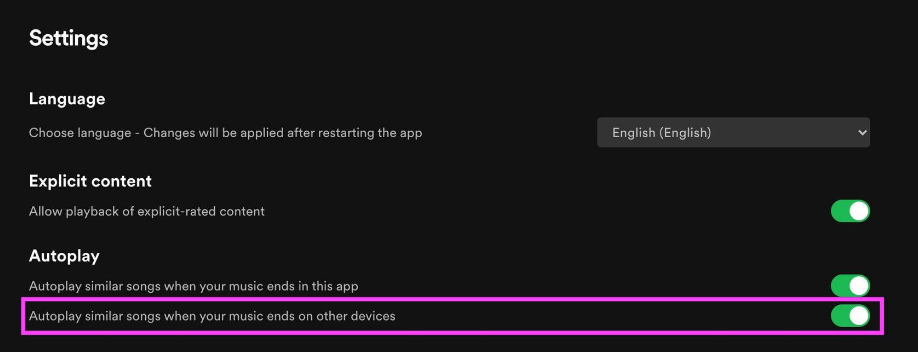
Note: It can take several minutes for the autoplay setting change to apply to your account and be reflected in the other Spotify apps. One you enable it in one of the Spotify apps, it can take up to 15 minutes to sync the setting to the other Spotify apps.
This new desktop app version 1.1.74 is still being rolled out to all users so you might not have it yet.
Web Player: This setting when enabled or disabled also applies to the Web Player. The Web Player does not have a settings page and is not technically a connected device, but this setting will also be used to control the behavior of autoplay with the Web Player.
Mobile App: This setting is currently only available in the desktop app, but it will be coming to the mobile app too in a future update. It's a global account setting so you can enable or disable autoplay in the desktop app and it will take affect in the mobile app too within several minutes.
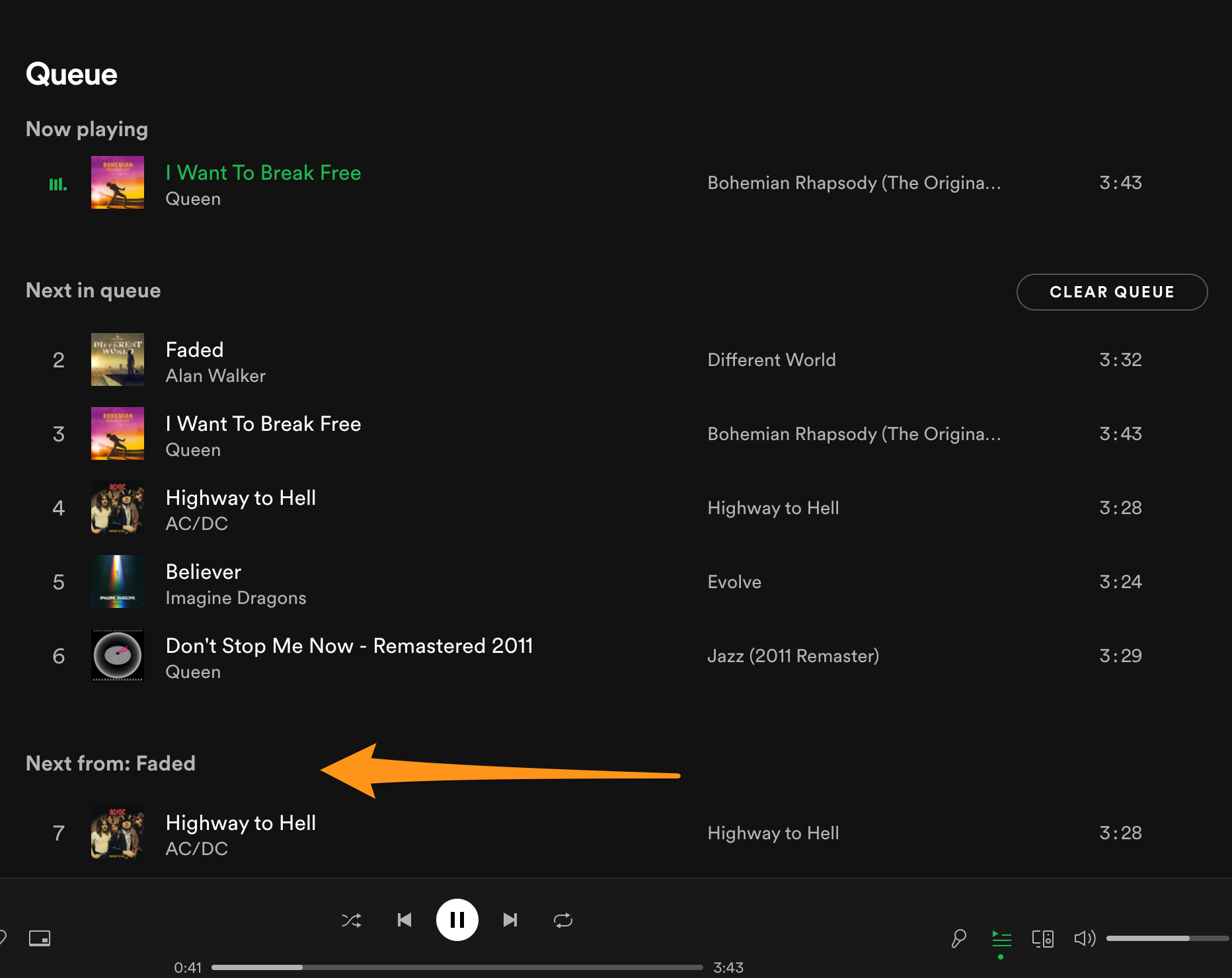
What is autoplay? When you are listening to an album or playlist with the repeat option turned off, similar music is added to your queue to keep the music going after the album or playlist has finished. This new setting turns that behavior either on or off.
@MattSuda I have downloaded the latest and greatest desktop app and turned OFF autoplay but it is still not working in the web app and PWA in desktop mode
There are 5 songs in playlist
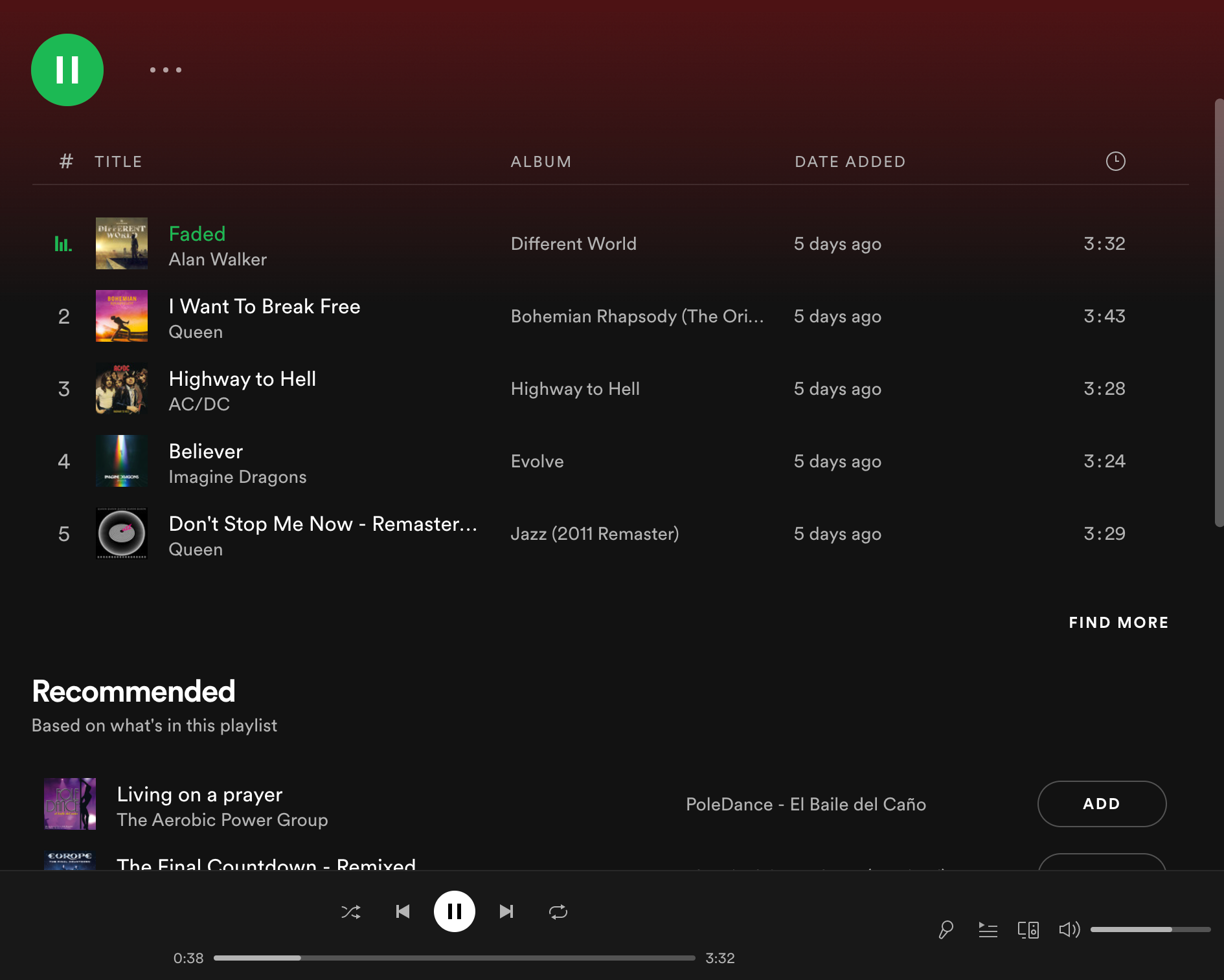
Yet Spotify inserts 40+ songs after - autoplay /is/ OFF
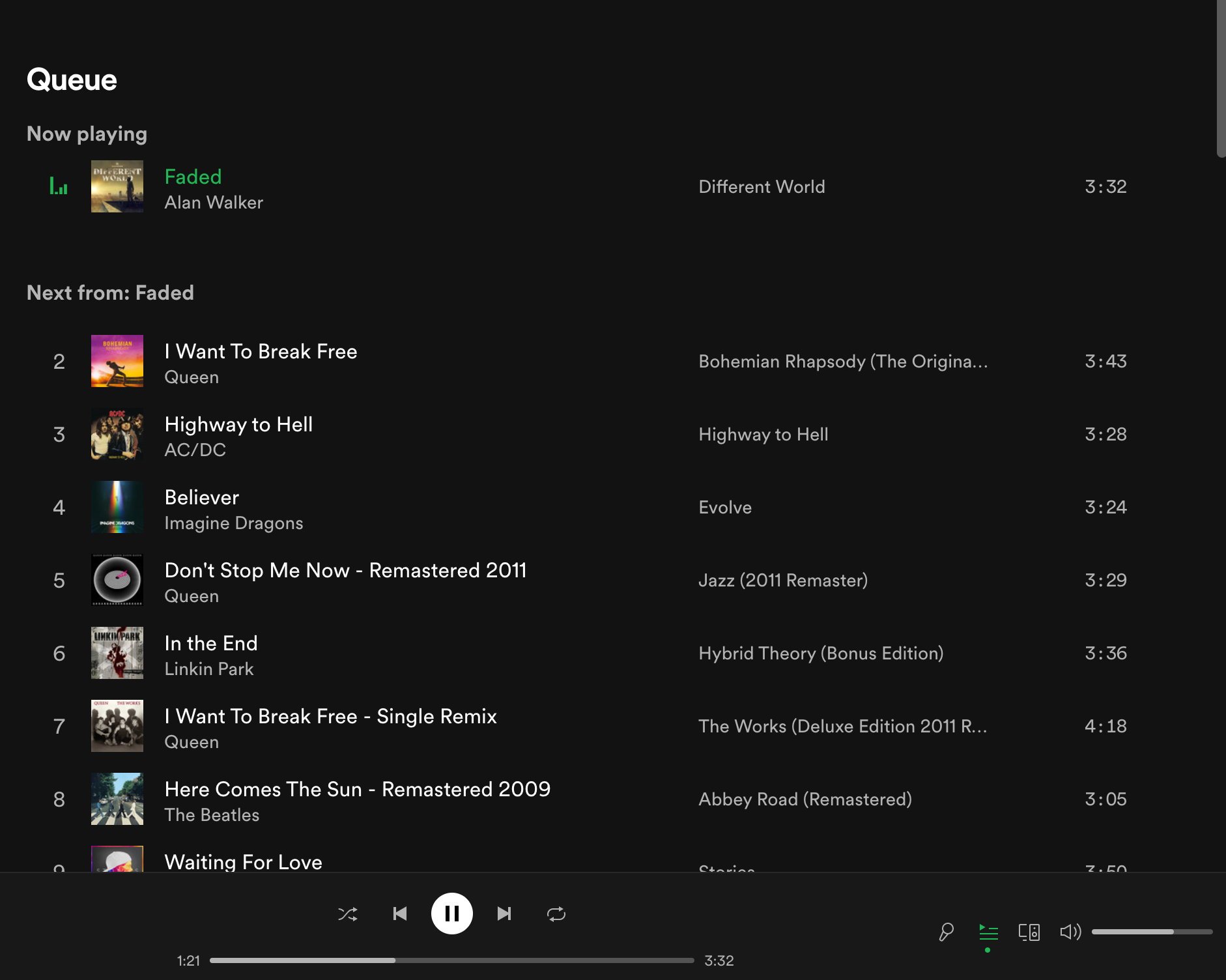

@MattSuda What does it mean that the update is being "rolled out"? All my installations are at version 1.1.73 with no indication of an available update. Running SpotifySetup does nothing to update the version. Please let me update manually so I can get rid of this awful bug.

It seems to work for me ! I did get the update on my office computer, I made the change and it seems to apply it to my home spotify connect devices. Good for Spotify to have answer to this concern.
Now, I hope that the HiFi quality will arrive as promised before the end of the year.
The problem is solved! Thanks!

Glad it's fixed but it's really stupid that there are two separate switches for autoplay to be disabled.

I had to reinstall the app on my Mac and now it works: you'll find 2 Autoplay settings and you you have to disable the second one.
The fix is still not available for the Linux app. I need to borrow a Mac for this.

Let’s have the fix for iOS now as well please.
The Linux app is not actively supported on the same schedule as the Windows and Mac desktop apps. So from time to time the Linux app will be updated usually after several months, but in general it will be slower to get the changes you see in the Windows and Mac desktop apps.
From the Linux download page:
"Spotify for Linux is a labor of love from our engineers that wanted to listen to Spotify on their Linux development machines. They work on it in their spare time and it is currently not a platform that we actively support. The experience may differ from our other Spotify Desktop clients, such as Windows and Mac. You can tell us what you think and ask other users for help at the Desktop (Linux) board in The Spotify Community forum."
Hopefully you'll see this change eventually!
-----------------------
This setting is currently only available in the desktop app, but it will be coming to the mobile app too in a future update. It's a global account setting so you can enable or disable autoplay in the desktop app and it will take affect in the mobile app too within several minutes.
Rolling out means that over time all users will eventually get the new update. Some users will get it first, then more users, and more until everyone gets the new update.
This support article shows how to see if an update is available in the desktop app:
https://support.spotify.com/article/updating-spotify/
Should also show if an update is available if you go to ---> About Spotify popup window
The blue dot and text in the about window only show up when there is an update ready and you'll have the option to restart to install it.
Are you still having trouble getting it to work? It can take several minutes after you turn the setting off to update on your account. Try again and let me know how it goes.

By the looks of it, ability to turn off auto-play isn't (/won't be?) available on Spotify Web?

Hey @YellowAfterlife,
Thanks for reaching out about this.
We can confirm that the option to manage Autoplay has been released for the desktop app. You just need to install the latest version and you'll find it by heading over to Settings > Autoplay > Autoplay similar songs when your music ends on other devices and this will apply globally for connected devices and the web player. This toggle will persist also when using a connected device via mobile.
Hope this helps. If you need a hand with anything else, the Community is here for you 🙂
Hey @Eni,
Have you read my comment by any chance? I'm asking about the web version ( https://open.spotify.com/ ) rather than desktop/mobile.
Hi @YellowAfterlife,
Thanks for getting back to us.
Keep in mind that the Autoplay similar songs when your music ends on other devices option needs to be toggled on from the app settings in the desktop app. Once this option is toggled on, it'll apply for the web player and the connected devices as well.
If you have any questions, just let us know.

Hi @Eni
the main problem is, that some of us do not have access to a Windows or iOS computer and are therefore unable to install "the latest version of the desktop app". I am waiting for the mobile app to be released, because I do not see the option to manage Autoplay come to the linux desktop app anytime soon.
From a users point of view the easiest solution would be to put the settings menu to the webplayer.
I can confirm that switching the setting in the native version worked for the web player, and also that opening a Windows VM to tick a checkbox is a bit of an overkill.

Happens with Chromecast and drives me nuts. How difficult can it be to forward a flag? Also, Chromecast plays shuffled by default which you should fix as you go.

Hi folks,
Thank you for your replies.
We want to let you know that as for today, we've been rolling out on the mobile app the setting to toggle on/off AutoPlay on external devices, so please make sure to keep your app up-to-date to not miss this feature.
@e_ijk The issue you mention about the shuffle feature on your Chromecast isn't usual. In this case, we invite you to create a new thread where we can assist you with that specific issue.
We'll be on the lookout.


Seems to still do this. I've checked all my devices and turned everything autoplay related off and it still keeps shoving stuff in "Next up", even worse, when I remove these from the queue it adds them right back.
This is absolutely driving me up the wall. I've tried logging out and back in, but that didn't do anything. Is there any proper fix?
UPDATE 2-7-2023:
The "Autoplay" setting was recently updated. The single "Autoplay" setting in the desktop and mobile apps will now enable or disable Autoplay across all devices on your account. This change makes it easier to manage instead of there being 2 different settings.
You only need to change the Autoplay setting in one of the apps, either desktop or mobile, and it will apply to your account on all devices including the Web Player and Spotify Connect devices.
You can read the support article for more information about the Autoplay feature.
At the end of 2021 a second setting was added to turn on/off Autoplay on the Web Player and Connect devices, but now it's just one single setting.