Autoplay when connecting to bluetooth
I've been having an issue with Spotify automatically starting and resume playing anytime bluetooth connects to my headphones or truck. I've tried all the "solutions" that I've found listed online and none of them work, or are terribly inconvenient, like logging out or turning the settings for my Bluetooth devices to not be used for media, or restricting back ground usage (then the app won't work at all if the screen times out, which creates other problems). Since the devs over at Spotify won't add an in app option to disable it auto starting and playing in the menu (like other apps are said to have because some developers actually listen to the people who use their app). This isn't a complete solution because you still have to clear Spotify from the back ground when you're disconnecting the Bluetooth device, otherwise it starts autoplaying as soon as it reconnects. I've been having this issue since Android 8 and am currently on Android 11 on a LG V60.
In your phone settings go to: apps > Spotify > app notifications.
Tap on the playback option and change it from "high importance" to "medium importance"
Switching it to "low importance" would also work, but then you lose playback controls in the notification shade.
I've tested this with my headphones and it works, I still need to test it in my truck but am confident it'll work there too. I don't know if this is a work around if iOS has this issue or not.
I've attached a screenshot of the notification option to change, hopefully this helps someone.
EDIT: unfortunately this ended up not being a long term solution, as Spotify is now acting the same as it was before.
Accepted answers
All comments
 Banffman

Hello and thanks for reaching out 💛
So I guess you're not necessarily asking for assistance but instead you're helping out people experiencing a similar issue. Is that correct?
That is correct, I figured it would be easier to find posted here, hopefully.
It'll indeed be easier to find since you've marked my reply as a solution. It'll be easier for users to be redirected to it.
Have a splendid week ✨

Spotify auto plays every time I connect to Bluetooth. I have read about work astounds but no fixes. This has been going on for years and only on my Samsung devices. Pandora, Deezer, nor Tidal do this.
My solution ended up not working very long, so I've been using the work around of using an app called macrodroid. I have it set up so when bluetooth connects it kills Spotify in the background, and then I can open Spotify when I'm ready to if that's what app I wanted and it doesn't start playing until I tell it to. It works the best of all the work arounds I've tried and is the most convenient, but it doesn't work about 10% of the time. If I had root access on my phone it would work all the time though. This is my solution until I can get my Playlists moved to Pandora and just cancel Spotify since they apparently don't know what they're doing over there, to leave such an issue alone for so long when so many people have this problem. Just stinks I need a separate app for the work around.
Now Spotify auto plays when disconnecting Bluetooth also

Hey folks,
Thank you for reaching out to the Community.
To keep investigating this further we’ll need more info about it. Let us know if this “autoplay” happens using just one bluetooth device or if it happens with any bluetooth device connected.
Also, would you mind confirming if you tried the workaround mentioned by @Banffman. If so, let us know the troubleshooting you’ve tried so far. This will give us a better look at the issue.
We’ll be waiting for your response.
I have a Samsung S20. I cannot set the playback notification to different levels of importance... So I disabled it. I will do some testing and update this thread.

Hey folks,
Thanks for all the info you've sent so far.
We can confirm that the right teams at Spotify are aware of this happening.
You can take a look at the Top Answer here for more info. Feel free to leave your details in the thread as well.
If you need a hand with anything else, the Community is here for you.
If that top answer had an updated time line of when it would be fixed it would instill confidence that the issue is actually going to be repaired, instead of referencing a 6 month old answer that really doesn't show that anything is actually getting done about it, and more of a "we promise we're working on it," all while we just keep paying a monthly subscription just to get irritated for all the work arounds that we have to go through, that don't even work all the time, well except the super inconvenient ones. Thanks for repeating something everyone who has tried to find a solution has already seen.
For testing, I turned off playback notification for Spotify. With this disabled, Spotify did not auto play when connecting or disconnecting Bluetooth devices.
That may stop the auto playing when connecting to bluetooth, but that also gets rid of the persistent notification while it's playing (which tells you the song information), and also takes away any control of the app from the notification shade (like changing songs), so then you have to unlock the phone and open the app, or stop whatever you're doing on the phone and go to the app. For me that's not acceptable. It's less convenient, and not something I have to deal with on other apps, and certainly not something that I should have to deal with for an app that I pay $15/month for for the family subscription. I have been dealing with this for around 4 years, which is about 3.5 years longer than I should've while sitting here stupidly hoping that they would actually value customer input and fix the issue, but I couldn't convince my wife to be alright with us switching to a different app (she doesn't use bluetooth so it's not a problem with her). She finally came to the realization she doesn't use spotify all that much and now doesn't care if we use a different service. Tonight I'll be migrating all our playlists over and switching to Pandora, cancel spotify and be done with this issue. That's really the only work around that actually works the whole time.
After some time, Spotify Play notifications being turned off does Not fix the issue.

Hey everyone!
This could be related to Android Auto, which resumes playback as soon as a connection has been established. You can disable it under your phone's settings (mine was under Connected devices) > Android Auto > Automatically start media. Make sure it's toggled off, then reboot your phone.
Hope this helps. Cheers!
Unfortunately this has been mentioned in other threads pertaining to this problem and is not a solution for the majority of the people that have tried. I tried disabling it myself and that didn't work. I even went as far as force Uninstalling android auto through adb hooked up to my laptop and even that didn't fix it.
This problem is caused by something in spotify's code.
I just disconnected my Bluetooth ear buds and Spotify started playing. I checked recently used apps and Spotify was not there. I checked notifications and it did not show any Spotify controls like it would normally when playing a song. I had to launch Spotify, see the current running song, and pause it from there.

This is yet another instance of gaslighting from Spotify about this issue, trying to pretend that IF ONLY users did this, or that, or the other thing, then the problem would be solved.
It happens with Spotify only, not with other similar apps. If other apps can fix this problem, then Spotify could, too.
Android is a widely used operating system, not some weird niche thing that Spotify's developers could not reasonably be expected to accommodate.
No amount of fiddling about with settings in Android fixes the problem.
The only successful work-arounds that I have found are:
1) Delete Spotify from my phone after using it, then re-install the next time I want to use it. This works for me when I am at home, because I don't listen to Spotify every day, nor do I use my car (where the Bluetooth automatically playing problem happens) every day. It doesn't work when I am on holiday, because then I want to use Spotify to play white noise overnight; I want to connect my phone to the car every day for navigating; and I don't want to use mobile data to re-install Spotify every night.
2) Download John Cage's 4'33" (a four and a half minute track of silence) so that it is available offline, set it to repeat that single track and try to remember to play this last thing before quitting Spotify. Then, when Spotify starts playing upon establishing a Bluetooth connection, you will hear nothing and it will not use up your mobile data.
Obviously, neither of these work-arounds are much good.
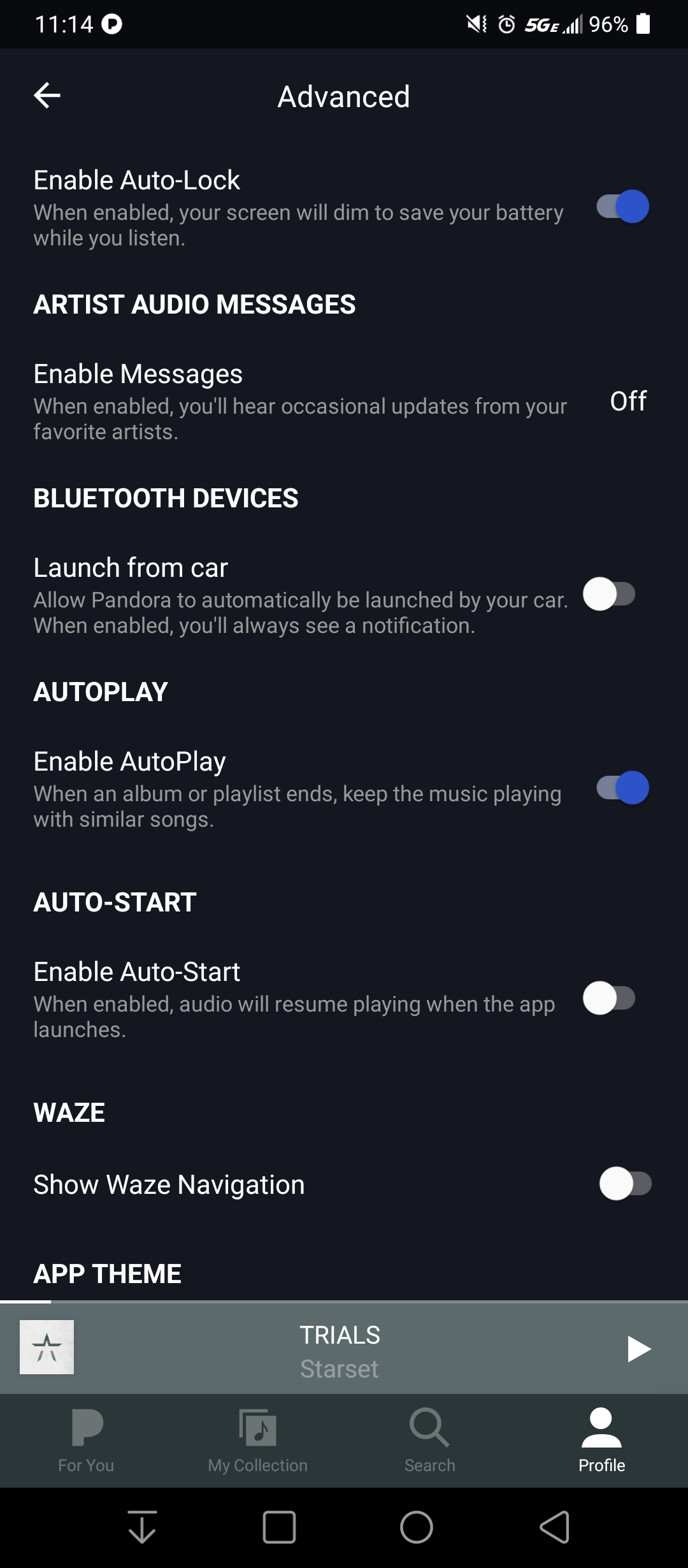
I agree. I've also attached a screen shot of pandora settings, which shows a streaming service that chose to give users the choice, not only auto starting music when the app launches (so even if Bluetooth triggers the app to start, it won't just start playing music) and also has an option to turn on or off the option to start the music when connecting to your car. The only time I've had pandora auto start the music when bluetooth connects is when the icon is still showing in the notification. I canceled Spotify premium a couple months ago and subscribe to pandora and it's so nice to not have it automatically start just because bluetooth connects. Hopefully Spotify developers see this and decide to stop being lazy and actually fix their app, because this shows it's possible for users to control those types of features if they really wanted them.
And this is why I have given up on Spotify and moved to Pandora

This is getting absolutely ridiculous. Today, IN A MEETING AT WORK, my phone started BLASTING music out of nowhere through the phone speaker because I had just hung up a phone call that i had connected with my Sony earbuds. Spotify wasn't even open on my phone.
When i'm in my car, every time i try to start a meeting with by car connected via bluetooth, Spotify will start f'ing playing randomly when i start the meeting even if the app is not open (and no i don't use android auto). Needless to say this is very distracting in the car, trying to mute myself so others don't get blasted with music out of nowhere.
I've tried everything everyone has suggested out of desperation to stop this from happening. Seriously Spotify, how difficult can this be to diagnose and fix? No other app that've ever owned across multiple devices across multiple years has never been this annoying and broken.
Yes, this has always been pretty annoying.
It has now become exponentially more annoying and potentially professionally embarrassing as more and more people use Bluetooth connected devices at work.
In my view, you cannot run the risk of having Spotify on your phone if you have connected to Spotify via Bluetooth in the recent past and there is a possibility that your phone will make a Bluetooth connection whilst you are at work or in a work vehicle with colleagues.
My other concern is that my work-around of deleting and re-installing Spotify once or twice a week may artificially inflate their popularity, if this is measured by new installations, and if this work-around is adopted by all of us who have the same complaint.

Pathetic. This long time subscriber is done and will spend my money with a developer that actually gives**bleep**.

What is sad is all the work around issues are not available on my s20. Also I don't use Android auto or any other car app. I listened to a podcast on Google podcast ( that happens to be on Spotify) and now it turns on and plays random podcast. When I open Spotify (it's not allowed to run in background mind you per settings) it just plays. I will uninstall AGAIN. Spotify also plays auto on my husbands ear buds Even though he doesn't have the app, but we are on the same WIFI. So sad because I will have to find new podcast as my favs are only on Spotify or Apple.

I have an iPhone and it’s been doing the same for years. I had airpods and now a new set of knockoffs and they both turn on Spotify when connecting. It’s not an exclusive thing to Android and the funny thing is just as many people say they have zero issues with this and also in the car. That makes me think it’s a setting, but someone would have found it by now if so. How can do many people with exactly the same devices have different results. So damn frustrating. I share the app with my daughter so I may opt for another. I can go back to Pandora I guess.

This started happening on my wife's Galaxy Flip4 when she installed Spotify. I've personally had it happen on a Galaxy S10, Galaxy S20, and Galaxy S22 Ultra, but it has never happened on my Pixel 6 Pro or Pixel 6a. I use Spotify daily and have it hooked up to Sony BT earphones and Shure BT earphones daily, and Android Auto every once in a while. Is it related to Samsung's particular version of Android?

The best part about this issue is that all the previous workarounds I can find online, are no longer options in my phone settings or in the Spotify settings. Which tells me that not only are they not looking to fix this issue but they're actively finding the workarounds people have found and removing them.


Classic Spotify support. They do not **bleep** and there is no purpose to even having this forum. I will take my money elsewhere, unfortunately this is the only recourse.