Collaborative playlist option disappeared

My Question or Issue
I am using the desktop windows 10 and mobile Android app - and on all platforms the option to make a playlist collaborative has disappeared, please help get it back.
It is only showing option to invite collaborator but when I add my friends as collaborator they are unable to add songs to the playlist.
Accepted answers
All comments
The option to make collaborative is not appearing. It is just showing invite collaborators. same thing is happening with other devices too.

Hey @Nebula5,
Thanks for the post.
If you click "Invite Collaborators" this should make the playlist Collaborative automatically 🙂
Hope this clears things up. Don't hesitate to reach out again if you have more questions.

This is inaccurate, the "Invite collaborators" button only gives you a secret link that expires after 24 hours. Several people have reported that we cannot make playlists collaborative, and the Invite Collaborators option is not a viable solution, since even that feature is broken and the invitees cannot add songs either.

Hi @WallyOllyO,
Thanks for your post.
Could you let us know whether you and your friends are using the desktop app, the mobile app or the Web Player? Please note that editing a collaborative playlist's content and permissions isn't currently possible on the Web Player. You can check the users' permissions with the following steps:
- Open the Spotify app on your phone or PC, then go to the playlist in question and open it.
- Underneath the playlist name you should find your profile's name + all other users whom you've invited as collaborators via the aforementioned steps. Tap on your profile name and a list of users should appear.
- Tap on the three dots next to a user's profile, then tap Make collaborator.
Let us know how it goes.
Cheers!

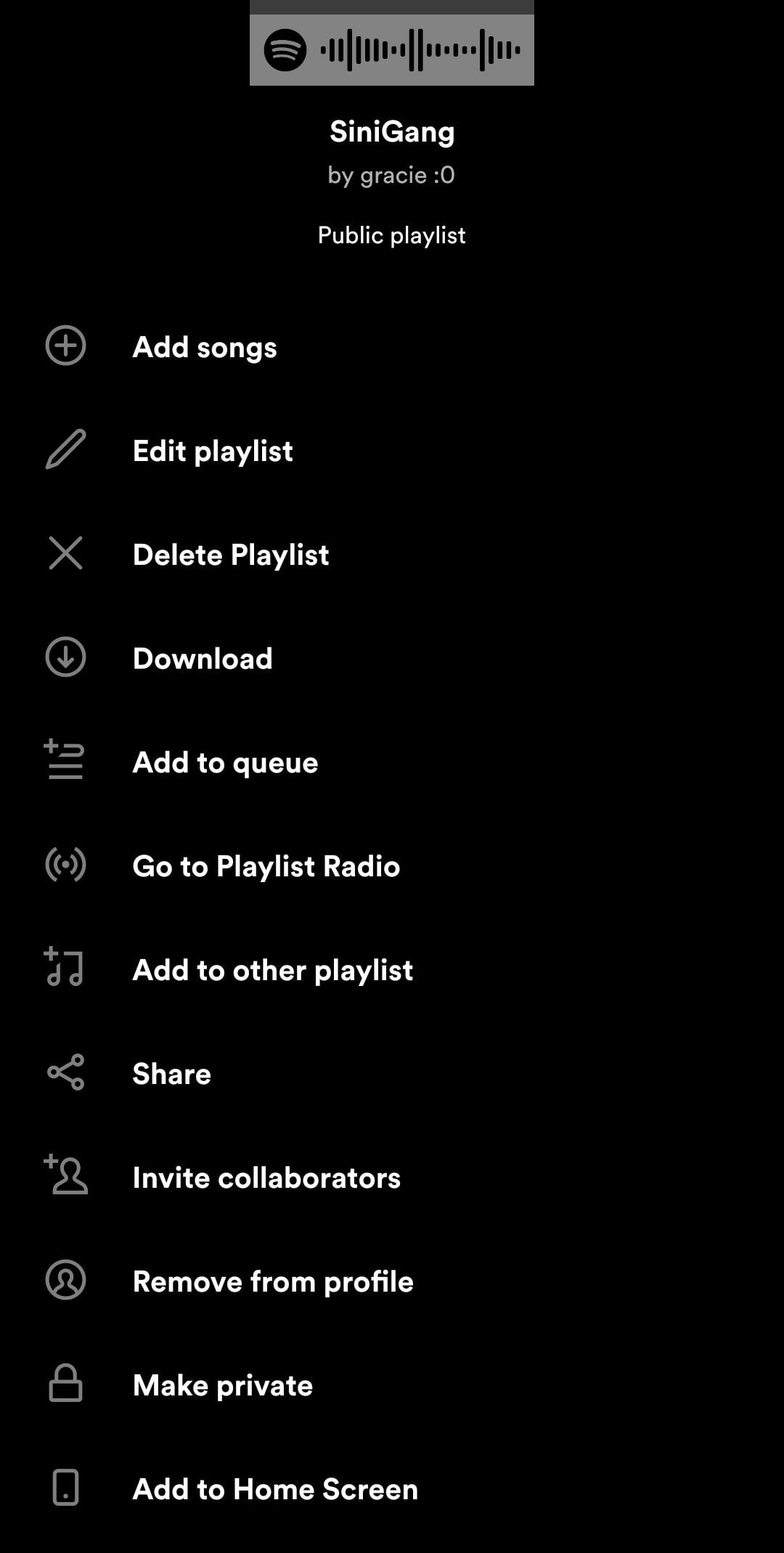
Hello, I have the same issue. I've tried sending the link to my friends but they said that it doesn't let them add songs even though they are already collaborators, or their names doesn't show up when they've already opened the link. The collab icon doesn't show up in the playlist as well. The Make Collaborative playlist doesn't show up in the three dots either.

Hey @graciehehe,
Thanks for getting in touch about this.
Could you let us know if when they try to accept the invite, a pop up appears for them with the option "Join playlist"?
On another note, as @Alex mentioned, tapping on "Invite Collaborators" should make the playlist collaborative automatically. In this case, you won't see the option "Make Collaborative". However, you should be able to see the collab icon right under the collaborators name when you open the playlist.
We'll be on the lookout.

Hi, the exact same issue is happening to me. I have no collaborative playlist option and the invite collaborators link doesn't work- my friends are unable to add songs into the playlist, picture attached. We're all using mobile apps.
Hi, Eni!
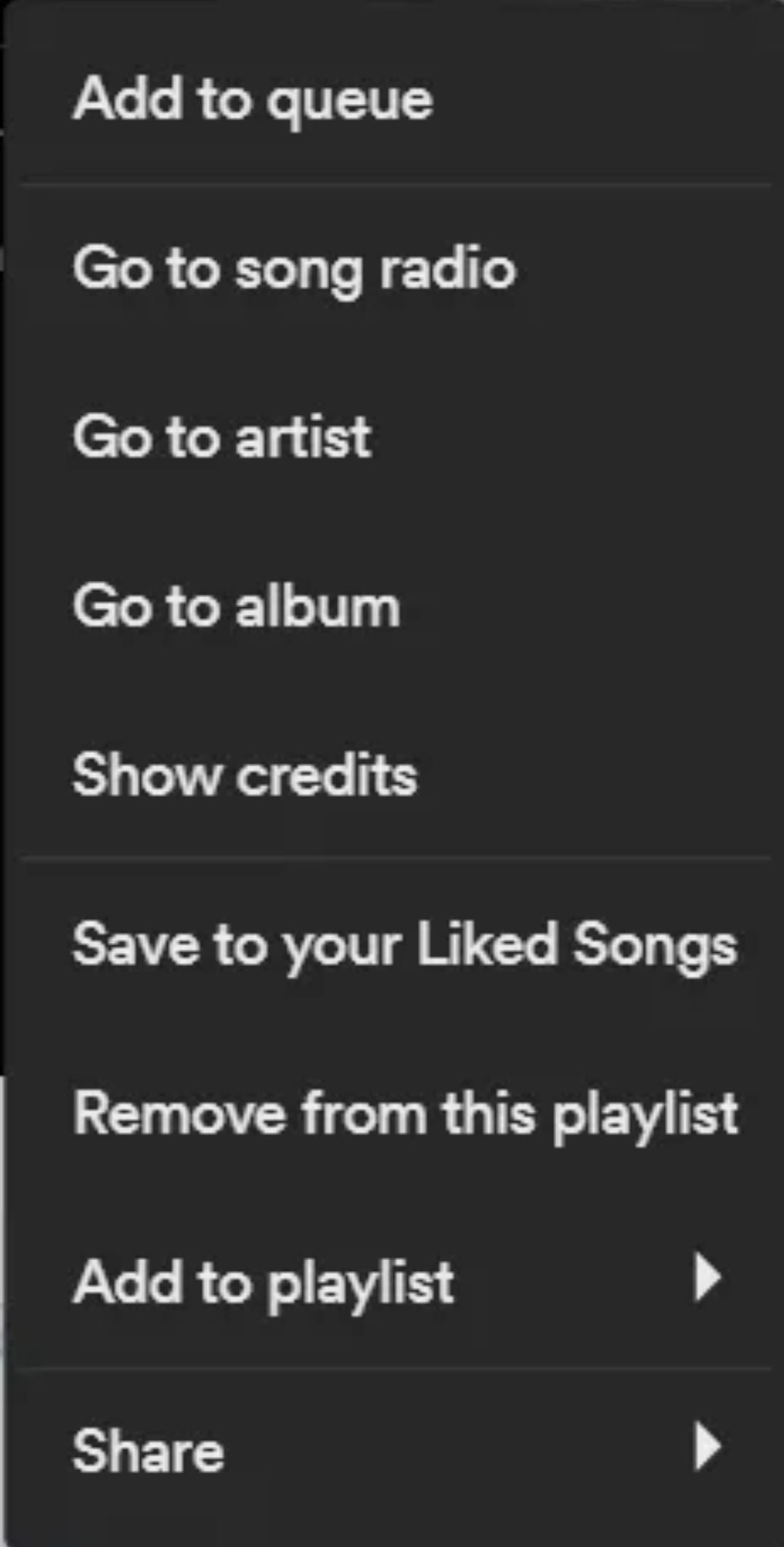
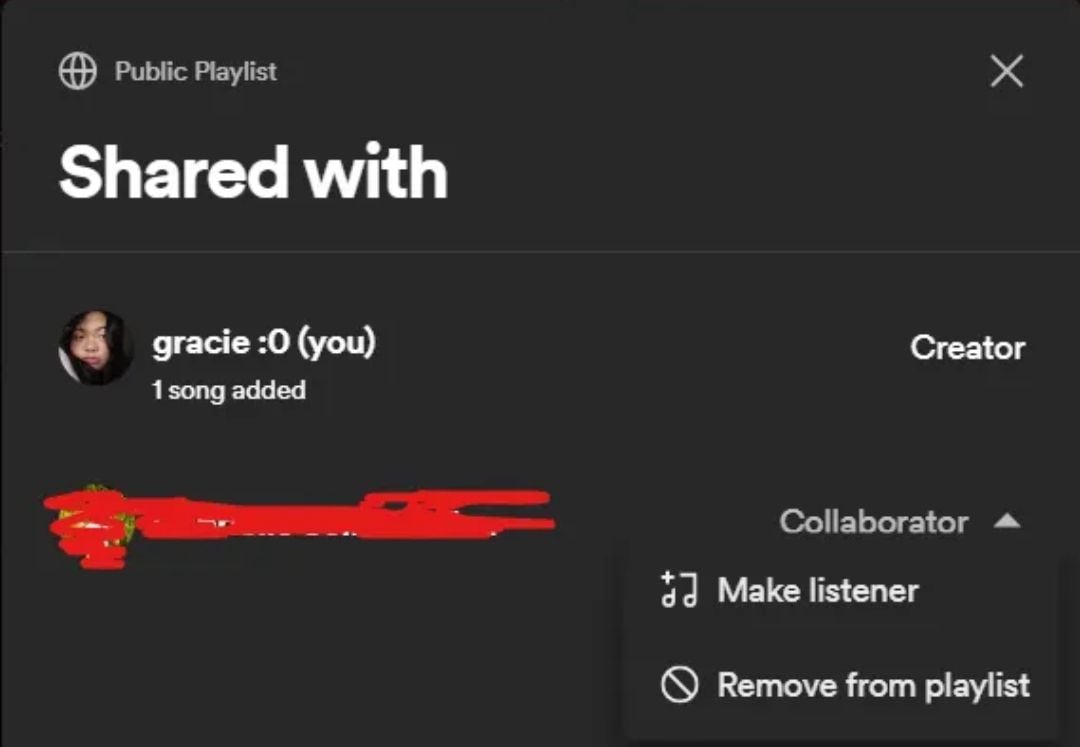
Thanks for replying to my comment. I sent the same link (again) through the invite collaborator icon, but they said that they don't see a pop-up, nor could they add songs. The Make Collaborative button had disappeared, the collaborative icon beside the playlist's title is nowhere to be seen, but I can see they they're collaborators in the playlist although (again) not able to have control over the playlist. See photos below.  ) (taken from Windows 11 laptop)


I have the same problem

I too am having this issue! No matter what I do the people I invite to be collaborators can’t edit the playlist. They don’t even show up under profiles in the playlist.

Hey folks,
Thanks for getting back to us
Could you check if the same thing happens when you try inviting collaborators after clicking on the icon next to the download button on the desktop app?
If nothing changes, could you please share with us the following? We'll look into this further.
- The exact Spotify version that is running on your device
- Device + OS version
- The troubleshooting steps that you've tried so far
- If the same thing happens when you try logging in to another account
- If possible, a video recording of what's happening when your friends click on the link and then try editing a playlist
Keep us posted.

I am also having this issue. There is no "make collaborative" option on my android phone anymore (although I had this feature last week), nor is available on my windows 10 desktop app or the webplayer on chrome. I only see the "invite collaborators" option but it will not allow my collaborators to add songs even when they have permission.
Spotify version: 8.7.18.1411
IPhone XR, iOS 15.2.1
I opened the account for my language learning discord server with 60000+ people, the idea was to make collaborative lists to share music from different countries among the users.
After creating the account I made two lists to test the features of collaborative lists with the staff team of the server. I was able to make them collaborative and they could add songs to them.
Then I made 60 lists more and when I wanted to make them collaborative to start sharing them I could not. The button had disappeared.
Troubleshooting: I've tried to make them collaborative from my desktop Spotify, people from the staff team have tried in their devices as well. I tried to make collaborative lists in my personal account and I could not (both accounts are located in Argentina).
It's worth nothing that sharing invite links to collaborate (as opposed to making the lists collaborative) is not a solution for me since I have 60 or more lists that I must make public in the server and the links last up to 24h. Making it completely inconvenient to update them.
Thanks
Updated my Spotify as of late night. So most current version on my iPhone 12. My wife and I have both attempted to make a playlist and add each other via the option “invite collaborators”. It never works. I’ve followed every trouble shooting tips from the support forums. From making sure we followed the playlist and even downloaded it.
I went to my desktop (windows 10) uninstalled and reinstalled the app. Inviting through there doesn’t work either.
on both platforms the option to make the playlist collaborative is missing.
Hey folks,
Thanks for the info.
We went ahead and passed in on to the right team. We'll keep you posted once we have news.
The Community is here for you if there's anything else!

I have the same issue on Windows Desktop client Version : 1.1.81.604.gccacfc8c
The option to make a playlist collaborative doesn't exist anymore.

Plan
Premium
Country
Philippines
Device
iPhone XS
Operating System
My Question or Issue
I have an old collaborative playlist that I made private. Now I want to revert it and bring it back to being collaborative without having to send another invite however I am not seeing the "Make Collaborative" option. Is this a bug or have they removed it?

Hey @YMaster,
Thanks for posting in the thread!
Right-clicking on a playlist should give you the option to invite collaborators.
If it doesn't show up, send us a screenshot of the menu and we'll take a look 🙂
Cheers!
I have the option to invite collaborators, but the person who received the link, can't add songs the the playlist, even if he liked the playlist and did "add to my profile".
When he make "add to a playlist" on a song, he see only his playlists, not the shared one.
And in your documentation, you mention the option to make a playlist collaborative, but this doesn't exist anymore in the options, we only have the "Invite collaborators"
Edit : we both use the windows desktop client, version indicated in my first message

I am also experiencing this issue – have been for a week or 2 now.
Here’s a screen recording of the issue using Spotify mobile app. The playlist was collaborative previously before I put it on private for some time. I wanted to make it collaborative again but the “Make Collaborative” option is missing.

I am having the same issue as everyone else in this thread. For context:
Device - Macbook Air (M1, 2020) / macOS Monterey Ver 12.1
Spotify - Desktop app / most updated version (I couldn't find the exact one but I don't have any updates available)
In our office we do a weekly collaborative playlist to boost morale and have a little fun towards the end of the week. My coworker and I are the main people who run these weekly playlists. About 3 weeks ago, we noticed we were having issues with people not being able to add songs to the collaborative playlist. I will also mention that I noticed these issues started to arrive when the "Make Collaborative" option became "Invite Collaborators." We tried everything from making the playlist private/public, adding it to the profile, copying the link from "invite collaborators," copying the link from the collaborators icon (next to the download button), creating the playlist on mobile, trying to add songs on mobile, etc. None of the things we tried worked and I ended up making the playlist on my account instead. All was seemingly ok until this week when I start to have the same issue. My coworkers informed me that they were unable to add any songs even though they had accessed the playlist from the pop-up, were also using the desktop or mobile app, were previously able to add songs, and have a Spotify account. I logged into a different account to try for myself and still had the same issue. To get a better idea, I described the steps I took and when I encountered the problem:
- I click on the link provided from the "invite collaborators" option
- the link takes me to a pop-up browser which then asks me if I want to open my Spotify desktop app.
- I open the playlist on the desktop app
- I add the playlist to my account by favoriting it (click the heart icon)
- the playlist is added to my playlists and appears on the left side of my screen
- I go to add a song and am unable to do so. When I click and drag a song the playlist is grayed out like it would be for a playlist I just follow. When I click the three dots on a song and try "add to a playlist" the collaborative playlist is not shown. You can see my attachments for screenshots of this.
This problem is persisting even for members who are listed as collaborators on the playlist as well. I am not sure if this is some sort of bug that happened when the collaborative playlist function was updated or what but prior to the change we never had any issues adding songs or collaborating on a playlist. Some insight would be much appreciated.
Thank you,
Abby
Hi @abbyelens!
Could you try removing all collaborators from the playlist, then sending them a new invite? If that doesn't work, try the following:
- Copy the contents of the playlist. Use Ctrl + A to select all tracks inside the playlist, then press Ctrl + C.
- Create a new playlist, paste the tracks in it, then invite your colleagues as collaborators again. It's important you send them the Invite collaborators link, instead of the Share link, since if you send them the Share link, they can only follow the playlist, but not edit its contents.
Let us know how it goes.

It does appear the collaborative playlist option is broken. I have tried every solution listed here and elsewhere and I get the same results as everyone else.
- Click "Invite collaborators to 'Playlist'" icon (person with a plus symbol), and it just says, "Link copied to clipboard".
- Paste the link to a notepad
- Log out of Spotify and log into the other account trying to make a collaborator
- Click "Search", paste the link, press "Enter", and the playlist shows up
- Click the "Save to Your Library" icon (heart), and the playlist appears in my library
- Click the ellipses next to any song and there is no option to remove the song, and no option to add another song to this playlist - no collaborative features - share only
If I right-click any playlist, there is no "Make Collaborative" option. There's only "Invite collaborators" which does the same exact thing as the "Invite" icon and has the same result. It is sharing just fine, but there are no collaborative features. My friend just paid to upgrade his account just so we could collaborate on playlists, and now it seems to have been a waste of money.
I've tried this with the Windows 10 desktop app, Android mobile app, and Web app (which I know doesn't have collaborative options anyway). I tried the Windows app installed from the Microsoft Store, then uninstalled that and used the app I downloaded from the Spotify website with the same result. The mobile app is up to date as well, and has the same result on my Motorola, my wife's Samsung, and my son's iPhone.
I also tried creating playlist from scratch with the same results. I also tried it from multiple accounts, not just my own.
This needs to be fixed please!
inviting different accounts. I’ve had them try to invite me. And it never
works.

Hey @Spriggs23,
Thanks for posting and welcome to the Community!
Could you specify what troubleshooting you've tried exactly, and by doing so to help us avoid giving you the same advices again? Also it could be worthwhile to try the suggestion given by @Yordan particularly and see if it'll help you resolve this situation.
Hope this helps. Let us know how you get on.


Hi there @Nebula5,
Thank you for reaching out to the Community. This seems odd and we'd like to have a closer look into this.
Just to confirm, have you followed the steps that's provided in this article?
If you followed the steps above without any success, can you have someone log in with their account on your devices to see if the issue persists? This will help us understand if it's account related or not.
We'll keep an eye out for your reply.
Take care!