Spotify friends activity empty/not updating

Plan
Premium
Country
Finland
Device
Pc
Operating System
Windows 10
My Question or Issue
For several months (pretty much years at this point), my Spotify friends feed has not been updating, it only shows 1 friend I have, while it should have a dozen others. This has been going on for far too long for it to be a problem on my end as I have changed my devices, settings, and other things to try and fix it. I have reinstalled Spotify and my OS but nothing helps. I also see no friends through my Facebook integration even after disconnecting and reconnecting my Facebook profile multiple times. All my settings are the same as my friends and he can see his friend activity but I can't. I already posted about this problem once, and was told it would fix itself but that was months ago. This is very infuriating as it has been going for so long.
Accepted answers
All comments

I can agree to this whole thread... This has been happening to me for a while now too but now I am just completely annoyed of it. Looking at this thread, I can see that Spotify has not been respecting peoples money. This is horrible customer service, and we only got a couple of "answers" that meant nothing for any of us. At this point if you guys are not going to fix this, take the feature out of the app all together.

Hi there,
I should add that as of late, only 1 person is now showing up in Friend Activity with it still showing 0 facebook friends on spotify.
Olly

Hey @That_Guy_Olly,
Thanks for your reply.
No worries, you can find the steps on how to perform a clean reinstall of the app by clicking on "clean reinstall" in the post @Jeremy sent previously.
On another note, it'd be helpful if you could log in to your account on your flatmate's PC to check if the issue persists there.
Keep in mind that there were changes made to every user's settings, in which the default setting to share listening activity has been globally set to OFF, and this may be the reason other users have disappeared from your Friend Feed. In this case, you can let your friends know of this change and ask them to turn it on in their settings if they want to share their listening activity.
If you're sure that they have this option toggled on, could you try disconnecting and then reconnecting your Facebook profile from the app settings?
Keep us posted.

my friends have the activity on and I keeping being asked to turn mine on....when it's already showing that it is on.....mine is on, and theirs is on....? help?

same here, it shows 1 out of 100. I love seing what others are listening to because i can then listen to what they are listening to and see if i like it too. + i love to see what my sisters, or boyfriend listen too, see if i like it, learn the song and suprice them the next time we have karaoke in the car! so sad it is a problem now with spotify, hope spotify fiks it asap!

Spotify!!! This platform either needs to revert back to the previous setting for the Friend's Activity feed to be shown automatically, or an email statement must be sent that a change has been made about the “Share my listening activity on Spotify” switch being turned off and that if users wish to share it, they now need to go into their settings. The regard for protection of users’ privacy is understandable, but to not know there is now a choice to share listening activity – that notice should not be kept private.
Most users do not know this has happened and as paying subscribers, it is not our responsibility to inform our own followers/those who we follow to turn on this setting. This is an important feature to many users and to have us troubleshoot it ourselves in an ongoing thread with little to no advice from Spotify employees is disheartening. We are losing value in this "premium" service we pay for. Please fix this and come up with a better solution that actually works.

I use the spotify app on windows 10 and it's been a while since I can see the friends I follow on the side of the app. I do not know what happened.

I'm having the same issue. When I went on settings, the show your friends' activity thing was on. I toggled it off, closed spotify, opened again, toggled it on, nothing. Restarted my computer, started spotify again, nothing. Uninstalled spotify (twice!), still nothing.

This is really bad! I've done a clean re-install and ever since the last update, none of my friends activity shows.

I've also had this issue as well as my friends, this is such a stupid update, personally I feel the best thing would be to just leave as many terrible reviews as we can and then just leave the service. Their refusal to address it is extremely disrespectful to their customers

Hi folks,
Thank you for your messages.
The default setting to share the user’s listening activity has been globally set to OFF. This gives everyone more direct control and choice if they want to publicly share what they listen to. This is why you're now seeing less or none people in your friend feed.
Keep in mind that this option is just to show your listening activity in other user's profiles and not to activate your Friends feed. To see the activity of other users, the people you follow must have this option active as well.
If you've already confirmed with your friends that they also have the option turned on, you can ask them to get in touch with the Customer Support team so they can review their individual accounts.
Let us know if you have any questions.

Literally same!!! any updates to this?


getting pop up messages on here from spotify asking us to tell them what we think..
what we think?!
WE WANT THE UPDATE YOU DID IN DECEMBER TO BE REVERTED !!!! we want to be able to see our friends listening share turned back in again

Please do something that actually works

The ability to share your listening activity was the best feature on Spotify and although they argue that it hasn't been completely removed, there are still a lot of issues with it. I'm not seeing all of the friends I was prior to the update and so many people are saying the same. It's tremendously disappointing. I know the update is unlikely to be reversed, but those of us having issues would love to know how to resolve them. Reinstalling Spotify, etc. hasn't been working for us.

Hi everyone,
Thanks for keeping us in the loop on this one.
We've investigated this and we can confirm that everything is working correctly. If your friend still isn't showing up in your Friend Feed, please suggest them to check these steps or ask them to reach out to us for further help.
Note that for the Friend Activity to be showing you need to follow ordinary users and not only Artist profiles.
What needs to happen is that both you and your friend need to have the following setting enabled:
- Settings->Social->'Share my listening activity on Spotify'.
You also have to be running the latest version of the Spotify app available, as this won't work on all of the older versions of the app.
Hope this info helps.

telling our friends to turn this feature on while it should be on by
default and it it your responsibility as a paid platform to satisfy your
customers in this way.

One, the primary issue this thread was about, is that sharing of activity
was defaulted to off for everyone, when it had been defaulting to on before
- and that spotify did not notify users of this change in an effective way
(for example, a dialogue popping up when they open Spotify to let them know
to turn it on).
The second issue is that some people were using this thread to report that
the feature seemed to not be working for them i.e. their friend had the
sharing setting turned on but their activity was not sharing, or not doing
so in a timely manner.
This is the issue that the Spotify employee was replying to, saying they
haven't been able to reproduce this issue at all and the feature seems to
be sharing correctly as long as sharing is turned on. I can't speak for
whether that's accurate or not (I've not experienced this issue) or whether
there was an issue that's now fixed or is still ongoing, but that is the
part they were replying to and is a separate issue to the one you are
mentioning.

Hiding this info in a forum page is not good communication with your users.
Solution to fix this nonsense: add a text at the bottom of "Friend Activity" saying "Friends will not see your activity and vice versa unless social settings are enabled" And word "settings" should be clickable which takes you to spotify settings and scroll down to Social section.

I have that same problem. I tried all the solutions you said but all failed. I also spoke to the support team before, but they couldn't help either.
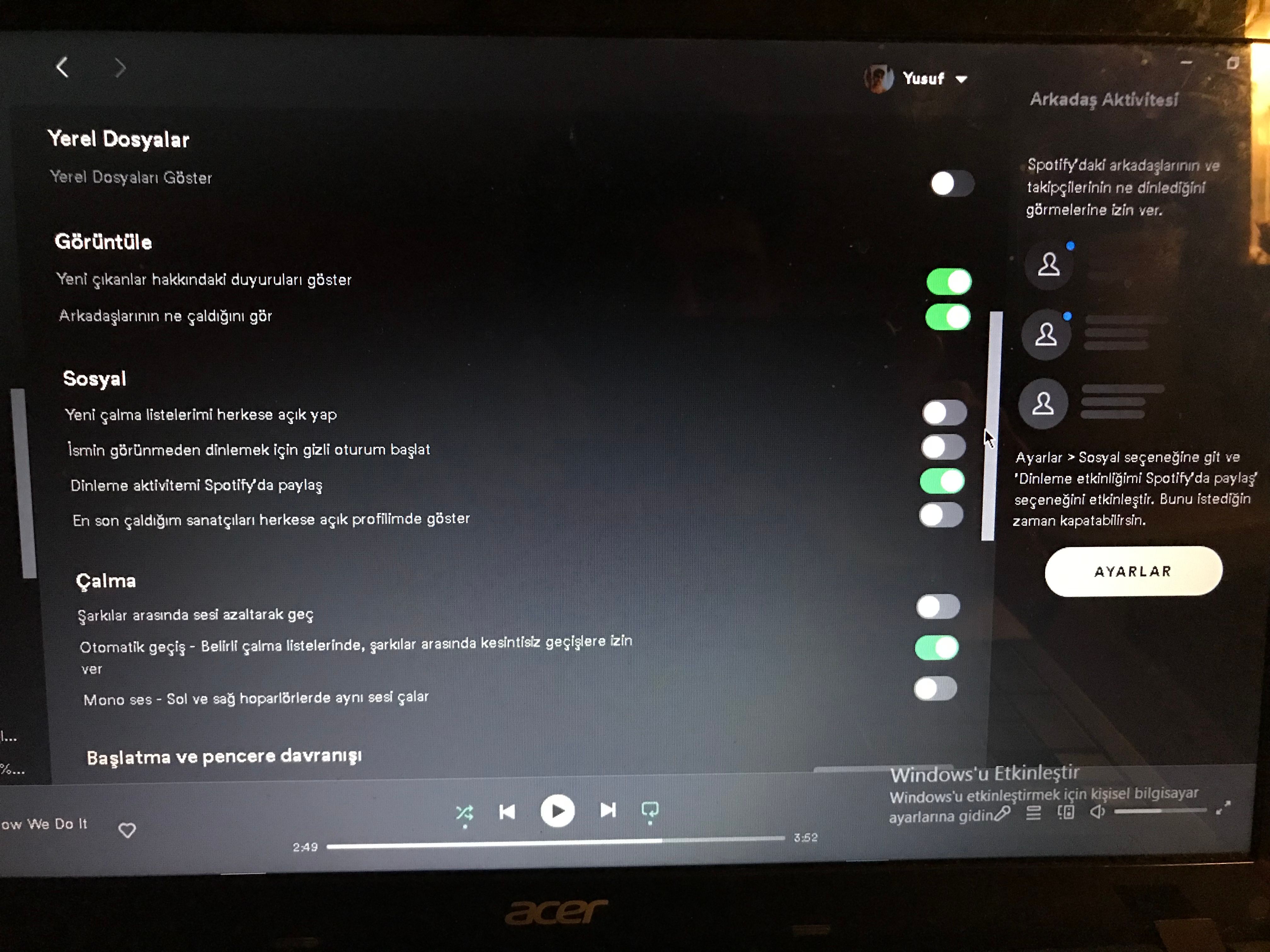

Hey @Yusuf6!
Here's something you can try out:
- Open Spotify, go to a friend's profile and unfollow them. Make sure they have turned on Share my listening activity on Spotify in the app's settings.
- Now follow them back and close Spotify.
- Go to C:\Users\%username%\AppData\Roaming\Spotify\.
- There you'll find a file called prefs, which holds info about the currently logged in account. Simply delete it.
- While in the Spotify folder, you'll also find a Users folder. Open it and delete its contents as well.
- Restart the Spotify app.
Note that you'll be logged out and your settings will be reset, so you'll have to adjust them again. If you had music downloaded for offline listening, you'll have to re-download it as well. Your library, however, will not be affected, so no worries there.
Let us know how it goes.

Hello - I have the same issue. I have tried reinstalling the app and have made sure the app settings are correct. I've also confirmed that other friends have their settings set correctly as well.

Happening for me, as well. I have made all the changes above! Also, my friends have confirmed they are sharing their activity and can see mine but I still can not see theirs. Hope this gets resolved! Thank you:)

Aside from checking the settings in spotify I also used the spotify web player installer. That fixed it for me.
After logging in you'll see the installer located bottom left of the interface.
(I used to install spotify using MS Store before this bug.)


POSSIBLE FIX-- This issue is due to Spotify updating but can be fixed with a third party PC clean-up tool. After following all forum instructions and failing to get a fix, I used a restore and clean up program (in my case, Restoro, which is free if you complete the clean up tasks manually) to clean my PC's registry and remove broken programs and it fixed my issue. I'm no IT expert but perhaps this means the spotify application is using/keeping junk/un-needed files that are interrupting the application from operating properly. I then reinstalled spotify and logged out and in a few times. Some of my friends are still missing but I can see at least one which is more than before!
it didin't work 😞
by the way they can see what i'm listening to but i can't see them
We have seen the reports of people saying Friend Feed is not working for them, and we are happy to investigate specific cases, because as far as we are aware, there are no issues with Friend Feed working.
Firstly, it’s important to restate that ALL users had “Share my listening activity on Spotify” turned off as default - so users you followed and saw in your Friend Feed in the past, will no longer show in your Friend Feed, UNLESS they turned “Share my listening activity on Spotify” back on.
Also worth noting that you don’t need Facebook set up for Friend Feed to work.
Having said that, all of the below must be true for users to show in your Friend Feed:
If all of this is true for you and your friend and they don’t show up in your Friend Feed, then:
Once we have this we can do some checking. Thanks all.