The Spotify application is not responding

Plan
Premium
Country
Spain
Device
Personal Computer
Operating System
Windows 10
My Question or Issue
Hi! I've been getting this message after I close Spotify (it usually bugs and I can't search for any music nor see my music inside Liked Songs or playlists). Whenever I close Spotify there's a really high chance (lately almost 100% of the times I close it) that it doesn't close fully, if I try to open it again it says "The Spotify application isn't responding".
I usually fix it opening Task Manager and closing the spotify.exe manually.
This has been happening for a while (3+ months), I have not only reinstalled Spotify but completely reinstalled Windows 10 (for other reasons) and it still happens. I would say there's some bug when closing the Electron app that makes it not fully close on Windows.
I've got a laptop with Mac OS Big Sur and it runs flawlessly there (also no bugs regarding the songs).
Is anyone looking into this issue? It's starting to get a bit annoying as it's been months since it began to happen.
Have a good day!
Oscar.
Accepted answers
All comments

Hey there @user-removed,
Thanks for your swift response.
Could you also share with us the current version of Spotify that you're having on your PC at the moment? Also did you download the app form the official Spotify site or from the Windows App Store? You can try to switch between the two versions and see if this will make any difference for the performance of the app alongside your Windows 10. It's also worthwhile to perform a so called clean reinstall of the app, as this is more thorough than the normal one and ensures that no cached data will cause interference with the new installation of your app.
Hope this helps. Let us know how you get on.

Are you for real? What part of "I have the regular download and I WILL NOT use the microsoft store version ever. I'd rather cancel my subscription and just use youtube which I kind of do half of the time anyway." do you not comprehend?
My version is
Spotify for Windows
1.1.81.604.gccacfc8c
I'm also not going to do a clean install. Your instructions say "Shut down your device, wait a couple of minutes and switch it on again." This is absolutely ridiculous. It just sounds like you have 0 idea about how a computer works and you're pulling the tech support <third world country> "Have you tried turning it off and on again?". If I end up uninstalling Spotify I guarantee I'll never install it again.
Hey again @user-removed,
Thanks for your reply and info.
We can see how this situation might be frustrating and we respect the fact that you have a strong preference about which version of the app to use. It's understandable and that is exactly why we have several versions available as download options. So no bad feelings here, as it was just a friendly suggestion for you to try out. Meanwhile, we believe there should be a newer version of the app available on our website, so another reinstall/update might be actually worthwhile.
As for the clean reinstall, we really think it's an important but usually overlooked process. We get that some of the steps described there might sound irrelevant, but the overall effect is that it helps to thoroughly clear previously cached info on your PC, thus ensuring it'll not interfere with the the latest instance of the app.
Hope this clears things up. If you have any questions or need anything else, the Community is here for you.

Unbelieveble. It has been MONTHS and literally all you can say is "Clean reinstall it", "Try from MS Store" "ARE YOU SURE YOU'VE DONE THE TWO STEPS ABOVE?"
**bleep** Really?? Man, how many times do we need to say WEHAVE DONE ALL YOU SAID AND IT'S NOT WORKING??
Jesus, we're PAYING for this service, come on!

having the same problem. AGAIN
Althou i do not see any spotify in Task Manager, so i can't end the task. But it's not responding. I re-installed the app. tried to install it and receive error 18 and error 3 therafter during instalation - the app cannot be installed because the app is still open somehow somewhere on my companuter. After it's been re-installed.
With all due respect, support's advice to do something through app lacks any ration - the app is not responding, i.e. it's not possible to open it.

Turning off hardware acceleration has not changed the problem. It still occurs. It seems to happen around times when Spotify wants to update itself.
No, the issue did not start after an OS update and I haven't installed any other software for mixing music.
Do you think, perhaps, you know, that it could be a bug in Spotify that needs to get some attention?
That's it. I'm going to cancel my subscription. The same thing is happening again and again and you just have no idea how to make it work propperly. I really don't need this annoyance to my life. Good bye spotify! Thank you for NOTHING. Hope you had good dinners with my money all these years!

Same issue on Win 10 with the microsoft app, after leaving my laptop for a while with spotify on, I'll come back and it's frozen, then I close it and I'm unable to start it again, it says it's not responding (even though process manager shows no running spotify task)
So I have to go in the Program list, find spotify and click "Repair" for it to work again..
This is really a big issue as it happens every day
After disabling Hardware Acceleration, I haven't had a crash in a week
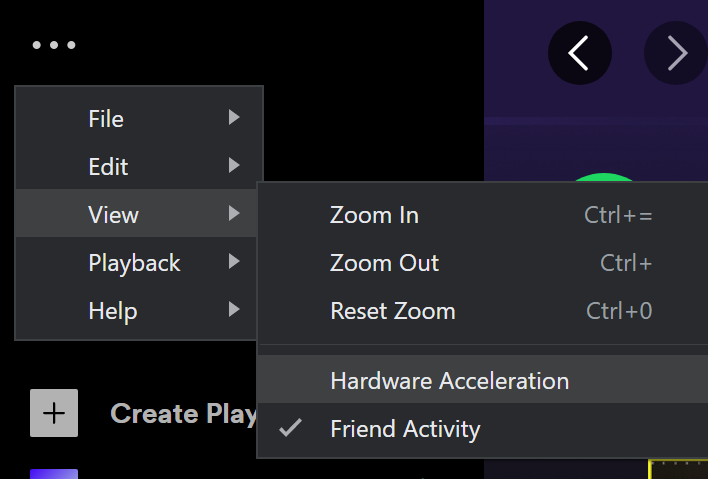

I just wanted to share some info that i thought was interesting.
I ran into this bug for the first time today (Win 11 - app store version 1.1.84.716.gc5f8b819). At first the app seemed to work okay but a number (not all) of the tiles on the home screen weren't filled with images. Clicking on a tile didn't do anything. So i closed the app and restarted, only to see the 'application not responding' message. This happened a few times in a row. I then went to do something else for about 5 minutes and then clicked on the Spotify icon again. now it started just fine.
So whatever the cause is, in some cases there might be a timeout for a process or device (GPU) to close before the app will be responsive again. Maybe this will help a few people to workaround the problem for the time being and for Spotify to get more insight into the problem.

I have been having this issue for a while now too, it started randomly a few months ago. Music continues to play (can even be skipped using keyboard controls) but the app itself is completely frozen, currently playing artwork doesn't update, I can't navigate around the app at all etc. The only way to fix it is to close Spotify, then I have to go and end the process in Task Manager (theres usually 5-6 Spotify.exe processes running, cancelling the top or bottom (which one is a random choice each time) instance usually closes them all, otherwise each one has to be closed 1 by 1) otherwise I get the error trying to reopen it. This happens to me at least once a day, usually multiple times.

Same issue here. This problem has existed for many years, on different systems, fresh clean installs. I have tried the "super uninstall" option, including the extra steps. But the problem always persists.
Don't Spotify employ any actual engineers that can solve problems like this? You know, like a serious company would do.

Hi there folks,
Thank you for your replies in this thread. Let's try to fix this together!
To start with, can you let us know what troubleshooting steps you've done that's been provided in the thread?
We'll be on the lookout for your replies.
Take care!
Hi Jeremy,
What would it take to escalate this up to the actual software development team, you know, as a bug?
Apologies, but I don't see how we "try to fix this together".
Regards,
Amir
I did everything all of it, including the third world tech support set of instructions and it worked well for a while.. and just now the application is completely unresponsive.
Also wth does even "Let's try to fix this together!" mean? Is the app open source and I missed that part? Otherwise this is fully on YOU.
I've dropped out. I won't pay for a solution that never comes. You gotta be kidding me you really don't know how to fix this. All you say is "aRe yOu SuRe YoU'vE dOnE aLL tHe StEpS aBoVe?". That's insane! We told you a THOUSAND times WE HAVE DONE and NOTHING SOLVED THE PROBLEM.
Well good luck who insists on spotify, cuz I'm really happy now on AMAZON MUSIC

Hey folks!
We can see where the frustration is coming from and it's fairly understandable.
What it takes to escalate this issue up the chain though is being able to reliably recreate the issue and understand why it happens.
In order to reassign resources to investigate this from other areas, we do need to have a clear understanding of both the impact and the cause of the issue, making sure that it isn't device based and isn't related to the app as a whole.
If this only occurs on a particular device/setup, finding a fix may prove itself difficult. Only if we can find a common denominator across the affected accounts can we actually address the issue and move things forward.
For the time being, we'd ask you to provide us with your OS type + version, your Spotify version and any other specific details or troubleshooting steps you've attempted.
Thanks for understanding 🙂

Having this issue as well already for a long time, only things that helps me getting control in spotify is killing the spotify processES(yes multiple 🙄) in taskmanager advanced and restarting spotify. Tried the hardware acceleration setting off, but no luck
OS Version Windows 10 Pro build 19044.1766 Windows Feature Experience Pack 120.2212.4180.0
Spotify for Windows
1.1.89.862.g94554d24

After skimming through this topic: I have the exact same problem:
- Spotify becomes unresponsive,
- I close it via a rightclick on the taskbar icon,
- trying to reopen it leads to a "the application is not responding" prompt,
- I kill all the Spotify processes until I seem to hit the "main" process and all others quit with it
- I reopen Spotify, it "installs" and functions as normal until it doesnt.
My guess is this is related to an updater. But whatever the case is, this has been persistant for years and is really annoying. Please fix, we are paying customers.
Also: I am really not interested in trying to debug this. Its clearly not an isolated problem with my system. If you need any non boilerplate info from me and I can actually help getting you information to replicate the issue I am happy to help though
Edition Windows 10 Pro N
Version 21H2
Installiert am 27.07.2021
Betriebssystembuild 19044.1826
Leistung Windows Feature Experience Pack 120.2212.4180.0
Spotify für Windows
1.1.91.824.g07f1e963
but as i said - its been here for years.
Exactly as im experiencing. However i can still play my playlist that was active last time and skip songs. Browsing new stuff is not possible and media buttons dont work as well.

Hey folks,
We understand your frustration when the app fails to load, however the reasons for this happening could be much different for each and every one of you. We'd be most helpful if we're able to address and troubleshoot such generally formulated requests independently on a case by case basis.
Ultimately, what we can suggest here is to check the Ongoing issues board for relevant threads that might already address your issue, and before positing your own request also to do some basic troubleshooting yourselves like performing a clean reinstall of the app for example, to see if this makes a change for you.
As this thread here has become too general and has grown a bit old, going forward, we'd like to close it off and refer you to post any further feedback alongside all your details in a fresh new post in one of the relevant help boards.
We hope this clears things up. Take care!
Not sure what make/model means when talking about a PC. It's a pretty beefy one, 32gb ram, some i7 intel processor, ssd for the OS and programs and a 1080gtx videocard.
I experience this in Windows 10, kept updated to the latest version but since it's been happening for at least a year it's not really the most relevant thing.
It's really hard to tell if this started happening after an update since it was so so long ago.
I do not have another account so I can't test that.
Note that disabling the hardware acceleration did not help.
Also it just happened again.. it's pretty consistently happening about once or twice a day.