Cannot drag songs to top of the queue

Operating System
Windows 10 - Desktop
Version
1.1.60.672.g6ad9c215-a
My Question or Issue
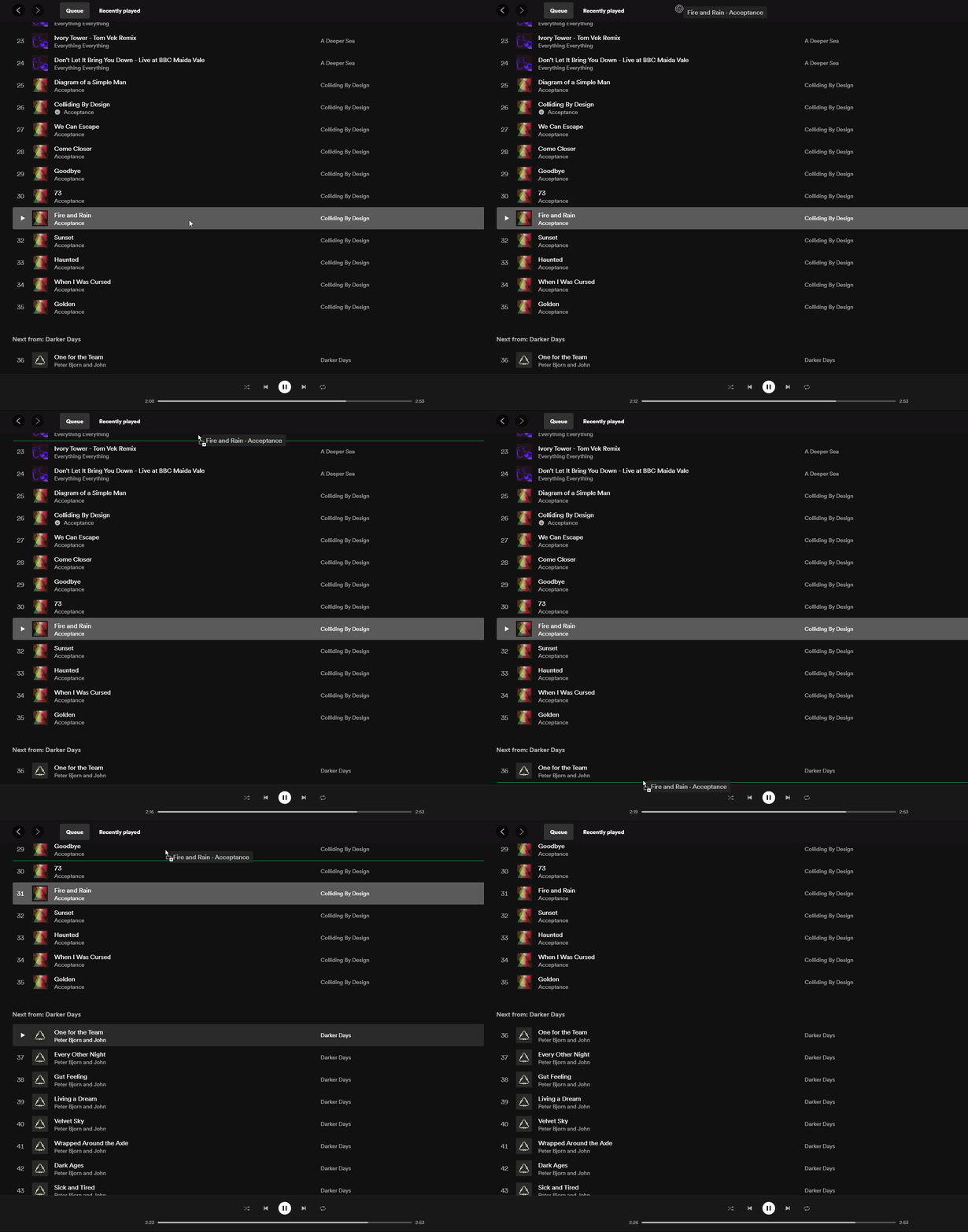
On the new UI, for some reason I cannot drag a song to the top of the queue if the screen must scroll to reach the top. If I drag the song to the top of the screen, it does not auto scroll. Dragging songs down the queue works, just not up the queue. Here's a video/GIF demonstration of the issue. I've tested that it indeed works on the Web and Mac Desktop versions.
Accepted answers
All comments

I'm seeing the same problem on version 1.1.60.672.g6ad9c215-a.
I believe the problem appeared with the latest UI revamp.
This is a pain point for me, as I maintain long play queues that I often reorganize.

Hi there @auriculectomy,
Thank you for your reply in this thread.
As mentioned above - we've reported this to the right team.
Let us know if we can help you with anything else 🙂
Take care!

This is still not fixed

Hi @thisguyhelped32,
Thanks for the post.
This issue has been reported to the right folks at Spotify. We don't have information on a specific date this will be fixed.
We recommend keeping your app up to date, as this might be handled in an upcoming update.
Cheers.

Drag and drop play queue scrolling on Windows desktop has never* worked for me (across multiple computers). It doesn't appear to work in the web player either. It works in playlists (both web and desktop), but not the play queue, which is an incredibly annoyance.
*maybe it worked at some point in the past?
Edit: Additional details, Windows spotify is always kept up to date. And, of course, the webplayer version is out-of-my control in that dimension. Can the right team who has been reported to get back to us pretty please?
I still cannot drag and scroll track(s) from the bottom towards the top. However, in what is a very simple workaround, I can successfully drag and scroll the play queue DOWN on the Windows 10 desktop app. In other words, I can move tracks from the top of the queue towards the bottom using drag and scroll. It's not the way my mind works, but if this is what a billion dollar company can give me I guess I'll take it lol.
edit: of course, this is what the OP already indicated, but it is so contrary to the way my mind works I had to discover this fact on my own.
Hi there @claphands,
Thank you for your reply and feedback in this thread.
As mentioned above - this has been reported to the right team. However, we can't put a timeframe on when this will be fixed.
Let us know if we can help you with anything else in the meantime 🙂
Take care!

Hello all, the exact same problem already has been reported to Spotify here:
The status is now "Good Suggestion".
So please vote for this 'idea' to get Spotify to address this issue faster!
Thx!
Hi there folks,
We just want to jump in and mention that you can Subscribe to the idea that @davidvh73 provided for any updates regarding this.
Have a great continued weekend 🙂
Take care!

Still no action on this, aside from "it's been sent to the right team". We maintain numerous playlists and update weekly, of course Spotify drops the new songs at the bottom whereas we put new songs at the top...it's a major hinderance if we can't drag the songs to the top of the playlist in the desktop app, the web allows you to do it but only one file at a time.
I have two computers for some reason one of them works and the newest install does not.

I am also experiencing this issue in the latest Spotify Windows app update across multiple Windows 10 and Windows 7 computers. Spotify adds songs / podcasts to bottom of playlist, and I cannot drag single or multiple items to top; this is an issue as I cannot listen to my chosen most current episodes of podcasts in my playlist(s) in my chosen order. SpotifyWeb is not ideal because I cannot select multiple items at all in order to move them, and once playlists reach a certain number, SpotifyWeb just omits ability to view items past that critical point. Like, I know I have more than 200 songs, please let me scroll and see them.

Adding that I am also having this issue with my playlists. This is a new problem for me - started in the past couple weeks or so. Just uninstalled and reinstalled and it didn't fix the problem.

I have had the same problem for a long time now, cannot drag songs in playlist from down to top. Please fix this.

Hey everyone,
Thanks for reaching out to us in the Community!
This has been reported to our tech folks, who are currently working on a fix. It'd be very helpful if you could check out the related Ongoing Issues thread here and provide us with the following info:
- Your device's make, model and OS version.
- The exact version of your Spotify app.
We appreciate your feedback. Hopefully it won't be too much longer before the issue is resolved.
Take care!

I have a similar problem in my playlist when I want to move a song from the bottom up. However, in a playlist, this can simply be done by marking the song I want to move higher, marking the song at the top behind which I want to place it, then moving both songs at once. This is how I do it in the playlist, not in the queue

fixed ! Thank You !

In which version is it fixed for you? I just got 1.1.85.895 and the queue it's still not scrolling up.
Here too it is not fixed yet.
Spotify for Windows - 1.1.85.895.g2a71e1b8
same version as you, I am running Windows 10
And dragging upwards scrolls up for you?
Note that we're talking about the queue list specifically. Dragging up and down works fine in any other playlist; it's just the queue list that is broken for whatever reason.
Sorry to be persistent, but this has been driving me crazy for almost a year now.
Sorry I misread that it was about the queue. I don't use that feature (just my own playlists) I queued up a bunch of songs and scrolling doesn't work. When I had posted earlier that it was working, I was talking about my playlists as the scrolling had stopped working for some time.

Hey folks,
Thank you for keeping in contact.
We appreciate the time you're taking reporting this issue and keeping us in the loop. As an updated version of the app was released recently, we'd first recommend performing a clean reinstall of the app. This is often an overlooked step, but it’s more thorough than a regular one and can be helpful to get rid of any cache of previous versions that might be causing troubles scrolling up in the queue.
Also, could you try in the Web Player to see if it makes any difference? This will give us a better look at the issue to keep investigating.
We'll be on the lookout.
I already did a clean install of the last version (which again is 1.1.85.895) and the bug persists.
It's the same in the web player (tried in Fireforx and Chrome).
By the way, the person who had posted that they had the issue fixed has just confirmed that they were looking at a regular playlist, not the queue. They just realized they also see this issue in their queue list.
Hey @slug_camargo,
Thank you for keeping in contact and for sharing that information.
This case is now being investigated by the relevant team in this thread. Any updates in the case would be posted there. We appreciate the time you took reporting this issue.
If you need to add new info, we'd recommend adding it in the thread mentioned above so we can have all the information in one place. Thanks for your patience and understanding.
If anything else comes up, don't hesitate to ask.

I've had a same problem but with a playlist. I've re-installed the app but still doesn't work. Anyway to fix it?

Hi there, 50 days since your post and nothing has changed. Has Spotify ever attempted to fix this relevant glitch?

Spotify for Windows - 1.1.89.862.g94554d24
Can't drag songs up in my playlists. I've reinstalled Spotify and it didn't work. No updates available. I have something like 100+ tracks in 500+ playlist to organize so it would be time consuming to drag and drop up by a little bits.

CAN anyone just fix this? Im paying full premium for what??? A broken UI that doesnt work,
Might Tidal be better choice if this keeps getting ignored almost year people saying this problem, yet no real fixes just copy/paste , Answer.

Encountered this problem today even though it worked fine before on the same PC...
Hi there @WhatWentDown,
Thank you for reaching out to the Community.
We've taken your feedback and reported this to the right team,
Always make sure to keep you app up to date.
Let us know if we can help you with anything else.
Take care!