Apple Watch Spotify constantly crashing

Watch model SE
Watch iOS 8.3
Iphone model Xr
Iphone iOS 15.2.1
Spotify version 8.6.96.591
Plan
Premium
Country
Mexico
Device 1
Iphone Xr
Operating System
iOS 15.2.1
Device 2
Apple Watch SE
Operating System
iOS 8.3
Spotify version
8.6.96.591
My Question or Issue
Brand new Apple Watch SE since opening and synchronizing it with iphone, has been in constant crash of the Spotify app (When clicking to open the app, it closes automatically).
The app crashes almost everytime, after one time of working properly after downloading it.
Downloading songs are also a problem, even when is a playlist with less than 10 songs.
The phone, watch and app are already with newest versions.
Closing the app (both phone and watch), logging out, factory reset of the watch have been already tested.
Accepted answers
All comments

Hi there
I am having similar problems with my apple watch where the spotify app continuously crashes.
I have an Iphone Xr with latest IOS version 15.2.1
I have an Apple Watch SE with latest version 8.3
It is a brand new watch and the spotify app has worked for me for a few days but now constantly crashes. I have restarted both devices, uninstalled and reinstalled properly with both devices and tried signing out and back in. Each time I do the spotify app works for a while but then begins its cycle of crashing again. Maybe something I do causes the crashing and I should avoid doing it? I have also seen other people have this problem with the same phone model and watch model as me. It is a shame as I don't want to have to use apple music to be able to listen without my phone.
Any help appreciated
Thanks

Hi @apple-fann!
Could you try unpairing and pairing your Apple Watch with your iPhone again? You can follow the steps in this article.
If the issue persists, try performing a clean reinstall again with the aforementioned steps to see if that does the trick.
Keep us posted! Take care.

Hi
I have the same Problem since the WatchOS 8.4 update. Before it was working. App open for 1 second and close. Watch already restarted and app reinstalled still the same.
Apple Watch 7 OS 8.4
Iphone 11 OS 15.3

Hey there @Denis1234,
Thanks for reaching out about this here in the Community.
Could you let us know if you've already tried the steps we mentioned previously in this thread?
Also, could you let us know the exact Spotify version of your iPhone?
We'll be waiting for your reply.
FYI: This is not a problem about the downloaded music subject, but also for the app initialization in general. Almost always that I want to open the spotify app without putting music on the phone first, it will crash the app.
-Already deleted data/cache the apps on both devices + downloaded them again, the problem persists 😕
It has been a really bad experience, I noticed it happens also with Shazam app on the watch, like third parties companies been afected by that.

Hi @Hectormartinap,
Thanks for the reply.
We're aware of some instability of Spotify on Apple Watch and we'll work on improving it. The right folks at Spotify are currently looking into the crashing issue.
Some users have reported the following workaround fixes the issue for them, at least temporarily.
When the app crashes on the watch, go to the dock (most recently used) and I slowly swipe up on the screen while it’s showing on the dock.
Let us know if this works for you.

Iphone 12. OS. 15.3.1
Watch series 7 cellular OS. 8.4.2
Same issues. Spotify craches after half a second. When it doesn't i cant listen on the watch - it simply doesn't connect.
I have tried clearing cache, reinstalling app on both phone and watch, resetting to factory settings and starting over with both phone and watch. Still nothing. Help!

Hey @aliceschoen,
Thanks for letting us know!
Good troubleshooting so far! Can you confirm for us if you've tried opening Spotify by swiping it slowly into focus and not by tapping as @Alex is describing above?
Also please let us know if you've managed to download anything at all on the watch until now and whether the issue persists when the device is connected to the Wi-Fi network.
Let us know if you have any questions.
Cheers!

Hi,
I think this is more to Spotify apps issue, I also keep having this issue, at first I thought of the watch, but after I read lots of forums, all said the same things.
I try all workaround that was shared, and still does not work.
Hope there will be fixed very soon from spotify.
Hi,
I think this is more to the Spotify apps issue, have tried all workaround, and all steps above, but still not fixed.
Its really annoying, since even cannot control the musing on my phone through the watch, because it keep creash, i have to open manually now playing.
End up having to uninstall Spotify in watch to better control the music from the watch.
But now cannot listen to music without a phone.
Hope there will be a fixed very soon.
Hey folks,
Thanks for the replies.
It would be very helpful if you could share some diagnostic logs from the watch. These will help the team investigating the issue greatly. To get the logs, please follow the steps in the screenshots below.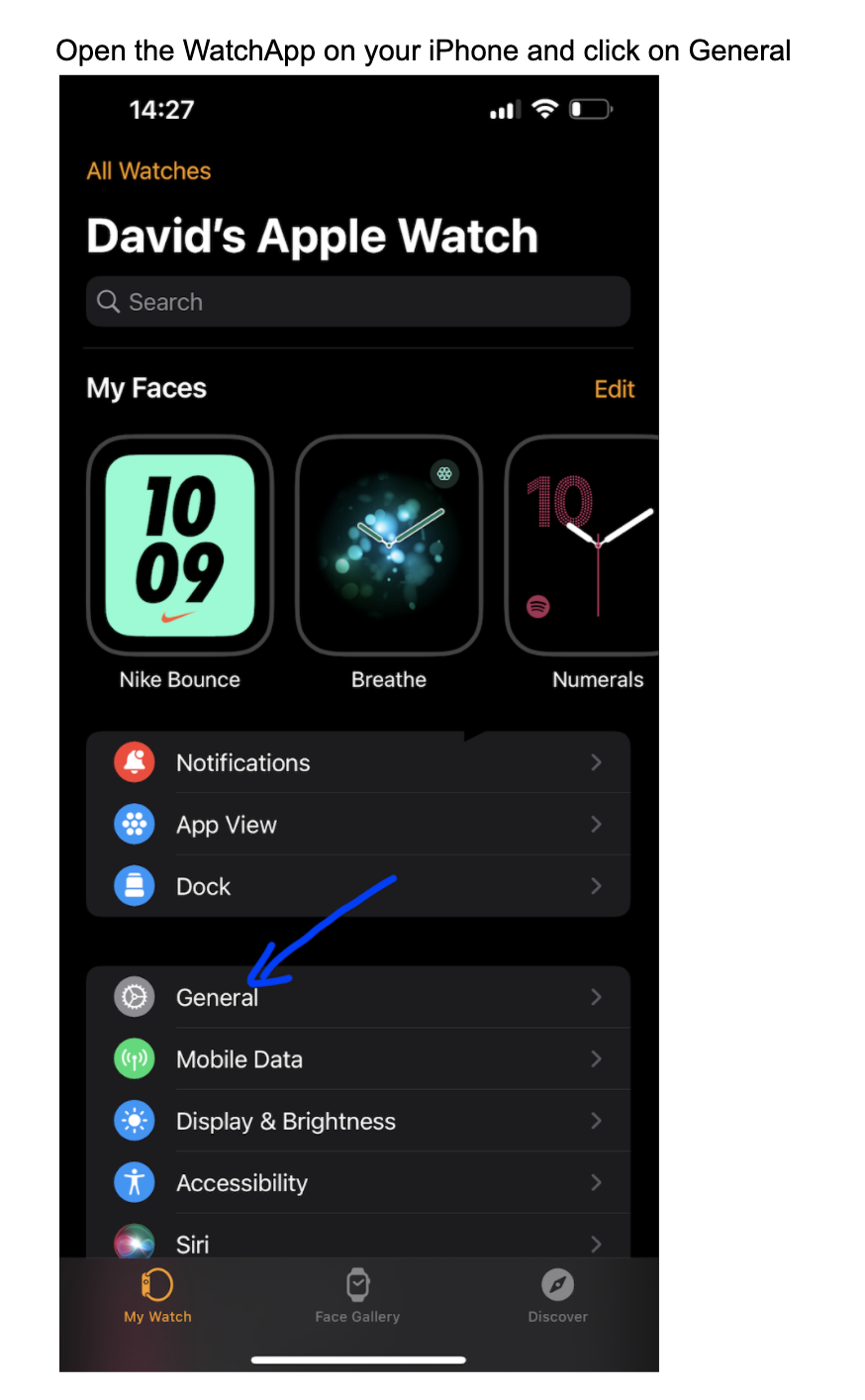
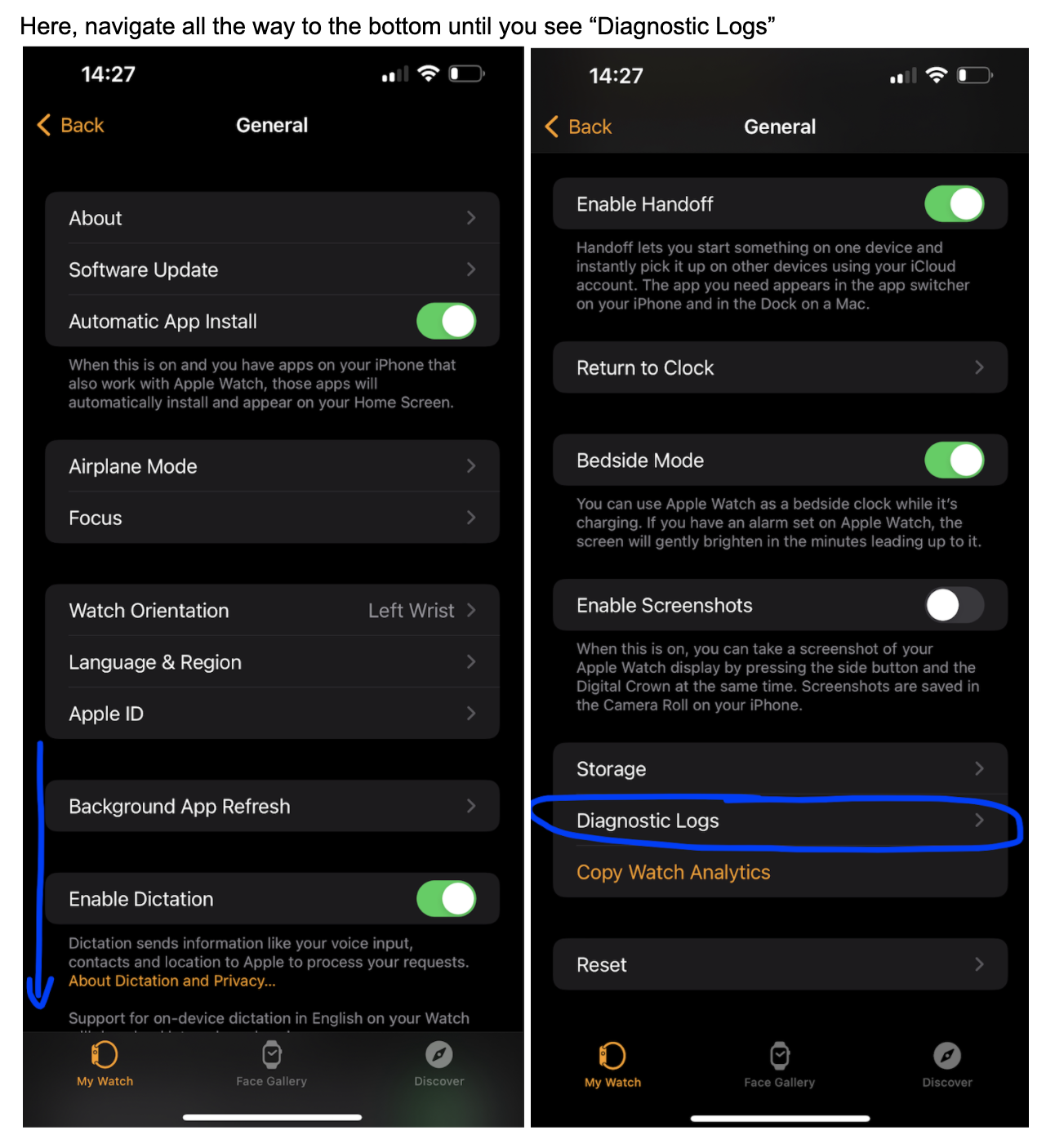
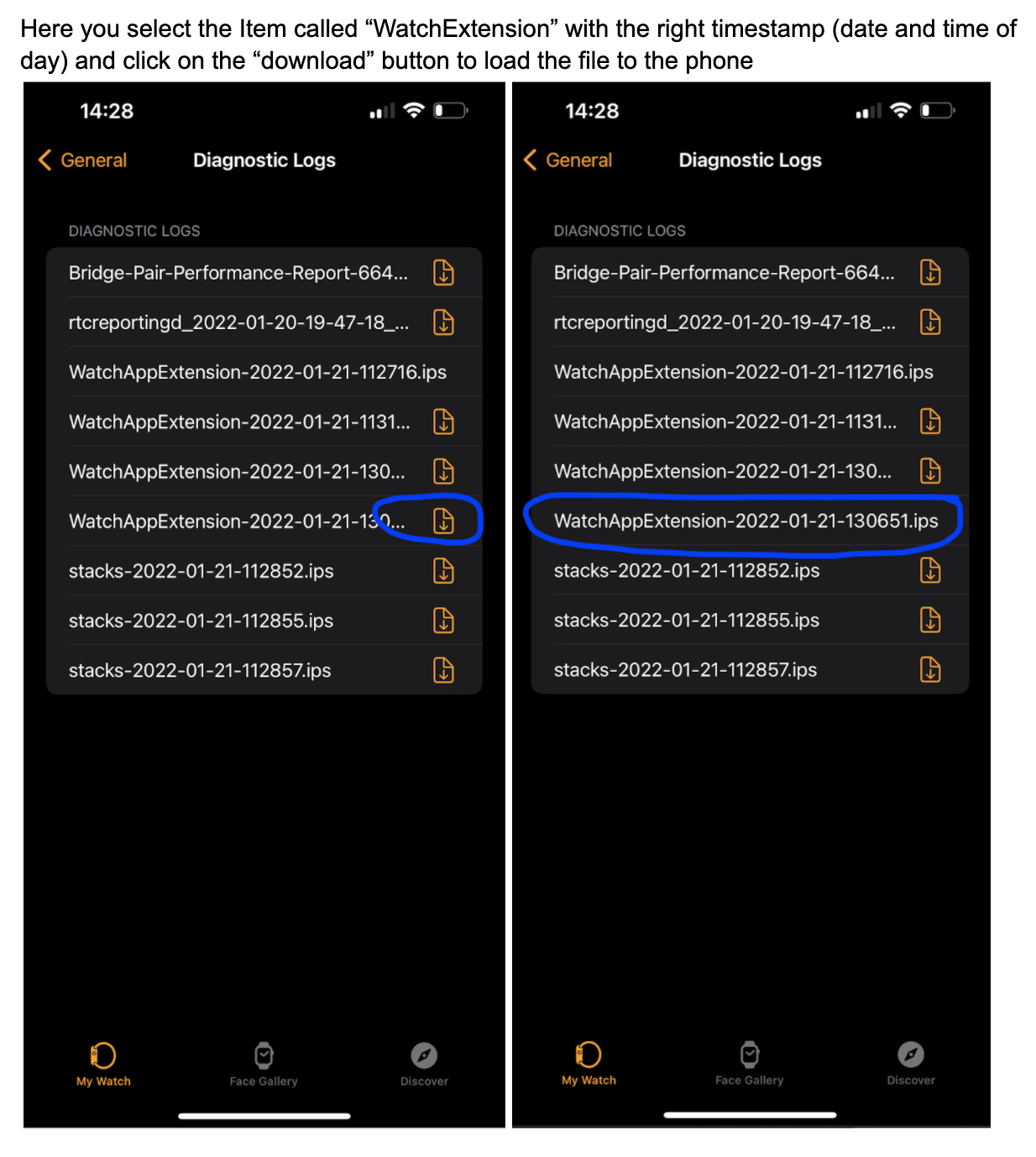
We would require the logs only for the last one or two days.
You can add these .ips files as a link to an external file sharing platform.
We'll be on the lookout for your replies.
Hi Alex,
Thanks for the reply, please find the error log screenshot below
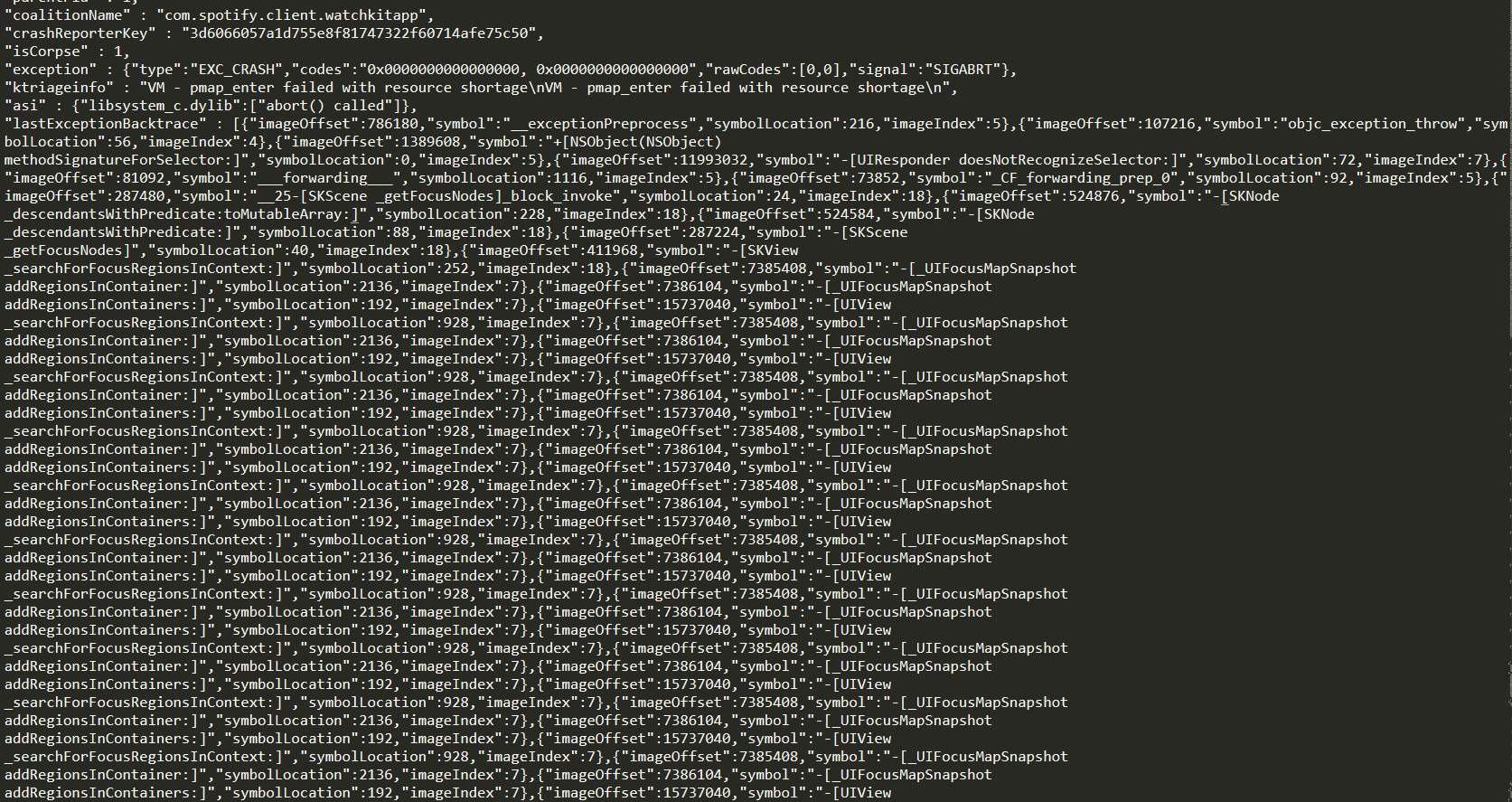
Thanks

Hey @user-removed,
Thank you for your reply and for providing us a screenshot 🙂
We've passed the screenshot to the right team that will continue to investigate this.
Let us know if we can help you with anything else in the meantime.
Take care!

Has a solution to this issue been implemented yet? I bought a new Apple Watch and Spotify keeps crashing, I can only stay at the Library section (I can also download playlists). The crashing issue occurs when I slide to the player and the third section. When I try to select a playlist from the library I’m order to change the playlist on another device via Spotify Connect, the change occurs but the app also crashes. I already tried unpairing the watch, deleting the app, quitting the app, restarting, etc without success.
Here’s a folder with 29 logs, hope they serve to find a quick fix to this problem 🙂
https://www.icloud.com/iclouddrive/0987SjgDYAhFJbro7MtYUDIdQ#Spotify_Watch_Logs
Hi there @miguel2412,
Thank you for your reply in this thread and for the information you've provided.
This is still being investigated.
Can you let us know if you did any of the troubleshooting that's been provided in this thread?
We'll keep an eye out for your reply.
Take care!
Thanks for the reply Jeremy, I’ve tried unpairing the watch, deleting the app, quitting the app from the dock, and restarting the watch.
As someone pointed out in this thread, I’m also experiencing the same issue with the Shazam app. However, Shazam I can’t be accessible at all. With Spotify I can at least download playlists and play them before the app crashes, but as previously mentioned the player is not accesible. Today the player got to work for a couple of minutes while listening to a podcast from my iPhone.
I’m addition. I’ve noticed that during the few seconds in which the Spotify app starts to load, I can access the library section (not the other two sections of the app) most of the times if I spin the Digital Crown inward.

Hi, I’m sorry to say that I experience the same issues as all the users above. The solution you provided with sliding the dock center helps a bit, but it’s impossible for me to play the downloaded music on the watch when my iPhone is put in the airplane mode. Has there maybe come up another solution that would permanently help with this issue?
Hey everyone,
We understand your frustration not being able to use the Spotify app with your watches.
The right folks at Spotify are working on fixing the crashing. Since this involves third party devices and collaboration with the team from Apple it might take longer, but rest assured that both teams are aware of the severity of this issue.
We'll let you know here as soon as we have more info.
Thanks for keeping us up to date Alex. Hoping that the Spotify team will be soon fixing this issue.

i have the exact same problem, my apple watch just bought 5 days ago. Previously it was possible to listen and connect Spotify from my iPhone to Apple Watch, but now I can't access it anymore. when I open the application it always crashes, I've tried the method given above (reinstalled on Apple Watch and iPhone but still can't be accessed, and Apple Watch factory reset still doesn't work) please respond and help, thank you
iphone 12 promax latest ios version
apple watch se latest watch os version
Hey @Willsonr,
Thanks for the input.
Could you share your log file as described by @Alex earlier in the thread? This will help our tech team a lot.
Keep us posted,
Cheers!
hi, good night, I'm trying to send the log data from my apple watch for the newest one, there will be 2 log data that I will send maybe you can see both of them, thank you

Hey @Willsonr,
Thanks for sharing this info.
We've passed this to the team in charge. They're working on it with the manufacturer.
Don't forget to keep the app up to date.
We appreciate your patience.

Hi, I am having the same problem here.
Just got a new Apple Watch S7 and I have an iPhone 12.
Spotify crashes in 1 sec every time I try to open it.
Hope you have a fix for that.
I attached 2 logs here.
https://www.dropbox.com/sh/fhdjor12nehz64e/AACkAyF_oloCVeWo2bXHDxdna?dl=0
Tks : )
Hello. Is there already any final and efficient solution to the precisely described by everyone issue? I’d like to emphasize on the fact that the subject was initially brought up almost half a year ago and until now without any method from your Spotify side that would help us all out with it. Maybe it is not the most important thing in the world, but for everyone including me it’s very annoying as a Spotify user who was promised offline music listening option on Apple Watch and can’t listen the music on it at all without a necessity to have the phone by my side at all times… e.g. when going out jogging
Im also not sure if you’re aware of that, but the other competitive brands, which names I don’t to have to mention, have this function normally working and without any issue. Which makes some of us thinking and perhaps considering soon to change the streaming music provider shortly. Please let us know the definite solution to that issue.
thanks in advance.
Coming here to say the same. It has become really frustrating being unable to use at all the Spotify Apple Watch app. There has been no recent updates on how the progress to fix this issue is going. It’s understandable that fixing this would take its time, but with the crash logs provided in this post it would be hoped for this problem to be fixed in a shorter time span. In addition, this post has not been labeled as “Under Investigation”. As mentioned by Armando, this inconvenience makes users to consider switching to other music and podcasts service. Currently, as the ongoing issue persists I’ve had to rely on other services to listen to music and podcasts. Still, I’m still hoping this crashing issue is solved ASAP.

When is this going to be fixed?!?! Seriously tempted to switch to Apple Music at this rate. The watch app crashes mostly when opened, and instantly when trying to play downloaded music!! Someone has to fix this has been far too long this has been occurring for.
Hi there folks,
Thank you for your replies and feedback.
We understand how this can feel very frustrating. Rest assured that our team still investigating this.
In the meantime it would be great if you can continue to provide us your log file so that we can continue to provide information to the team that's looking into this. You can check how you do that with the steps provided by @Alex earlier in the thread.
Take care!


Was having this same issue (iPhone 12 with Apple Watch Series 6) since around mid-April. Tried everything listed above and also erased and factory reset my watch, contacted Apple and Spotify numerous times in the past and did everything they advised to try and figure out whether it was my phone, watch or just the app that was the issue. We paired my reset watch with my brother’s iPhone (12 Pro Max) and it worked fine with both his Spotify log in and my log in. This helped us realize that it wasn’t the Spotify app/account or my watch that was the issue but rather my iPhone. Did absolutely everything short of factory resetting my phone when finally I went to my App Store purchase history and checked to see what apps I may have installed around the time that this issue started and found 4 apps from the time frame (Tiny Scan, ShopThings, Dream by WOMBO and BitLife) deleted all 4 apps and the issue was instantly resolved.
I advise you to check your app purchase/download history and see what apps were downloaded to your device at the time the issue began. I had been on a call with Apple for over an hour before we tried this and it worked. My Spotify on my Apple Watch now opens, plays and connects with my phone and other Apple devices like it should.
Not sure which app it was in particular that was causing the issue, since I deleted all 4 at once instead of deleting one at a time and checking my watch in between (though for research purposes I will probably reinstall them one by one and see which causes the issue). Once I get around to doing that I’ll let you all know which exact app(s) (and the developers).
Hope this helps!
Hey @Hectormartinap,
Thanks for posting and welcome to the Community!
We understand that you've experienced issues with running Spotify for the first time on your brand new Apple Watch SE. We're here to try help you resolve this situation and enjoy the music straight from your wrist!
Firstly, it's worthwhile to reinstall the Spotify app on both devices - as on the watch, so on the phone. A guide provided by Apple on how to do this in a more thorough way, thus clearing any possible cache-related issues could be seen here. And a similar guide from our side to do a clean reinstall on your iOS device is posted here. Give those steps a try and let us know if any of this helps.
We believe that after reinstalling the app on both devices cleanly, the download functionality should also start to behave as expected. But do keep in mind, that there’s a download limit of 50 tracks per playlist. More useful info about enjoying Spotify on Apple Watch, you can read on our site here.
Hope this helps. Let us know how you get on.