Cannot add songs to collaborative playlist that I AM following

Plan
Premium
Country
UK
Device
Macbook Pro late 2018 & Web (Google Chrome)
Operating System
macOS 10.15.5
My Question or Issue
My friend has a collaborative playlist that I have liked & followed but I am not given the option to add a song to that playlist. I have tried restarting the app, and have also tried on the web application on google chrome. Have double checked that the playlist says it is collaborative and have made sure that I AM following the playlist.
Accepted answers
All comments

Hey there @Intrinity,
Just jumping in here to add some extra info 🙂
It's currently not possible to add songs to a collaborative playlist that isn't yours on the web player. If your desktop app looks just like the web player then you're probably on a new desktop experience we're currently testing, which is missing this feature as well.
In case you'd like to be able to switch between the old desktop design and the new look, we suggest you add your +VOTE to this idea to show your support.
You can also consider submitting a new idea for any particular feature you'd like to see return in the new app design. The Idea Exchange is the best way to share your thought on new features and the Community team is actively bringing your feedback to the internal teams at Spotify - check how here.
In the meantime you can still use your mobile device to add songs to a collaborative playlist 🎶
Hope this information is useful. Let us know if there's anything else you need help with.

Has this been resolved yet? I'm trying to have a collaborative playlist and people are saying they cannot add any songs.
I have checked https://support.spotify.com/us/article/collaborative-playlists/ and indeed I should simply be sharing the url?

Hi @ptrvrhvn,
Thank you for sharing your post on this thread.
Certainly, other people should be able to add songs to your collaborative playlist after sharing the link with them. Could you let us know if they get an error, or what exactly happens when they try to add tracks to it?
It's also worth double checking if the playlist is set as collaborative. You can do this by going to the desktop app, open the playlist and click on the 3 dot menu. The option should be ticked:

Keep us posted.

Right, but they still can't add songs from the desktop app.
Hi @sethemck,
Thank you for keeping in touch.
In order to keep assisting you, please let us know what happens when other people try to add songs to the playlist or if they get any errors.
Also, what are the devices they're trying from?
We'll be on the lookout.

Me and my friend made a collaborative playlist, owned by me, we were able to add songs, up to a point, then my friend isnt able to add songs anymore, same problem, hasnt fixed ?

Hey @osent,
Thanks for posting here 🙂
Could you please share with us the following? We'll look into this further.
- In case you get an error message, you can send us a screenshot of it.
- When you friend tries to add songs-which device are they using?
- If you create another collaborative playlist, does the same thing happen?
Keep us posted.

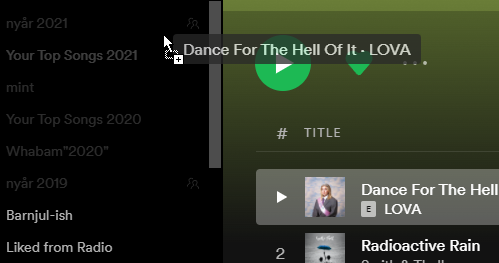
As far as I can tell, it is still not possible to add songs to a collaborative playlist that the user is not the owner of. When trying to drag the song to the playlist, it is greyed out.
See the picture below, taken from the webapp in Chrome (on Windows 10). It is clearly visible which playlists that can be added to. The playlist "nyår 2021" is a collaborative playlist, created by my friend. If you look closely, the collaboration icon can be seen to the right of the name as well.
Hi @Kristofh,
Thank you for posting on the Community!
For the time being, it's not possible to add tracks to collaborative playlists from the Web Player. This option is available only on mobile devices or the desktop app.
Could you try to do this again from the full app and let us know if it works for you?
Keep us posted.
Thank you for giving a straight answer to the question. I feel that hasn't been given before in this thread.
It does indeed work adding songs from the desktop and phone apps, that was never the issue here.

Solved (for me)!
I had this problem, too. It turns out that i needed to follow the playlist creator.
Kevin

Hey @Kristofh & @Ksmiller99,
Thanks for your replies.
We appreciate your last message, letting us know that everything is working as it should.
Remember the Community is here for you in case you need anything else.
Cheers!

Hi,
I'm facing this issue in the desktop and mobile apps. Already followed the previous recommendations: I'm following the playlist, the playlist creator and have it in my library.
However it's still greyed out when I try to drag a song to it.
Can you help?

I would like to second this and ask why it is so tricky for this to just... WORK! hahaha
I have created a shared playlist and invited people using the open.spotify link
they then click the link and it open the web page and they select "open spotify"
They are then directed to the playlist and have liked and followed the creator but no dice and are unable to drag songs into this playlist
Yes, I too wonder why not just fix this feature. But I guess it is a matter of priority. The webplayer is not important enough.
But as has been stated above, it works in the phone app and in the native app on desktop, but not in the webplayer.

No, it doesn't always work in the phone app.
I'm on my Samsung, using the Spotify app.
I see my friend's playlist in my lists of playlists. I can listen to it.
I am 'following' both the playlist, and my friend.
But I can't add songs to the playlist.
I've tried the Spotify app on my Samsung, the desktop app on my Dell, and the webplayer on my Dell (Chrome browser).
Other people seem to be adding songs to the playlist without issue, maybe they're on Apple devices?
I don't get it.
Hi everyone,
Thanks for reaching out to the Community.
Keep in mind that you can add songs to collaborative playlists from the mobile app or desktop app version.
We understand you'd like to have this functionality on the web player. At the moment, it's not available, however, we'll pass your feedback and comments to the team in charge.
On another note, @cjohnson0620, could you send us the exact make/model, OS version and Spotify version installed on your devices? Also, let us know if this is happening with a different account (if possible).
We'll be waiting for your reply.

I'm on the desktop app, still doesn't work. really a shame because the playlist will only be open a ltd. amount of time. i'm following the creator and have it saved to my library. is there a limit to how many people can add to a playlist? that's the only explanation i can see for this situation at this point. When I try to join on my apple phone, it gives me a popup but then tells me I have no internet connection when I do. My data is turned on and my wifi is just fine. this is very annoying at this point and i'm wondering why this is still a bug after almost 2 years
Hi @squonsh,
Thanks for posting on the Community.
In this case, everyone who clicks on the shared link within 24 hours can access the playlist as a collaborator. After that time, the link will either just redirect to the playlist if it's public or will show an error if it's a private one. In order to add more collaborators after 24 hours, a new link needs to be generated and sent.
Changing tunes, if the app is not detecting any internet network on your phone, we suggest creating a new thread in the relevant Help board (iPhone), including as much info as possible in order to check it further.
Remember the Community is here if anything else comes up.

It works on a phone but not on the desktop app.

Hey @lougould99,
Thanks for posting.
Could you make sure you follow this guide to create a collaborative playlist and share editing rights with a separate link for every person? Keep in mind, that the links are valid only 24 hours.
Tell us also in more detail what are you experiencing on your end on the desktop app.
Keep us posted,
Cheers!

Having the same issue of being unable to add to the playlist despite the link being generated today. Same for both mobile and desktop app.
Hey @Ethan-Lee,
Thanks for the reply.
Could you share a video recording of the process of you opening the collaborator link and trying to add songs to the collaborative playlist?
Keep us posted,
Cheers!

Seeing this issue as well, specifically on the web client. I can add to it fine from my phone app, but it does not show up in the list of playlists to add to when I am on the web client.
Here is the issue displayed in the web app: https://youtu.be/N_c96_JSBNg
And here is adding to the same playlist in the mobile app: https://youtube.com/shorts/PhIX-XJGQnQ?feature=share

Hey @cebuckley1999,
Thanks for posting in the thread!
For the time being, it's not possible to add tracks to collaborative playlists from the Web Player. This option should only be available on mobile devices and the desktop app.
Hope this clears things up a bit 🙂
Cheers!

HI, I am having the same issue. I am following a friend that has created a list and added to my library. I can see and play the list but I can't add songs. I've tried it in both desktop apps for Mac and Windows without success. Thank you

Hi, also having the same issue - also tried the above suggestions, in the mobile and desktop apps and in browsers... no luck.
Hi, Any further suggestions here? It is not working for a few people in any format of Spotify App
Hey there,
Thanks for the posts.
Have you tried requesting a new invitation from the owner of the playlist?
It is also important, that the owner has set you as a collaborator and not a listener, could you make sure this is done?
Keep us posted,
Cheers!
Hi Intrinity!
Thanks for posting in the Spotify Community!
Try in the desktop app, either by changing the URl to "open.spotify.com" rather than "play.spotify.com" in the address bar, or head into the web player settings and change links to open automatically in the desktop app.
Hope this helps.
Cheers!