Spotify can't play this right now. If you have the file on your computer you can import it

Plan
Premium
Country
UK
Device
Desktop
Operating System
Windows 10
My Question or Issue
When I try to play a song I get the following error message "Spotify can't play this right now. If you have the file on your computer you can import it"
I have tried all the fixes I have seen:
Reinstalling app.
Using version from Microsoft store.
Disabled hardware acceleration.
Disabled crossfading.
Changed speaker options.
Deleted local files.
I've had this issue before and it was fixed by using the version from the Microsoft store but this isn't working now.
Spotify works on my phone and my laptop, web player also works only the desktop app doesn't work.
Accepted answers

Hey folks,
Just dropping by to mention that this is an issue that can be caused by a variety of things, so for your convenience, we've compiled all of the most common ones in this article, along with steps on how to get everything fixed of course.
Make sure to try those suggestions and if you have anything you'd like to share, feel free to comment in this thread. If the issue you have is more specific and doesn't get resolved by these steps, feel free to reach out on a separate thread so we can assist you further.
Cheers!
All comments

Hey @JenzDoolaeghe,
Thanks for posting in the Community.
In order for us to provide further troubleshooting steps, we need to know what exactly you've tried. Could you list the steps, that didn't work for you?
It is also important to share more on the issue you're experiencing as in the Spotify desktop app version you're using, what the sound output device is and how your device is connected to the internet.
Keep us posted,
Cheers!

I tried to clean reinstall spotify but it did not work.
@jtostado solution worked like a charm.

Hey @shin2022,
Thank you for keeping in contact and for the info shared.
We're glad that everything is working fine for you by now. We appreciate the time you took following the troubleshooting steps and sharing what works for you.
If anyone still has this issue, could you confirm if lowering the default device sound setting below 192000 Hz (as mentioned previously by @JimboDimbo) makes any difference? This will help us investigate the issue, in case it persists.
We'll be on the lookout.

I appreciate the provided help. For contrast the Special Playlist that i created isn't working on computer but works on phone...I created it on my phone...also these steps didn't work, or at least that's how it appears to be, the playlist still doesn't play on computer...
Hey @nabh_pal7,
Thanks for the reply.
Have you tried the sound output settings on your computer or reinstalling the sound drivers? How did that go?
Tell us also exactly what you've changed, so we can make sure we're on the same page.
Keep us posted,
Cheers!

How do you go about setting the sound to 192,000 Hz. I don't have an advanced tab in sounds? the songs play fine but as soon as I put on my headphones it comes up with the error message "Spotify Can't Play The songs........"...Can you suggest anything else, its so frustrating

Hey @retahc!
Try the following steps:
- From you taskbar, right click on the Speaker icon (with plugged headphones and sound output changed to them)
- Click on Sounds -> select the Playback tab -> locate your headphones
- Right click on them and go to Properties -> select Advanced
Sound quality should be there, listed as a drop-down menu.
Let us know how it goes 🙂
Thanks!

Hi,
This did not work on me, "it said that it can't play this song since it's not in my computer".
So streaming songs is not available?
Useless to pay premium for this household if we can't listen music.

Hey there @Mortalheart,
Thanks for reaching out about this and welcome to the Community.
Just to make sure, are you getting this error message when you're trying to listen to local files or stream songs from Spotify's catalog?
On another note, is this happening on multiple devices or only on a specific one?
Lastly, could you let us know if the same happens if you use a different internet connection?
Keep us posted.
Hi,
Unfortunately that error message is finnish language but i hope you understand now.
And that error is happening to my account pc 1, 2 and anroid phone oneplus 6
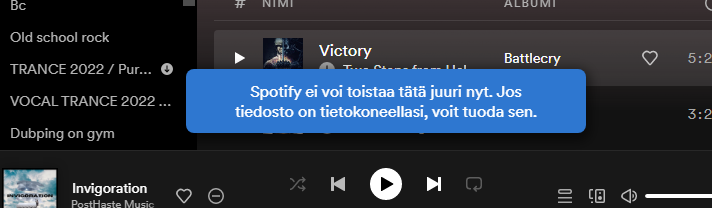
so basically can't listen at all.
Hey @Mortalheart,
Thank you for keeping us in the loop and for the info shared.
As this is happening on different devices, it could be related to the internet connection or network permissions. To check if this could be the case, would you mind trying with a different WiFi network?
In case you don’t have another network to try it, you can use a mobile data hotspot while testing it to see if it makes any difference.
Lastly, if the issue persists; include in your next response the OS version of your devices, along with the Spotify version you’re currently running.
We’ll be on the lookout.
Hi,
Today the issue only shows on my pc 1 which screenshot is added under, PC 2 and Anroid phone did work normally.
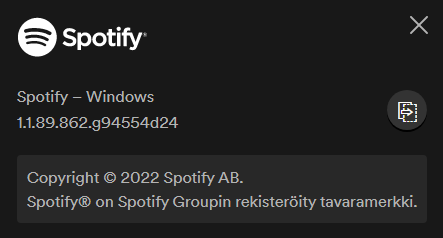
I used my mobile phones shared internet via USB hotspot and did not helped at all.
Hey @Mortalheart,
Thanks for the reply.
What kind of a sound output device are you using? Is is connected to the PC via USB or via an AUX cable?
Do you have an extra sound card or you're using the one integrated in the motherboard? Try switching between the two, if you're using an external one. Also try reinstalling the sound drivers and changing the default output device in the sound output settings.
Have you tried if Spotify works in the Safe Mode of Windows?
Keep us posted,
Cheers!
Hi,
I'm using GoXlr mini on this computers out going mixer/amplifyer.
Hey @Mortalheart,
Thank you for keeping us in the loop.
Just to make sure, did the issue start happening recently, but it was working fine before using the same output device?
Also, could you check if unplugging that device and selecting the default audio output makes any difference?
Lastly, would you mind confirming if the issue persists when using a different internet connection as suggested previously?
We'll be on the lookout.
Hi,
The issue just started after latest windows 10 update patch.
I have unplugged and replugged all audio and usb devices. Uninstalled spotify and reinstalled but nothing seems to help.
Rerolled windows patch back to latest working one and did not help at all.
Really run in to wall with this case.

I just found another solution and it involves changing the file storage location in settings, that is what fixed my Spotify from streaming on my PC.

Thanks for jumping in and sharing your solution @Xquisy!
@Mortalheart do you mind testing if this does the trick for you as well? If you’re still having issues with the desktop app, we’d recommend trying our web player to see if that makes a difference.
You also mentioned this is happening to your account on multiple devices - what happens if you log in to a different account, do you get the same result?
Could you also clarify, whether this happens for the entire Spotify catalogue or only specific playlists/songs?

Both these things did not work for me. However, I did come up with a solution for me.
1. Click the 3 dots in the top left corner of the app.
2. Hover your mouse over the "view" tab.
3. Turn "Hardware Acceleration" off and then on again.
4. Enjoy having your Spotify back lol
Hi,
I have tried it and i have 2 tb drives so and 60% free space of all 4 four of them
Shoundn't be the issue
Hi,
Didn't work...

Hey @Mortalheart,
Thanks for your reply in this thread and for the info you kindly sent us 🙂
As mentioned before and Just to confirm, is this happening in both the web player and the desktop app? If not sure, try it and let us know how it goes.
On another note, if you log in with another account on the computer you notice this inconvenience, did you experience the same? It'd be awesome if you could check. You can create a free test account to check if the inconvenience persists there.
We'd like you to know we're investigating further the root cause of this. We'll need this info, so we can check if perhaps it's something account-related.
Keep us in the loop and don't hesitate to get back to us if you have any other questions.

It works for me so far, thanks.
Hi,
This happends only in desktop app. I can still use web player.
Hey @Mortalheart,
Thanks for the confirmation.
Would you mind asking a friend or a relative to log in to their account on your desktop app to check if the same happens with a different account?
We'll be on the lookout.
Hi,
Suddendly today without anything to do with it it just keep working normally 😄
So problem solved, but thank you alot for help
Hey @Mortalheart,
Fantastic news! Give us a shout if it starts misbehaving again; we're always here to help.
Have a good one 🙂

Hi Folks, i have this problem my windows, but the soluction above not resolution for me, please help me.
The message is "Spotify can´t play this right now. If you have the file on your computer you can import it
"
Hey there @22f7rnlk6v4agm5xs7az,
Thanks for getting in touch about this.
Could you let us know exactly which troubleshooting steps you've already tried? That way we can avoid repeating any steps.
If you haven't tried performing a reinstall of the app on your PC, we suggest that you do so by following these steps.
Also, we suggest that you disable any antivirus or ad-blocking software, and turn off any VPNs if in use.
Keep us posted.
Hey folks,
Could you check if the correct audio output device has been selected for Spotify? Also, make sure that the sample rate of the device is set to anywhere between 44.1 kHz and 192 kHz. You'll find a guide on how to do that + some additional things you can try in this article, check it out 👍
If you're experiencing this in the Web Player, I'd recommend trying the troubleshooting steps from this post.
Cheers 🤘