Device
PC
Operating System
Windows 11
My Question or Issue
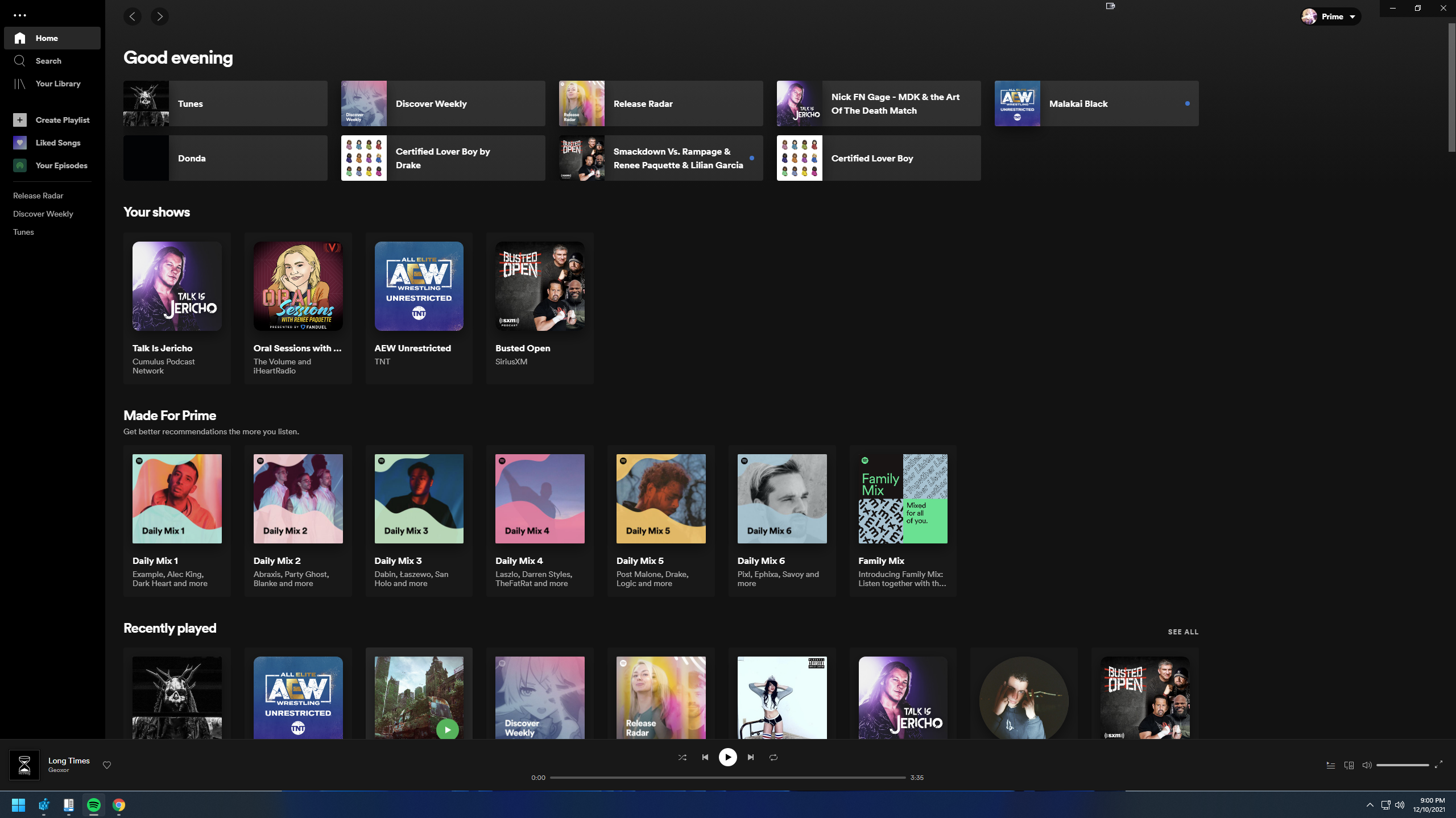
When I maximize Spotify there's a thin gap left over at the bottom which is slightly annoying. You can see it just slightly above the Windows taskbar.
Woohoo 🎉
Finally this issue seems to have been fixed in version 1.2.4.893
Only took since 2018 to get it properly fixed. Now let's just hope this fix is permanent this time around.
I can't believe this is finally happened. Just got Spotify () for Windows 1.2.4.912.g949d5fd0 and it's fixed 🎉
Nice, reported in October last year and this still hasn't been fixed.
After months this is still not fixed. And on my new laptop with screen resolution 2560*1600 the problem is the same on Windows 11. Not great that a company with so so much money doesn't fix such annoying issues.
Plan
Premium
Country
UK
GF65 Thin 10UE Laptop
Whenever I put the desktop version of Spotify to full screen, there is almost always a thin line just above my taskbar from the page behind. I've had this since updating to Windows 11 in late November, never had any issues with it in Windows 10. I've tried many things including reinstalling Spotify after fully uninstalling it and seeing if anybody has had the same issue as me however, I was unable to find any solutions.What my Spotify looks like when full-screen
I don't know why Spotify have these community forums for people to post issues to, they never seem to actually fix any of them. I'm also part of another thread that's been going for nearly a year, with MULTIPLE posts added to each day with complaints that the Spotify app no longer updates metadata when connected to a car Bluetooth and stays on the same track unless paused and unpaused to "refresh" it. They just don't bother looking into things.
I also now have this annoying 1-pixel wide gap at the bottom too, after upgrading to Windows 11, on any of my monitors (1920x1080). Didn't have this issue before. Don't have this issue with any other programs on my PC.
It's clearly affecting a lot of people, but will Spotify fix it? I very much doubt it...
I'm also having the same issue. This did NOT happen in Windows 10 on my 27 inch 2560x1440p monitor. Upon upgrading to Windows 11 this issue started occurring.
Can we get a time frame for this fix? Doesn't seem like a hard fix (especially if you use UWP for the Spotify desktop app) and it's been months.
Having the same problem after updating to the newest version of Spotify today. Already had Windows 11 installed but didn't have this issue in the previous Spotify version.
I have the same issue. What I have noticed is, if you are directed from the web app to the Windows 11 Spotify app, the full screen is properly set. The desktop app has to not be already opened. Only if the desktop app is prompted by the web app, you get proper full screen. This got me thinking, maybe there is an issue with how Windows 11 shortcuts the desktop app.
It's coming up on six months of this issue...
the first pixels are visible
Hello,
The issue still persists. The blank space is at the bottom is still there.
Yes, it's the latest version and clean install as well. And it's been around 6 months since the launch of Windows 11, so this is definitely a bug in Spotify Desktop app itself.
Hey folks,
Just wanted to inform you that this has been reported to our tech folks. While we're unable to provide any timeline for a fix at this point, it is something we're aware of and will be kept on our radar.
It will most likely be addressed at a later date with a general optimization patch.
Same Here.... Windows 10, latest drivers, Spotify version 1.1.81.604.gccacfc8c.
In my case I have a stacked monitor configuration and every time I open the app, it show maybe a pixel line over the second monitor.
Experiencing the same issue, this should be a fast and easy fix. Not really surprised it's taking ages though...
This exact same issue was reported in the Beta branch way back in 2018 on Windows 10. They didn't properly fix it back then, so don't expect a fix anytime this century.
Only "fix" they did back then was to hide the issue by forcing a 2 pixel high black bar instead. So the root issue was never fixed, nor did they seem interested in solving it properly after that. So I'm not surprised the issue is back now 🙄
5 months later and its still not solved.
Czechia
DELL Latitude, HP Pavilion
Windows 11, Windows 10
My Issue
When Spotify Windows app is maximized, there's a transparent line at the bottom of the window. There's a topic with the same issue from 2018. Please, get rid of it.
This is such a jarring visual glitch, and it makes the Windows app look very amateur. It surely can't be that hard to fix... as someone who works at a product company too, it's crazy to me that this issue has gone unfixed for at least 8 months now.
not 8 months, it has been there for almost 4 years
United Kingdom
Windows 10
Spotify leaves a small - one pixel wide - bar of content on the monitor on which it isn't active. This seems to happen randomly when snapped to fill a whole screen and isn't due to me adjusting the window size wrong - this happens when Windows snaps the Spotify application fullscreen and doesn't seem to happen with any other application.
I have tried to demonstrate this in one of the screenshots by placing a black fullscreen on one of my monitors - there is a visible, one pixel wide, line of content that Spotify is pushing onto the other screen (orange because of the content that I have open on Spotify on the other monitor in one screenshot, and in the other it's a full line of white which also happens sometimes).
It's been another 4 months since that post, not sure why your top answer says that post is one month ago, are you not planning on fixing it? Happens at 1080p, 1440p on Windows 11 100% scaling.1440p 100% scaling
1080p 100% scaling
Issue still exists. Fresh install on brand new win11 laptop. 1920x1080. Dual monitor win10 desktop setup is unaffected.
This has been a problem for SOOOOOOOO long. I'm finding threads about this that are almost 2 years old. It can't be THAT hard to fix this, holy s*** guys, get your stuff together. No other app but Spotify has this issue.
And I have the exact same issue on both my computers. This is ridiculous
Any news? It still exists and noone seems to care..
Reported almost a year ago and still no fix?
Have this issue as well, still nothing after almost a year?
It's been a year probably since I had reported this issue, still not fixed.
So now they're A/B testing a redesigned UI. But the problem still remains even in that 😂
2018, 2019, 2020, 2021, 2022... they'll fix it any day now
Do yall have actual clowns working on this lol. It's just 1 pixel. Make the app bigger.
Same error in September 2022, it is the only application where I have this problem.
I also have the same problem, it's already been a year, why is this not fixed???
Wow guys, you just released an UI update and still haven't bothered to fix this stupid issue. Truly baffling.