Spotify friends activity empty/not updating

Plan
Premium
Country
Finland
Device
Pc
Operating System
Windows 10
My Question or Issue
For several months (pretty much years at this point), my Spotify friends feed has not been updating, it only shows 1 friend I have, while it should have a dozen others. This has been going on for far too long for it to be a problem on my end as I have changed my devices, settings, and other things to try and fix it. I have reinstalled Spotify and my OS but nothing helps. I also see no friends through my Facebook integration even after disconnecting and reconnecting my Facebook profile multiple times. All my settings are the same as my friends and he can see his friend activity but I can't. I already posted about this problem once, and was told it would fix itself but that was months ago. This is very infuriating as it has been going for so long.
Accepted answers
All comments

Hi, I have an individual premium plan. For months, I haven't been able to add friends I know to be on Spotify, even when they have had the option of allowing others to view listening activities toggled on. It is super weird as I even have a "blend" playlist with one of these said friends, and now the friend has disappeared.
This was not a problem before, I have a bunch of friends I follow and had been able to view listening activity, until months ago. It seems I am not given the option to add all of my friends on Spotify, even after having disabling/enabling disconnecting/connecting view activity or app options, and knowing it to be true that they have indeed connected the two apps and given rights to them both.
I noticed that in my Spotify account settings under "Apps", Facebook is not listed as one of them, despite having disconnected and reconnected Facebook through the Spotify platform several times. If someone could advise what else could be done, I would be very grateful.
Thank you.

Hey @ooleebs1,
Does the issue persist across all your devices and have you tried any troubleshooting steps so far?
A good idea here would be to clear your cached data to see if that makes a difference.
If this doesn't help - log out of & back in the app twice in a row on all devices. This will force a manual sync of your data.
And in case the issue persists after that, you may also try doing a clean reinstall of the app on your devices, as shown here.
If this doesn't get resolved, we'd appreciate some screenshots, or even a link to a video recording of the issue, so that we can take a better look at things 🙂
Many thanks!
Hello Vasil!
Thanks for your response!
Unfortunately, clearing cache, then logging in/out of all my devices, and uninstalling desktop/app versions did not help. Now, it says there are 200 friends instead of the 202 from before these steps.
So I even unlinked and linked Spotify/Facebook several times, each time removing access manually from Facebook. And on my Spotify account page, it still looks like there isn't access given to Facebook (see screenshot).
I thought this might have been an account log in issue, but I tried logging in with a username/password, and then logged out to try logging in through Facebook, both ways seemed to bring me back to the same Spotify account with same number of friends listed.
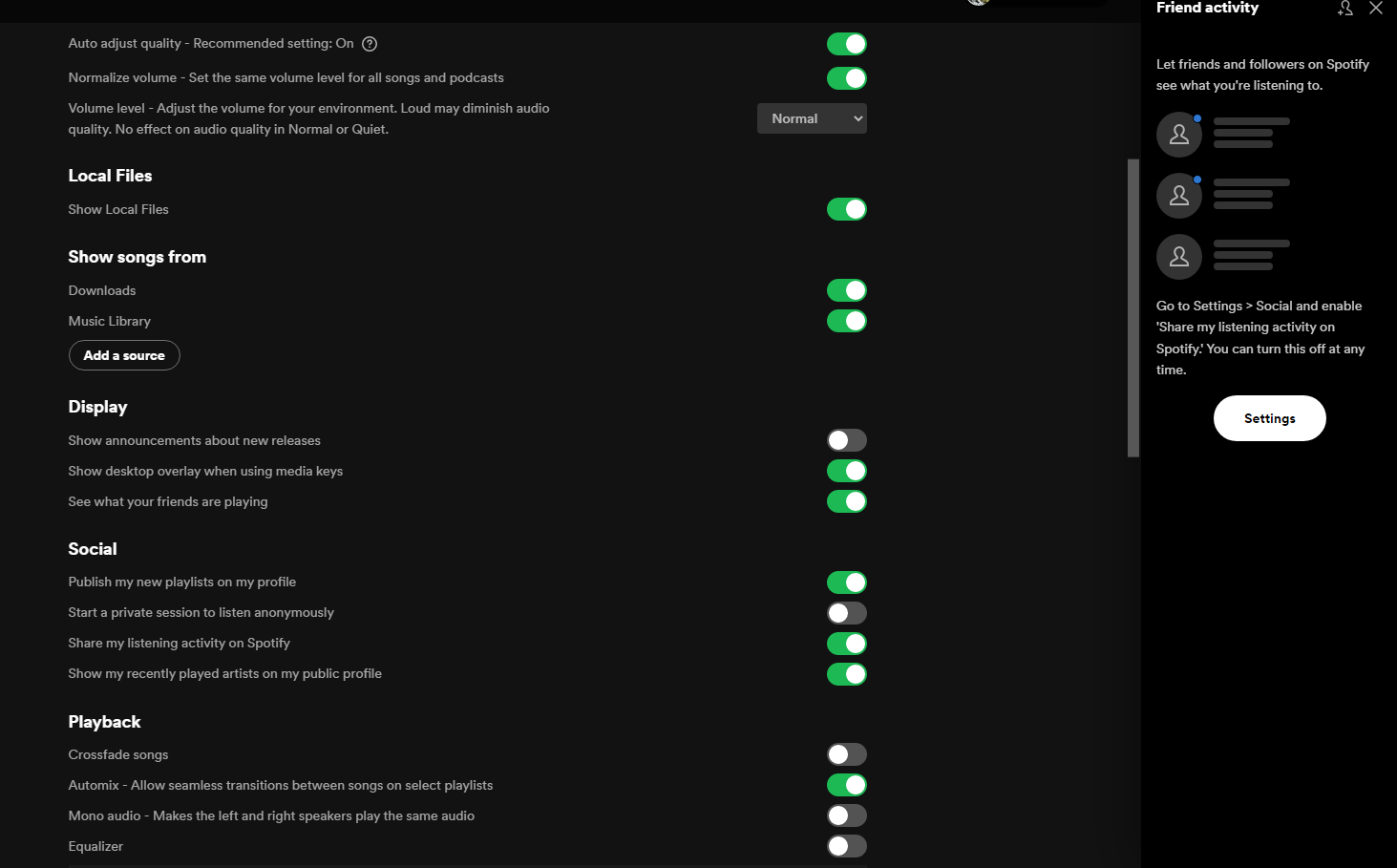
Additionally - I am not sure if I should still be prompted to toggle on Share my listening activity on Spotify, even after having done so this whole time. (see screenshot)
Would there be other suggestions to try?
Many thanks in advance

Plan
family plan Premium
Country
malaysia
Device
Android, multiple PC
Operating System
(latest Android ,Windows 10)
My Question or Issue
Hi everyone, my account has been facing this issue for a long time. and its getting annoying.
followed all suggestion i found on internet.
the share activity option had been turn on long time ago. and it doest fix the issue. even i log into other device, still same.
however, discord spotify activity are working. i can see what my friend listening over discord but not in the spotify app.

Solution:
1. Make sure you're running latest version of the desktop app.
2. Go to settings in the desktop appand activate "Share my activity" and connect Facebook and log in.
3. Go to your Spotify account on the web (Click your profile in the upper right corner and click account.
4. In the browser window that just opened, go to Privacy settings, and toggle the switch under "Facebook data" to allow processing.
Done!

I've been having this issue for the last few months and I've reinstalled the application several times on my desktop, i've installed Spotify on my new mac and it still does not seem to work. I have checked to see that my Spotify listening activity is enabled, along with my friends Spotify accounts. I can't seem to find anything wrong but it still doesn't work
Hi, thanks. I tried this and it doesn't work, including clearing cache, logging out/in of all devices, disconnecting/connecting Facebook / Spotify on respective platforms, uninstalling and installing desktop and mobile apps. One particular friend I know of is on Facebook with Spotify connected, and who already is able to view listening activities of others. They are not listed in my list of Facebook names when I try to "Find friends" to follow. No listening activity is showing up either, even when I have followed a whole bunch of other friends.

Hi!
I recently posted an issue and was redirected here so that a more relevant team could check my account and help me fix the issue. Here's a link to my post: https://community.spotify.com/t5/Desktop-Mac/I-can-see-other-people-s-listening-activity-but-they-can-t-see/m-p/5438011#M549391
In short, I can see other people's listening activity but they can't see mine, even with all the proper settings turned on, even after clean reinstalls, different devices, and different internet connections. This has been happening for over a year.
I give permission for someone to look at my account:
https://open.spotify.com/user/a%C3%B1gi%C3%A9?si=c0728cb2858a41f4
and my old account which I have been using to confirm that none of my friends can see what I'm listening to:
https://open.spotify.com/user/sl3i4ilbu1h0vvtbzas2lxmf1
Thanks so much for helping out!

Same here, across devices.
Weirdly it was the same one friend that showed up for a while, then after a recent re-re-reinstall, it was a different friend (but still only showing the one!)
Hi, any updates?

Estou tendo o mesmo problema, o spotify ESTÁ ATIVADO O COMPARTILHAMENTO DO MEU AMIGO E O MEU, DIGO NOVAMENTE, ESTÁ ATIVADO AS DUAS CONTAS O COMPARTILHAMENTO, PRECISO DIZER NOVAMENTE?? OU ENTENDERAM QUE ESTÁ ATIVADO AS 2 CONTAS???? E mesmo assim não aparece o que meus amigos estão ouvindo, então não venha com **bleep** pronta pedindo para eu falar para meu amigo ativar a opção, pois como eu disse acima ja esta ativada.. Tem que repetir várias vezes porque parece que vocês nem lêem.. enfim, quero uma solução pra isso

To do this you need to head to the Spotify Desktop app and head to Spotify/Edit > Preferences > Social > Facebook and Connect to Facebook if it isn't connected. Then, can you head to Activity > people to follow? Here, you can click view all, and find all Facebook friends on Spotify.
Greetings,
james

I succeeded in adding friends without Facebook in the past -- now it seems impossible, even following all the ideas here: https://community.spotify.com/t5/Accounts/Add-people-friends-without-Facebook-accounts/m-p/1270686
What happened? Is it some kind of restriction?

I've also been having this problem hasn't been working for over a year my friend said that they could see my activity but I can't see anyone's its pretty infuriating at this point. I've triple checked all the settings and tried reinstalling and relogging in with no change.
I've had the same problem on both free or premium accounts and tried every method suggested several times over and in the period of almost a year now. All threads with this issue have been merged it seems, but no resolution.

Still having this issue as well.
The settings are on but I can't even see my friends, it just keeps loading indefinitely. And it's been like that for more than one year.
still no updates? its been over a month

I have the same issue. My friends can not see what songs I am listening to. I can see their activity normally. I have all the appropriate settings turned on.
What do?

Me too UGH this is so frustrating!! I LOVE seeing my friend's music and I haven't seen it in at least a year 😞

No update? I also have the same problem for over a year now. Spotify you need to help us!!!!

I have been having this issue for a year now. I can't see my friends listening activity and my friends can't see mine. I read almost all the solutions and posts on this thread and none of them work! I tried logging in and out many times, restarting Spotify, switches networks, uninstalling and re-installing the app, nothing, just nothing is working.

Plan
Duo
Country
USA
Device
PC
Operating System
Windows 11
My Question or Issue
I can't see my follower's activity. I have reinstalled it twice and logged out about 15 time. My friend has even made sure their setting to allow me to see their activity was enabled. Is there anything else I can do? I feel like I have tried everything.
Thank You!

Over a year with the problem. Nothing works, no updates, amazing

Plan
Free
Country
Philippines
Device
PC
Operating System
Windows 10
My Question or Issue
friend activity isnt showing, I dont know why or how but I think i accidentally pressed the X thing. Ive already tried installing the new version, enabling and disabling "See what your friends are playing" and nothing has worked

Seriously?! Two years, and this **bleep** is still happening? This was my favorite part of Spotify, but why even stick with them anymore? The discover weekly and release radar algorithms routinely give me trash, and I don't even get to see what friends are listening to in order to find new music. Freshly installed windows on a new computer and fully updated it. Updated my Spotify to the newest version as well and relinked my facebook account. The weird thing is that I had the friend list there before relinking facebook, but it wouldn't update what my friends were listening to, and after linking, the panel for friends entirely disappeared even though I have my sharing turned on as well as viewing friend activity. Please fix this!!!!!!

Hey, i would like to add that, yes, i only have friends left in my Spotify since, like two years, and i cannot add anyone.
I don't know why we can't just have a spotify username, and add our friends. Why it's only bind to facebook and not new social medias, not even Instagram... We are more than ever in the social medias era.
This feature is the same since 2011. It hasn't improved much since then and spotify is asking itself why the stock is going down...


I have the same problem and have for months. I'm finally following it up.
I've checked Facebook settings on FB, on Spotify account, and in the Spotify settings.
Everything is checked on, but it won't show anyone, ever.
I've tried logging in and out, closing and opening the app, rebooting PC, reinstalling the app, etc.
It's really frustrating and I'd love to know how to fix it.
It really sucks.
Hi. This thread was marked as solved, which is inaccurate. Obviously it is still a huge problem that affects many many users and for a long time now. Please follow up on the matter properly. Thanks.
Hi KIRIL. This thread was marked as solved, which is inaccurate. Obviously it is still a huge problem that affects many many users and for a long time now. Please follow up on the matter properly. Thanks.
@ooleebs1 and I have been trying to get help and find a solution for more than 2 months with no response. When is the Spotify team going to look into our issues? This has been the same for over 2 years, 2 years which I have been actively trying to find a solution. This really is the reason why I got Spotify, to see friend activity and for people to see mine 😕
I hope someone can help fix these long-running issues.
We have seen the reports of people saying Friend Feed is not working for them, and we are happy to investigate specific cases, because as far as we are aware, there are no issues with Friend Feed working.
Firstly, it’s important to restate that ALL users had “Share my listening activity on Spotify” turned off as default - so users you followed and saw in your Friend Feed in the past, will no longer show in your Friend Feed, UNLESS they turned “Share my listening activity on Spotify” back on.
Also worth noting that you don’t need Facebook set up for Friend Feed to work.
Having said that, all of the below must be true for users to show in your Friend Feed:
If all of this is true for you and your friend and they don’t show up in your Friend Feed, then:
Once we have this we can do some checking. Thanks all.