Daily mixes inconsistent on different devices

Plan
Premium
Country
England
Device
Phone 8 Plus
Chromebook/Web connection
Operating System
iOS/ChromeOS Chrome Browser
My Question or Issue
Daily mixes are not showing the same songs on different devices.
This has been reported before:
https://community.spotify.com/t5/Desktop-Windows/Daily-Mix-is-different-from-smartphone/td-p/4525942
but the thread appears closed and I can't add to it.
To confirm - logging out and back in again does nothing, it makes no difference the songs are still totally different on my mixes. Can this be fixed please, it makes jumping seamlessly between devices impossible.
Thanks
P
Accepted answers
All comments
 agareth

Hey folks,
Thanks for reaching out to us.
We hope you don’t mind us replying now as we just stumbled upon this thread.
It's a good idea to log out from everywhere with these steps. Are there any changes?
In case that doesn't help, we'd suggest you give these steps a go and run a clean reinstall? This one is more thorough than the usual one.
Let us know how it goes. If you have questions, you know where to find us.

Hey @Badgersnadgers,
Thanks for posting here.
Could you give the steps mentioned in the thread a go to see if that changes anything?
We recommend running a clean reinstall as sometimes the cache can lead to different issues. That way you can also make sure that the app is up-to-date.
Let us know how it goes.

This does not work you need to fix this and make one playlist created have the same songs that was created for that playlist, reinstalling does nothing and it is impossible to move between devices and play the same songs. I moved from Pandora to not have to deal with stuff like this

Hey @Anewaywithlife,
Thank you for keeping in contact.
The daily mixes are special selections of songs specially made for you. We've tried this on our end using different devices, but we couldn't replicate the issue. All songs were the same and keeping the same order between devices if using the same account.
The system only changes the songs if you have a different account logged in by mistake. We understand you've already tried some troubleshooting steps including reinstalling, but to be sure that we're on the same page - did you use the steps for a clean reinstall mentioned in this article? They are more thorough than a regular one. That way you can make sure the cache is not causing this issue.
Also, make sure you use the exact same credentials to log in on the Web Player and your mobile device after the reinstall. If the issue persists, could you record a short video where we can take a better look? You can attach it to your next response by using the Insert Video option in the post editor. You can also upload it to Google Drive and share the link with us (make sure the video has the permissions for anyone to watch it).
We'll be on the lookout.

Happens to me all the time - very frustrating.
Two different windows 10 PCs all logged into spotify app as the same user.
PC A - app is showing different daily mixes from
PC A web and PC B app and PC B web - which all agree


Hey @beethoven2000,
Thank you for the provided info!
On PC A, could you try the troubleshooting steps, mentioned by @OscarDC?
If this doesn't do the trick and you've installed the app from our website, check if the Spotify app version from the Microsoft app store behaves differently.
If the issue remains with both versions, try the following steps:
- Open Notepad as an administrator (right-click - Open as Administrator)
- Go to File - Open and navigate to C:\Windows\System32\drivers\etc
- Choose "All Files" instead of "Text Documents" next to the File Name box. You'll see a handful of files. Pick hosts and click on Open
- When the file is open, you will see a block of text with # in front of each line and might see entries like 0.0.0.0 website.com127.0.0.1 website2.com
- Check for any entries with Spotify in the address. Examples may look like: 0.0.0.0 weblb-wg.gslb.spotify.com0.0.0.0
- If you do find any lines with Spotify, please remove them.
- Save your changes and restart Spotify
Let us know how it goes! 🙂
We'll be on the lookout for your response.

I'm not 100% sure if this is the same issue as you other guys are having but restarting Spotify on all connected devices fixes it for me. That seem to force a refresh of the daily mix playlists so they are all in sync. It's still really annoying, as I have to restart Spotify on my "media pc" almost every day.
It seems that the daily mixes don't always update if I leave Spotify running overnight.
Hey @Mengidd,
Welcome to the Community and thank you for joining the conversation.
We're glad to know that everything is working fine now. We appreciate the time you took following the process and sharing what works for you. Hopefully, this tip will fix the issue for other users too.
In case you need anything else, remember that we're just a post away.
Cheers!
Just to clarify, it's not working fine, what I'm doing is a shitty workaround. It's hella annoying that I have to restart Spotify on all my devices all the time to be able to play daily mixes as they don't resync if I leave the app open over multiple days.
I just wanted to add that I'm able to get it working by restarting all my devices, but it's not a solution. A solution would have to come from Spotify that makes the daily mixes resync even if you have the app open.

Hey @Mengidd,
Thanks for the clarification.
Could you let us know which troubleshooting steps you've already tried? That way we can avoid repeating any steps.
If you haven't performed a clean reinstall on your devices yet, we suggest that you do so by following the steps @OscarDC sent above.
Let us know how it goes.
This is not an issue with my device or installation. This is consistently happening on all my devices, even tried with a device that never had Spotify installed before, same issue.
This is a general bug in Spotify, this is how your tech team can reproduce this:
- Start Spotify on two devices
- Start controlling device #2 from device #1, and start playing a daily mix list
- Stop playing from device #1 and then close Spotify on device #1
- Wait over night (or until the daily list is supposed to be updated)
- Start up Spotify on device #1 again, and connect to device #2 for remote controlling. Don't touch device #2, it's always running and not being directly interacted with.
- Open the daily list on device #1, which is now updated with new songs for today and try to play a song that's not in yesterday's list (which is still the active list on device #2 as it has not synced the list because it seems to not do that unless you interact with your discovery page or whatever). The song will simply not play.
No troubleshooting will help this, as I have tested and been able to reproduce this with multiple devices, device #2 have been both MacOS and Windows 11 during my tests. Device #1 have been Windows 11, MacOS and Android. All seems to experience the same issue.

Hello. Almost 2024 and that's still a problem.
Cannot cross-play. Just shout out loud because of this, it makes me angry!
Tried going back and forth on the songs to sync but the one that are not on the other device wont play.
Version on iOs: 8.8.88.445
Version on macOS (Intel): 1.1.89.862.g94554d24
Version on Windows (64 bits): 1.2.24.756.g7a7fc7f0

I have the same issue on Android and MacOS, pressing next/prev on the device not currently playing produces even weirder behavior like randomly jumping to a completely different song (not related to either version of the playlist).
Spotify for Android (14): 8.8.96.364
Spotify for macOS (Apple Silicon): 1.2.26.1187.g36b715a1

Absolutely hilarious the 5d chess spotify tries to do the deny their app has had this problem for years. No amount of restarting/uninstalling an app should affect a website across multiple devices. Fix**bleep** this is asinine.
Just checking in many months later to say this is still happening. I have to say that Spotify is by far the most inconsistent and buggy app I use on any device for any purpose.

Hello, just felt like informing, it is still happening as of 4/21/2024. I have logged out and in of all devices, and reinstalled on my phone. Nothing has fixed the issue.
From what I can read above, this has been easily reproduced by users with two devices but the Spotify dev team apparently can't manage it?
Sounds like the app / interface needs a daily mix resync cycle whenever it becomes active again if it was left open. Unsure why this is such a problem to implement given it's been 5 years since I reported the issue, moderately disappointing.
Just here to report that this is still an issue all these years later. Interesting that nobody at Spotify seems to care.

I can’t believe it’s September 14, 2024, 5 years since this issue was first reported on this thread (not even including the previous mentioned report about which was in 2018) and its still not fixed!
Spotify this is unacceptable!! How is it that so
many people can be having this issue but yall can’t seem to understand it or fix it?? Why are we paying for an app that is so buggy that you can’t even use a basic feature of said paid for app?? I’m bout to head over to pandora or something!
fix this issue!!

Same issue here. If I open one of my daily mix playlists in a browser, different tracks appear than in the spotify app. Guess we'll have to learn to live with that, seeing the activity on this 3y old thread. How hard can it be for a $90B company?

I also have Daily Mix playlists out of sync between my devices. iPhone, Mac and web browser version are synced and work fine but Windows app is showing different tracks. If, while playing audio via the Windows device speakers, I try to play a different track by selecting it in the playlist view via one of the two Apple devices, Spotify on Windows says error "Spotify can't play this right now. If you have the file on your computer you can import it" and stops playing music.
If I do it via the queue for the same track it's fine. It does this only when trying to play via the playlist view.
I'm also having the same issue for "[artistName] Radio" playlists.
Logging out/in, clearing cache, reinstalling, deleting folders and similar stuff doesn't work. It's not a device problem. It's a Spotify problem.

Almost the end of January 2025. This is still a known and common defect for myself and many other users. The introduction of daylist perpetuates the defect and can now easily be visible when using the desktop app on a computer and the mobile app on a phone. The titles of daylist across the two devices can be close in the generated name but never identical. Songs on daylist across the two devices can be similar in genre but with different songs.
I'm a professional Quality Assurance tester in the IT industry with well over a decade of experience. This is definably a defect. It is common in my line of work for developers to deny and reject defects despite how easily they can be produced. Customer service representatives such as the moderators here are trained to derail and distract from known issues that developers can't fix. Developers will not fix this unless forced. They can only be forced with a project from those above them. If a project is not going to produce new revenue or prevent a loss of revenue, then it will not be pushed down to the developers.
This is a common problem in the industry and it is not surprising that there is no fix and instead the defect has extended to new features. Hilariously sad.

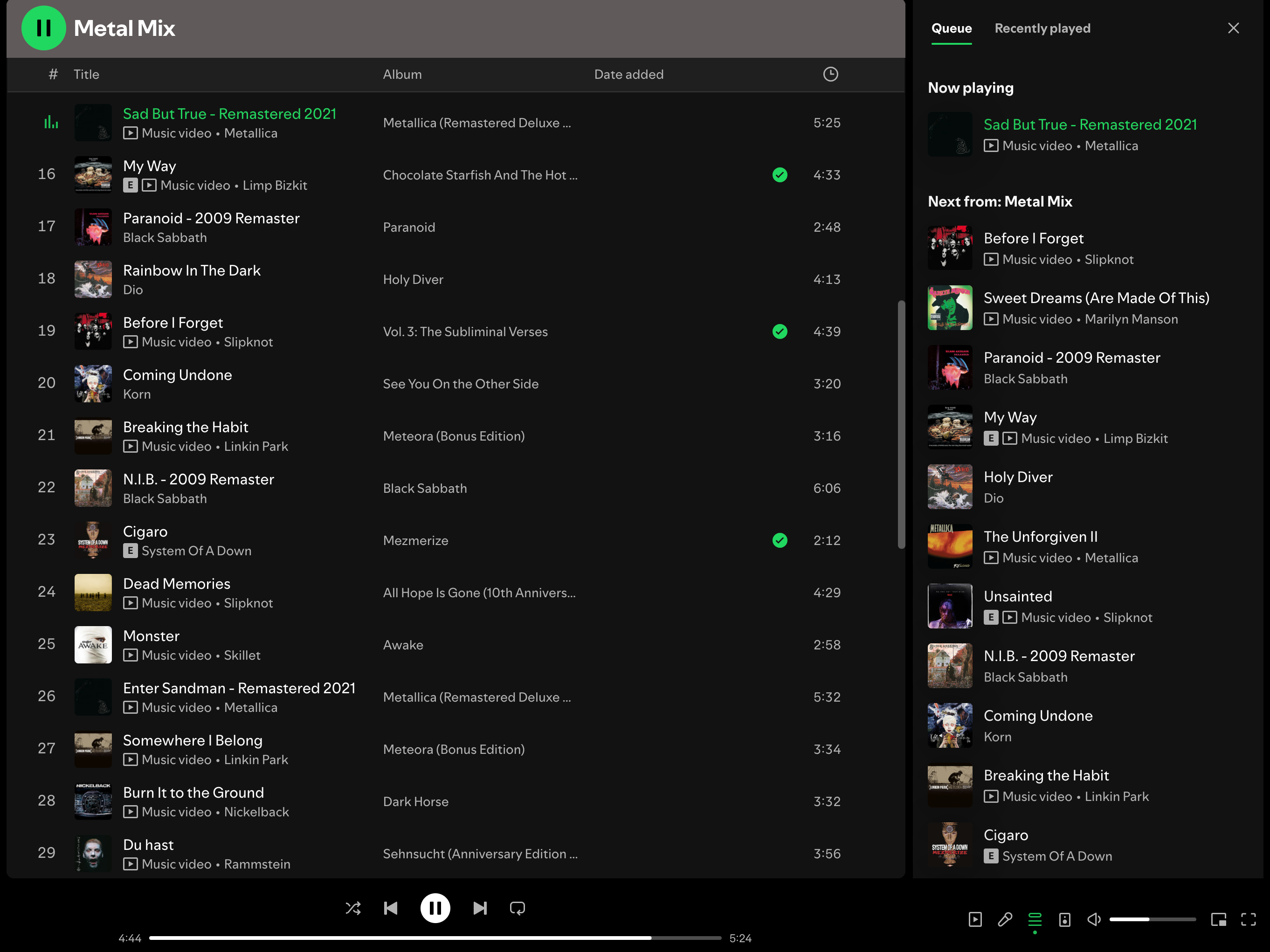
In my desktop app It's not syncing even inside the spotify app. If you check the playlist and the queue, they are completelly different.

Yup! Just here to confirm THIS IS STILL AN ISSUE IN 2025. 3 different devices, 3 different sets of Daily Mix. Sometimes (sometimes) 2 of the devices are in sync. My specs:
Macbook - 1.1.89.862.g94554d24
iPhone - 8.9.19
Android box - 9.0.56.591

Hey folks,
Apologies for the radio silence and we appreciate your participation in the thread.
We'd like to take a further look into this behavior of the inconsistency of the Daily Mixes playlists across devices and it would be very helpful if you could share with us the following details, if you've not already done so:
- Exact steps to reproduce the behavior (if you're using the Connect feature for example).
- What troubleshooting steps you've tried so far.
- Device(s) and the OS-version(s).
- Exact Spotify-version.
- Does this happen in the Web Player as well?
- Is the queue different on each device?
- Are the playlists sorted by the same order across devices?
Thanks and we'll be on the lookout.


The issue is still reproducible.
For me, the contents of Daily Mixes are consistent on desktop (between the app and the Web player), but in the Android app, the songs are completely different.
Exact steps to reproduce are unclear, as the issue is quite random but consistent.
The queue is different between devices, too. But not always. Sometimes it's the same, but gets messed up when I play the next song.
Moreover, when I play music on desktop but then try to change the song using phone - the playback on PC stops completely (but only if I tapped the song that is present on the phone's queue, but not on the desktop).
When I try to start playing a song on my PC using my phone, it doesn't start. In the desktop app, there's an error "Spotify can't play this right now...". So I literally can't control what I play on my PC from my phone. But only for the songs that are present on the phone's mix but are missing on PC.
As for your question about sorting: some songs are completely missing on one device while being present on another, and vice versa, so I think sorting is irrelevant here. But the number of songs in the mix is always 50
Versions:
Desktop: Spotify for Windows (64 bit) 1.2.74.477.g3be53afe
Android Phone: 9.0.88.1405 (latest as of the time of this post)