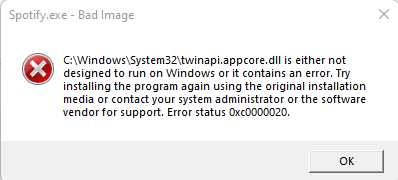
Bad image issue

Plan
Free/Premium
Country
Device
PC
Operating System
Windows 11 Pro
My Question or Issue
Cant install Spotify, tried deleting and reinstalling from both app store and as a program but still this issue persists. I need help. Thanks
Accepted answers
All comments

issue persists.

Hey @thedesertedfox,
Thanks for getting back to us!
Do you experience the same behavior when you open the Web Player?
It's also a good idea to check for any pending updates on your PC and browser.
In case you're still unable to install the app, we'd suggest to reach out to Microsoft as this error is not common and it seems to be caused by the operational system that you use rather than the app.
Hope this helps,
Cheers!
Hey,
No I didnt have any issue with using the web player, it worked just fine.
However, updating my PC yesterday seemed to fix this whole problem, Spotify now works just fine. Thank you all for the help, you guys have been amazing!
Happy holidays,
Thanks again,
Rhys

Hey there @thedesertedfox,
Thanks for the post.
Glad to hear that everything is working fine for you again 🙂
Cheers.
Hi there,
Can you try deleting all Spotify files present using the steps for Windows listed here? Then, when installing Spotify again, try using the .exe file from our site and run it as an administrator (you can find the option for that by right clicking on the file).
Hope this helps.