Introducing Smart Shuffle!

Introducing Smart Shuffle!
We know that our users love creating their own playlists to capture key moments in time – in fact, playlists created by users often become their most-streamed playlist for the first several months but listening to these playlists slowly fades overtime, and users are eager to discover new music.
With this in mind, we’re excited to launch a new play mode called Smart Shuffle that keeps listening sessions fresh and provides personalized recommendations that perfectly match any listeners’ playlist vibe.
This update will roll out to Premium users on mobile devices starting today.
How does Smart Shuffle work?
- You can use it in any playlist created by you, and your Liked Songs.
- To activate it, just use the Shuffle button to switch between regular play, Shuffle mode and Smart Shuffle.
- When Smart Shuffle is on, recommendations are added to your session automatically. You can find all the recommendations sitting in your queue.
- You will be able to recognize the music we are recommending with the sparkle (✨) symbol next to the track. For a playlist with more than 15 songs, we’ll recommend one song for every three tracks.
- And the best part, your original playlist remains untouched, so you can add any new track that catches your ear.
- If you like a specific recommendation, just save it using the plus button in the Now Playing View. If that song doesn’t hit right, just tap the minus to remove it from the recommendations. This is then used to better adjust the suggestions we put forward.
- Every time you turn Smart Shuffle off, a new mix will be available every time you activate it again.
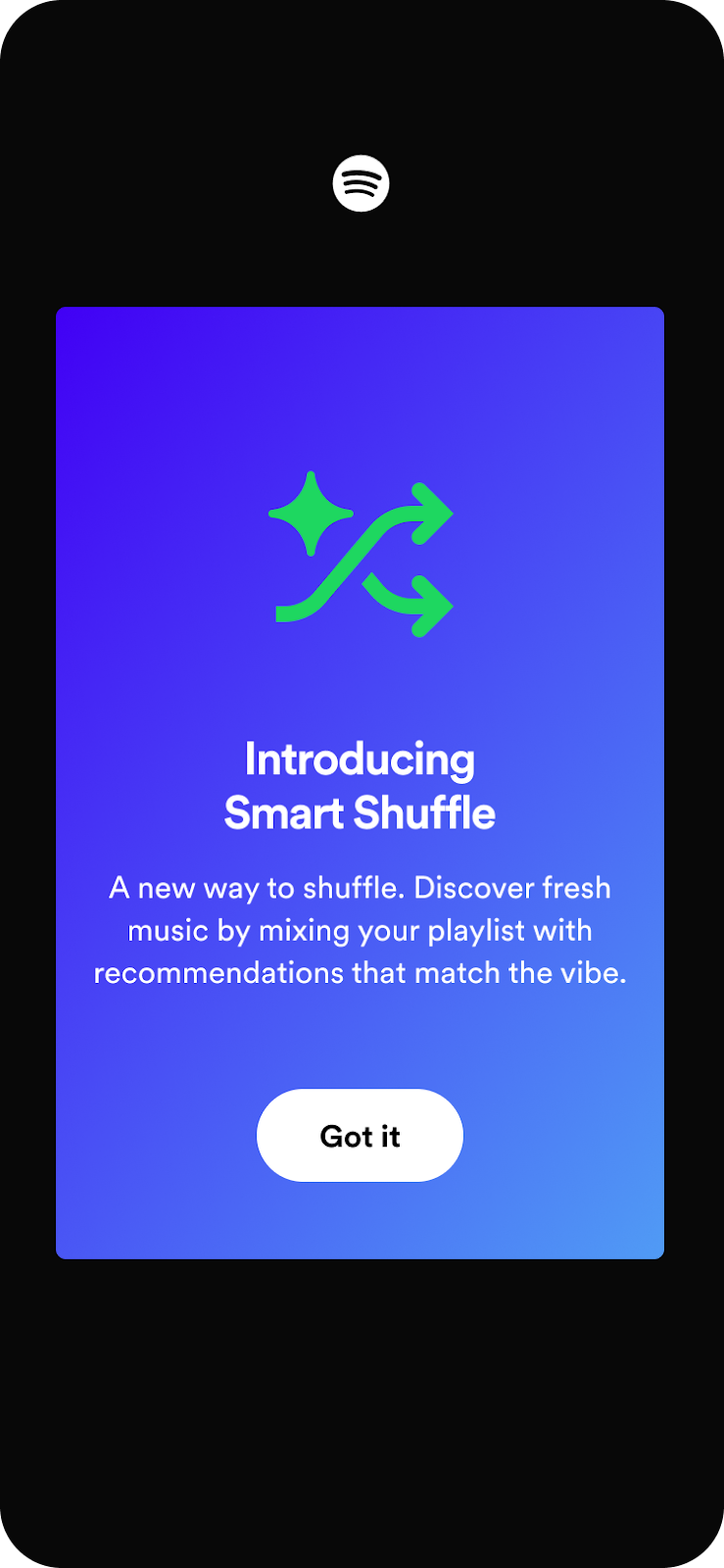 Introductory page
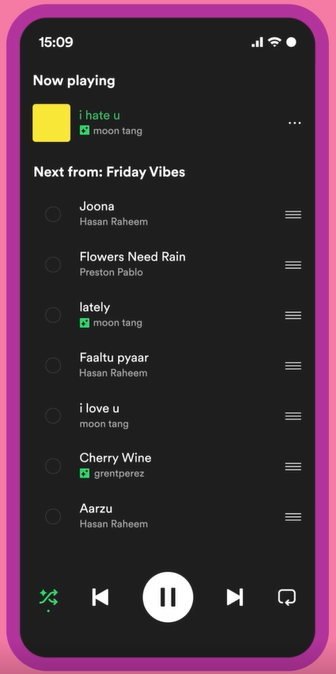 How the queue will look
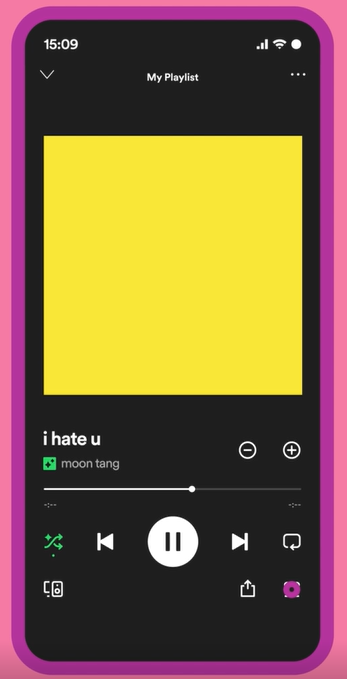
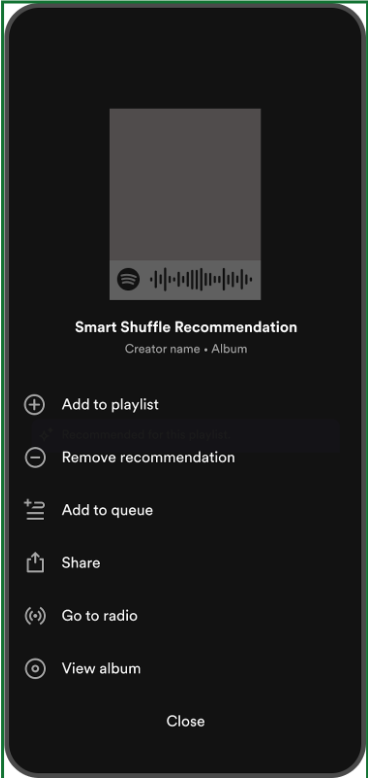
Adding and removing recommendations.
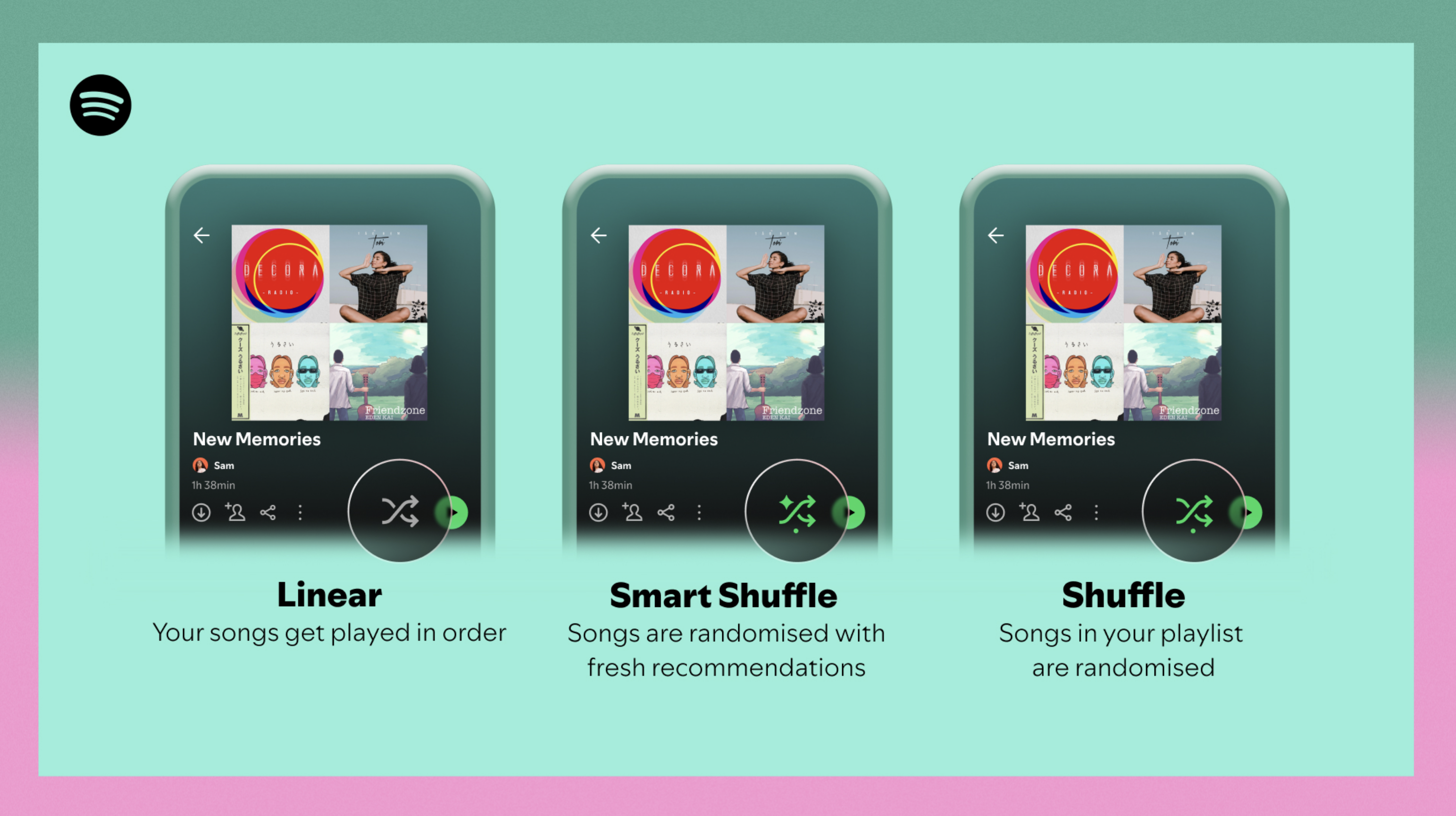
Different playback options.
FAQ
What about the Enhance feature?
For now, Smart Shuffle will replace the Enhance feature.
What will happen to Discover Weekly and other regularly updated playlists?
For the time being, no changes to those will be made. Smart Shuffle aims to improve the listening experience for user curated playlists.
Does this mean that using Smart Shuffle will cause my carefully curated playlists to get cluttered with new recommendations?
No! Your original playlist remains untouched, so you can add any new track that catches your ear. Smart Shuffle won’t change your playlist without your explicit permission. What changes instead is what you'll hear during each specific listening session
🌟 I would like to disable Smart Shuffle permanently. Can I do that?
Yes, you can! Just go to Settings and privacy and then to Playback and toggle the option Enable all play modes to off. This will mean you will only have the regular shuffle.
Note: This option is for Premium users only.
We hope you're as excited as we are about this new play mode. The official Newsroom announcement is out, you can check that out too. For any and all feedback on the matter you may have, you're more than welcome to comment in the thread below.
Accepted answers
All comments

I've had the new Smart Shuffle in my mobile app for a while now.
I would prefer if the feature was reverted back to the Enhance button. The new "Smart Shuffle" mode has made the app much harder to use for me.
It is really annoying now that when I want to go to a playlist and turn shuffle mode ON and then later turn shuffle mode OFF, I have to wait for "Smart Shuffle" to load first with the spinning icon which can take up 2-3 seconds before I can THEN turn OFF the shuffle mode completely. This is really annoying. It also affects the shuffle button on the Now Playing View. At first it feels as if the shuffle button is lagging and taking a while to respond to your tap due to the loading icon. It's just not easy to turn off when I want shuffle mode completely off.
Enhanced being a separate button was easy to understand and turn on/off. With it now being lumped into the Shuffle button, it will be much harder for users to use. Shuffle and Repeat mode buttons are standard controls of almost all music players. By changing the way the Shuffle button performs will be a huge learning curve. I can just imagine having a hard time explaining this to people I know who use Spotify especially those that are older.
Every music app has a shuffle button. Spotify is the only music app (that I'm aware of) that has made Shuffle harder to use by making it have 2 different modes. To turn shuffle off, you first have to turn Smart Shuffle on, which takes 2-3 seconds to load with the spinning loading icon, then you can finally turn it off.
Also, free users upgrade to Premium to get away from Shuffle Play mode where suggested songs randomly gets throw in. A lot of free users will upgrade, and complain that even though they are paying they still have the free Shuffle Play mode, and not know they have Smart Shuffle mode turned on since suggestions are being thrown into the playlist. The Enhance button just made more sense and was probably easier for new Premium users to understand.
Spotify should take into account how changing a standard music player function will affect older people and those that aren't as tech savvy.
Overall, I honestly think this is a terrible change.

- To activate it, just use the Shuffle button to switch between regular play, Shuffle mode and Smart Shuffle.
I find this really, really frustrating. I like having two options, alphabetical (regular play) and random (shuffle), because when I find a good song, like "She Falls Asleep, Part 1" I like turning off shuffle to listen to "She Falls Asleep, Part 2" but for some reason this Smart Shuffle takes me off of the alphabetical order when I come back to regular play and it takes me to some weird order I still don't understand but it's not shuffle. I've tried to disable it but there is no way I was able to find.

There needs to be a way to disable this system wide. Adding a button press that lags to turn off regular shuffle is an unacceptable design choice.
Smart shuffle as a whole isn't bad but the forced integration with regular playback is idiotic.


I'm in the same boat. It's extremely annoying 😕

Hey there, welcome to the Spotify Community!
This might be related to a recent change Spotify made. Check out the smart shuffle which has replaced enhanced here.
Let me know if you need anything else.

Where can we give feedback on this because I'm disliking smart shuffle. The enhance button was good because you could add songs to a list in an order you like but smart shuffle will only add songs AND shuffle. I can't separate the two actions.

I just get so confused by the decision makers at Spotify. I use the app for hours every day so I'm not just complaining for no reason.
In the case of smart shuffle why not just leave the enhance feature so we can curate playlists easily without waiting for new songs to pop up in the queue? Are you not learning from the past? Remember when the 'Radio' feature would not reveal all the songs at first and it was widely panned?
People don't want surprises in a random shuffle of their playlists. Give us the power to curate; you just make educated suggestions and get the heck out of the way.
This new smart shuffle thing makes life so much harder for people who want to have a smooth listening experience.

Is there a way to completely disable smart shuffle? I like to be able to shuffle songs in playlist that I've already made without all the hassle that comes with smart shuffle. It's already ruining my listening experience....

I like smart shuffle, but I'd love if enhanced playlists were still an option for those playlists that you want to listen in the order they are in.

The idea of Smart Shuffle is ok, i'm not entirely against it but if I have to choose one, the 'Enhance' button was far better. If we can manage to keep both, it would be nice.

Enhance is/was superior. There’s no reason to just suddenly remove it after implementing it across the mobile and desktop apps. It’s way too late to go back to Smart Shuffle now; this decision is baffling.
- Enhance had its own button, which was more clear and easier to toggle than having to repeatedly press the Shuffle button
- It provided visible, immediate song suggestions instead of hiding them in the queue
- It kept the Shuffle button simple for those who don’t want the smart feature; now disabling shuffle mode takes extra tapping (and often a loading animation while Smart Shuffle loads before you can disable it)
Now we have an even more fragmented experience between desktop and mobile, in addition to the “+” disaster.
Do the dev teams at Spotify even meet with each other? Why implement a feature across all platforms after A/B testing just to change your minds months later, leaving the inter-platform UX in a nonsensical limbo? What the F are you guys doing?

I completely hate smart shuffle, it slows down my switching from shuffle to non shuffle. Please bring back the enhanced playlist feature or atleast make the smart shuffle feature optional in the settings.

Utterly useless change. Adding lag to shuffle and hiding new songs in the queue. Removing enhance for this is completely insane.

Even though I don't hate the smart shuffle, I think that removing the enchance button was a regression. You have much more control about your playlist, especially when you try to create a new playlist.
I think that these two feature can coexist rather than remove or keep the other.

I am a half an hour away from canceling my Spotify subscription and going with Pandora or something else because of this stupid, smart shuffle… Somebody better fix it by the end of next week or I’m done with Spotify ….done!

Spotify removed this function on Android ! 😉

"Enhance" was so much better.

I recommend Deezer. I like the interface a lot, has better recommendations, and NO smart shuffle. Plus you get HiFi (note it's not Hi-res) for a couple of dollars more.
I'm only keeping Spotify for the family plan and better integration with some appliances like the car player and Echo devices

Thank you, I hate it.
- You are actually taking away my ability to decide how and when to listen to the added (enhanced) songs by putting them on the queue, cause if I want to check how a specific song feels, to assess if I want to add it, I have to jump over the previous songs of the queue for it, so those get removed from the queue. So if I want to check the "smart" added songs, I have to do it in order.
- I have to decide on the spot if I want to add a "smart" song to the playlist, cause it doesn't stay visible in the playlist once it's out of the queue. What if I'm in the shower? What if I'm biking? What if I just don't want to have half my attention in constantly evaluating possible new additions?
- I like the enhance button cause it gives me suggestions that I can easily include or exclude from the playlist, and most importantly it gives me a steady expanded playlist allowing me to get a feeling for the "enhanced" songs over time and add them at my own pace.
I understand the point of smart shuffle. If you have and already curated and finished playlist you can get what you call a "fresh listening" of it. Sure, but you could also do that with the Enhance button. What only the enhance button can do is help you in the process of creating new playlists. It was an absolutely vital option for me, and now you are substituting it for something that does less in a more inconvenient way.
Please BRING BACK TO ENHANCE BUTTON

I strongly hate the fact that you cant disable smart shuffle in settings anywhere. when i use Spotify i shuffle my playlist until i like what the queue looks like. now, not only do i have to deal with smart shuffle, but it makes me reopen the queue menu every-time i want to shuffle again. absolutely terrible.

i hate it because i usually press shuffle multiple times to find a queue that i like, the new function makes it laggy while doong that.

How about asking us to join a beta version to see if we like the new changes before they get implemented for everyone?

Plan
Premium
Country
US
Device
iPhone
Operating System
iOS 10
My Question or Issue
I woke up this morning to find the shuffle button on my phone not working. The app would give me the pop up over and over again "Something went wrong - Go Back" until it lagged out and crashed (happened multiple times). When I open the app back up and tried to shuffle, it continually had me use smart shuffle which I really hate.
Smart shuffle is still there even when I am offline and only trying to listen to my downloaded playlist songs. It haunts me. I cannot escape it.
Smart shuffle is an awful addition and truly ruins my experience using the app but it's fine if I can disable it. Except there is no option anywhere in the app or settings or web player to get rid of it altogether. Apparently smart shuffle has been around for a while, so I don't know why I just now am getting it, maybe because I updated my phone recently? But the smart shuffle is now put in place of the easy option to repeat a song over and over again, which sucks. I actually utilize that feature frequently when I get obsessed with one song and it's really convenient to choose when I get to listen to that one song specifically from my playlist, or easily turn it off when I want to listen to the rest of my playlist normally.
Also, even when I am able to choose to shuffle normally, if I click one too many times by accident or don't like the proposed shuffle and try to shuffle again, it automatically chooses smart shuffle as the next option and skips whatever song I had playing for some random one I don't know and it sucks, and when I click smart shuffle off it jumps back to my playlist normally but my song was already interrupted so what's the point anymore. There really needs an option in settings to turn it off altogether, I hate even seeing recommended songs and I wish there was a way to get rid of that too, but that's easier to deal with since they're mostly out of the way.
This is not an issue for me on the web player or laptop app, just my phone, which is where I use spotify the most while I'm driving. I updated the app hoping that would fix it and it didn't work. Still lagging and crashing, still can't get rid of the app ruining smart shuffle. I don't want to log out of all of my accounts or delete and reinstall the app like the other solutions I've seen, that's a huge pain.
I get why it's a thing and it might help a lot of people discover new music and that's cool, keep the feature for those folks. It personally frustrates me to tears that I can't get rid of it. Let me add my own music and stop shoving stuff I don't care about down my throat.
I am pretty sure the old Enhance button and the new Smart Shuffle that replaces it, only work on the playlists you, yourself have created.
I haven't seen this option available when listening to playlists created by others.

This exact thing is happening to me. Whoever came up with the idea for this smart shuffle is an **bleep**. It showed up on my Spotify last year but went away and now it's back as of yesterday, and there isn't a way to get rid of it. I do not want recommendations for music. I do not want to continuously have to bypass it when switching off shuffle, especially when driving. If I wanted to be a lunatic that didn't get to pick the exact songs I listen to, I'd listen to the radio or Pandora. Spotify's "enhancements" are just ruining their app.
wow, they bleeped i*d.i.o*t. Didn't know it was such a hard swear.

Make it a different button or require a press and hold

Hi there folks,
We're here to say that we've taken your feedback into account and you will now be able to disable Smart Shuffle from the app settings, as described in this now implemented idea!
The steps are as follows:
This is for Premium users only and is only available on mobile at the moment, but rest assured it will be coming to desktop in due time as well.
Cheers!