Can't sort playlists

Plan
Premium
Country
Germany
Device
Samsung Note 10 plus
Operating System
Android 11
My Question or Issue
I simply want to sort my playlist to recently added and not added first, but since the last update i cannot find this information, i've been trying to find it for days.
I tried to go to my playlist and search for an option in the three dots menu but its not there, not even in the edit playlist option.
Accepted answers

Turning off the smart suffle was the answer for my question
All comments

Hey @Crylia,
Thanks for reaching out about this in the Community!
Can you send us a screenshot of what you're seeing when you click the 3-dot menu and open the filter option?
We'll be on the lookout for your reply.
This is what I see, I'm missing the option to sort by recently added or by name. I also got no option to reverse the order.
It would've taken me much less time it this option would've been called sort playlist or just sort and if it would've been next to the 3 dot menu or inside it, where you would expect it.

2 out of 3 playlists I can scroll up and the filter button is there. But one of my playlists it is not . How do I fix this

i found the solution, simply disable enhance

I still can't figure this out. The headers are no longer hot links, and the drop down (3 dot) menu option list has nothing! Grrr
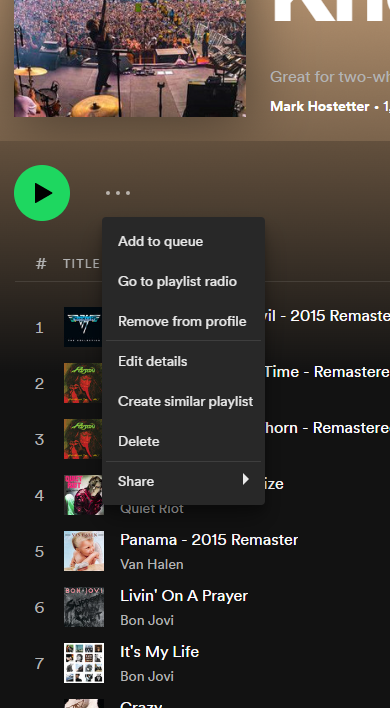

Hey @Knees-to-the-Breeze,
Thanks for posting in the Community.
Could you elaborate on your experience with a few screenshots so we can guide you on how to get this sorted out?
Keep us posted,
Cheers!

This d id not worked for me. Whats did is that you must not be in Enhanced mode. When done scroll up to top MANUALLY. By default its not at the top! The Search bottom wil appear and next to it the Short bottom.
Remind you that if you switch back to Enhanced playlist mode the sorting resets! This means that you cannot use the Enhanced mode at all!
What is "enhance mode" and how do I disable that?
Turning off the smart suffle was the answer for my question

Thanks this was driving me crazy

+1 to disabling the smart shuffle, thanks. Wow what an embarrassingly bad UX.

Thank you! I was losing my mind, but by clicking off the "smart shuffle," I can now scroll up to the "sort" button.

Finally... why hide it like that... who would think to pull down ...terrible UI

Yep me too. For some reason the smart shuffle breaks Spotify.
It would've taken me much less time it this option would've been called sort playlist or just sort and if it would've been next to the 3 dot menu or inside it, where you would expect it.