Desktop: New Your Library sidebar

Spotify is introducing a new Your Library sidebar in the desktop app and Web Player.
The new Your Library sidebar improves navigation and makes it easier and faster to collect and retrieve all types of content, bringing new features to desktop that you're already familiar with in the mobile app. The new sidebar is also more customizable than before to meet different preferences.
This thread is your go-to destination for learning what's new, asking questions, getting help for issues you might have, as well as to share your feedback about the new Your Library sidebar for desktop. Also, do you have any tips for other users on how you are using the new Your Library sidebar? We'd love to hear them.
What's new in the Your Library sidebar?
- See your entire collection and all of the content types (not just playlists)
- Filters for your collection (Playlists, Artists, Albums, Podcasts) that can be combined with other filters (By you, By Spotify, Downloaded)
- Sort options for your collection (Recents, Recently Added, Alphabetical, Creator, Custom Order)
- Chosen filters and sort options will be remembered in the sidebar across restarts of the desktop app
- Search through your collection in the sidebar
- Pinned library items to find your favorites, faster – current limit is 4 (Playlists, Playlist Folders, Artists, Albums, Podcasts)
- Art covers are now shown in the sidebar
- Compact library layout (no art covers) is available as an option in Settings to increase content density
- Dedicated + (plus) button to create Playlists and Playlist Folders
- Flexible Sizing: A collapsed library view (with only art covers) to maximize the browsing area, a regular width view, and an expanded view for more focused library management and curation. (you can also drag to customize the size)
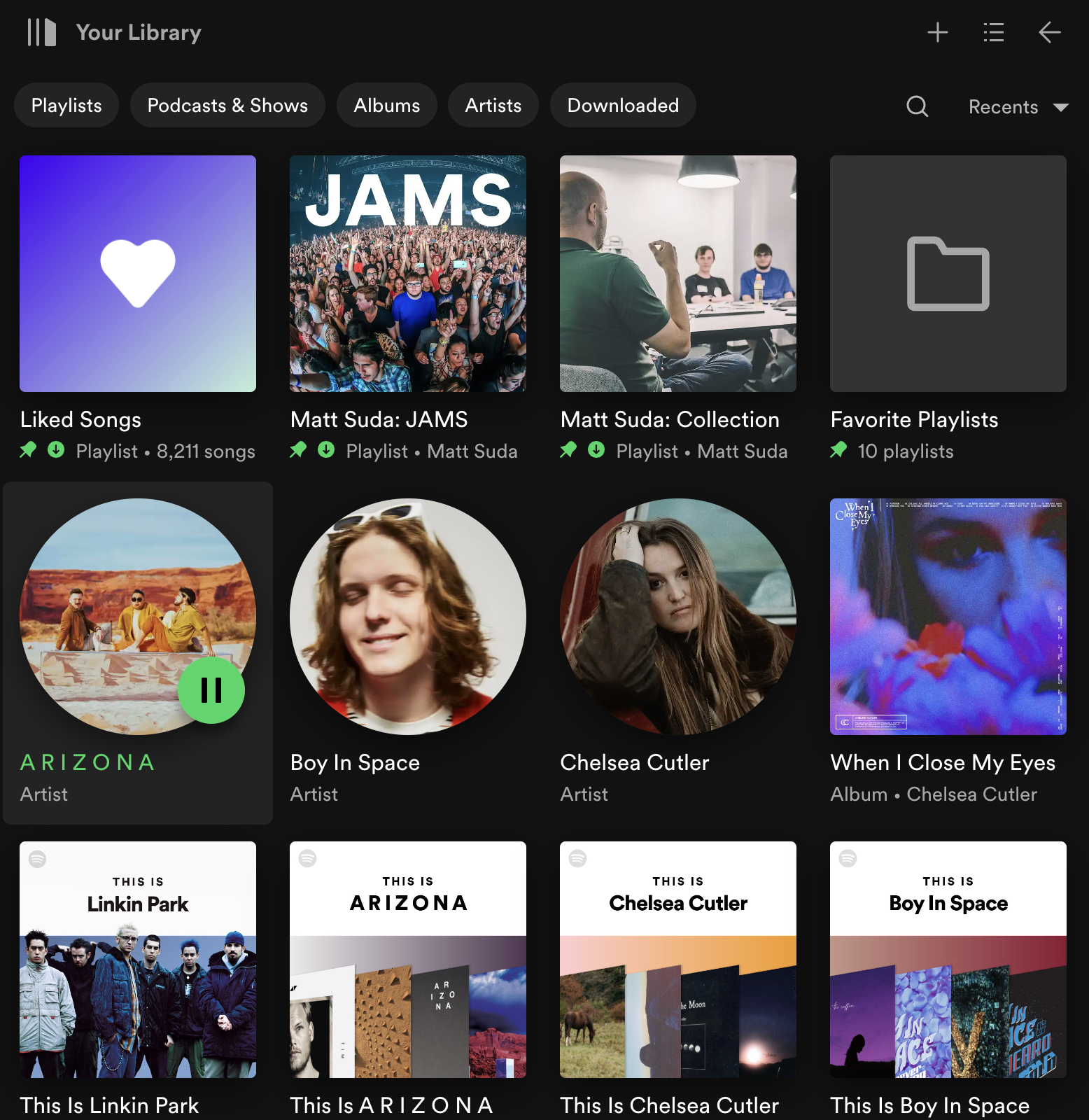
- In the expanded library view, you have options for list view, compact view, and a grid view. The list and compact views show you more details in 2 columns, Date Added and Last Played, and the grid view allows you to see larger art covers.
- Playlist Folders can still be expanded into the sidebar in a tree view, and now when you click on them, the sidebar only shows the Playlist Folder and what's inside for a more focused view.
- Menu option to move a playlist to a folder (with search)
Note: The Your Library sidebar experience will be the same for the most part in the Web Player. However, the Web Player does not support all of the features found in the desktop app. To be able to use all of the features, you can download the desktop app right here.

Tips to get started:
If you need a familiar experience to help you get started with the new Your Library sidebar, here's how to get it as close as possible to the old sidebar that previously only showed playlists:
- In the left "Your Library" sidebar, click on the "Playlists" filter at the top.
- Then, in the drop down menu select "Custom Order" under "Sort by". You will then see your previous playlist order and be able to move your playlists and folders like before.
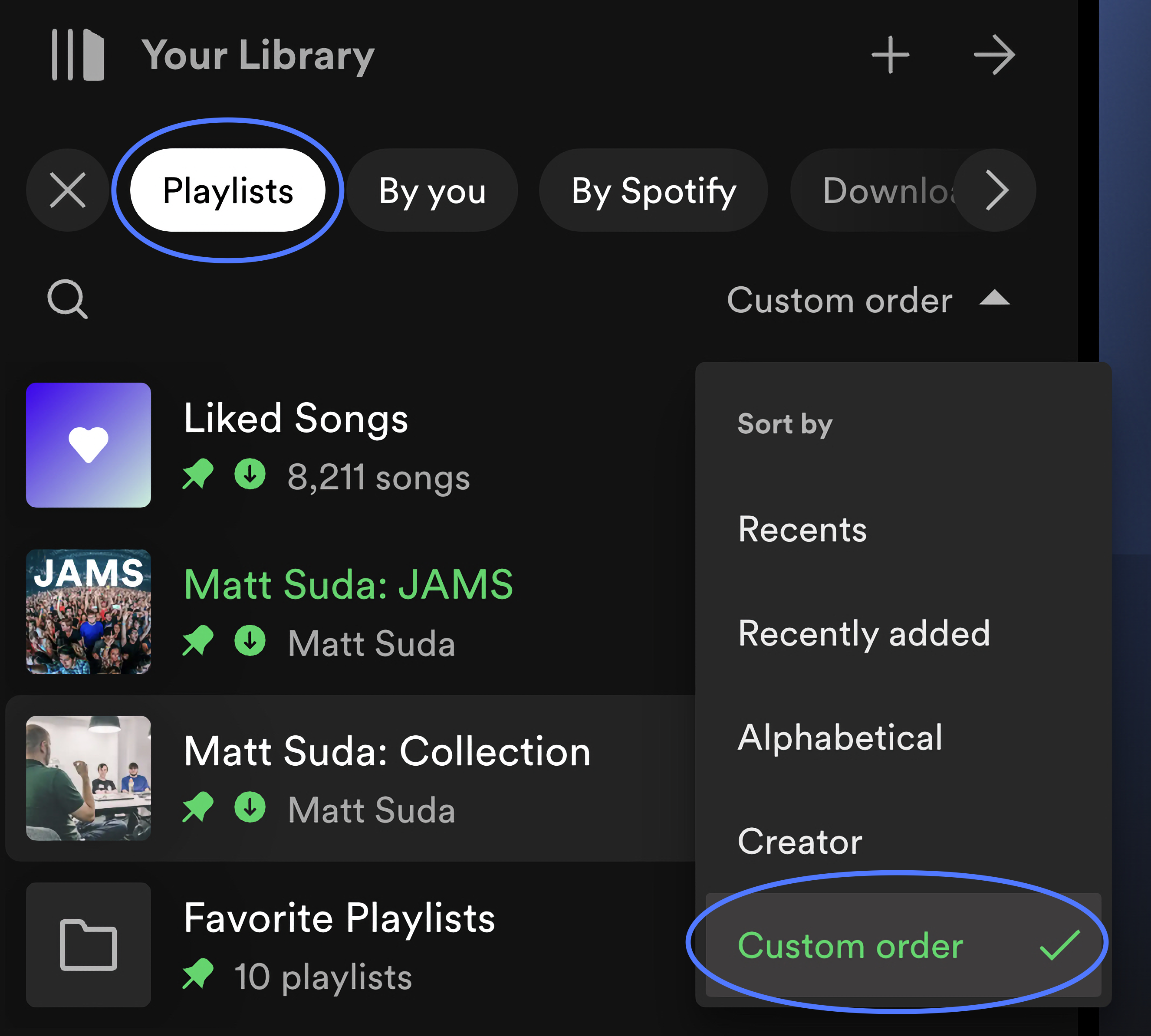
- Your currently chosen filters and sort options will be remembered across restarts of the desktop app.
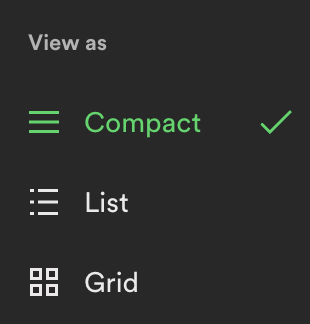
- If you would like to only see text in the Your Library sidebar (no art covers), go to the drop down menu and at the bottom of the menu click on "Compact" under "View as".
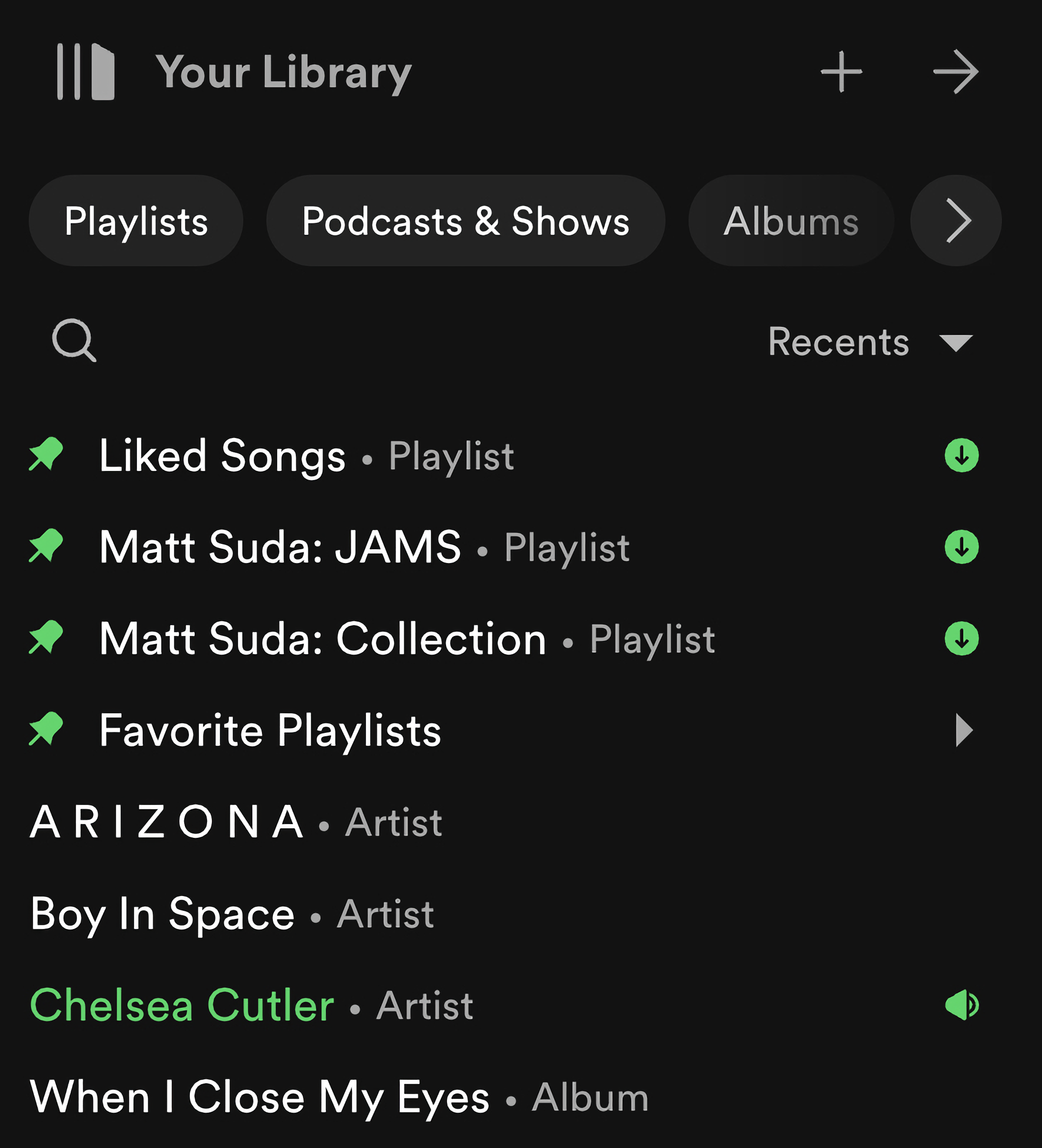
- Flexible Sizing: You can drag the Your Library sidebar to different sizes. Fully expand the sidebar by clicking the arrow button at the top, and fully collapse the sidebar by clicking on the "Your Library" heading to see only art covers.
- At the top, you can scroll through the different filters with your mouse scroll wheel for faster navigation when the sidebar is set to a smaller size.
Walkthrough of the basics:
Sidebar List:
You can now see your entire collection and all of the content types (not just playlists) in the sidebar list. At the top, click on the filters to filter the content you want to see, and click on the drop down menu to change the sort order or view of the list. To create a new Playlist or Playlist Folder, click on the + (plus) button at the top right corner of the sidebar. To search through your collection, click on the search button.

Filter Options:
At the top, click on the filters to filter the content you want to see. You can scroll through the different filters with your mouse scroll wheel for faster navigation when the sidebar is set to a smaller size.
To remove the filter, click on the X or the currently selected filter and then choose another filter to see another type of content. Having no filter selected will show all types of content mixed in the list.
- Playlists
- Artists
- Albums
- Podcasts & Shows
- These can be combined with other filters: By you, By Spotify, Downloaded
Sort Options:
At the top, click on the drop down menu to change the sort order of the list under "Sort by".
- Recents
- Recently Added
- Alphabetical
- Creator
When the "Playlists" filter is selected, you have the option to see your playlists in your own custom order.
- Custom Order
When the "Podcasts & Shows" filter is selected, you have the following option:
- Recently Updated
View Options:
At the top, click on the drop down menu to change the view of the list under "View as".
- Compact (view text only without art covers)
- List
- Grid (bigger art covers)
Flexible Sizing:
You can hover over and click on the right edge of the sidebar to drag it to your preferred width. You can also fully expand the sidebar by clicking the arrow button at the top, and fully collapse the sidebar by clicking on the "Your Library" heading to see only art covers.
In the expanded library view, you have options for list view, compact view, and a grid view. The list and compact views show you more details in 2 columns, Date Added and Last Played, and the grid view allows you to see larger art covers.
FAQ:
This section will answer your frequently asked questions and will be updated with the latest answers.
Related help articles on the support website:
• Your Library • Sort and filter • Keyboard Shortcuts
Can I view the Your Library page in the main browsing area like before?
- Unfortunately, the old Your Library page in the main browsing area is being discontinued with the release of the new Your Library sidebar. You can adjust the size of the Your Library sidebar to be bigger and you can also enable the "grid view" if you would like to see bigger art covers.
How do I see only my playlists in the sidebar like I used to be able to, I can't drag and move my playlists or folders anymore?
-
In the left "Your Library" sidebar, click on the "Playlists" filter at the top.
Then, in the sort options drop down menu select "Custom Order". You will then see your previous playlist order and be able to move your playlists and folders like before.
Your currently chosen filters and sort options will be remembered across restarts of the desktop app.
I don't want to see art cover images in the sidebar, how do I turn them off?
- If you would like to only see text in the Your Library sidebar (no art covers), go to the drop down menu and at the bottom of the menu click on "Compact" under "View as".
How do I get the album art to expand in the bottom left corner like before? When I try to expand the album art, it opens the Now Playing View sidebar to the right.
-
Unfortunately, that is no longer possible. When you expand the album art in the bottom left corner of the app, it will no longer hover over the Your Library sidebar. Instead, the new right sidebar will open up. You can resize the Now Playing View sidebar to your preferred size.
You can read more information about this by going here.
How do I play or shuffle play a Playlist Folder now? (I don't see dedicated pages with play / shuffle options anymore)
- Right click on a Playlist Folder and select the "Play" option. To shuffle play, make sure to turn on the shuffle mode first before selecting the "Play" option in the right click menu.
How do I get to my Local Files now?
-
In the left "Your Library" sidebar, click on the "Playlists" filter at the top.
Then, in the sort drop down select "Custom Order".
The "Local Files" playlist will be near the top of the list under your pinned items (if any).
Feedback:
Where can I give my feedback about the new Your Library sidebar in the desktop app?
- We welcome your feedback about this change. The best way to share your feedback is to comment here in this thread.
Accepted answers
All comments

Reiterate what everyone else says. This new sidebar is horrible. Rather than all the things I need fitting on my screen so I can quickly navigate. Now there are about 5 items visible and I have to go through this filtering palaver to get even close to what I want.

Here is my idea. Give us back the old UI. This is the actual shittiest piece**bleep** UI update I have ever seen for anything. Why the **bleep** is liked albums and artists confined in a small space on the left? With a confusing and ugly layout. The album art is no longer adjustable so if you wish to have it bigger it doesn't scale to the collapsible sidebar so it just hovers over everything obstructing text. Please explain what the **bleep** you guys were thinking? Why do companies like you always have to make changes literally NO ONE asked for nor wants? Why not at least give us UI skin options or something?

Just got this 'update' today, Wednesday for me. The four pin limit makes no sense to me as well, and I'm with you on the UI. Not everything has to be round, stop trying to make it look "new" and linked to the mobile app. There's a reason I mainly use spotify on my PC.
@Silvyah what you said x100. The font size for the playlists titles has been blown up, making it feel even more cluttered as well. I have around 40 playlists that I've already meticulously ordered to my liking, and now with this update they're all out of order, and to get them back into order, I have to use the "custom order" thing which then places the Liked Songs and Local Files playlists at the top, with no option to remove them. 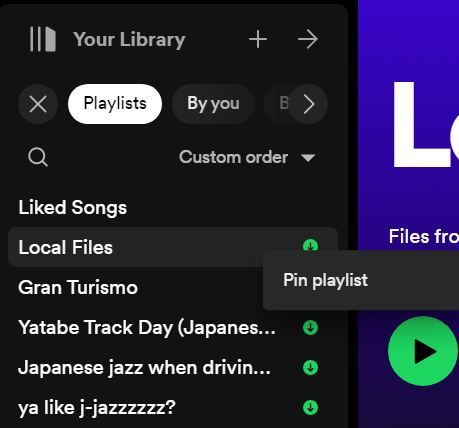
^^ No option to remove, can't move it to the bottom of the list either.
Like you said,
I don't want mobile design on my desktop.
There is a reason it doesn't work for gaming.
There is a reason it doesn't work for websites.
Please, don't.
At the very least, get rid of this idiotic rounded theme, not everything has to have a "new corporate design"
Better yet, just add an option for the minimal theme everyone's used to, they could call it Legacy mode for all I care just let us change it back.
**bleep** it. I'm just gonna install an older version of Spotify without this d o g s hi t User Interface. These **bleep**s trying to justify their job title **bleep**ing everything up for us, the paying userbase, are not going to listen. Just like every single company when they change their design into something nobody asked for/likes. Either give the old UI back as opposed to this shitty mobile looking **bleep**, or give us the option to modify your braindead app to make our own UI's. If the mere acting of trying to use your program makes my cortisol levels rise, its a serious problem on your part, Spotify.

Had to log in just to say how much i hate the new interface. If i want to browse my saved albums they all are on the small scroll list on the left side, instead of how they were in the middle of the screen earlier. I could see way more and find albums easier before. If i want to view my albums or playlists or whatever why am i forced to watch the big ass home screen in the middle with recommendations. This doesn't make any sence and the person coming up with it should be fired.

I must be in the minority, but I actually like the redesign for the desktop app and web player. I like having the content I interact with most right there and being able to resize the panels is also really nice! I think the refresh has been long overdue. I imagine this would be optimal on a touch screen.

Wow, this is absolutely horrible and ugly.
Spotify has a habit of making everything worse, painful to look at and navigate.
They never improve the things that should be improved, it's always about taking away features and making things more awkward to use.
What's the difference between Recents and Recently Added?
Please can I have the OLD previous version back?
We are all paying for this service and should have a say.
This is a joke! What terrible design.
Before, the album art would line up neatly and nicely. Now we have this disgusting mess.

Hey @NyteMyre
You can add your +VOTE to this Idea post to support the addition of images to playlist folders!
See how the Idea Exchange works here.
If my answer was useful, don't forget to give it a 'Like!' If my answer was the solution, don't forget to mark it as the solution! Thanks! 😇 | If you need anything else, please reply and ask, Feel free to follow my Spotify or Community profiles! Disclaimer: I am not affiliated with Spotify. |

Liked Songs is stuck at the top of my playlists and can't be moved. Super annoying. I don't want to see this playlist at all! Is there any way to get rid of it?
Also, is there away to see your albums and artists outside of the sidebar? It's much more difficult to causally browse now.
How can I get the album artwork (in bottom left corner) to re-size as the sidebar re-sizes - just like how it used to behave???
Please can we finally have a comprehensive HISTORY function?
100 songs is just pathetic, but the iphone app goes back 3 months - why??
On the iMac you can just press Apple key and +/- to make the text and everything else bigger or smaller.

The current UI for the desktop app is terrible and severely limits the organization of playlists. The collapsible idea seems nice but when you have several folders, all of the icons look the same and it's so frustrating to navigate through the massive text. In addition to this, you can't order the playlists in a custom way. Why would that feature be taken away?? Please return it to the way it was before with just the text and no images!! Or at least make it an option to choose which layout you would like in settings. That seems like a reasonable compromise.

The Library redesign that occurred on the mobile app is now taking over the desktop app. I don't mind changing the behavior of folders to be more like a file explorer than a drop-down, but it is totally egregious that I don't have full control over how items in the Library are prioritized. I have dozens of playlists sorted into seven folders, but I can only pin four of them to the top. This means that - after filtering for playlists (annoying step) - I have my four most-used folders, followed by Spotify's "Liked Songs" and "Your Episodes" playlists, neither of which I use, and then my other items. This is disrespectful. I expect this kind of screw-you removal of customization from Facebook or Tik-Tok, but I actually pay for Spotify.
Spotify wants to be the "everything audio" destination and seems to think that experiencing music (discovering, organizing, listening, sharing) is the same as with podcasts, but it isn't. And it's giving up on music-friendly and user-friendly ethos in the process.

Saw somewhere else:
ALT + SHIFT + 3
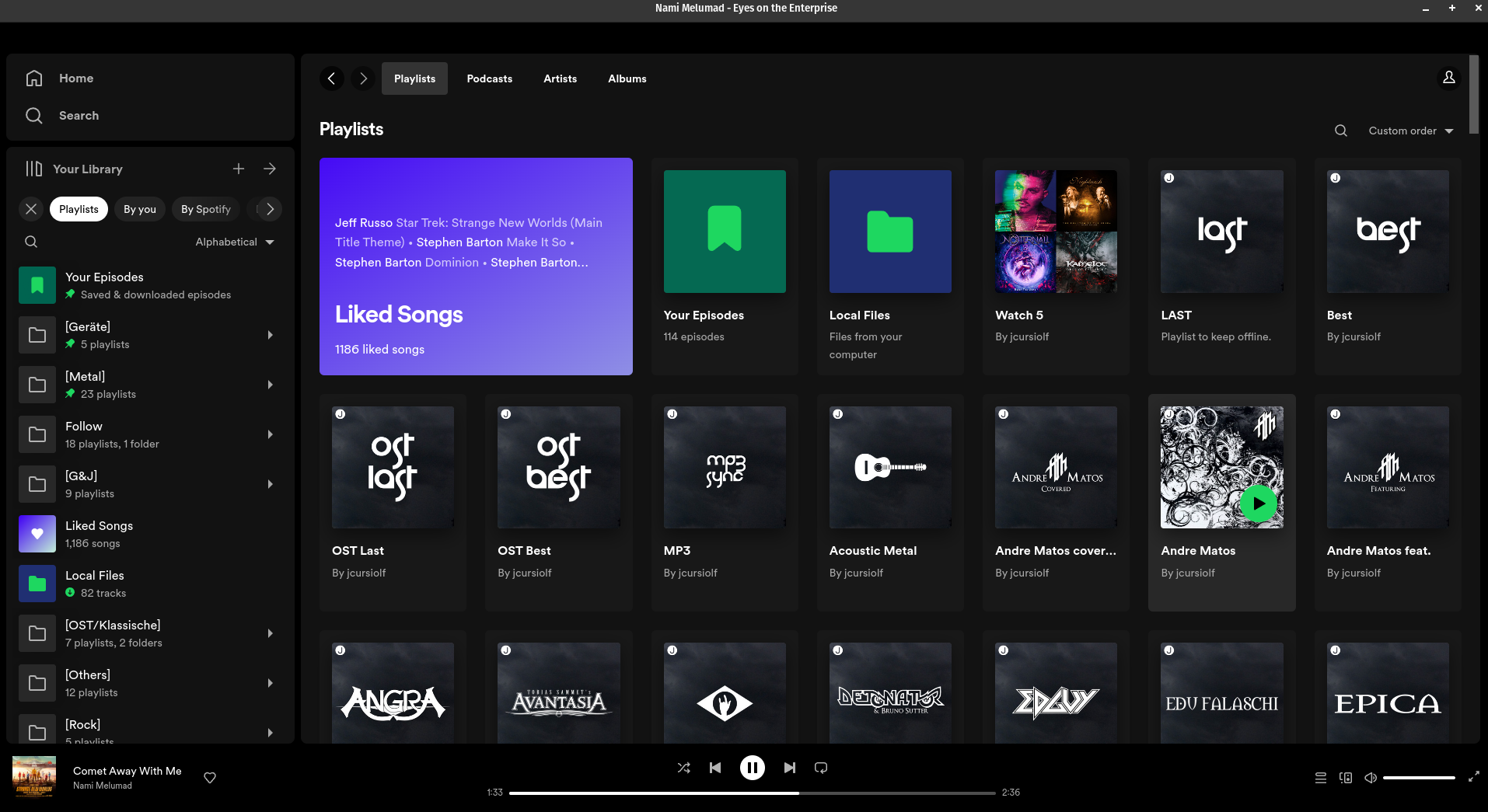

This works on Windows too (Win +/-) and makes the UI a bit more manageable, especially if you tick "Use compact library layout"
Hey @jcursiolf and @icStatic
You can see the full list of keyboard shortcuts in Spotify by pressing Control + (/).
kaworu_bloodpaw, I know, no need to explain how to see the shortcuts. This was a tip for people that want to see the old-style library, since the button for that was removed in the new UI.
hmm this doesn't work on the imac
👍🏻
To be honest, it will probably be completely removed, eventually. We'll see where all this feedback goes.
this is just to get to the playlists screen right?


Let us be able to drag and put our playlists in our own order like the old layout
nice one.
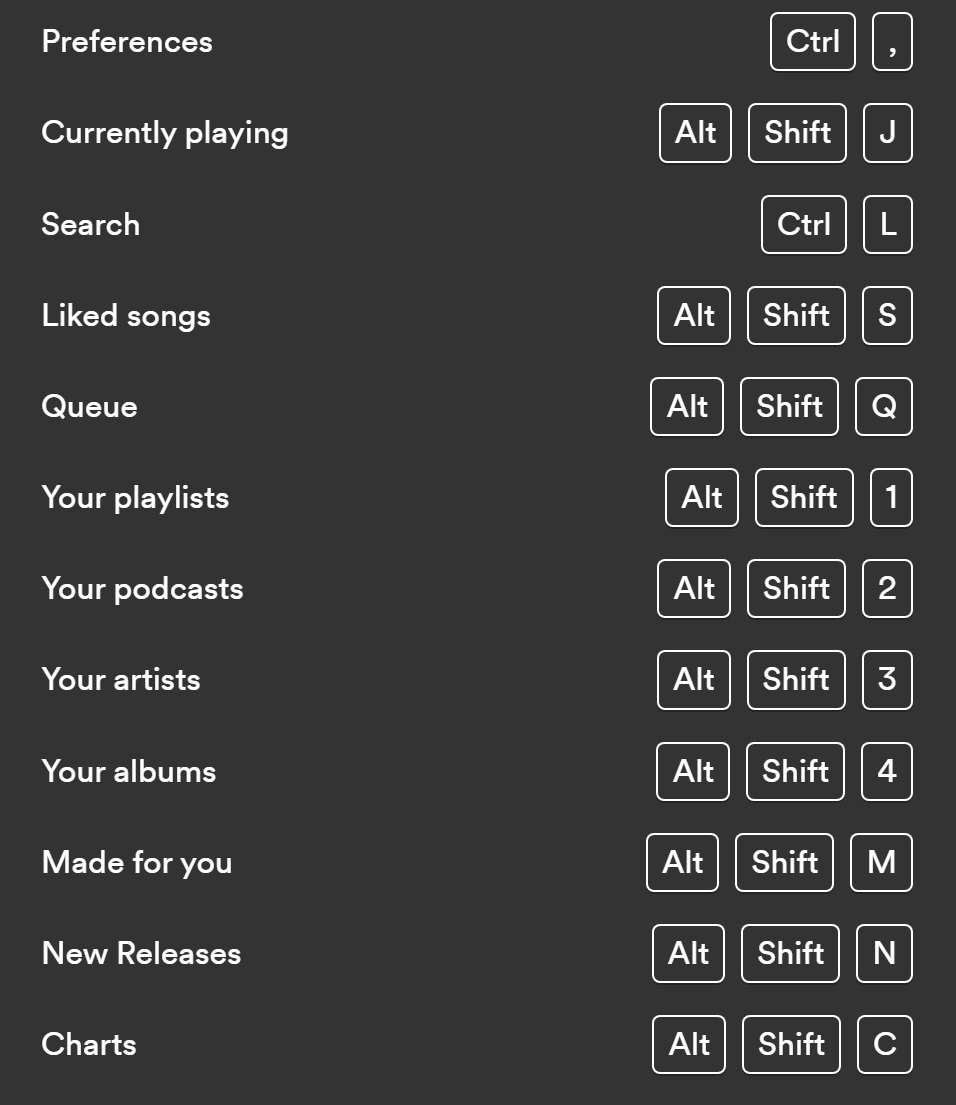
You can use multiple shortcuts to get to many screens that are now otherwise inaccessible.
Here's a full list.
If my answer was useful, don't forget to give it a 'Like!' If my answer was the solution, don't forget to mark it as the solution! Thanks! 😇 | If you need anything else, please reply and ask, Feel free to follow my Spotify or Community profiles! Disclaimer: I am not affiliated with Spotify. |
My custom keyboard shortcuts for going forward/back now no longer work.
I tried re-adding them in my imac preferences and they still don't work. How can I rectify this please - anyone?
Thanks!
Thanks, where did you see this list?
Where is it accessed and can they be changed?
On Mac, you should be able to access it by pressing Command + /
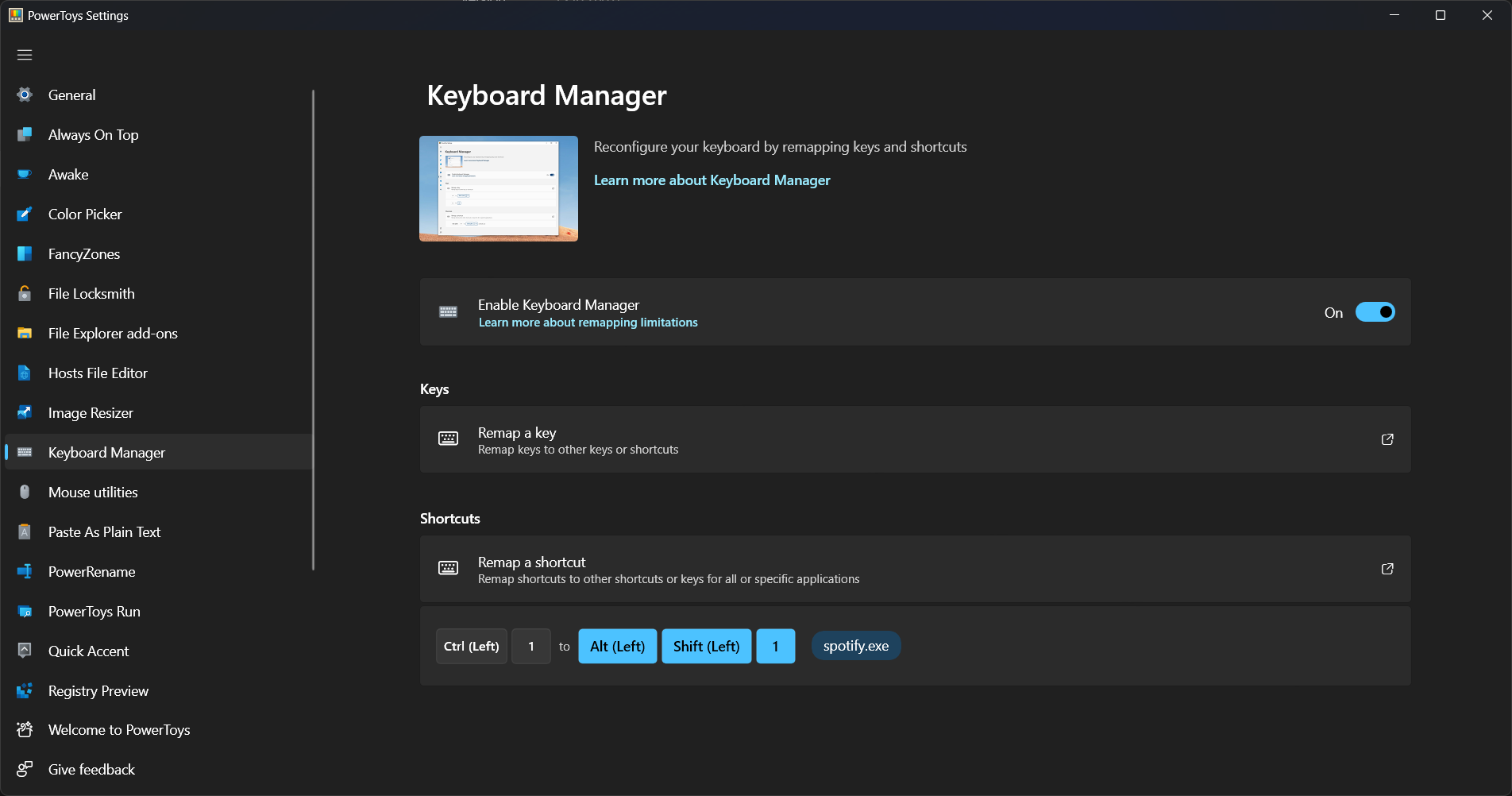
They cannot be natively changed. I know Windows has a tool for custom keyboard shortcuts for the entire system or per app. I have no idea if something like this exists on Mac.
Ex:
I mapped Control + 1 to the keyboard shortcut for the playlists screen on Spotify
Hey everyone,
Thank you for participating in this thread and sharing your feedback about the new Your Library experience on desktop.
Before anything else, we want to assure you that we're reviewing your comments and forwarding each individual user's feedback to the relevant team here at Spotify.
We'd also like to address some of the most common issues we've noticed being mentioned here:
My playlists are out of order after the update (mentioned by @Sylis_ca, @oauo, @sergioro, and others)
I'm unable to move playlists/folders out of a folder (pointed out by @RectangleSquare, @Hencraft, @thisisgok, and others)
The Library sidebar has limited width
Once again, thank you for sharing your constructive criticism and helping to make Spotify better!