[Mobile] Remove current Song from Playlist

Hi
This is a usability improvement for the Mobile devices. Sometimes I want to remove songs from a playlist. This is currently quite a long task to perform on the mobile device.
- I first have to select the right playlist.
- Then I have to locate the song, which is not listed alphabetically. They are listed in the order I built the playlist with the oldest first and newest last.Some of my playlists have up to 900 songs in them and scrolling slowly can be difficult and timeconsuming.
- Then click on the "pencil" icon and delete the track I don't want.
I think it would be a better user experience if we could delete songs as easy as it is to add them to a playlist.
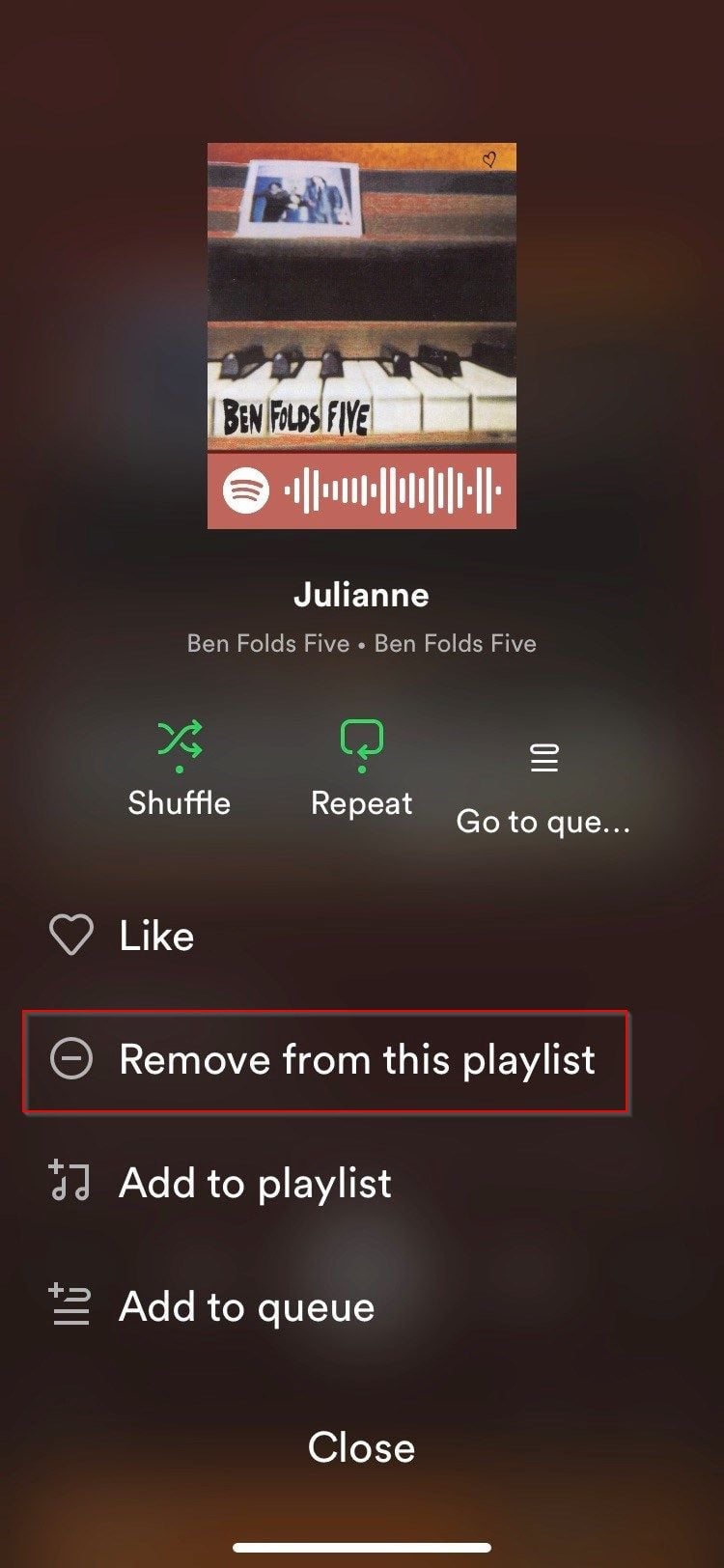
So here's a suggestion for the mobile app, look there's even a space for it on the info page! 

Cheers
J
_____________________
UPDATE 3 June 2017
I have been contacted by user eviljojo22 who has developed a Plugin that creates a playlist named "Remove from Spotify" and every 45 minutes minutes it deletes every song in it and also in every playlist in which that same song appears (which may not be what you want). However, this is an option that may help you before Spotify gets round to providing this very simple function. Good luck (and Thank you EvilJojo22)
Connect on https://spotify-playlist.eivo.fr
_____________________
UPDATE 7 February 2019
I have been contacted by user bamboony who has developed an android app that might solve the problem in the short term:
https://play.google.com/store/apps/details?id=org.bamboomy.delete.deletespotifytrack
_____________________
UPDATE 15 February 2022
They delivered! This feature now exists. Click the three dots while playing a track and select the option "Remove from this Playlist"
Comments

it comes to obvious and reasonable requests for improvement in their
customers' listening experience. Shame on Spotify.


nope, this is not the solution and feature i'm asking for (and such obvious feature should be here).
Some of my playlist have over 500 tracks, and I don't have a time to scroll and look for that one track to remove,
and my playlist because of this grow even bigger.....

Currently, it's really hard to remove a song from a playlist in the Android app. You need to really dig inside and takes a lot of effort to remove a song.
It would be great to be able to remove a song from a playlist directly during the playback screen.

razorre Ymattyd911 describes before complaining as there is not need to scroll if you follow these steps:
- you're in the "Now Playing" screen
- click on the Name of the playlist at the top of that screen
- the app will go into that playllist with the currently playing song selected
- then you can use the 3 dots to remove the song from that playlist
Agreed it could be much simpler, right from the "Now Playing" screen.
And (question for the Spotify UX'ers) why is there no swipe left/right to quickly remove a song from a playlist. We're on a touchscreen, wouldn't that be the most obvious move?

I have a playlist with lots of songs.. time to time i add more songs without first listening them.. almost all of my playlists are downloaded as well.. so l shuffle and listen to the playlist.. then comes one of the song that i did not like.. i want to remove it from the playlist and downloaded songs.. but unfortunately that three dot menu does not include that option!
I search the song in my library, find it and no! there is no option to remove the song from the downloaded songs or any playlist..
So, since there is no search option in a playlist, now i scroll through all that playlist that includes the song i did not like and like to remove and other thousands.. find the song and yes, there it is the option to remove the song from the playlist!
Would you please just make it simple and list that option in the three dot menu of the song itself as well?

Updated on 2023-06-12
Hello and thanks for submitting your idea to the Idea Exchange!
We've gone ahead and marked this as a new suggestion. Spotify Staff will look into this idea once it reaches the necessary amount of votes.
More info on how your feedback reaches Spotify via the Idea Exchange can be found here.
Cheers!

Unfortunately this doesnt work for me anymore since latest update. If i click on the name of my playlist it opens the playlist at the beginning... anyone else reporting this issue??

This is still a problem on my Samsung galaxy. Im driving down the highway scrolling through a playlist on my phone that is 700 songs long trying to not crash while looking for this annoying song so I can stop my ears from bleeding. The problem has been fixed on my Macbook, where I can simply tap the three-dot button and remove the song from the playlist right from the queue. Not so on my galaxy. Arguably its more of a safety concern to be able to quickly remove the song from a phone when listing and driving. I suppose I could just drive in silence for 60 hours a week or listen to music that hurts my ears... Please fix this.

They are constantly switching it around for me, as I had mentioned in two earlier posts (tried to use the permalink feature but couldn't get it to work, sorry).
Lately I have to click on the name of the playlist (encircled in red) to get directly to the song in the playlist, whereas clicking on the "downward arrow" above it takes me to whatever I had open before opening the song in full screen view.

But as I said, things are constantly being switched around and different people seem to get different UIs. The only thing they just can't seem get done is a simple button to directly remove the song from the playlist. Can't imagine a sensible reason why.

icon to turn it off. When I did that, clicking on the playlist name took me
to the current song in the playlist.
So if you're in Smart Shuffle mode, the app is no longer capable of locating the currently playing song in the playlist ??? What a joke! They've had a similar problem before, where the current song couldn't be found when the sort order of the playlist was changed. Go figure ...
Do they even test their products before releasing new features? It is really terrible that we need to detect all of their bugs! And if you start a new topic here and it does not get many votes, they simply ignore it with "not enough votes" or "not right now", instead of just fixing obvious bugs. Come on, Spotify!

Does anyone like the way Spotify does customer service?
I’m wondering if having a subscription means I’m the product and companies the customer. Does anyone else have information on this?
Thanks in advance
@ westfen:
Ty for the info, i tried but it only worked once for me 😔

Selecting the playlist from the top brings you to the song in question, where you can easily remove it. But if the song is from my local files it doesn't know how to locate it and just takes me to whatever the previous screen was.

Mostly i use my favorite songs 'playlist'. I simply add or remove songs with the heart-symbol. I would prefer using real playlists, but its a pain in the a** to remove songs from playlists.
Please add a direct remove button button similar and as accessable as the 'heart-button' in my favorite songs list. I dont want to find every track before removing it.
This would help me to easily manage my playlists and keep them up to date.
Thanks fir reading this.

This function is not working anymore for me in Android app - it was only way to quickly navigate to the currently playing song in playlist. Why this is not working anymore and how to navigate to the playing song now Spotify?
I knew “Univited Guests” on Gould pl was a scam. And I told Spotify many times. Here’s proof:
Swedish Gangs Use Fake Spotify Hits From Affiliated Ganster Rappers To Launder Money
Wow. This really works. 😉

Click on the currently playing song’s ellipsis (…) in the top right corner, then click “Find Song” to locate where the song is in your playlist + Liked Songs and it will bring you right to it. This feature would be really helpful when playing songs on Shuffle!

But you have to scroll and scroll until you see the song playing?? THIS HAS NOT BEEN SOLVED and has been painful for around 7 years I think
@kodadex, this was not the recommended way. The best way used to be: to click the
Playing from playlist
<playlistname>
header on the "Now Playing" screen. This will bring you to that playlist AND will make sure that the current song is scrolled into view.
But there is a better and easier way now since the introduction of the plus/tick button. Click the tick (which indicates the song is in one of your playlists) and in the new screen (overview of all your playlists) uncheck the playlist were you want the track removed. That way you can also quickly move a track to another playlist.

A friend and I were just talking about this -- he showed me that iOS now has "Remove from this Playlist" ... but Android does not.
hey spotify -- we Android people want that too! It's way easier to use/find than navigating to the song buried in the playlist.
@joebelfiore 2 questions:
- You're sure that this was on the Now Playing screen?
- You still don't know that it is super easy to remove a song from a playlist by ticking the green checkmark and unchecking that playlist. You can even quickly move or add a track to another (or several other) playlists. I still don't understand why Spotify sacrificed the heart button for the plus/checkmark button, but at least it offers some very convenient functions.

10 years later - nothing. They don't care about mobile decides android

Really? On ios I am ok with, but would prefer to just delete it, pulling down when in the app to search the playlist for the track and can delete it from there but still is a little goofy. Lately the app is not sytem aware enough to know when there is a wifi connection. You are forced to restart the app to get it to be
Oh I see see they did fix that in ios, just never checked. Just did update and maybe they improved its system awareness? Have yet to try it....
@adamstifuk So you just complain instead of reading through the thread? Because in the comment right before yours (from July 4th) I explained that it is very easy now to remove/add tracks to and from one or multiple playlists in one go. That's for about 1,5 year now.

Im not scrolling on mobile thru 10k songs.
Spotify management be like