Screen flickers when opening web player

Device
PC
Operating System
Windows 10
My Question or Issue
I've never seen something like this. When I open open.spotify.com my screen goes crazy and starts flickering. I attached a video about the issue. No other website does this nor the Spotify app. I can make it stop when I unplug and reconnect my HDMI cable from the video card. It doesn't happen again, only after a computer restart. Any ideas?
Accepted answers
All comments
I've tried the things you suggested but it does the same thing. I thought that maybe a browser extension is causing it but the same thing happens with another browser without any extensions.

Hi @martino315,
Thank you for your reply and the troubleshooting you've done so far. This seems odd so let's continue to investigate this together.
Can you make sure that you're running the latest browser version?
Keep us posted to that we can continue to help you out if you need us to 🙂
Take care!
Yes, I'm running the latest browser version.

Hey @martino315,
Thank you for keeping in contact and for the info sent.
As the issue can be resolved by unplugging the HDMI cable, could you check if the drivers of your video card are up to date? If so, would you mind checking if it happens by logging into a different account in the Web player?
Also, it would be great if you could check on a different PC to see if it makes any difference. This will give us a better picture of the issue to keep investigating.
We'll be on the lookout.
It seems that updating my video card driver solved it. Thank you for the help.

Hey @martino315,
Thanks for your last reply.
We're glad to know that everything is working as it should on your end.
Remember the Community is here in case you need anything.
Cheers!

The same issue happens in macOS 13.2.1 (22D68). To solve this, disable True Tone from your Displays settings. It would be good, however, if Spotify and/or Apple could come up with a solution to use Spotify without turning off this feature.
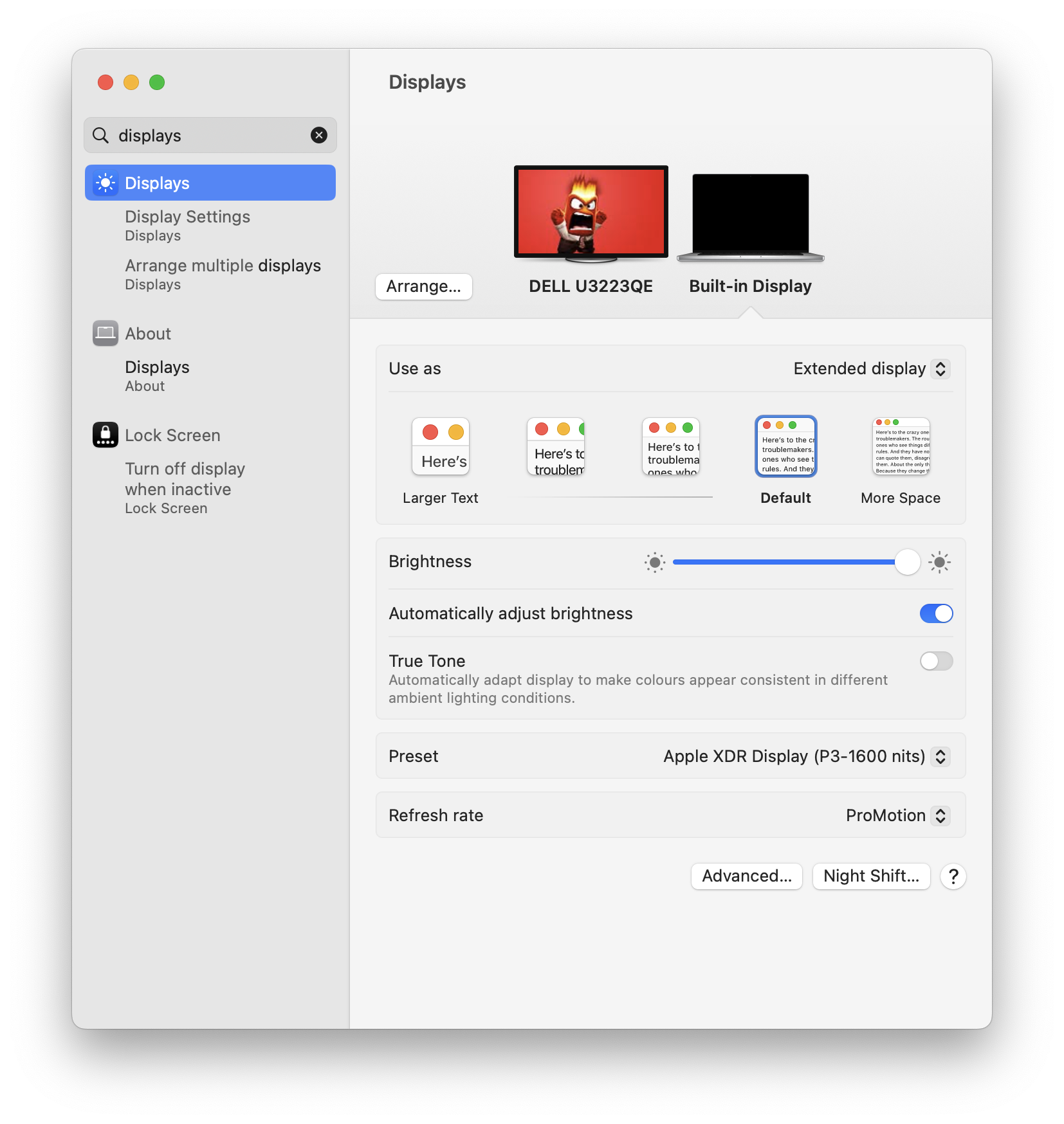
Sorry, it hasn't solved it. After restart the same thing happens. It's been going on for over a year now.
Are you on Windows 10 or on a macOS?
I'm on the lates Windows 10 build.

Hey folks,
Thanks for letting us know.
We've forwarded this info to the relevant team, however, we can't confirm when it will be addressed. In the meantime, please make sure to keep your browsers up-to-date.
Take care,

Same problem here. I was using Spotify (web version) over 2 years using my previous PC. with the new one, screen starts flickering.
Windows 10 Build 19045.2846.
CPU: i9 13900K
RAM: 32 GB DDR5
VGA: Nvidia Geforce RTX 3070 Driver 531.68
Firefox 112.0.2 (64-bit)
weird problem !

This happens with Nvidia 3090 on windows 10 since at least april and has not been resolved with recent driver updates.

Hi! got the same problem as described above, so it's still valid. But I'm glad that I've found this description so now I now that I I wasn't imagining it.

would just like to say ive had this same problem on 3 different monitors on a high quality pc on webplayer and the downloadable desktop app, Ive checked everything possible on my end i even bought a brand new HDMI still makes my whole screen spazz in and out and sometimes even turns off the monitor some how. Very weird im just tryna listen to my playlists

Yeah, this is still an ongoing issue and I can confirm.
**bleep** / 16GB Ram / NVIDIA GeForce RTX 3060.
In fact, the issue seems to not even exist until I open the web page for anything pertaining to spotify and then I get a constant slight flicker in the screen after the fact until I reset my pc.

It seems to be the poorly developed and poorly tested code.
They supply <iframe> code like this:
<iframe style="border-radius:12px" src="https://open.spotify.com/embed/playlist/3DGhHnt93zcS61EuRTCjgZ?utm_source=generator" width="100%" height="352" frameBorder="0" allowfullscreen="" allow="autoplay; clipboard-write; encrypted-media; fullscreen; picture-in-picture" loading="lazy"></iframe>
When really it should just be this, because, it seems by removing this garbage, everything still works - minus the flickering HDMI issue xD
<iframe style="border-radius:12px" src="https://open.spotify.com/embed/playlist/3DGhHnt93zcS61EuRTCjgZ?utm_source=generator" width="100%" height="352" frameBorder="0"></iframe>
I haven't debugged or tested any further than that, I'm sure someone could narrow the problem down even more... but Spotify developers REALLY, REALLY, REALLY, should be fixing this. They caused it.
- If you right click > inspect element, or you are responsible for the website the spotify player code is embedded in:
- Search through the code to find the web player, if it is an <iframe> remove the following:
allowfullscreen="" allow="clipboard-write; encrypted-media; fullscreen; picture-in-picture" loading="lazy"
3. Your flickering will stop.

I've also had this issue with both my old and new laptop, searched the issue & here I am.
UPDATE:
So as it turns out (in my case) the issue was created by my VGA(F)-to-HDMI(M) adapter. It was a passive adapter so maybe with an active one this wouldn't be a problem. I changed my monitor to a HDMI one and the flickering went away.

Hi, i had the same issue on my PC at work. I'm Using 3 Screens with a Quadro T2000. I'm not allowed to change things that require an admin login. However, i tried some things and I have solved the problem for me. I Changed the refresh-rate on one of my screens from 60Hz to 50 Hz. It's kind of an eys sore, but i only need that screen for PDFs or Excel sheets, so that's no big problem. I don't know why that solved the problem, but.. yay? But come on Spotify, this has to be solved by you on the tecnical site, it's been almost 2 years....

This is ridiculous...
I've been experiencing this issue since 2021, on a Windows 10 device, and now on a brand-new Windows 11 device, freshly updated, this stuff is not only still present, but even more annoying as instead of just a black screen, now I get static noise taking both my screens.
And here is the community, giving you lazy bees the answer to your own ineptitude, leading to such a terrible paid-for experience. Do you care? As 10 months later, we are all still going through the same spiel, I would say not.
Just to clarify, don't waste your time with me by asking me such silly questions such as "Did you update your drivers?" or "Did you try installing the app?".
Eff your app, and eff your "customer support". Sort out your own mess out, Spotiffy people.
It's the year 2024, and you can't tweak a buggy line to stop messing with our screens.
It's beyond words.

I can confirm in May 2024 this is still an issue. Across three different devices. On my old device it happened when I opened the webpage and resized it or moved it around. On my new device it does it every time a new song starts, even when the browser is minimised.

I had the same problem and I found my solution in my BIOS Settings. I can't account for all the types of BIOS' out there but in my there was as "Video Out" setting. Mine was set to SPDIF. I changed it to HDMI, rebooted and the flickering stopped. Hope this helps someone.
I thought mine was the SPDIF / HDMI setting in the Bios but the problem returned after a reboot. I looked at my display settings and found a refresh rate was set at 59HZ instead of 60HZ. I switched it to 60 and no flicker for the last 2 days.

English, please. After trying every "cure" I could find on the www (besides changing video boards in my new Mac Minis), I've given up and stopped using Spotify. That's too bad, because it was was my salvation as I fight stage 4 cancer. There's no way in LLLL I'm going to try a fourth monitor or 4th Mini just 'cause yet another site swears it will make my computer usable with Spotify. My life is too short to fight a company that refuses to even acknowledge, let alone fix problems they cause.
connector. Problem solved.


This flickering **bleep** just started on my desktop PC (i7-8700T 32gb memory) and does it on both the desktop app and the browser so it's definitely on THEIR side. I'm about to the point of dropping them as I don't see them ever going to Hi-Res anything. **bleep**, the only reason I stayed this long is because of the interface because it for damn sure doesn't sound that great.
Hey @martino315,
Thanks for getting in touch about this and welcome to the Community.
Would you mind trying to restart your router and your PC to check if that makes the difference?
On another note, could you check if the same happens using a different browser and an incognito window?
We'll be on the lookout.