Local files on my android greyed out and skipped in playlists, but can still be played otherwise?

Plan
Premium
Country
United States
Device
Samsung Galaxy S10e, HP ENVY x360 Convertible 15m=dr0xxx
Operating System
Android 11, Windows 10
My Question or Issue
A couple songs which come from my local files are skipped over in playlists and I can't figure out why or how to fix them. They're shown as greyed out in playlists yet if i directly play one it plays just fine. The only issue is that when I go from song to song in a playlist, they're skipped over and can't be played even if I skip back. I've already tried deleting their files, redownloading them and putting them back into the same playlists but nothing has worked. Both are from albums and each song from the two albums were downloaded in the same places so I'm not sure why only two songs of them all can't be played.
Accepted answers

Hey folks,
Sounds like you were syncing your local files from your PC to your phone (i.e. you're downloading a playlist that has local files on the PC and syncing them over to your phone). Spotify did some changes to the way local files are discovered a few months ago and this is now a legacy feature which may no longer work as intended, so it's highly recommended you use the method below.
❗ What you need to do is upload the local files you have on your PC to your phone's internal storage so that they're physically present on the device. After that, switch on Local audio files in the app's settings and make sure to grant Spotify access to your files and media - the latter can be done in your phone's settings or by accessing the Local files folder in Your Library.
💡 Tip: to ensure stability across all devices, it's recommended you use 320kbps .mp3s.
In case the local files that are already in your playlists are greyed out, you'll have to manually remove and re-add all tracks so that the playlists are properly synced.
There's more info on local files in the articles below, check them out, if you haven't already:
In case you run into other issues you can try a clean reinstall of the app on your phone and repeat the aforementioned process.
Cheers!
All comments

I have read some older threads, and decided to try setting the app to have unrestricted battery access. So far it hasn't happened again. Will update on what happens

Hey Eni,
Reaching out again as I feel we now have enough "confirmed cases" to confirm this as an issue. Is there a next step that can be taken to have this issue more properly addressed and/or maybe pass this along for fixing ect?
Even making spotify have unrestricted battery didnt help. Today the local file wasnt even skipping playlists, I couldn't play it even when clicking on it. It said spotify cant play this right now its not available on this device. Its saved on my phone storage. The only workaround I found is to turn local files off and on from the app and it will work again, till next time but its quite annoying. It seems like spotify cant find this file but if its in storage how come? A fix would be gladly appreciated.

Same here. This is driving me nuts. I am tired of having to remake playlists etc.

I'm also having the same problem, however I do not have the time of day to delete the amount of files I have, how do I solve this without a clean install?
Look, I'm having the same issues, but I have over 100 local files and over 700 downloads from Spotify, I am not willing to do a fresh install, and this has been reoccurring, current model is a Pixel 6 version 12.

Make: Samsung Galaxy S22 Ultra
Model No.: SM-S908U
Android Version: 13
One UI Version: 5.1
Software Version: 8.8.80.599 (Updated Oct 17, 2023)
This issue has been frustrating me for some time. I have had to do full uninstalls, not just cache clears, several times. I have removed all data and redownloaded songs at least 5 times over the course of 3 months as I've imported my local computer files to my phone. I suspected it was something dodgy with the way the downloads were batched, so I imported all my music into a .rar file and unpacked it all natively on my phone. Even with my computer and my phone carrying literally the same exact files, spotify has issues recognizing local files it hasn't yet loaded for play. The automatic response from the software is to mark songs that don't play upon queue as "unplayable", and then not even a full second later, you can tap on the song and it works like a charm. It's frustrating because there's no "re-try" or "re-load" feature, either. Once it's marked grey, its unable to be naturally queued in your playlists. I have had spotify for a very long time, and I have been subscribing to premium since I was in freshman year of high school. I'm now 24 years old, and it seems that feature bloat has been the focus for spotify. Smart shuffle also destroys local playlists. Literally, turning on smart shuffle (unavoidable if you're trying to turn shuffle off), completely wipes playlists of all local tracks.
TLDR, I have the same problem as these fine folks, and its irritating that after supporting spotify for nearly a decade of my life financially and vocally, that the official response to genuinely poorly designed software is "just uninstall reinstall bro lol, you just have to remake all your playlists with local files". That's probablt fine if you only have a local album or two, but I have several albums, all with their own playlists because spotify does not recognize local albums, and yet we're still treating the program like it's the next big social platform. I just want a music player that doesn't blow chunks. I am heavily considering switching to Fubar and just buying all my music. At this point, it would have been cheaper, and I would own the music outright. Please, please, please prioritize stability before more garbage features like 'smart shuffle' get kicked out the door by airheaded execs who just want to increase the number of streams for already popular artists.
... oh yeah, and also, thanks for your time.
Yeah they truly don't **bleep** about this. No reply from anyone that will do anything, what a garbage support system**bleep** has been happening for years and they don't care.

Did the samsung bug get fixed? Or do we have a workaround? I am experiencing the same issues Ej5s was pointing out.
Nope spotify doesn't give af

Glad to see that I'm not alone with this issue, and that it's not only on Samsung.

I'm on a one plus nord having the same problem, Spotify just doesn't care.
Hi Mihail! Can you "unsolve" this and open up the case again since it's clearly not resolved?

S21 ultra here and I've had this problem for a while now. I've given up doing the workarounds already. Lol

I've also been having the issue; I have the files downloaded directly onto my phone and they keep getting greyed out and won't play in shuffle; but I can tap on them and play them. I've also noticed they've been un-downloading themself from my downloaded playlist. I'm on a Samsung s22, so this is looking like an android issue

It's never getting fixed. It's clearly an old and broad issue that they are never going to fix because they don't get anything from it. In fact, they profit from the issue. By no being able to listen to local files properly on Spotify, you'll likely listen more to Spotify songs. That's why they won't fix it. They get more money that way.
I love unreleased songs but rarely listen to them because of this issue. So I listen to the songs available on Spotify. It's sad but it's the true.
Unluckily for them I can batch recut my local songs to seem new so they show up in my playlists. Is it a PITA? Yes. Am I going to keep doing it? Yes, because I am stubborn and I won't let them win.
you're definitely right, its partially the reason why I pay for YouTube premium so I can listen to whatever, but it's still such a pain. if Spotify wasn't so convenient I would've cancelled it by now; and that's what they're banking on unfortunately.
Hey guys, I wanted to post an update for a slight work-around to this, hopefully anyone still in this chain hasn't completely lost hope.
In order to avoid this happening, I recommend connecting your phone and computer that your local files are hosted on to the same wifi connection at least once a month with the spotify application opened on both. Every time you do this, it "checks again" for local mp3s. Basically, anytime it messes up, youre going to want to do this. Its a chore and pretty annoying but ultimately a lot easier than nuking your downloads (and playlists) on either client.
The other thing I recommend doing is: if it's been a while since you've played a local song, and youre worried about selecting a song and greying it out, I would intentionally have a different mp3 to use as a buffer in case it doesn't load like it should. I have a couple personal voice memos and stuff that automatically got indexed by spotify in my library, so If I'm concerned that it wont load properly I just select one of those.
I've started making sure my spotify libraries get synced once a week even if theres no new song additions and this has basically solved the problem for me, and when it stops working I just fix it whenever I get home from wherever I am when my songs "grey out". Hopefully any/all of this was helpful. Happy new years guys. Go download a bandcamp album or two.

Thanks, it inspired me to just disable the local files display option in the settings, get back to the library and then re-enable the option. It worked! My device is Samsung Galaxy S23.

This is WHY this happens and Spotify needs to fix it. When we synchronize or local files via PC or even if we just import MP3 files and save the directly to your phone. Spotify often keeps them in a local files and or sync folder. Spotify will often randomly (after an update I've noticed) remove all the spaces in a saved MP3 file in the local files folder and that is what causes it to be greyed out because it can't find the original name of the file since Spotify changes the filename. For example: I had a file called Captain Planet - Intro.mp3 - after a Spotify update it renamed all my local files and removed the spaces in them so the file then looked like CaptainPlanet-Intro.mp3 even though only the spaces were removed it was enough for the original source file to not be found when I went to the playlist where I added the original file. I have since copied all my local files to a new folder far away from the Spotify folders and then manually readded each song and it has never happened again. I believe that during certain Spotify updates they have a bug that has existed for quite some time now where it causes all saved or synced local files to be renamed with spaces removed thus greying everything out. General Customer service is inept unfortunately and will always say to just delete everything and reinstall.

iPhone 11, Spotify version 8.9.8.487
Windows 10, Spotify version 1.2.29.605.g66a43ceb
My Question or Issue
I use local files a lot because a lot of the music I listen to isn’t available on Spotify, and certain songs keep “undownloading” from my phone, forcing them to be redownloaded every time I open the app. They disappear at random, but are gone more often than not. It is the same songs every time, and every time I launch Spotify it tries to download the same songs. They were obtained from genuine sources, so foul play is impossible. The attached photo shows that local files work, it’s just these specific songs that are causing me problems.
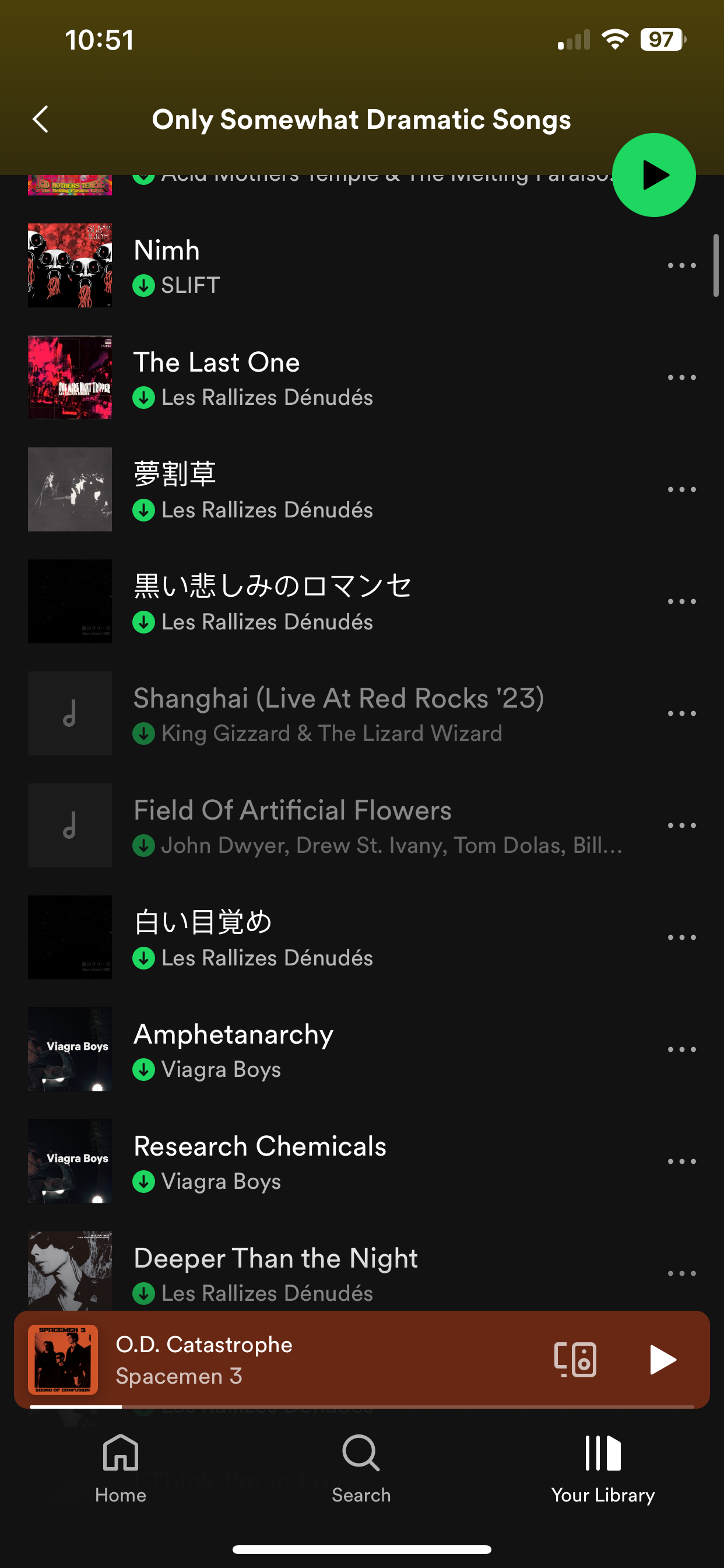

been having the exact same issue lately and it’s really frustrating, and i couldn’t seem to find any recent discussion of it until now, everytime i redownload my files, they stay for a bit until they randomly disappear, but the weirdest thing is just. a few specific songs actually stay downloaded each time, and it’s the exact same ones every time? rainbow stairway and solid soul for example are both local files, and play completely normally every time for whatever reason while the others don’t. i used to have a bunch of video game osts downloaded to my phone with no issues even up until now when i deleted all my mobile downloads to try and fix this issue, so i’m not entirely sure why isn’t changed all of a sudden

I have this problem as well. The spotify on my android will download and be able to play the local files from the playlist as well as long as spotify is open on the computer with the local files. As soon as I close the spotify on the computer, the local files songs on the android spotify becomes unavailable.


I have this problem as well but i'm on an iphone 11. The same random songs keep getting greyed out. I've tried everything in this topic but it doesn't work.
Hi all!
I followed up on the tip that spotify removes spaces in the synced local files on phones. It seems that anything that is not part of the english abc, number or "-/_" are removed from the title as well. I have renamed my local files on the computer accordingly, and the syncign is working well again.
So theoretically if we just don't have spaces in our file names we won't have this problem?
so I guess it just works sometimes 😕
Sounds good I will try this
I had to clean up the local synced files on my phone first, because the previous downloads could mess up the naming. Like if there's a song named "example" and spotify had to download it again, then the second copy would become "example (1)". Maybe that's causing an issue for spotify during identifying the files.
Hey @AndOr47,
Thanks for reaching out and welcome to the Community.
Could you give the steps here a go and perform a clean reinstall of the app on all your devices? They are more thorough than a regular reinstall and make sure that no corrupted files remain that might be the reason for such behavior. You should also remove all playlists with imported files and start the whole process from scratch using the instructions in this guide. We'd recommend to also change the source of the local files. Simply create a new folder in a different directory on your device and move your local files to this folder. Then just delete the old folder used for the local files. Now you can try importing the files again.
Hope this helps. Keep us posted on how it goes.