"Couldn't load the lyrics for this song" error

As of version 8.8.20.544 and the version prior to that has caused the lyrics from my personal playlist in my device 'Samsung-SMJ250F' to disappear, at first I thought it was brcause the songs were old but way older songs still had lyrics
The playlist is a private playlist featuring all songs of 'DragonForce'
and after the update none of the songs had lyrics.
Accepted answers
All comments


Plan
Free
Country
USA
Device
Samsung galaxy tab s6 lite
Operating System
Android
My Question or Issue
I have been using sportify for 2 years, and this never happened. From yesterday, most of my song's lyrics said that it couldn’t load the lyrics for this song. Is it the problem in samsung? I am using the latest version, and I tried logging out and reinstalling the app. I need help as soon as possible. Can you help me?

Hey there @vivi-,
Thanks for getting in touch about this here in the Community.
Just to confirm, is this only happening on your Mac or on other devices as well?
If this only happens on your PC, it's well worth running a clean reinstall of the app to get rid of any cached files that might be causing trouble.
If this doesn't do the trick, could you give a different internet connection a go to see if that makes the difference?
Let us know how it goes.

Hey there! Thanks for bringing this up, and welcome to the Spotify Community!
Can you please let us know if you are on a Premium or a Free service? Also, is this happening no matter what track you play?
Keep me posted.
/Mateus

Plan
Premium
Country
Israel
Device
Samsung a33
Operating System
Android 13
My Question or Issue
Some of the lyrics in songs just disappeared. I tried to log in and out, reinstall the app and nothing changed🥲🤷🏼♀️

I’ve also done the same and have been having this issue!!! Almost every song says “couldn’t load lyrics”, only a few don’t. I’m using the free version, please help fix this!

Plan
Free
Country
Egypt
Device
Laptop
Operating System
Windows 10
My Question or Issue
The lyrics for some songs were working but now they don't and it says you caught us we are still working on this or you'll have to guess the lyrics for this song but for my friends it shows the lyrics are working for the same song and i tried everything from a clean reinstall to completely wiping my pc and still doesn't work and checked if i have the latest version or not

Im on free service and yes this is happening no matter what track i play!

Hey @Yunji,
Thanks for posting in the Community.
The availability of these features can vary over time, as well as between markets, and depending on the agreements we have in place with our rights holders. We add new content to Spotify every day, so if you can’t find something right now, it may appear (or reappear) soon.
Hope this clears things a bit.
Cheers!

Hi there, folks @Farouk123 @aniyahh!
Thank you for getting back to me and providing more details regarding this.
The availability of these features can vary over time, as well as between markets, depending on the agreements we have in place with our rights holders. We add new content to Spotify every day, so if you can’t find something right now, it may appear (or reappear) soon.
Hope this clears things up.
/Mateus

I am seeing the same issue with Spotify on my iPhone and it does not display lyrics to Spanish/Latin songs. When I play a song with English lyrics it works fine. I have already logged off and back on and even deleted the app and re-addded it and it still doesn’t work. This has been an issue for about a week now.

Same

It didn't work, but thank you for the idea.

Same I have this problem since a week its happening on my phone and my Mac

I’m not on offline mode, I’ve cleared my cashe, I logged out and back in, I uninstalled it and restarted it I’ve literally done everything and it still doesn’t work. How do I fix this? It’s get frustrating

Plan
Free/Premium
Country
Vietnam
Device
(HP EliteBook 840 G3)
Operating System
(Windows 11 Pro)
My Question or Issue
Why lyrics don't work on some songs? It worked before but now it don't work on desktop and web player.
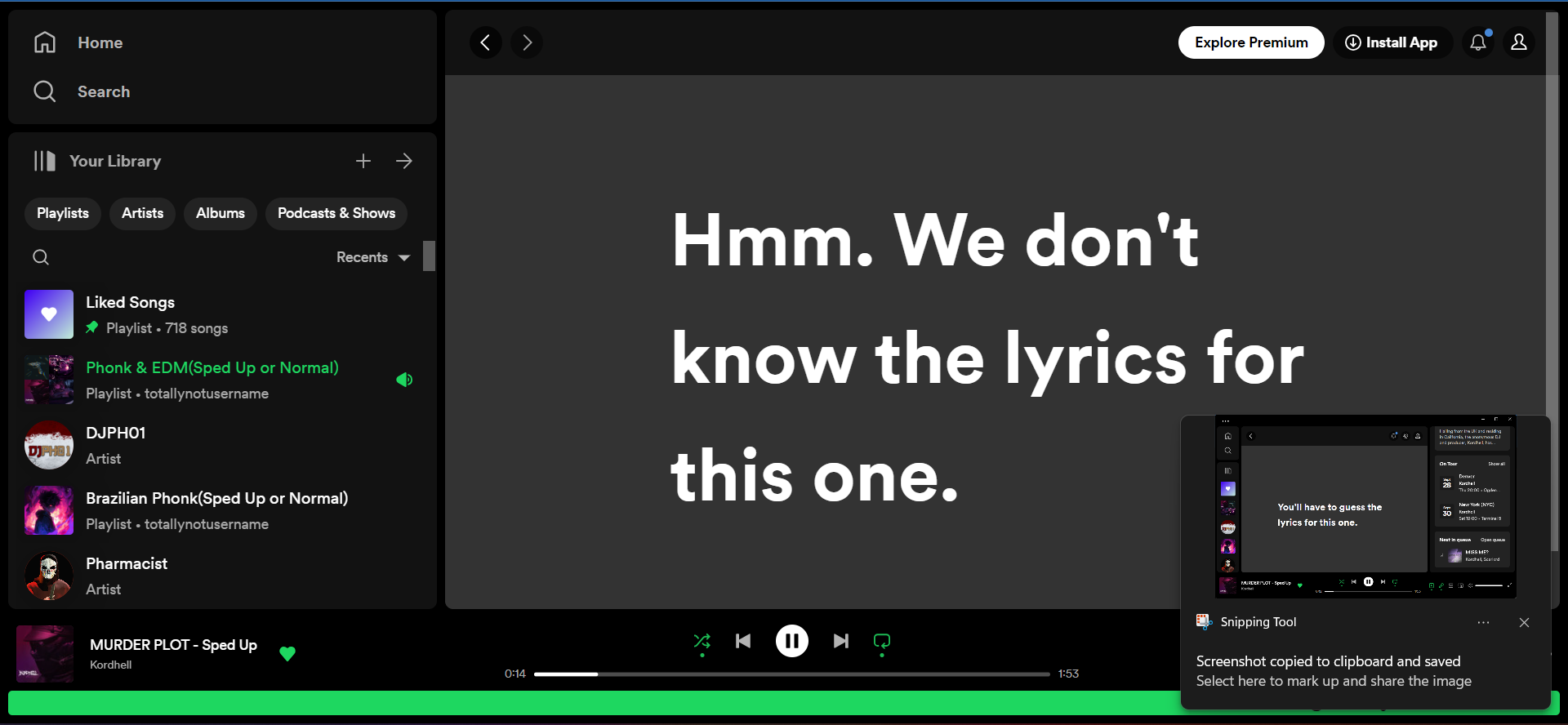
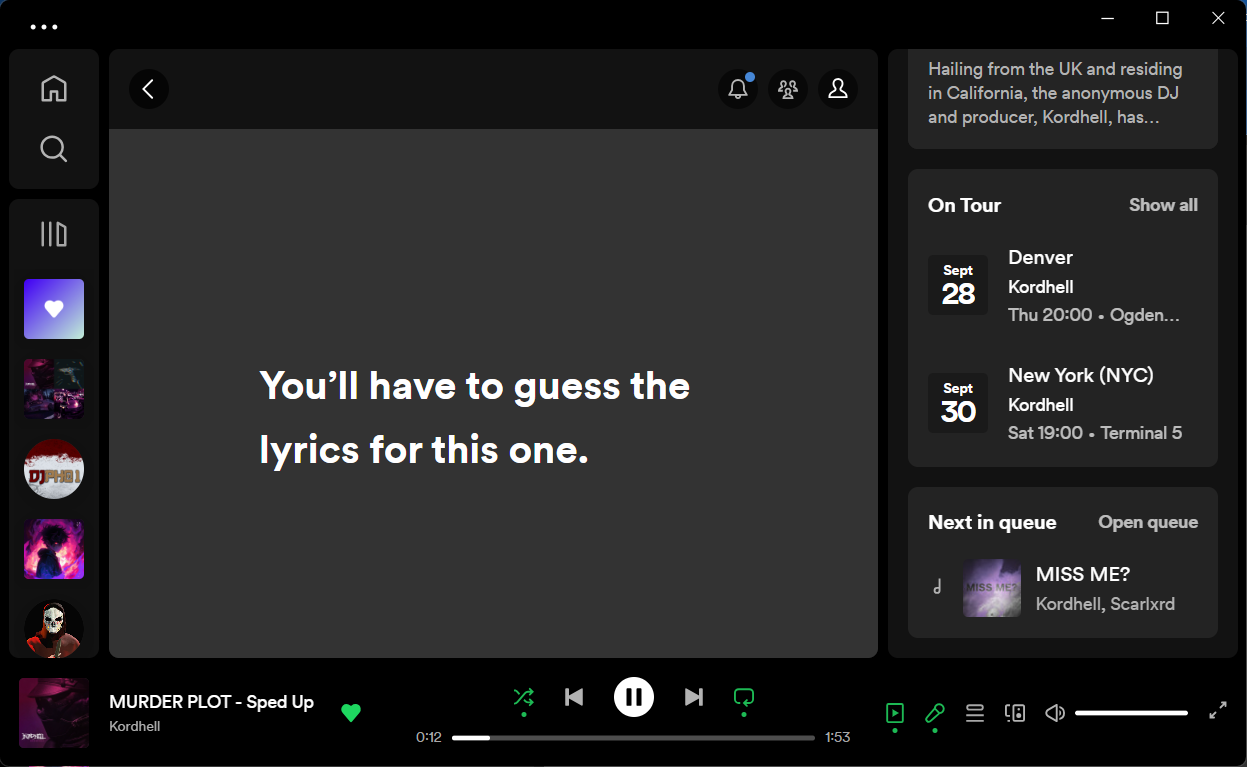

Plan
Free/Premium
Country
Poland
Device
ASUSVivobook aswell as Samsung Galaxy A70
Operating System
Windows 11, Android
My Question or Issue
So my issue is that until yesterday my lyrics were working perfectly fine but after then all of a sudden it keeps on saying that "Lyrics couldn't load" or "Were still working on the lyrics" or something like that. And it says that in almost every song but it wasn't happening before and i know for a fact that where it says that the lyrics aren't working were working before.
I have alrady reinstalled is did the latest update but it still doesn't work. As I was scrolling to see if it happened to anyone else i noticed it happened back in 2021 and I think the problem might of came back. Of course i dont want to jump into any conclusions so if you can find out why this is happening please tell me.
Also below I've attached some screenshots for my laptop of the lyrics not working.
I'll be waiting patiently for the answer.
Thank you!


Hi folks,
Thanks for your replies in this thread.
@vivi-, take into account that offline mode is only available for Premium users. This means, if you don't have Premium, you won't see the option to turn it on or off. If you do have Premium, let us know if you're able to see the lyrics and use offline mode on your mobile device. On another note, are the lyrics missing only for some songs or for all of them?
@21savagebestrapper, could you send a screenshot/photo of what you see on your screen when you try to access the lyrics? We'll take a look.
We'll keep an eye out for your replies!
Okay. Do you think there are any ways I can troubleshoot this issue?
I have tried most the ways Google told to fix it but it isn't showing up still
Hey @user-removed,
Thanks for posting in the Community.
The availability of these features can vary over time, as well as between markets, and depending on the agreements we have in place with our rights holders. We add new content to Spotify every day, so if you can’t find something right now, it may appear (or reappear) soon.
Hope this clears things a bit.
Cheers!
Same. I tried to install couple of versions, log in and out and still nothing. Spotify went worse🫥😕


Device
desktop window
My Question
I used to be able to see the lyrics of most of the songs in my Playlist, yet all of them have disappeared since last week. Whenever I play a song on desktop, only "lyrics not found" is shown. I ensure that the lyrics were available in the past, feel so desperate cuz I can no longer see the lyrics while listening to the songs.
Hey there,
Thanks for your prompt responses.
To begin with, we recommend making sure your Spotify app is up to date. You can also reinstall the app to clear any cache that might be causing issues. This will also install the latest available version of the app on your devices.
If after doing it, you still can't see the lyrics, it's normal. This is becuase the availability of Lyrics may vary depending on app versions and small experiments we run from time to time. We appreciate your patience and understanding as we continue to refine the app experience.
Let us know if you have any questions.
Been almost 2 weeks since no lyrics idk if it's my account or my devices
Same. I also did reinstall and remove my cashe. Are their any other ways to troubleshoot other than restarting my computer, reinstalling Spotify, and signing out?
I also tested using the Testing Lyrics playlist and the lyrics for those songs worked. However, the songs that I'm trying to listen to used to have lyrics and my friends can still see the lyrics to those songs. I don't know what the issue is at this point. The songs are: Drunk-Dazed by ENHYPEN, Chaconne by ENHYPEN, Sacrifice by ENHYPEN, Given-Taken by ENHYPEN, Sugar Rush Ride by TOMORROW X TOGETHER, and multiple other songs from my personal playlists.
Hey folks,
Thanks for posting about this here in the Community.
Please note that the availability of the Lyrics feature and the lyrics themselves can vary over time, as well as between markets, and depending on the agreements we have in place with our rights holders. We add new content to Spotify every day, so if you can’t find something right now, it may appear (or reappear) soon.
We hope this helps!
Cheers,