Spotify Takes Listening With Friends to Another Level with Jam

Spotify is introducing a more fun, intuitive, and collaborative social listening experience with Jam. Whether you’re together or apart, joining a Jam with your loved ones is now simpler than ever by tapping phones, scanning a QR code, or sharing a link. Premium users can start or join a Jam, and anyone on Spotify - Free and Premium users - can join and add songs to the Jam.
With Jam, we're now taking a step forward with our social features by offering you a unique, new experience to listen together with friends.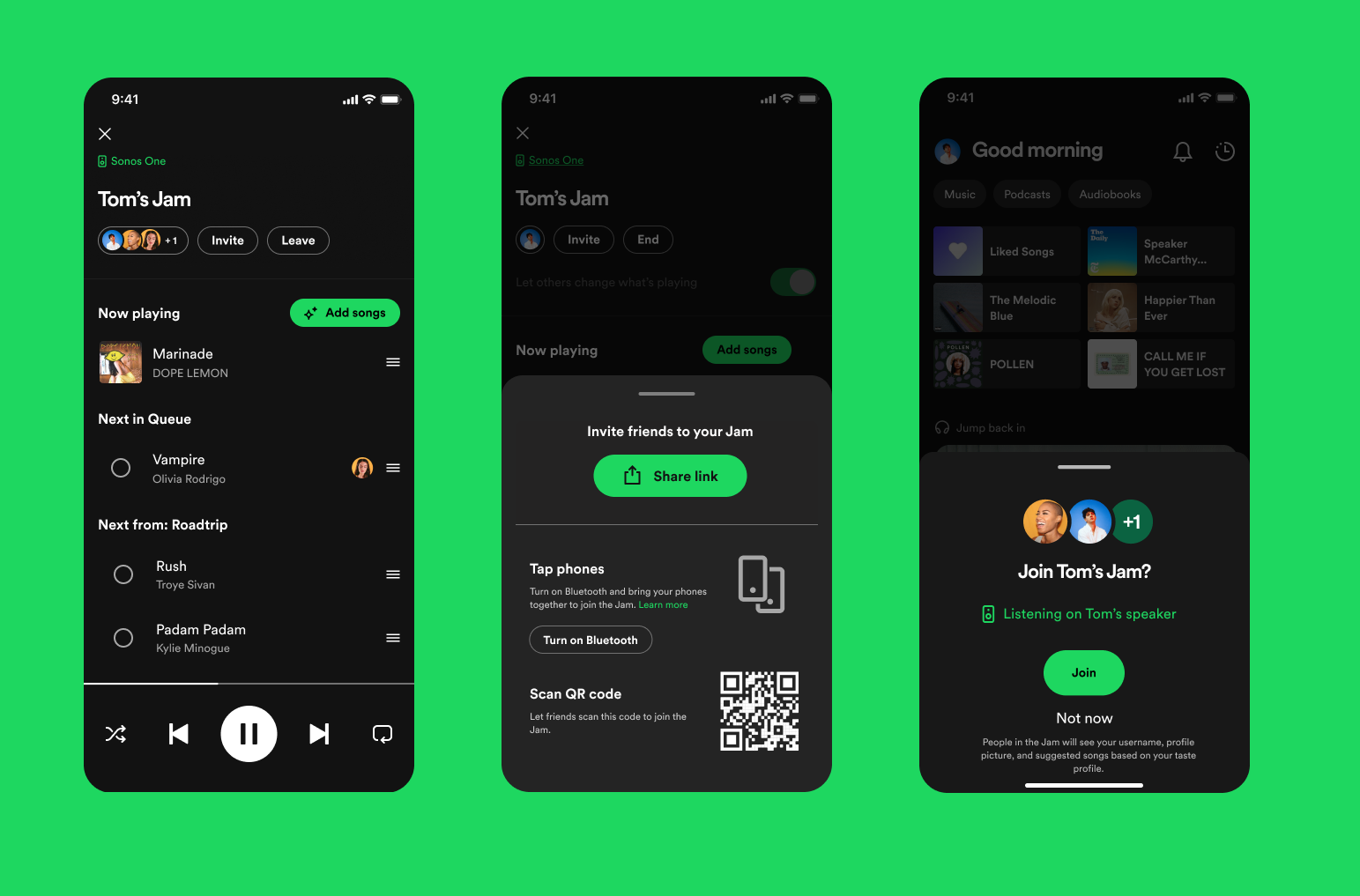
Here's how to listen together, in real-time, using Jam
- Premium listeners everywhere can start a Jam right away on any non-private playlist or track, through the three-dot menu or from the speaker icon.
- You can join a Jam by tapping phones together if you're logged in on Spotify and your Bluetooth is turned on.
- Get personalized music suggestions bringing together you and your friends’ music tastes and add those crowd-pleasing songs to the Jam.
- Everyone in the Jam can play, pause, skip, change the volume, and add songs.
- As the host you can turn off “Guest controls” so only you can change the volume and what’s playing. When all “Guest controls” are turned off, guests can only queue.
- Anyone invited can add songs to the queue and see who added which song.
- Joining via share link allows you to select the output device (Premium-only) and listen remotely.
How to use Spotify Jam?
- Ready for a party? Start a Jam straight in your playlist by accessing its menu in the three-dot, or on the speaker icon (Premium-only).
- Don't miss out on the fun - Whether you are a Free or Premium user, you can join a Jam with your friends using a link, QR Code, playing on the same speaker, or tapping phones.
- Have no idea which song to add to the queue? Get fresh music suggestions bringing together the music taste of everyone in the Jam.
FAQ
How to start a Jam?
Premium users can start a Jam by accessing the playlist context menu, device picker, or connecting to a speaker. Users on the same WiFi will receive an invite to join your Jam once you open the Spotify app. You can disable this in the Device Picker.
Which type of speakers are compatible?
Any Bluetooth, AirPlay, or WiFi speakers such as Sonos, Bose, Google, or Amazon.
Can Free users start and share a Jam?
In order to start and share a Jam, an active Premium subscription is required.
Can I start a Jam in any playlist?
Yes, however, you can start a Jam only on public playlists such as RapCaviar, Hot Country, Today's Top Hits, or your own playlists.
How to join a Jam?
Free & Premium users can join a Jam in person by playing on the same speaker as their friends, link, QR Code, or tapping phones (enable Bluetooth Permissions in App settings and turn Bluetooth on for this to work). Premium users can also join a Jam remotely by link.
I have an active Premium subscription and joined a Jam remotely, can I use my own device to listen to music?
Yes. If you join via link, you will get the option to either join on the host device or your own device.
How does this affect Group Sessions and Remote Group Sessions?
Jam combines the group session experiences you might have used in the Spotify app. You can use Jam to listen together, no matter if you are listening together or apart.
Which platforms is Spotify Jam supported?
Spotify Jam is available on iOS & Android.
To use Spotify Jam, what is the minimum version of Spotify required?
Spotify version 8.8.68+
Jam is now available globally for both Free and Premium users around the world. We hope that you enjoy this new immersive and enjoyable experience of listening together.
Feedback
Do you have questions? Please, comment here. We are all ears for your feedback in this thread!
Accepted answers
All comments

I am having the same issue, I don’t believe they have implicated an ability to listen to music together remotely, just with one speaker/bluetooth device

Looks like a very cool feature! This will be awesome for people who live far from family/loved ones and want to share a music listening experience with them!
Hi there @jacksonvoelkel and @PelliMoonster, thank you for bringing this up!
Yes, with Jam you can listen to music with your friends remotely using different speakers. When you or your friend join a Jam, they need to select their own device. After that, you can choose a device speaker to listen to music.
You can also check the support article if you have further questions.
/Mateus
Thank you for your response, it’s working now! My friends and I were never prompted with the ability to pick whether to listen on separate or the same devices earlier this week, but it’s now working.

I'm not seeing this feature at all available when joining a Jam. I've tried with several hosts now, with only being able to listen on the host's device, not my own. Seems like a complete walk back from Group Sessions.

If you put together some playlists of backing tracks (some already exist on Spotify), could it be used for remote practising or actual jamming across band members, or for music teaching, or would it be too laggy depending on how distant people are on the network?

There used to be group sessions, but now I can’t find them, how can I sit on a PC with a friend and listen to music now?

Still not working for me, changing devices automatically cancels the jam session and we both have premium subscriptions, maybe be more clear with the steps needed to achieve this effect.
Seems like a very big mess to me .

utter disaster, since this release i can no longer connect to my Bose Sound touch speaker using Wi-Fi - utterly pointless feature for me and it has "broken" the main way i used Spotify. Brilliant, thank you Spotify

I would like to be able to disable invites to join Jams. They are disruptive and annoying. I don't share music with people in the parking lot at work, yet i keep getting invited.
I have turned off the feature on my own device, but i can't disable the invites. Please please please allow me to disable this "feature". It's not a feature if i can't turn it off.

here too, can't change the device to listen to music without being disconnected, terrible so far.

I would rather have an usable desktop UI where I can organize my library insead of another new fancy feature that is not working apparently anyway. But that is what Spotify is in 2023...

They've already had this feature in various forms since at least the early 2010s when I started using Spotify. Back when they had third party integrated apps, there was Soundrop, which let you and your friends curate and listen to shared playlists in rooms, complete with voting on songs to prioritize play order and even chat. But instead of doing the smart thing and adopting this already-mature user experience into their software or continuing to collaborate with Soundrop in some way, Spotify just killed their third party app store in favor of a web API and moved on like it was nothing. Now nine years later, they're floundering trying to bring that same kind of functionality back natively, despite a much more limited feature-set and restricting it to the app only, and despite Jams being an evolutionary product based on the earlier Group Sessions. This service used to be worth paying for, and with over a decade of listening I'm pretty invested in the ecosystem, as it were... but I don't think I can justify sticking around any longer.

There’s a bug where if you’re listening apart and a song is added to the queue, the currently playing song will restart for everyone except the host. Please fix this because it makes remote group sessions pointless if it can’t stay in sync.

it would be really cool if in future updates users could turn jams into a personal radio with multiple hosts or allow sharing a host with another user with seamless connection to any device or speaker because now it is broadcast from one host and is interrupted after switching devices such as phone to a desktop app or to headphones and speakers

Unfortunately this new feature, Jam, does not allow for multiple devices to play the music at once. It only allows for the users to control the music on one speaker. The feature you wished for already existed as Group Session but it has been superseded with Jam.
It was a great feature for LDR but they got rid of it.

How can I turn this feature off or completely disable it? When opening the app (to listen to music - the purpose of Spotify) I'm nearly always getting bombarded with these features that I have zero interest in. I *never* want to 'start a jam' - please stop asking me.
How can I turn off *all* popups in the app that I didn't ask for actually? I never want the app to completely interrupt what I'm trying to do with a full window popup, but I can't find a way to disable them.
Ironic that as I was typing this the website popped up a modal asking me to leave feedback. The interruptions when trying to use anything Spotify are way too much. Please, tone it back & let the user actually use the service.

Spotify letting us all down once again. We just want to listen to our music together, but when we are not in the same place. PLEASE REVERT

How do i use this feature to listen remotely? I’ve tried with various Jams and only the host is able to hear the music?

Any chance of the desktop app getting this feature anytime soon?

Link only open the app, not doing anything more ...
And when we are in same JAM, we can listen our musique on our own speaker...
PLS get the old feature back !

Hello everyone, I never posted here before, I'm not even sure if I'm in the right place to post this. But, I'm having such a weird issue. I'm gonna try to explain
I'm listening to a shuffle playlist, A-OK!
I turn off shuffle mode, the playlist starts over.
I'm in song 222, and I want to listen to song 223, so I turn off shuffle, however, instead of playing song 223, it starts playing from song number 1.
Hope that's not super confusing. I know that people had a similar issue that the playlist would just start over out of nowhere, but I haven't found anyone with the same issue I'm having.

Hi everybody!
I find the new Jam feature actually quite nice and useful. I use Spotify in 3 ways: personally (headphones on laptop, desktop, mobile, etc.), home on Sonos system (via Spotify connect) and then in the car (via CarPlay). For both home and car use, the new feature is great, as usually there are other people around, friends, family, etc. and we can all take part of choosing the music. Especially in the car. For a long roadtrip this is great feature. Hence my question: is there a way to access the Jam feature through the CarPlay interface? I looked for it, but couldn't find any way. An its inconvenient if I need to use the actual iPhone interface in order to turn the Jam on, and then let the other people in the car join in.
Thanks a lot for your answer!
Hi there @GeorgiP! Thanks for your kind feedback and question, and sorry for the late reply!
Unfortunately, you can't access or manage a Jam through the CarPlay, however, you can suggest an idea here in the Community by following these steps.
If you have any other concerns or questions regarding Jam, you can access the support article here.
Hope this clears things up!
/Mateus
not this feature doesn't work! I try with my family ( same account on family offert ) so two premium account ! Can’t change the output of musique… only controll !

Now the only thing I need is just friends to test this feature out.

Plan
Premium
Country
UK
Device
Pixel 6a
Operating System
Android 13
Spotify version:
Version 8.8.76.667
My Question or Issue
The new Jam feature, often turned on by default when connecting to Bluetooth devices allows anyone on the local network to connect to the session and start playing music. On large shared networks, such as a University Eduroam, this exposes my private listening to hundreds of people, who can play music without any approval from my side.
This feature can be turned off by unchecking Let others Jam on this speaker but there is no option for the intermediate level of openness:
You allow people you approve play music on your device, such as by clicking a link or scanning a QR code, and not the whole local network.
This lack of approval to start playing on my private device is seriously concerning security vulnerability.
Thanks a lot @MateusM , I will do that. I think it will be awesome feature bringing the Jam feature to an even higher level when used via the CarPlay/AndroidAuto interface.


How can I use Jam to listen on different devices?
Before today, me and my friends would use Spotify's remote group sessions to listen to the same album while we are in different places. Today, I cannot find the feature. When I invite him to join a jam, he is able to control my speaker, but he doesn't hear anything on his phone. Is it still possible for two Spotify Premium users in different locations to sync their listening and share a queue?