How to turn off playing now view permanently?

Accepted answers
All comments


AHHH!!! yes!! Thank you! This helps my ADHD brain immensely.

Thank you, I hate this feature so much.

There have been many changes with the app, which I know apps evolve. I'm okay with change, but some of the changes just seem unnecessary. Maybe it's for metrics, maybe it's to let me know that this exists. But some of these changes are just like, why? Why are you making this more frustrating to use? Maybe you should do more user testing. I'm sorry for ranting but I just want to play a song and that panel always pops up. Today it really got to me. I close it always, it's just an annoying extra step I have to take now when playing a song. /rant Enjoy your day.
Ok i just discovered there's a setting to turn this off, so maybe in the messaging let me know I can turn this off.

Updated on 2023-10-12
Thank you for sharing your feedback with the Spotify Ideas Exchange.
Your suggestion has been marked as a New Suggestion and will be reviewed by the Spotify staff once it receives enough votes. We appreciate your contribution and look forward to your continued support of this idea!
For more details about how the Ideas Exchange works, please refer to here.

Hi Spotify,
That setting won't work and I dont like to see now-play panel - please fix it instatly as some of us hate that feature. Thanks.
Regards
Vaari


Dear Spotify. I appreciate that you have created the "Now Playing Side Window". However, I do not enjoy having it forced upon me each time I change from one playlist to another, between Windows, or when the song playing changes. As a playlist curator, I appreciate that I can use multiple screens with multiple windows which is a function that no other streaming service can do. However, with no On/Off selection, this function is a major distraction that slows my workflow, as I sort through various New Music playlists, including my Release Radar. Please give users the ability to use this function when WE want to. Please DO NOT FORCE it on us.
Thank you.
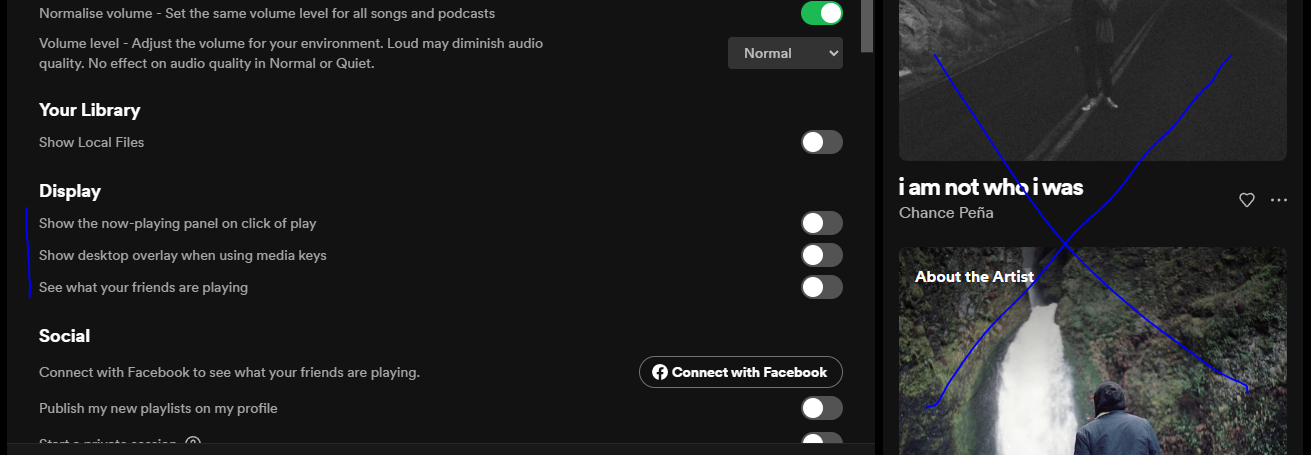
I appreciate you showing me which button to turn off. I couldn't find it on the web player or the mobile app. However here is a screenshot of my Settings in the Web app. As you can see the 'Show the now-playing panel on click of play' is off. However the 'now playing panel' is not going away. I can't work as a playlist curator with this happening. I restarted my computer and have the latest version of the web app.
For me, this problem has not gone away. My issue is not closed
You can see I have the switch off but the now playing windows are open. If I play a different song the windows will switch to that song.

Hey @tunedIN,
Thanks for reaching out!
From your screenshots I can see that you're using both the desktop app and the Web Player. The "Show the now-playing panel on click of play" option is turned off for the desktop app, but it looks like it isn't in the Web Player. Can you turn it off from the settings there as well? That way, the Now Playing view won't reopen unless manually opened.
If you want to open/close it, you can also click on the Now playing view icon:

Let us know how it goes.
Thank you, Elena. I am eternally grateful. This issue has now been fixed by turning off in the app and web player, ❤️

Thanks for letting us know @tunedIN 🙂
The Community's always here if you need help with anything else.
Have a good one!

Edit: I think I posted this in the wrong place lol

I still have this issue. Primarily, when I switch from my phone (iPhone13pro) to my Macbook Air. Most of the time when I switch between the two, the Now Playing view comes back up on my Mac. It’s very frustrating.
This might impact it: I listen to a lot of podcasts. Those seem to activate the NowPlaying view most often.

This setting does not persist in MacOS when you reboot. The Now Playing and video snippets turn back on and do not remain off. I super hate that panel, as it is distracting and totally useless.

Same thing here, turning off the setting does not persistate after rebooting the app. M1 MacBook Pro from 2020, mcOS Sonoma. PLEASE do something, this useless panel is driving me crazy.

it would be amazing if these product owners would just stop enshittifying every product instead of putting in some busted ass annoying feature and degrading the quality of the app for months or years until a small handful of users finally find the toggle to roll it back to when the app was designed around its core purpose.
like if you have to put the toggle in the settings... maybe you should take that as a cue that its not that great of a "feature"
Hi I have done this many times, but now playing view always finds a way to reopen itself. You guys need to hire some developers who have any integrity at all.

Here's a post from 2023:
https://community.spotify.com/t5/App-Features/Now-playing-panel-cannot-disable/m-p/5568695
and the problem is still a problem.
Using the Mac App, I disable the "Show the now-playing panel on click of play" and the "Display short, looping visuals on tracks (Canvas)" and they are respected for a short time. Then about a week later, boom, they are enabled once again.
So my idea is this: test this setting thoroughly. If a new update reverses it, then fix that, too.
PS: Showing the looping canvas on the iOS App and being unable to turn that off is distracting. When driving and using CarPlay, showing me a "video" is unsafe.

Hey there @jc21com,
Thanks for reaching out. We moved your post from the Idea Exchange to the help boards where it better fits.
Just to confirm, have you tried performing a clean reinstall of the app to see if it makes any difference? This is often an overlooked step, but it can be helpful to get rid of any cache that might be causing trouble.
If that doesn't do the trick, could you let us know the OS version of your device, along with the exact Spotify version? Also, make sure to include any other troubleshooting steps you've tried, if any.
Lastly, keep in mind you can find the option to turn off Canvas on mobile devices by going to Settings > Playback.
We'll be on the lookout for your reply.

One more user here with the same issue. I've stopped counting how many times I've disabled this in the settings, but somehow it just keeps turning back on by itself.
It's driving me crazy to the point I'm thinking of canceling my payment plan.
Please do something about it.

Yes! I also have this problem, and it's driving me crazy!


This thing is so annoying. The most recent update means it's always poking out the side now. I don't care about merch, about the artist or song credits.
I want the album art to be larger like it was before and be able to click the song title to go to where it's playing from (like before) now it always takes me to the album it came from.
Give us some flexibility, please. We pay for this service and pushing these useless features makes no sense, you're not going to make any more money off me by doing it.

"Show the now-playing panel on click of play" at windows 11 desktop settings does nothing.. on or off, now playing view will play every time..
Yes i have updated my computer and restarted it and spotify over multiple days.. bug been there for least few weeks... And no, i do not plan to re-install spotify because of this.. silly you would ask that.
.
Plan
Premium
Country
Finland
Device
Lenovo X1 laptop
Operating System
Windows 11, latest updates


Hi
On the webplayer the Now Playing View expands automatically Every Single Time a new song is selected
I use a raspberry pi as a media player behind my tv, hooked up to loudspeakers. It runs the spotify web player well enough. But the Now Playing View adding video playback every time a song or album is selected ramps up the cpu+ram usage BY A LOT and makes audio playback stutter.
Why can't I just permanently disable this ? It will literally cause the pi to crash if i leave the browser running for more than a day. It only has issues when I don't manually collapse the Now Playing View everytime I put up a new song. Very annoying... It probably also shortens the lifespan of the hardware
Hi @WarQueenLola9!
You can toggle off this feature in the Settings menu under Display:
Cheers!