Close button should minimize the Spotify window - Spotify won't minimize using Close button

Plan
Premium Family
Country
United Arab Emirates
Device
Desktop
Operating System
Linux Mint 19.3 Cinnamon
My Question or Issue
There is an option in Advanced Settings for "Close button should minimize the Spotify window". This morning I discovered this and switched it on.
Closing the window, however, shuts down Spotify.
I've tried the usual troubleshooting elements:
1. Clear cache
2. Clear storage
3. killall
4. Spotify dump (results in 0Kb text file)
Does this work on other Linux environments? Is there anything else I need to do to make Spotify minimize instead?
Accepted answers
All comments

Since my last update to the stable version 1.2.22.982 on Ubuntu 22.04.3, it working perfectly.

Currently using 1.2.22.982.g794acc0a on Ubuntu 23.04. The icon appears on the tray in the last version, but after minimizing it to tray, there is no way to restore the window using the tray icon. Tried both Ubuntu AppIndicators and AppIndicator and KStatusNotifierItem Support. The first button that says "Minimize to tray" just disappears and double-clicking the icon just opens the menu, at least in GNOME
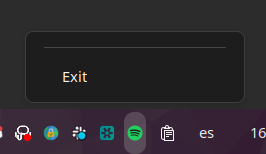

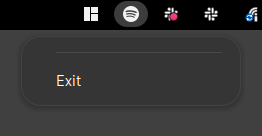
Hi rogama25, this is indeed a very weird behavior. I run it nicely in Kubuntu 23.04. Will try it also at Gnome to try to reproduce this. But in the meantime, can you provide me more info? Are you running Snap or Deb? Wayland or X11? Is there some sequence of actions that make the menu to only show "Exit", as in the screenshot?
I am using the deb package: APT-Sources: http://repository.spotify.com stable/non-free amd64 Packages
I'm running X11 because there are still some problems on this laptop with Nvidia cards on Wayland.
To reproduce the bug I just need to close the window, either hitting the X or clicking the minimize to tray in the tray icon. After closing it, the first time I open the menu I have the separator and the exit button, but next times the separator is also not present, and the option does not appear again when I re-open the app through the app launcher. I had a bunch of extensions but after disabling them, including Ubuntu's ones, and restarting the computer the problem is still there:
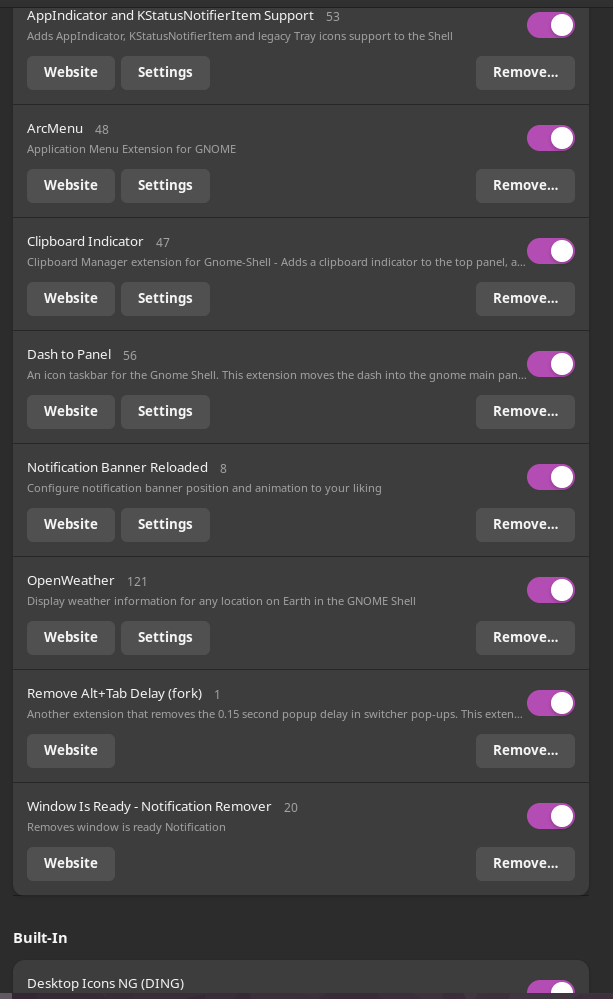
Immediately after disabling the app indicators extensions, the Spotify window opens by itself and after enabling the extension again the "minimize to tray" option appears. Same behavior if I completely close the app and restart it again.
Please keep in mind that tray icons behave a lot differently in GNOME than in KDE, usually in GNOME there is no double-click functionality to restore the window while in KDE there usually is, more like Windows

Thanks to the devs for finally implementing minimize to tray!
Works awesome on Ubuntu 22.04 using Wayland and dash to panel extension.

Hi Jack_l0
yeah, except double clicking the tray icon doesn't open the spotify window
That might be a Linux/gnome limitation.
No app that i have works with double click, tried with Steam, Skype, Caprine, Transmission, etc.
LE: some java apps work by double-click, but i think it's a hacky, non-standard implementation of systray icon because they come with they own context menu and seems kinda buggy, minimize/maximize not working all the time.
We created a problem and the papirus team adapted the spotify icon to the correct version

Hi!
Firstly, thanks for improving the Linux client. Wanted to report my latest experience
I have 1.2.22.982.g794acc0a + enabled wayland
On Gnome, the icon on the dash is fine, but the tray icon (with the appindicator extension) is random and it doesn't show "Show Spotify" after minimized. Client side decorations are out of place (XP style)

On kde plasma, icon on the task manager (the panel) is is still broken, but the tray icon is fine and functional. Server side decorations are intact.
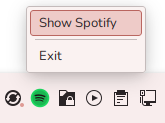
On the general feedback, I think (double?) clicking to the icon should directly show and hide it.
We have proper MPRIS on both these desktops so the icon itself doesn't really need play/stop functions, so I'll stay neutral on that.
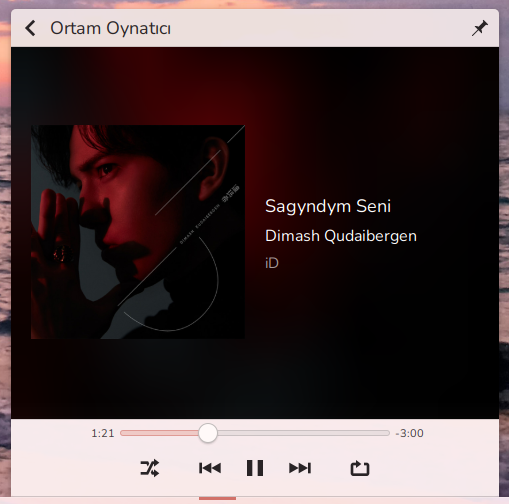
And slightly off-topic, it would be very cool if we could access the lyrics part through dbus or a temporary .lrc file etc, and then us community can make fancy desktop extensions to karaoke them on panels or desktop etc. Would like to contribute if it was open but this is not the expectable case here, so I just wanted to ask here 😛
@Jack_l0 wrote:That might be a Linux/gnome limitation.
No app that i have works with double click, tried with Steam, Skype, Caprine, Transmission, etc.
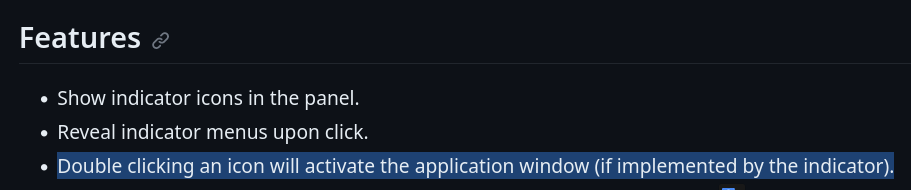
You need to have libindicator-gtk3 installed as stated in the gnome-shell-extension-appindicator repo for double click function. (it works with Steam, Telegram, Element... for me, not with spotify yet)

It doesn't work on Fedora 38 with the lastest 1.2.22.982.g794acc0a + (Flatpak) version. Using wayland. Closing Spotify closes the app and does not minimize it to the tray.

It's finally working!! Thanks to the devs!
(Fedora 38 with KDE Plasma on Wayland)
Hey saschaeggi, we do not officially create a Flatpak. So, I don't know who creates this package that you refer to
Still, I need more info to know what's going on. Such as what's you window manager, since not all provide tray icon support
Hey Beryesa, thanks for the feedback.
Unfortunately the "double-click" is not possible by default due to a limitation of the underneath library. We chose to use this one (libayatana), as it's the most common across different distros. Still, I keep an eye to alternatives.
About lyrics, unfortunately it's not possible for a few reasons. First, they are protected by copyright, and thus Spotify cannot distribute them externally to the application. Also, there's no standard (afaik) to publish them, such as there is MPRIS for desktop integration
Hey @pgomes I got an update this morning and now it seems to be fixed on my end as well! Thanks so much for your work on the linux client! ❤️

Recently, after starting spotify and minimizing it to tray, the window cannot be restored from the tray. Right clicking the icon and selecting "show spotify" doesn't bring the window up, although the text does change to "minimize to tray" so it seems like something is happening, the window just isn't appearing. Attempting to open the window through either the panel launcher or application runner seems like it's trying to open the window and then fails. This is on KDE plasma wayland session. This problem only started since the last update, before that the minimize to tray worked perfectly. There was no output in the logs when the window fails to open.
Hey Slysoft, we already detected the problem and fixed it. A new release with the fix should be available after Friday

it works again, cheers!

Hello, this issue persists on SNAP ubuntu 23.10.1. X11.
Will moving to deb version fix it?
Hey LazyY, the feature is working both for Snap and Deb. I just tested both at version 1.2.26
Keep in mind that for the tray icon to work, those are mandatory:
- Your desktop environment should support it. For example: KDE supports it off-the-shelf. But not Gnome, which requires to install a plug-in to make it work
- the tray icon is only enabled if you go to your "Settings" and enable the choice "Close button should minimize the Spotify window"

good job devs!
note: if u guys using cinnamon desktop like me, u need to enable this applets and put it wherever panels u guys like. it's that simple, mine used to be at the bottom panel, (but i removed it and forgot to enabled it again 🤓)


Thanks for working on this, really appreciate it.
On Fedora 39, GNOME 45.3 and the AppIndicator and KStatusNotifer Support extension, Spotify does appear in the tray and minimizes to it (keeps running), but the tray menu does not allow to re-open it. It only shows the Exit option.
When Spotify is open, the tray menu has "Minimize to Tray" and "Exit" options.
If you close the window, the tray menu now only has the "Exit" option.
If you don't close the window but instead click on the tray menu and "Minimize to Tray", the window closes as expected and the tray menu continues to only have "Exit".
Double clicking the icon has no effect either.
Another issue is that, upon starting, the tray icon is not there if though the option to minimize to the tray is activated. If you toggle it in Settings, then the icon appear.
I've installed it using the flatpak from flathub.org. The version is 1.2.26.1187.g36b715a1
For fedora, install the rpm package:
sudo dnf config-manager --add-repo=https://negativo17.org/repos/fedora-spotify.repo
sudo dnf install spotify-client
see more: https://negativo17.org/spotify-client/
Also install libayatana-appindicator for the tray to work correctly:
sudo dnf copr enable till/xpad
sudo dnf install libayatana-appindicator libayatana-appindicator libayatana-ido libayatana-indicator xpad
@temcodes thanks for the help. I tried it but it has the exact same issue (even uninstalled the flatpak to make sure nothing was conflicting). The good news is that the icon is color now instead of the black/white in the Flatpak but that's all.
I tested it twice, once just the spotify-client from negativo17 and then again after installing xpad, but the result was the same.
Maybe I ask which GNOME version you have? I wonder if this is actually an issue with that GNOME extension.
I'm currently using fedora 39 + kde, no problems observed so far. I just tested the latest version of the app with gnome 44 and you are right, indeed the latest version of spotify seems to have broken compatibility a bit. I only have one "Exit" item displayed too.
Hope the developers see this 🙂
thanks for double checking. tbh, GNOME design decisions puzzle me so I would assume they are somehow making it harder for app devs, if I had to guess.
I'll see what I can figure out in the extension itself, maybe that's the issue.
In `journalct /usr/bin/gnome-shell -f -o cat`, I don't see any errors when Spotify starts or when I close the window.
The only error I see is when I click the tray icon to open Spotify:
```
spotify-client, does not support activation: GDBus.Error:org.freedesktop.DBus.Error.UnknownMethod: No such method “Activate”
```
These are the logs from Spotify itself:
```
$ flatpak run com.spotify.Client
/app/extra/bin/spotify: /usr/lib/x86_64-linux-gnu/libcurl.so.4: no version information available (required by /app/extra/bin/spotify)
[spotifywm] attached to spotify
/app/extra/share/spotify/spotify: /usr/lib/x86_64-linux-gnu/libcurl.so.4: no version information available (required by /app/extra/share/spotify/spotify)
/app/extra/share/spotify/spotify: /usr/lib/x86_64-linux-gnu/libcurl.so.4: no version information available (required by /app/extra/share/spotify/spotify)
[spotifywm] attached to spotify
[spotifywm] attached to spotify
Gtk-Message: 10:45:46.644: Failed to load module "canberra-gtk-module"
Gtk-Message: 10:45:46.644: Failed to load module "pk-gtk-module"
Gtk-Message: 10:45:46.645: Failed to load module "canberra-gtk-module"
Gtk-Message: 10:45:46.645: Failed to load module "pk-gtk-module"
[spotifywm] spotify window 2600004 found
[spotifywm] spotify window 2400003 found
/proc/self/exe: /usr/lib/x86_64-linux-gnu/libcurl.so.4: no version information available (required by /proc/self/exe)
[spotifywm] attached to spotify
[spotifywm] spotify window 2c00007 found
[spotifywm] spotify window 2c00007 found
```
Logs from Electron...
Closed window:
C45: -> :1.52 call org.freedesktop.IBus.InputContext.Reset at /org/freedesktop/IBus/InputContext_17
C56: -> all signal com.canonical.dbusmenu.ItemsPropertiesUpdated at /org/ayatana/NotificationItem/spotify_client/Menu
Clicked tray icon (nothing happened):
B5546: <- :1.23 call org.kde.StatusNotifierItem.ProvideXdgActivationToken at /org/ayatana/NotificationItem/spotify_client
C58: -> :1.23 return error org.freedesktop.DBus.Error.UnknownMethod from B5546
B5547: <- :1.23 call org.kde.StatusNotifierItem.Activate at /org/ayatana/NotificationItem/spotify_client
C59: -> :1.23 return error org.freedesktop.DBus.Error.UnknownMethod from B5547
B5548: <- :1.23 call com.canonical.dbusmenu.Event at /org/ayatana/NotificationItem/spotify_client/Menu
B5549: <- :1.23 call com.canonical.dbusmenu.AboutToShow at /org/ayatana/NotificationItem/spotify_client/Menu
C60: -> :1.23 return from B5548
C61: -> :1.23 return from B5549
B5550: <- :1.23 call com.canonical.dbusmenu.GetGroupProperties at /org/ayatana/NotificationItem/spotify_client/Menu
C62: -> :1.23 return from B5550
B5551: <- :1.23 call com.canonical.dbusmenu.Event at /org/ayatana/NotificationItem/spotify_client/Menu
C63: -> :1.23 return from B5551
Right-clicked tray icon (only Exit option shown):
B5560: <- :1.23 call com.canonical.dbusmenu.Event at /org/ayatana/NotificationItem/spotify_client/Menu
B5561: <- :1.23 call com.canonical.dbusmenu.AboutToShow at /org/ayatana/NotificationItem/spotify_client/Menu
C64: -> :1.23 return from B5560
C65: -> :1.23 return from B5561
B5562: <- :1.23 call com.canonical.dbusmenu.Event at /org/ayatana/NotificationItem/spotify_client/Menu
C66: -> :1.23 return from B5562
Working beatifully on Ubuntu 22.04.3, deb version. Thanks a lot for the team's hard work.