Audiobooks - check remaining Listen Time

Plan
Premium
My Question or Issue
Is there a way to know how long you have spent listening to audiobooks, and to see how long you have left before it resets?
I would like to know so I don’t run out of listening hours mid chapter
Accepted answers
All comments

Hello and welcome to the Community!
This is how you can check how much audiobook listening time is left in the plan and how long before your listening hours are renewed:
Mobile
- Tap your profile picture.
- Tap Settings and privacy.
- Go to Account and tap the name of your plan. This shows you the plan overview.
- Select Track your included hours and top ups.

Desktop
- Log in to your account page.
- Under Subscription, select Audiobook Listening Time.
Note: There might be some delays in tracking the audiobook listening time you’ve used if you pause your listening mid-chapter, or you’re offline for an extended period of time.
For more info about Audiobooks in Premium plans check out this Support Article.

How do can you display how much listen time there is left in an audio book? Like on Audible.

Hey there @coxbright,
Thanks for getting in touch about this.
When you go to the book's page, you can see the total time of the book on the top:

Also, if you start an episode, it will show you the remaining time:

And with the steps @Xenia mentioned above, you can check how much total listening time is left in your subscription.
Hope this helps. If you need a hand with anything else, the Community is here for you.

It’s great that we can now access audiobooks through the app and have a large library to pick from. However 15 hours a month is nothing. Can’t even read a whole book. The top up is for 10 hours only and costs MORE than the monthly price. If the book is 30 plus hours we are paying more than audible to read it.
I wonder if we could choose between options. I would happily choose unlimited books over podcasts and/or music.
Or, allowing the download of one book a month. (although very restrictive, audible is not at the top of my list for this).
ultimately, the current rules and restrictions won’t make me stay and I’ll bet many avid readers won’t be impressed with the top up price. I’d like to see the stats of how many people just quit the book and never return a month later.

Why is it that I have been forced to “top up” every 7 hours? I have not gotten 15 hours… I haven’t even been able to get 10 hours even after PAYING FOR IT

Hi Xenia, I am trying to use the directions you gave but am not seeing an option for tracking my reading when I tap on my plan. Could you help me figure out what I might be doing wrong? Attached what I see

In my case, the section in your second screenshot that says "15 hours/month of listening..." has a little arrow and if I tap it I can then see how much I've got left. Maybe you need to start listening to something, before the section becomes interactive?

Hey @1224482827,
Thanks for posting here!
If you're not able to check the details on mobile, could you instead log into the Account PageXenia's post? This page can be accessed both on mobile and desktop.
Keep us updated 🙂

Is this feature on the mobile app for iOS? I have to use the browser and it’s annoying.

Hey @BloomingDaises,
Thanks for your reply!
You can check how much audiobook listening time is left in the plan and how long before your listening hours are renewed. To check it, you can follow these steps on your mobile device:
- Swipe left or tap your profile picture.
- Tap Settings and privacy.
- Go to Account and tap the name of your plan. This shows you the plan overview.
- Select Track your included hours and top-ups.
If you're referring to the ability to listen to audiobooks from your mobile device, yes, it's possible. You can give a look at this article to learn how to search for audiobooks included in your subscription. Remember, the eligible plans for this are Premium Individual, Premium Family (plan manager only), Premium Duo (plan manager only).
If you're referring to a different feature, please let us know and we'll do our best to help you.
We'll be on the lookout!

Is there a way to show time listened while you’re listening to the book? I track my minutes listened in a different app and I keep having to subtract the total with how much I have left and it’s a pain.

Hi Xenia, are you able to explain how a month is tracked e.g calendar month or billing month? I paid my bill on the 7th have only listen to a couple hours since then but says I have meet the 15 hour threshold. If if by Calendar month I won't have listen to 15 hours yet.
Cheers!

Hey there,
Thanks for posting in this thread!
@RuthLarsen - We renew the hours of audiobook listening time included in your plan at the start of your billing period. You can double-check the payment date on your account page here. Also, keep in mind that any unused audiobook listening time (that's included in the plan) from the previous month will expire at that time as well.
If you want more time to listen to audiobooks, should you have run out this month for example, you can purchase Top up audiobook hours. Feel free to have a look at this page for more details on how Top ups works.
Hope this clears things up!
Cheers 🙂

Hi, the instructions for mobile app don't work. There is no "Premium Plan" option under Settings?? Desktop instructions work fine

Hi @puck123,
Thanks for the reply.
The subscription option is usually under "Account". What do you see in there? If you send us a screenshot, please make sure than no sensitive information is visible.
Let us know how it goes.
I see my account name username and plan
Agree, there is absolutely zero chance of me paying $2 /hr for a top up what a shame Spotify missed the mark with this feature. If my plan wasn't included in my home internet bundle it would be bye bye Spotify. But if it's free I'll keep it but listen to audiobooks on audible 🤷
Hey @puck123,
Thanks for the additional details!
Just to confirm, are you able to open the plan overview when pressing on 'Premium Plan'? This will usually expand the plan details & you can then see what the subscription includes.
It's also worth checking so that you're running the latest Spotify version, to ensure that the app has the latest features, should you be unable to access the overview.
Another option is to check the available hours in a web browser. You can do so by heading over to the account page > Subscription > Audiobook Listening Time.
Let us know how you get on!
When I open my plan it just says I need to manage my premium account in a web browser. TBH it really feels like this is a lot harder than it needs to be. Put a button on the home screen for goodness sake! I guess Spotify are hoping people will unexpectedly run out of time because it isn't easy to keep track of and then impulse-buy top-ups to finish their chapter or whatever, when in reality all this really does is annoy your customers
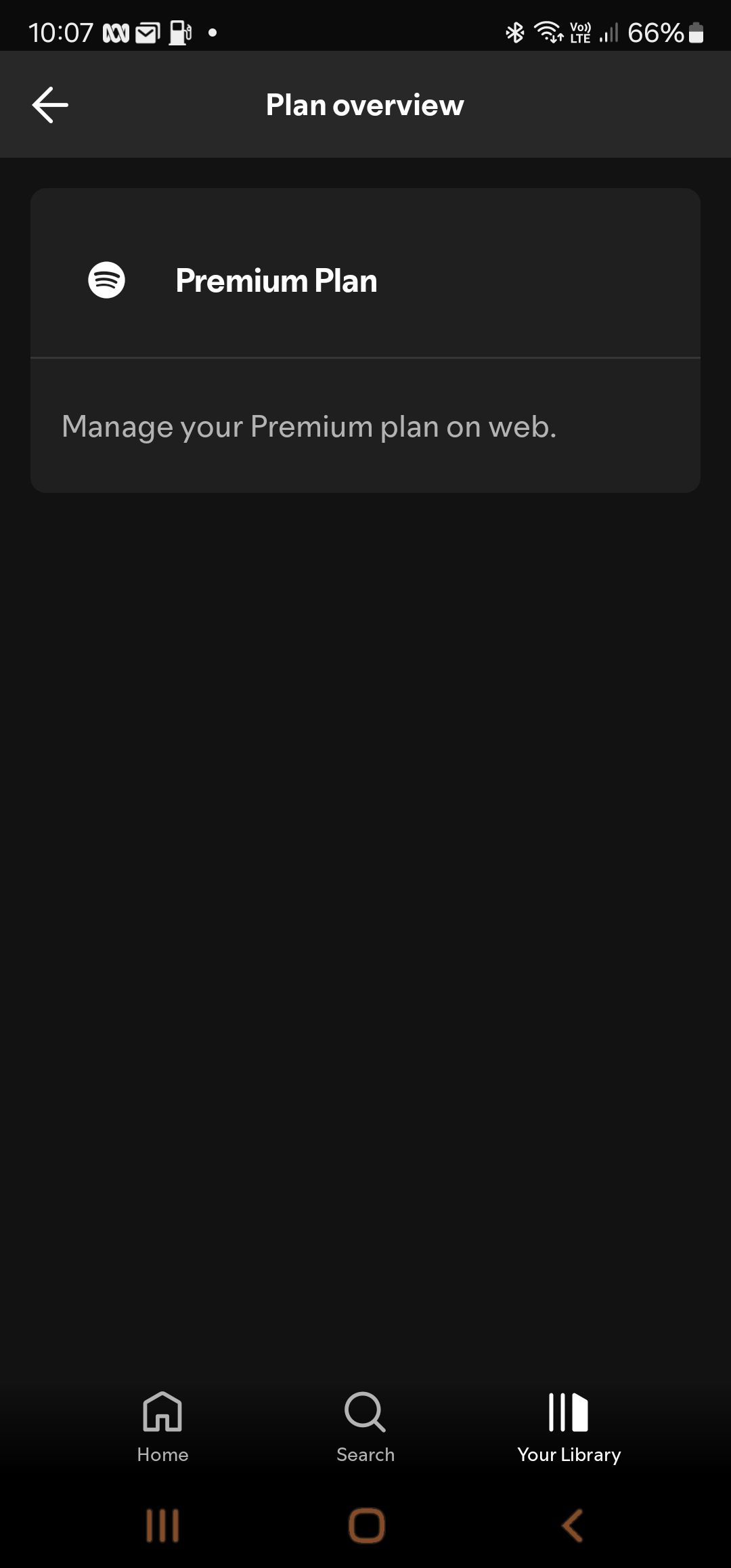
Hey @puck123,
Thanks for the reply and for sharing your thoughts on this - we appreciate it!
We're always working on improving the app and its features. We'd recommend you post your suggestion in our Ideas Board, as we regularly take new ideas and feedback into consideration for future improvements. Here you can read more on how ideas work
If there's anything else, we're just a post away!

There is no way of checking your hours with individual. I am certain I have not used my 15 hours as the current book I listen to on headphones around the house is only 5 hours and its only 2/3rds of the way through the book. Its the only book I have been listening too since the start of the new billing period and I always stop the book when I have finishing listening. I have spoken to Spotify and currently, there is no way for them to show a breakdown of where the hours go. Something is definitely not right here. Also the other users on the account do not use audiobook. I have highlighted it and hopefully they will work on giving users a breakdown of where these hours are going.

(English is not my first language)
Hey, I'm here to see if there's a way to check where my 12 hours audiobook listen time went. I am pretty sure- not for the first time- that I haven't fully used them, but audiobooks are blocked now and the plan says I've used them.
I would like to check on that. Any chance?
Hey there @andreastampehl,
Thanks for posting here and welcome.
To answer your question, you can know how much audiobook listening time you have left by checking the steps mentioned by @Xenia or by giving a look at this article. Nonetheless, as per this moment, there's no specific way to check exactly where you expended your listening hours.
You can give a look at the workaround mentioned by @Eni. We understand this is not ideal, so we'd recommend you post a suggestion about this in our Ideas board. Just for context, the Idea Exchange is a place where Spotify users can share their feedback in the form of ideas, to improve the Spotify experience for everyone. When posting suggestions there, make sure to follow our Ideas Exchange Guidelines.
Now, we'd like to add some further insights. Take into account that we count the audiobook listening time used based on each playback of an audiobook at normal speed. This means:
- If you re-listen to a book, or part of the book, your allocated audiobook listening time will continue to reduce as normal.
- If you listen to a 5-hour audiobook at 2x speed, even if you finish the audiobook in 2.5 hours, your audiobook listening time is reduced by 5 hours since that’s the length of the book at normal speed.
We hope you found this helpful. We're always here to help.

The solution given by @Xenia used to work but as of today my account no longer shows my listening hours, I had bought a top-up and was able to see how much of my top-up I had left too. Why has this been removed?
Hey there @MIA_124,
Thanks for posting in this thread!
You should still be able to see your remaining listening hours directly in the mobile app, as well as on your account page. The exact steps can be found under How do I know how much audiobook listening time I have left? on this page.
If the hours aren't displayed, we would like to investigate further, so it would be great if you could try from another device as well, to see if you notice any difference. An option is to do a clean reinstall, if this issue only occurs on the mobile app. This will clear stored cache and also ensure that you're running the latest app version.
Fingers crossed this helps 🙂

Did something happen to the remaining time of audiobook? It used to be available when i clicked the plan name. Now i cant find how much time i have left.
Hey there @corry000,
Thanks for getting in touch about this here in the Community.
Just to confirm, have you tried following the steps @Maria sent previously?
If so, and the issue persists, could you send us a screenshot of what you're seeing on your end so we can take a closer look? You can attach it to your next response by using the Insert image option in the post editor. Make sure not to send any private info.
We'll be on the lookout for your reply.

I have the same issue—it used to be where your instructions led us but no more. I had purchased a top up and now have no idea how much is left of that either.

This is no longer working on the app. Can someone please fix this.


Why on Earth do I need to go online to find out how many audiobook listening hours I have left? It’s f*cking INFURIATING.
Literally one week ago I could see this in the app - then one if your so called ‘updates’ happens and the ability to do this (through going through an already unnecessary wormhole of the accounts and management sections in the app) has now been removed.
What possible benefit does this have for the user experience of the app?!?! I know enough people who have left Spotify because of frankly stupid frustrations like this - and if this isn’t changed I may join them.
SORT IT OUT.
Hello and welcome to the Community!
This is how you can check how much audiobook listening time is left in the plan and how long before your listening hours are renewed:
Mobile
Desktop
Note: There might be some delays in tracking the audiobook listening time you’ve used if you pause your listening mid-chapter, or you’re offline for an extended period of time.
For more info about Audiobooks in Premium plans check out this Support Article.