Introducing Smart Shuffle!

Introducing Smart Shuffle!
We know that our users love creating their own playlists to capture key moments in time – in fact, playlists created by users often become their most-streamed playlist for the first several months but listening to these playlists slowly fades overtime, and users are eager to discover new music.
With this in mind, we’re excited to launch a new play mode called Smart Shuffle that keeps listening sessions fresh and provides personalized recommendations that perfectly match any listeners’ playlist vibe.
This update will roll out to Premium users on mobile devices starting today.
How does Smart Shuffle work?
- You can use it in any playlist created by you, and your Liked Songs.
- To activate it, just use the Shuffle button to switch between regular play, Shuffle mode and Smart Shuffle.
- When Smart Shuffle is on, recommendations are added to your session automatically. You can find all the recommendations sitting in your queue.
- You will be able to recognize the music we are recommending with the sparkle (✨) symbol next to the track. For a playlist with more than 15 songs, we’ll recommend one song for every three tracks.
- And the best part, your original playlist remains untouched, so you can add any new track that catches your ear.
- If you like a specific recommendation, just save it using the plus button in the Now Playing View. If that song doesn’t hit right, just tap the minus to remove it from the recommendations. This is then used to better adjust the suggestions we put forward.
- Every time you turn Smart Shuffle off, a new mix will be available every time you activate it again.
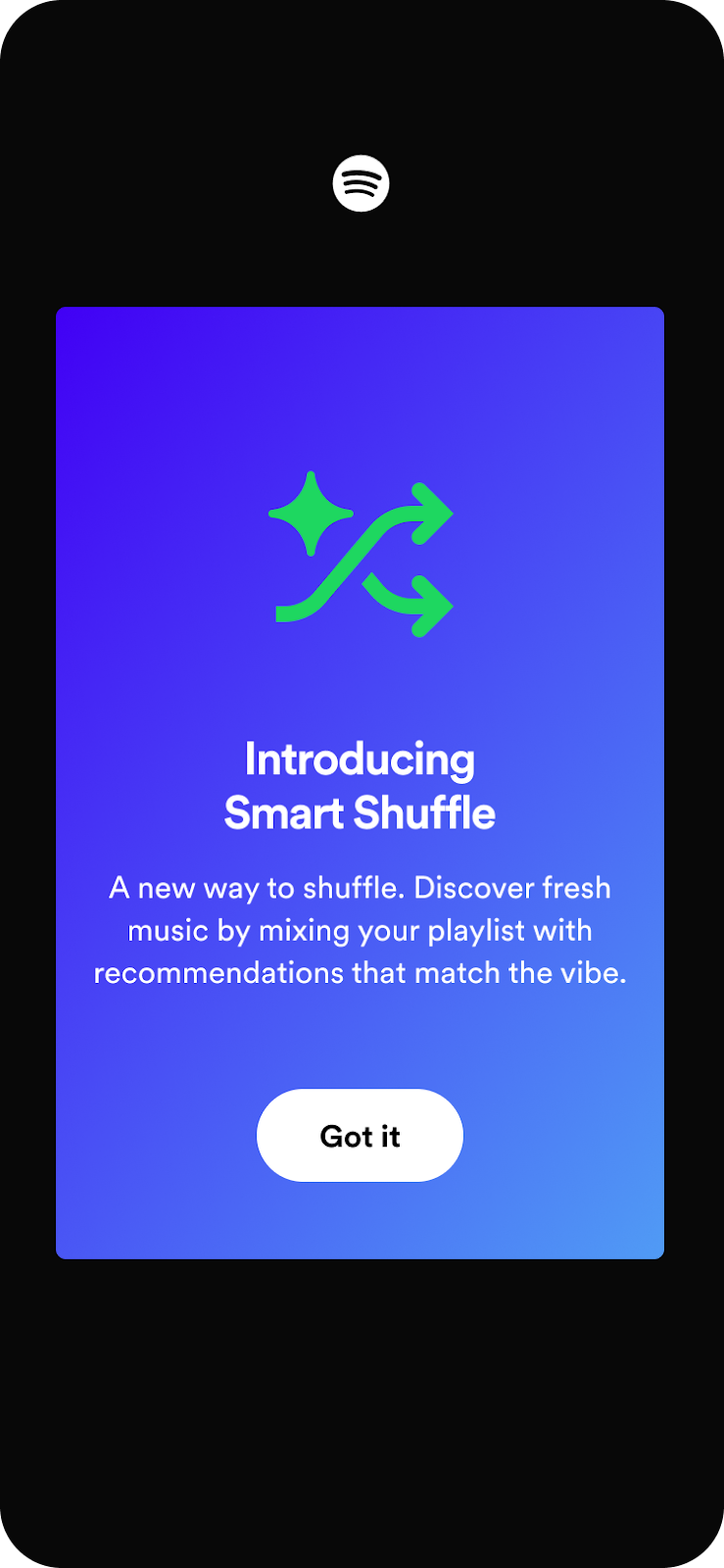 Introductory page
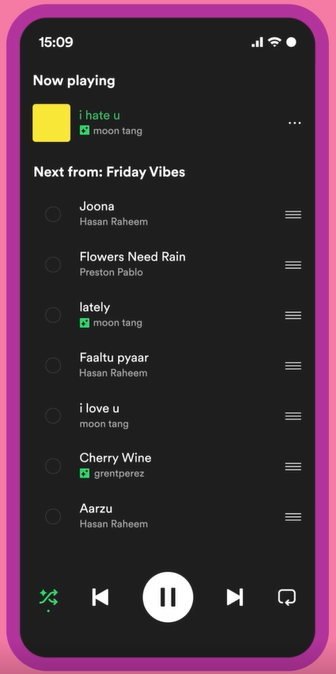 How the queue will look
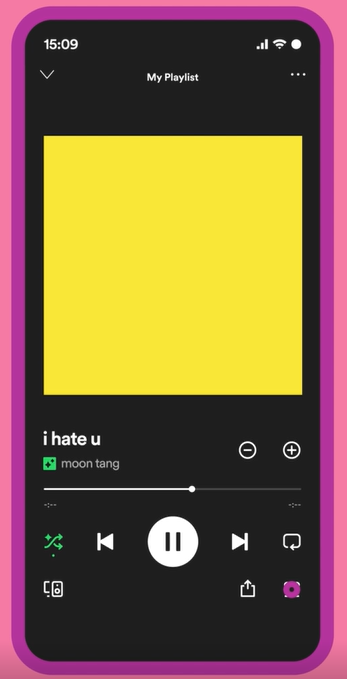
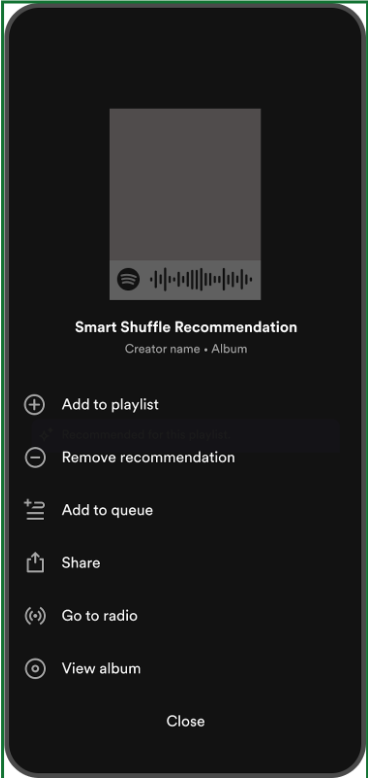
Adding and removing recommendations.
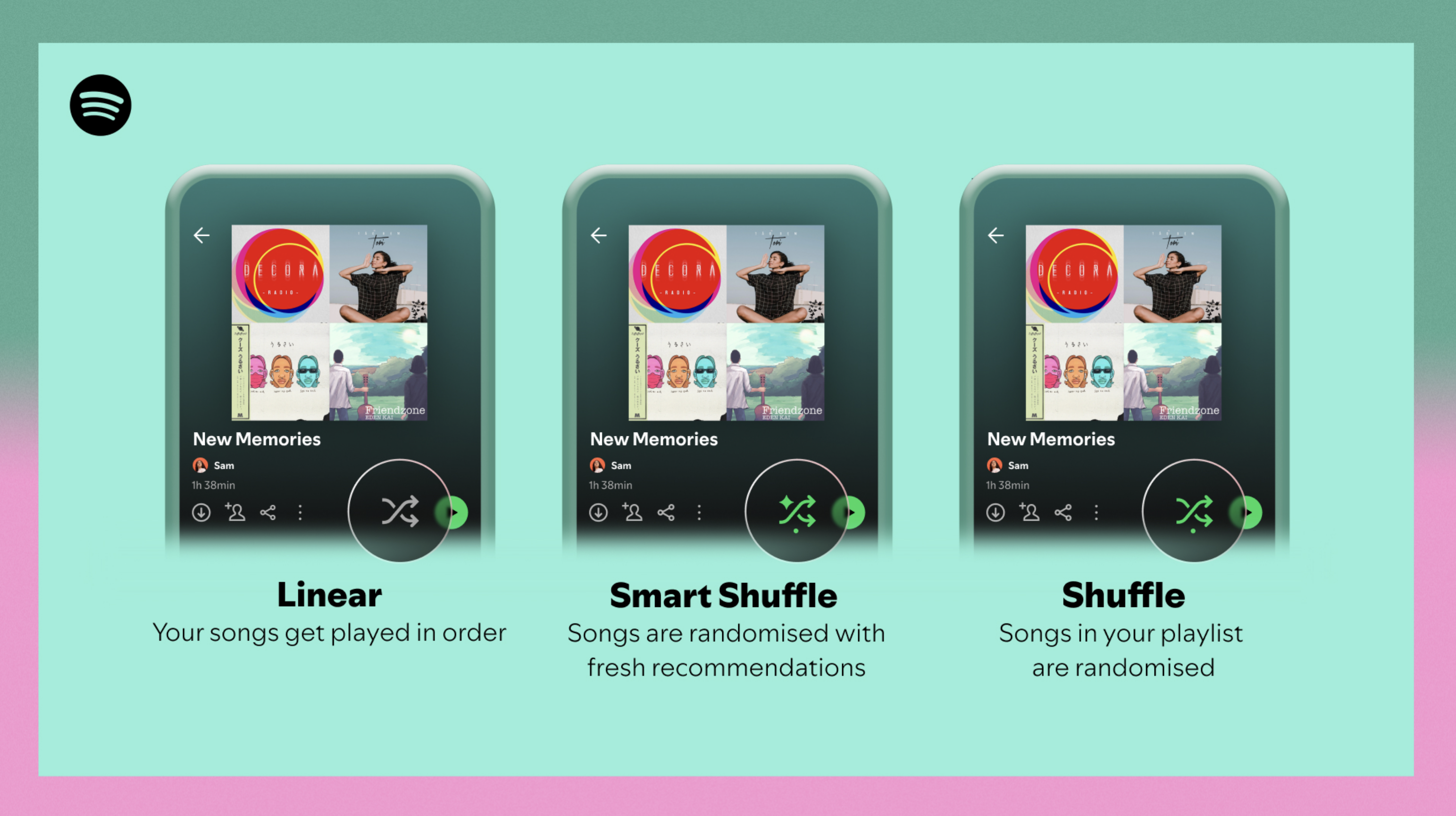
Different playback options.
FAQ
What about the Enhance feature?
For now, Smart Shuffle will replace the Enhance feature.
What will happen to Discover Weekly and other regularly updated playlists?
For the time being, no changes to those will be made. Smart Shuffle aims to improve the listening experience for user curated playlists.
Does this mean that using Smart Shuffle will cause my carefully curated playlists to get cluttered with new recommendations?
No! Your original playlist remains untouched, so you can add any new track that catches your ear. Smart Shuffle won’t change your playlist without your explicit permission. What changes instead is what you'll hear during each specific listening session
🌟 I would like to disable Smart Shuffle permanently. Can I do that?
Yes, you can! Just go to Settings and privacy and then to Playback and toggle the option Enable all play modes to off. This will mean you will only have the regular shuffle.
Note: This option is for Premium users only.
We hope you're as excited as we are about this new play mode. The official Newsroom announcement is out, you can check that out too. For any and all feedback on the matter you may have, you're more than welcome to comment in the thread below.
Accepted answers
All comments

Hate smart shuffle. And now I have to manually enable/disable shuffle on every playlist I try - incredibly annoying and poor experience.

Here is how you fix this issue, just an FYI

I think everyone knows this. They just don't want the smart shuffle feature being activated by the shuffle button because it's an awful implementation of this feature and too buggy.

Hi. First time commenting here ever. That's how annoying Smart Shuffle is that you have me typing this.
This feature is awful. It should have an option to KEEP IT DISABLED. Not a toggle that reactivates itself when it feels like it.
I dont like this feature and I dont use it. I always make sure its off when I play my playlists. And two songs later, Smart Shuffle says "$#%$ you", tur s itself back on, and I'm now listening to a random track I did not want.
There seems to be a majority of people who simply want the option of permanently keeping this disabled, why is Spotify being this adamantly stubborn to fix this?

bring back enhance instead it was better  . bring back radio for playlists that was the best feature

Smart shuffle is garbage, please add an option to permanently disable it.

How do we create a vote to have a disable option in the web/app settings?

Please, disable the shuffle button. It is too annoying and horrible decision of UX!!!

I do not enjoy the smart shuffle feature. Is it not essentially adding a way to revert back to the unpaid version of Spotify where it adds its own “recommendations” between the songs you are actually trying to listen to? Why would I, someone paying for spotify, want to go back to having to listen to spotify generated playlists. I pay for it so I can make my OWN. Adding the smart shuffle button on top of the regular shuffle is INSANELY inconvenient and makes using the app slow and clunky. Please add a way to disable this feature entirely. It’s annoying as **bleep**.

Please allow users to permanently disable smart shuffle, or remove it from the cycling of the shuffle button.
It is so poorly implemented- I am actually so frustrated using your app now. When network connection is poor, switching between shuffling and not is arduous when it is a core and simple feature of a playlist.
Additionally stop forcing smart shuffle by default. I have never once used it, and despite that I constantly find it enabled when opening up my playlists.

I was a huge fan of the enhance function that was just barely removed. I actually discovered almost all of my new music through the enhance feature. I have used the DJ, but I found myself getting annoyed because while I am looking for new music I don't want to hear the songs I already have added to my playlists. With enhance I was able to methodically go through each of the recommendations at my own pace by turning of the shuffle button and selecting the next recommended song after listening to the previous one. This method helped me to add dozens of hours of music from artists and genres that I feel I wouldn't have found otherwise. The new smart shuffle removes some of the freedom that was given with the enhance feature. Sure I can just open the queue and manually scroll through it, but I found my previous method with enhance was much more efficient

please just add an option to disable this feature without needing to tap the shuffle button 2 more times its so annoying

I want to permanently disable this feature. Give me the option.

Please change the behaviour of the shuffle button. I don't want to cycle between shuffle, smart shuffle and normal play. If there was a separate switch for enabling smart shuffle I would not mind the feature, but how it is implemented now is very annoying.
Sometimes I ride the train with bad network connectivity. I click on the shuffle button to disable shuffling. I see a spinner for a long time. I do not like this.

Plan
Free/Premium
Country
USA
Device
Samsung 23 Ultra, new windows 11 desk top computer, windows 10 laptop and a cheap old Android tablet just for testing on 4 different devices.
Operating System
( Samsung Android, Windows 10 and 11)
My Question or Issue
Spotify won't shuffle all the songs in my playlist. We should be able to just choose shuffle and it will shuffle and play all the songs in my playlist no matter how big it is. I tried all the suggested workarounds and they do not fix this issue, and they are too complicated and every time I log out and back in it auto repopulates the que therefor the clearing the que workaround has to be done every time I log in. Spotify needs to fix this ASAP, but since this has been a problem for a decade now I do not see them fixing it at all. I am on a 30 day trial and the ability to shuffle my entire playlist is at the top of my list of needs for a music streaming service. Looks like I may have to drop Spotify, too bad they can not fix this very simple but BIG issue.

Spotify, PLEASE add a settings toggle to turn off Smart Shuffle! It really screws with my listening. If I want Smart Shuffle, then I'll intentionally turn it on if you had a settings toggle. The music I have in my playlists is the only music I want to listen to! I'll add suggested songs to a playlist (as seen at the bottom of a playlist on the desktop client) but I don't want music auto-added to my play queue.
My biggest gripe about the feature is when using it in Android Auto. It turns itself on automatically, and when I want to disable it and go to regular shuffle mode, it somehow turns itself back on and gets confused. So basically, I have to go through and press the shuffle button a few times until I finally get to regular shuffle mode, which takes some time because I have to wait for it to turn on the Smart Shuffle mode (about 5-10 seconds) then turn it off, then turn on regular shuffle mode. This means taking my eyes off the road for an extended period of time, which is DANGEROUS when driving!!! I dealt with it until today when I got dangerously close to an accident when I was trying to go from Smart Shuffle to regular shuffle mode because I had to take my eyes off the road for too long just to watch for it to go to Smart Shuffle mode, then turn it off, then turn on regular shuffle mode. Thankfully I'm one of the lucky ones to have a car with forward collision prevention, which is the only thing that saved me from an accident.
In summary: Just add a settings toggle to enable or disable smart shuffle mode. It's a dangerous feature when you're on the road!

I think we all can agree that this function was far from ready for release. Even I who wants it cant use it. *laughs* Its a joke as it is today.
Mayority (at least in here) hate it and want it shut off. A small minority like me want it, actually like it, but it simply wont work. The suggested songs keeps vanishing after a few seconds I turn it on.
*shakes head* Can you guys at Spotify please just remove it and re-release sometime next year when it works? Please.
I also suggest looking over your trial methods. Or lack there of...
ps. Before re-releasing it also make it possible to turn on/off in the settings ^^

It's by design.

Give us the option to completely disable it please, this is the most freaking annoying feature ever. It keeps coming back even if I am not on randomize smart shuffle. It scr3wing up my next song when I am removing it, it goes back to the beginning of my liked song instead of playing the next one after X song. So funny that the whole community is just screaming at you and you just pretend to not see how awful this feature is sht. Thanks for listening to the customers.

It'd be nice if this feature was made as a separate button. This feature has never worked right for me as it just adds songs that are already in the playlist (not very "smart", huh?)
My biggest pet peeve is how it adds a delay if you want to turn off shuffle. Ok, tap it once it enables shuffle, fine. But you can't quickly disable shuffle because it has to load all the recommendations (which are, in my case, songs that already in the playlist). Just make it a separate button (gee, like the old Enhance feature?), or make it so that it turns off if we hold the shuffle button.

Can Spotify add an option to remove smart shuffle or make it a separate button from the normal shuffle? It’s quite an annoying feature. If I wanted songs recommendations, I would use the “radio” feature or one of the “mixes” the app creates.

I really liked the Enhance button on the top of every playlist. It would add related songs right below a song I have added. And it would help continue recommending songs of that genre if I choose to add it. It was much better than the Smart Shuffle where it doesn't even show up on my playlist.

even have an acknowledgment of an issue, months after it should have been
dealt with. I'm beginning to think Spotify doesn't even deserve customers,
let alone to make money.

I can see from my email notifications that moderators are merging new complaints into this thread, so Spotify must know that we all hate this abomination of a feature. I've seen the following moderators merge posts into this thread:
Can one of you please acknowledge there is an issue here and talk about steps Spotify is taking to resolve it?
I tried to send a direct message to the above moderators and reached a limit after multiple failed attempts (more than one recipient, moderators not open to messages, invalid HTML in message...). This is the error message:
"You have reached the limit for number of private messages that you can send for now. Please try again later."
No messages were even sent, there were only send attempts. I tried to create a new thread to describe this issue and Spotify is not even allowing new issues at this point.
This company is really going downhill.

Just let me be able to completely disable it. I pay to listen to my music uninterrupted when I’m switching from regular shuffling to default. I don’t want to wait 5 seconds in between the different mode available. Just add a feature to turn it off completely. NOBODY ASKED FOR THIS.
Yes, this is my biggest pet peeve with this "feature". It adds an unnecessary delay if you want to turn shuffle on or off, or just want to reshuffle the queue.
It's also a huge PITA if you're in an area with poor cell service. One time, I was a rest stop with poor reception and Spotify took its sweet time to disable shuffle because it has to load the terrible recommendations into the queue. Did they not test this feature? Who in the right mind thinks it's a genius idea to use the same damn button.

How do I disable this permanently? Don't tell me to press the shuffle icon again, I don't even want to see it there.

I wish there was a way to permanently disable Smart Shuffle! I hate it - I can add to my own playlists myself. Spotify's normal shuffle seems algorithm-based anyway and I still hear the same songs over and over despite having some playlists with months worth of songs. Can we have an unbiased, pure shuffle please? Or at least give us that option?


Still waiting to be able to disable this useless "smart" feature.
When I'm playing a playlist sometimes it's "on" but it displays as no shuffle at all. I have to manually go back to my plalist and play a song of my choosing because I put the effort to select the musics I like in a specific mood and then spotify thinks it knows better than me.
Just give us a toggle in the settings ffs
Hi there folks,
We're here to say that we've taken your feedback into account and you will now be able to disable Smart Shuffle from the app settings, as described in this now implemented idea!
The steps are as follows:
This is for Premium users only and is only available on mobile at the moment, but rest assured it will be coming to desktop in due time as well.
Cheers!