what mean Wired connection in green

When I play music it show me under the song in green Wired Connection what can that mean ?
Accepted answers
All comments

but im not using any 😭

Hey folks,
Thanks for reaching out. Apologies for the late reply.
Can you please send us a screenshot of the notification and let us know the model, OS version and Spotify version of your device?
Cheers,

I have the same issue, it looks like this.

I’m having the same issue tired closing and opening and refreshing still nothing

I’m having the same problem. Says wired connection but it’s not connected to anything. My combine shows it as headphones, but again, nothing physically connected.
My “volume” (not combine)
Can you let me know what your solution was? I have the same problem.

I would also like to know. This is what I’m seeing when I’m just listening though the phone’s speaker.
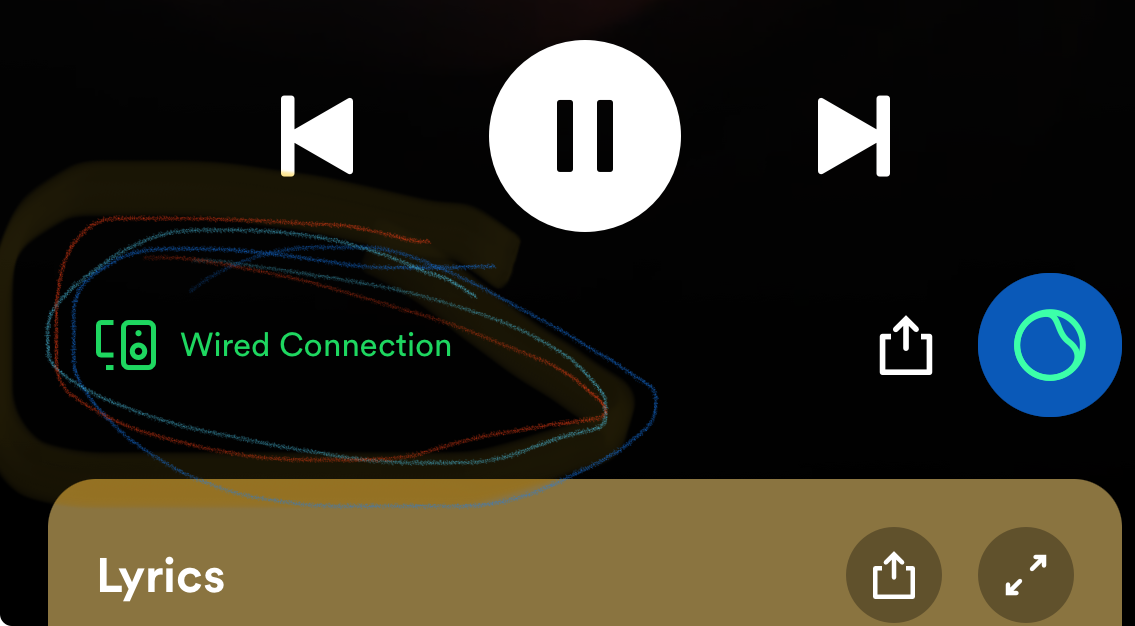
Hey folks,
Thanks for posting in the Community.
Can you please try some troubleshooting steps like reinstalling the app and trying with a different account?
Let us know how it goes.

I also had this problem then for the last two nights it would play different random songs on random speakers/tvs in my home.
Hey @Ryland20,
Thanks for posting here.
Are you seeing the same message in the Connect bar when this happens? It would be a good idea to secure your account using these steps to rule out unauthorized access.
Cheers,

I have the same issue. Not connected to any other device (including headphones). It used to say connected to this iPhone and not be in green.
I have an idea of one cause. I listen to Spotify on my iPhone 12 Pro in my work truck via the lightning adapter through a 3.5mm audio cord. I think it's happening when I unplug the dongle/adapter when my phone is locked and the note of what Spotify is playing through gets stuck on "Wired Connection". When I connect to another device, like a Bluetooth speaker, and then back to my phone, it goes away. Hope this is helpful.

So I’m paying a premium subscription every month to reinstall the app when an issue comes up?

Hey folks,
Thanks for all your replies and for the info shared.
We'd like to add some insights. This behavior is expected when there's a cable connected through the C-lighting port. This should disappear as soon as the cable is disconnected.
If you've noticed the Wired Connection banner is getting stuck after removing any cable connected to the device, we'd suggest restarting the app and making sure both the app and your mobile devices are up-to-date.
We'll be here if anything else comes up.

I have had the same problem the last few days. It seems to happen after I unplug my iPhone from Apple Car Play. It never did this before. I have had to restart my iPhone 3 times this week to correct the issue. I did recently update my iPhone to the latest download 17.3.1 I wonder if it’s related?

I am also having this issue. It’s frustrating and as others have said- we don’t pay premium rates to have this level of frustration preventing us from using Spotify. It’s clearly a common issue. Sort it out.

I’m also experiencing the same issue.
Phone is up to date. Closing and reopening the app does not fix it.
Are Spotify working to resolve this known issue?
I refuse that reinstalling the app is a solution for an issue that does not appear to be isolated.

Hey there folks,
Thanks for reaching out in this thread!
Just to make sure that we're on the same page, is the symbol still displayed even after disconnecting your device from the cable? Does clearing stored cache from the app make any difference?
Would you mind letting us know what device and operating system version you're using, along with the Spotify version?
We'll keep an eye out for your replies.

Same thing here for the last week. When I unplug from CarPlay it should no longer have a wired connection. Now this weekend I had it plugged in through CarPlay through my car and no sound in the vehicle at all my Spotify screen in the car showed that the music was playing, but there was absolutely no sound. Switched over to Pandora and had sound in music so it’s obviously a connection issue between iPhone CarPlay and Spotify. I pay for a family premium Spotify account and both my daughter and I in this last week have not been able to use our Spotify through our CarPlay. I just tried to use Spotify app at my desk through my phone And no sound again says it’s a wired connection. Have to turn on my Bluetooth and get my earbuds in order to be able to listen to music ridiculous
Hey folks,
For anyone still experiencing this, please let us know the model, OS version and exact Spotify version of the affected devices and describe the issue in as much detail as possible (if you haven't already) so we can notify our tech team about it.
Thanks!

Hi, i just encountered same issue, i'm currently using on Windows 10 enterprise with Spotify for Windows (64 bit)
1.2.43.420.gc7b23f70.
Tried logged out, clearing cache and uninstalling the App, still can't change the Wired connection.

I have this issue on my MacBook Pro running iOS 14.4 (23E214). I am plugged in with an adaptor for my: ethernet cable + external lens as well as plugged in to charge. Wire connection only, even on Spotify Web Browser - no luck.

So do we need to disconnect CarPlay and then it should work? It’s only happening on my daughters ipad


The same for me I can’t hear it … is there something wrong with Spotify or do I have to change to Walmarts Spotify?
Hey folks,
Thanks for reaching out here!
@Chance_thegambler - to confirm, have you tried any troubleshooting mentioned earlier in the thread? Such as a clean reinstall of the app, clearing stored cache, making sure the device's OS is up-to-date, etc. It would be great if you could give it a shot (if you haven't already). And should the issue persist, let us know which steps you've tried, as this will help us avoid repeat steps as well.
Also, as you mention that you can't hear it, we assume there's no sound when Wired Connection is shown. In that case, do you notice any difference after changing the playback device? For example, you can try connecting to a speaker and then switch playback back to your device. It's also worth having a look at the points on this page.
If this behavior persists, or if what you're experiencing is different, feel free to send us more details on what's happening from your end. For example, does it occur at any specific points and with a certain device.
Let us know how it goes!
You're using probably using headphones or ear phones, hence, wired connection