I want to remove a credit card from my payment details.

Accepted answers
All comments

Hey there,
Thanks for reaching out.
The payment method associated with your subscription will be removed when your subscription ends. You can see how to cancel here.
If you've updated your payment method here, it automatically replace the previous payment method, so there's no need to take any further action. 🙂
Let me know if you have any other questions.

This is not helpful. Regardless of the fact that the payment method for the subscription has been changed, there should definitely be an option to remove old payment methods. This is a huge oversight for spotify, and a feature that most customer-friendly sites and apps have.
Hey @TheShiniestOne,
Thanks for reaching out.
I personally don't see any benefit in adding such an option, since the old payment method gets removed when a subscription ends or when the payment method gets updated. 🙂 But feel free to submit your idea at https://community.spotify.com/t5/Ideas/ct-p/newideas.

I agree with Newbie. I just googled how to remove payment method and I am also frustrated I cannot remove my old payment method.

Yeah, this is flat out unacceptable. Maybe not slimy enough for others to downgrade to free and jump ship, but enough for me. Hope this changes, but I'm sure they have the numbers to not care, which is unfortunate.

I want to remove a credit card from my payment details.

Yes

There is a place called "Saved payment cards" under "Payment." You can click the card you want to remove here and remove it. Hope this helps!
Hey @lighthousetwin10,
Keep in mind that that's not the payment method associated with the subscription. It's only used for other purchases 🙂
I updated my card information first and then removed the old one. It no longer shows up as an option so as far as I'm concerned I removed the old one. It is technically the same card, just new expiration date and CVV

I'm getting nagged by Spotify by email that my payment method is not working anymore, click here to rectify! As this could be a scam I decided to go into the app - unfortunately when I go to my saved credit card details it's locked, so I can't check to see what card is being used! All I can do is add another card. I'll now have to wait and see if my account subsequently closes. Very frustrating! I've never had this problem with any other streaming service.

Pretty bad replies by Maxim. Don't answer the question and only try to defend Spotify for something they don't need to be defended for. If the "Spotify Star" really really knew what he was talking about he would have replied what Lighthousetwin10 replied as that was the answer to the question asked. What do they do, attack commenter and defend spotify. Ridiculous. Can we report "Spotify Stars"?

I went to the spotify website on a laptop. I went to profile in the upper right corner, and selected account. I scrolled down halfway and selected "Saved Payment Cards." I clicked the three dots to the left of the last 4 digits of the card and had the option to "remove saved card." I hope this helps.

Rosie20,
Thank you!!! This is the answer everyone is looking for. I was trying to delete an old card I no longer have access to. Your answer helped me. Worked beautifully. Thank you, I appreciate it! 😊

Same, it won't let me get rid of my card because there is no way to remove your card. Spotify keeps on trying to take money out of my account even though I'm back on free plan.

I was able to remove all cards on my Spotify account. I did it via the desktop version.
1. Go to your account on web https://accounts.spotify.com/
2. Click "Saved Payment Cards"
3. Under "My Cards" you'll see all associated cards with the account
4. Click the card you want to remove
5. Click "Remove Saved Card"
and boom, all done.

Thanks man!

This is what we were looking for @rosie20, THANK YOU for this productive and actually helpful answer!

card is not shown, but it a different page it shows that the card ending with black black will be charged

there is no option to remove gcash in my account, i recently cancelled my subscription but accidentally tap on renewed and it concerns me as it renewed easily without asking for my payment details. i tried checking the option to remove my gcash while my subscription is active and also after i cancel but both has nk option tk remove gcash, i reached out with your support through messaging but they said there is alo no optio. to remove gcash and they will escalate to your team. i hope that is true because this is serious problem and it is best to reslove it because if the plan can be renewed easily then if someone access or accidentally renewed my subscription it will be hassle since there is nk guarantee that you will refund the charge. another hassle is the timeframe for the refund. prevention is better than cure. it is best to have the option to remove gcash totally before any future issues

I didn't see my card under the "saved payments cards" option. How else can I remove it?
Hi Ada,
1. Possibly you've removed it already.
2. Were you using the web based version or mobile?
3. Within the "Saved payment cards" is there any saved card?
4. Are you cancelling your account outright or just trying to switch CC?

I HAVE BEEN CHARGED ON MY OLD PYMENT METOTH ASWELL IN THE NEW ONE WHAT CAN I DO IN THIS SITUATION

Plan
Premium
Country
Australia
Device
N/A
Operating System
N/A
My Question or Issue
i have updated my card details and removed the previous card, but the old card is still being billed instead of the new debit card. I have updated under manage my account and the card details, only the new card appears in the list of payment options but the old card is still being billed.

To help with confusion:
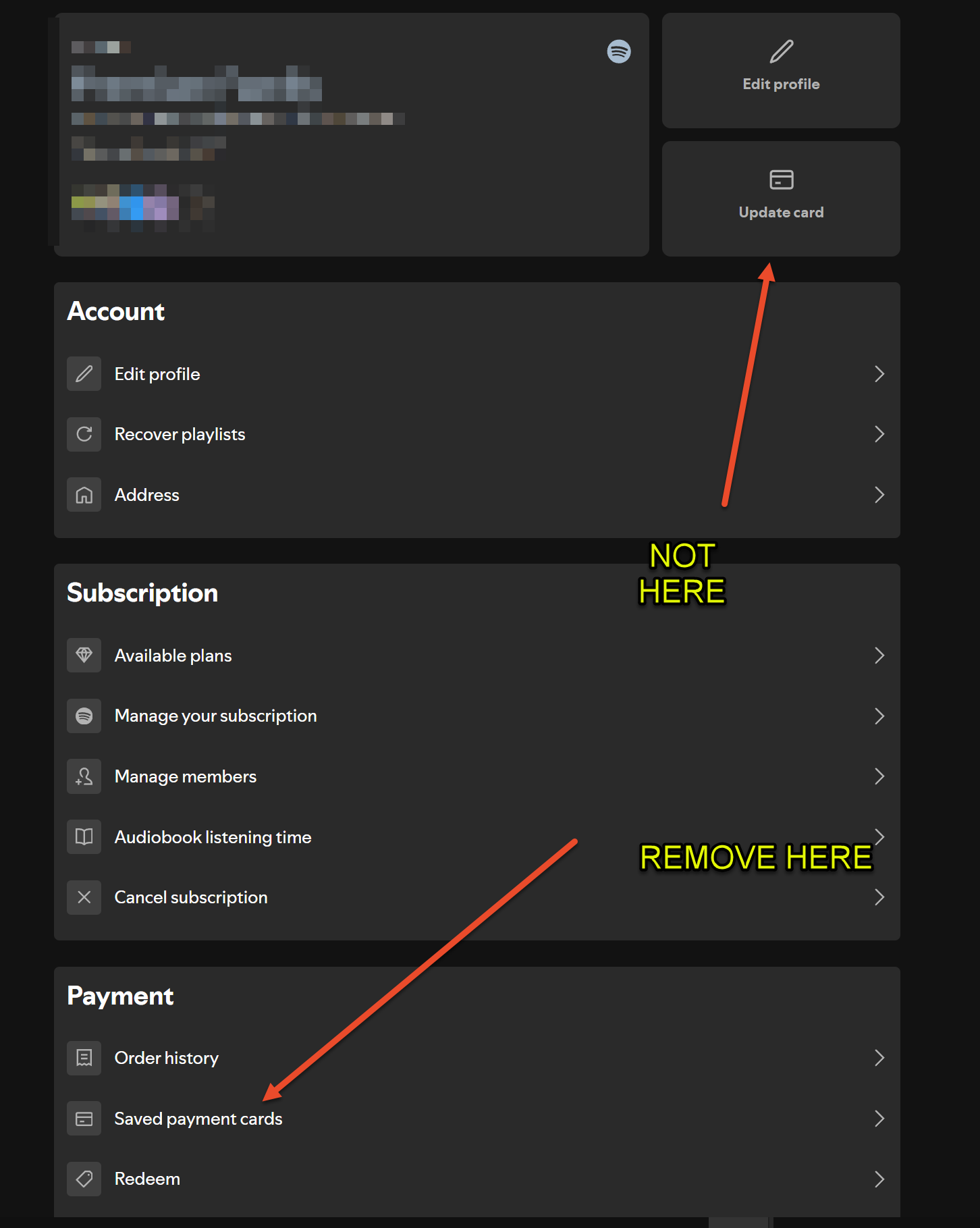
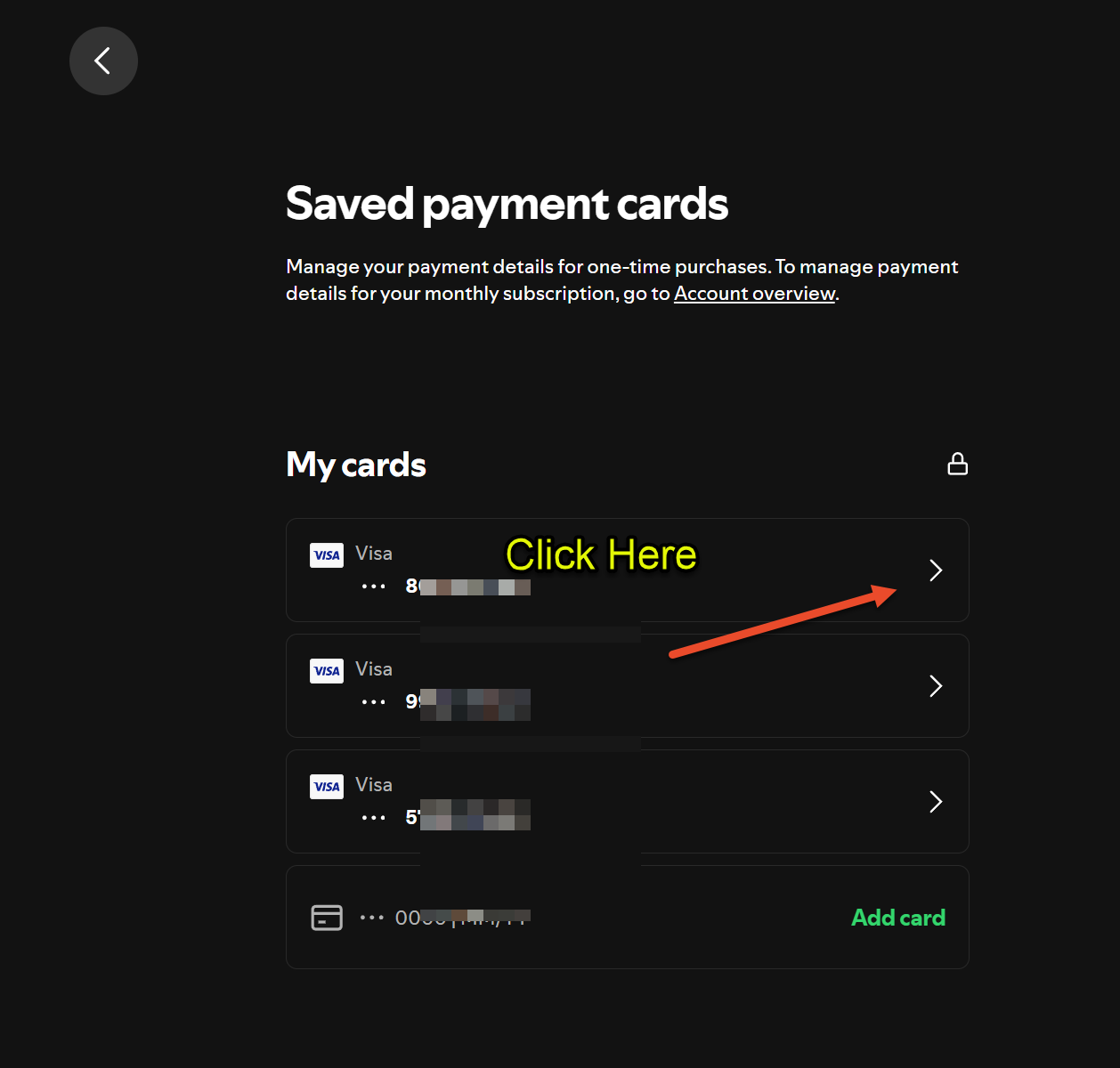
Voila!

There is no cards showing in this location -> so i cannot delete for anything
https://www.spotify.com/account/saved-payment-cards/
But, i can subscribe for a subscription in this page with "Saved Mastercard" option (last credit card i used to make purchased)
https://www.spotify.com/account/manage-your-plan/
This is a very very very bad function of Spotify to get customer money by an accident purchasing.

Why is the option to remove card in different menu from the one where you update card information? All of the payment method options should be in one place. Not split between one menu up top and then a different one halfway down the page.

I removed all future billing cards, however, the system has one that has only the option to change:
I need remove this debit card is of my father.


I was able to remove all cards on my Spotify account. I did it via the desktop version.
1. Go to your account on web https://accounts.spotify.com/
2. Click "Saved Payment Cards"
3. Under "My Cards" you'll see all associated cards with the account
4. Click the card you want to remove
5. Click "Remove Saved Card"
and boom, all done.