My downloaded musics are deleting when I restart the device

- None of the below information is required. However, the more you provide the easier it will be for us to try and help.
Plan
Premium
Country
Device
- Galaxy s20
Operating System
Android 11
My Question or Issue
Hi, I have a problem that downloaded musics are deleting. When I restart the phone, then Spotify redownload every musics. It makes me so annoying.... I almost have 4000+ download music. So when redownload the music takes long time.
I already did reinstall the Spotify app, and check app's storage authority. But It didn't work. Let me know any solutions. Thanks!
Accepted answers
All comments
Hey,
Thanks for your help. I tried the solution, but it didn't work. Spotify still redownload musics. And I'm using SD Card storage.
I'm sorry I'm late. Thanks.

Hi @sihyun359,
Thank you for your reply!
Since you're using an SD card, please switch to your phone's internal storage and test it for a couple of days to see if the issue persists.
If the issue doesn't repeat, we suggest you factory reset your SD card and test it again.
Keep us posted on how this goes.
Hey,
Thanks for reply. I've already downloaded musics in my phone's internal storage before, so I don't need to test it. Because the problem was same as now. What can I do now?
Thank you.
Hi @sihyun359,
Thank you for keeping us in the loop.
If the same issue is repeating with your phone's internal storage, please make sure that there are no cache clearing apps running for Spotify. Keep in mind that even if you didn't install those apps, some devices have them preinstalled.
They can also have names like "storage manager" or "smart clean". Since your downloaded music is stored in the form of cache, such apps can affect them.
Let us know how this goes.
Hey,
Thank you for helping me out.
I've checked apps on my device. But I think there's nothing like you mentioned. What can I do next?
Hi @sihyun359,
Thank you for your swift reply!
We'd like to narrow this down a little more. Can you log in with another account, such as a friend's or a family member's to see if the issue persists?
If it doesn't repeat, then we suggest you contact our folks from Customer Support who can take a background look at your account. Here is the link, when you do, you can link them to this Community thread so they don't repeat any steps.
Let us know if you have any questions.

I'm facing exactly the same issue with my A52s. Which is rendering the app basically unusable for me.
I spent a long time narrowing down what triggers the behavior and I think I found it.
The phone is starting the Spotify Helper before Android has even mounted the SD card, changing the app settings to use the internal memory as music location. It finds nothing and starts downloading again.
You can't stop the download process to change the setting back to the SD and if you try to switch the location before it downloads the app just hangs and never finishes doing any of the tasks.
Disabling the "Spotify Connect in the Background" setting and waiting until the phone loads after a reboot before opening the app does the trick*.
Edit: most of the time, sometimes Spotify still starts before the SD and switches back to internal memory.
Hi @amk_,
Thank you for posting on this thread and sharing those insights.
Even though you've successfully narrowed down the issue as much as possible, there may still be underlying errors in the cache of your device.
In this case, it's worth contacting Customer Support with the link I shared above, so they can take a direct look at your account.
Let us know if you have any questions.

I have the same phone and the same issue.
Didn't have this issue on my Xiaomi phone so maybe it's a Samsung thing.
Also on my Samsung it shows 4 storage options: Internal storage, "actual" SD Card" and 2 times it shows another 2 SD CARDS but their size is mirror image of the Device storage, what's up with that?

Hey there @Stjepan97,
Thanks for reaching out about this here in the Community.
Just to confirm, have you tried the steps @MafeG sent previously?
On another note, we can confirm that the right team is aware of the issue you mentioned about the multiple card storage options in the app settings. You can check this Status update for more info.
Keep us posted.
Yes I tried that and everything else I found online in the last few days.
This issues is been going on for years, which you can confirm with quick Google search.
And in all these years no one found an actual solution and Spotify just seems to ignore it.
So, the solution for this is to force move the Spotify App to the SD Card.
You have to activate the Developer Options and in there enable "Force allow apps on external". This will allow you to move the Spotify App to your SD.
Once the App is on the SD card you wont have the issue anymore since the App wont start at all until the SD card is mounted and ready to be used.
Been using this for months now, not a single time has Spotify downloaded the whole library again.
Will I run into the issues when I need to unmount the SD Card?
@Stjepan97 wrote:Will I run into the issues when I need to unmount the SD Card?
Nope, just tested it right now. Unmount SD card, re-mount SD card, everything still works.
The App doesnt run into any problems because it gets stopped the second the SD card gets dismounted.

That it has anything to do with our personal accounts and stop passing the buck because that has nothing to do with it. This has to do with Samsung and Spotify itself. And they need to fix this problem that they don't even bother looking into to fix. This has been a problem for over a year and it has been well noted and nobody at Spotify does anything.
You know I wonder, if we used a secondary app or went within the Samsung settings and always forced stopped the Spotify app, plus disabling connecting in the background Etc, before rebooting, if that would work?

Hi, I’m also facing this issue on my iPhone13mini. Has this been solved or should I contact customer support?
Hi,
Have you tried the steps above? If you still have problems after trying above the steps, I don't think you can find a good solution even if you contact customer service. I also contacted customer support with the same problem, but they gave me a solution similar to the steps above and still couldn't solve the problem.
I think it was a problem with the SD card, but i'm not sure. And now I'm using a different phone, so the problem isn't happening.
However, your problem can be different from mine, so contact the customer support, but don't expect too much.
I'm sorry I couldn't help you. I hope your problem is solved.
Thanks!
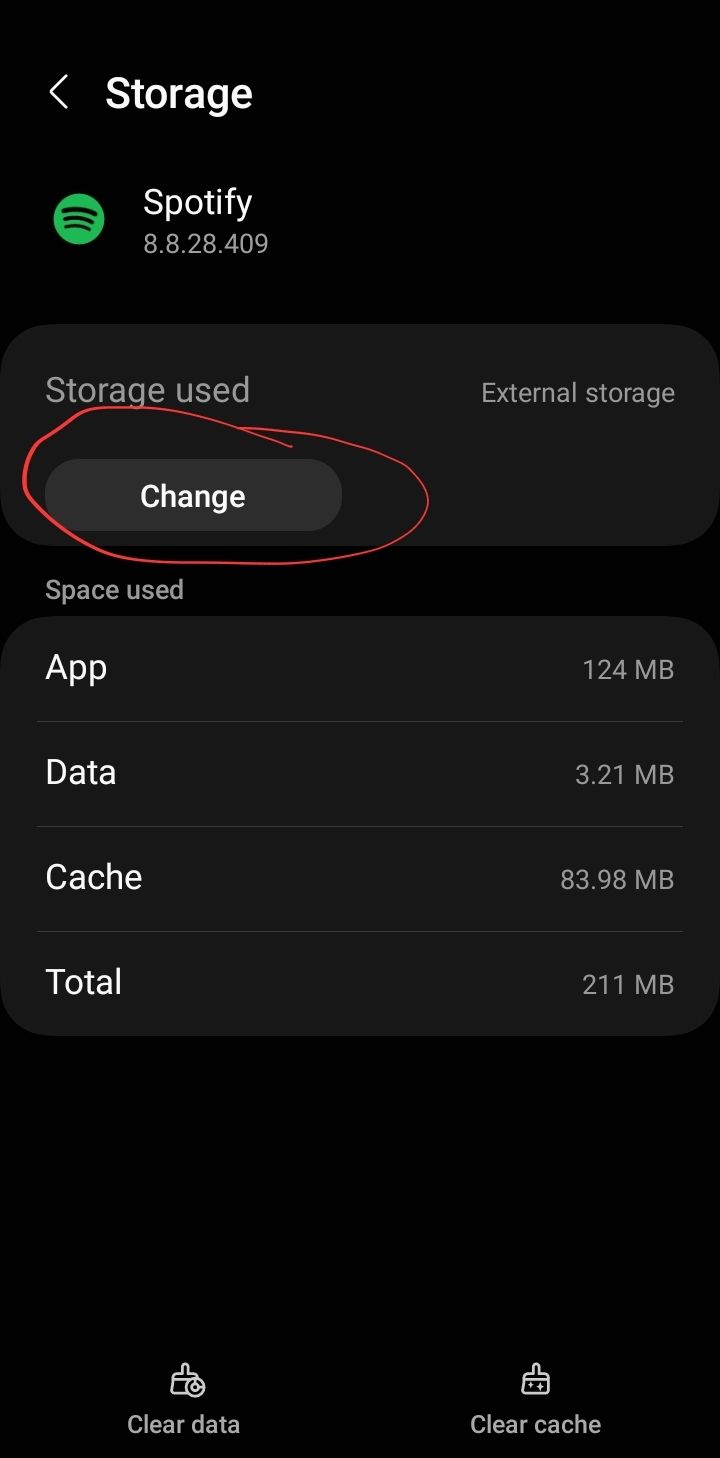
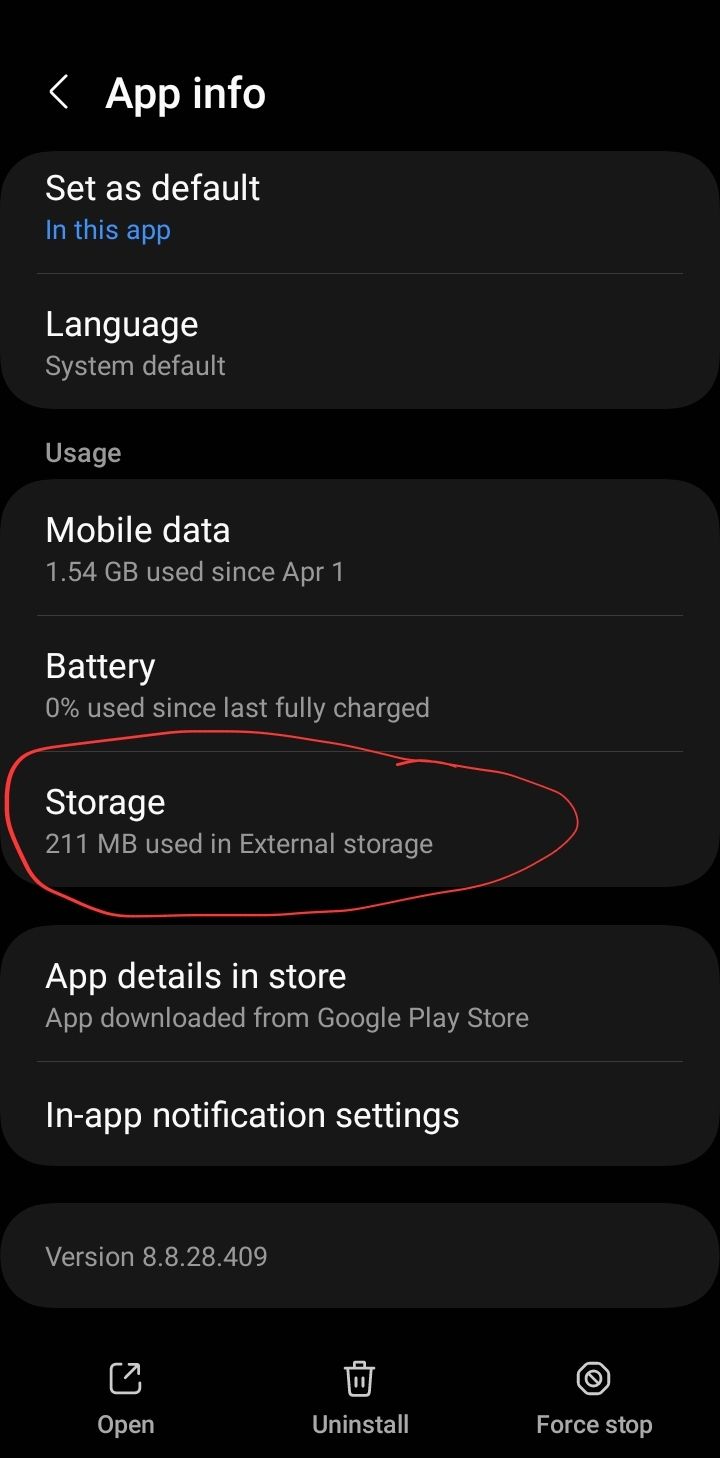
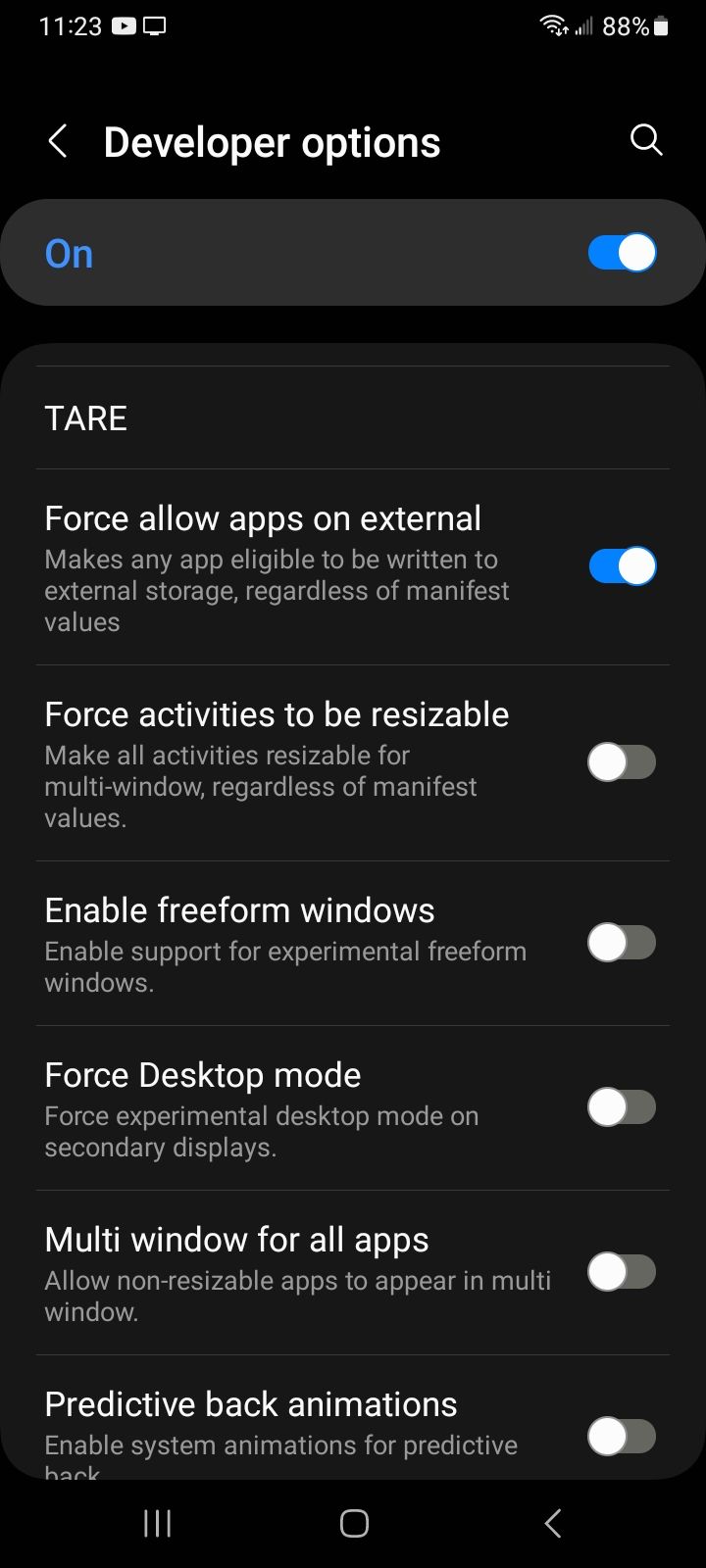
So I found out what to do. If you have an Android device that is! You need to enable developer options first thing in settings of your Android. If you have any questions on this, just YouTube it or Google it. You have to like go into your phone settings and about phone and build number and tap on it five times I believe is the process. At this point you now have an extra option within the settings of your phone call developer options. I believe it's all the way to the bottom. You click on that, and there's a whole lot of information but there's only one thing you are looking for. One option which says, "force allow apps on external". I will enclose a screenshot of this option. After that, you have to uninstall Spotify and reinstall Spotify and then you go into app options in your settings and you can move the app to your SD card. I will include screenshots of kind of where to find this as it's kind of tough to spot at first at least it was for me lol. The big thing is, you don't necessarily have to reinstall the app, but, once you move it to your external SD card you're going to lose your downloads it's just the way it is. So redownload everything again no matter what you do, I am a fan of just uninstalling the app because it will delete all the information that it had with your SD card and just starting fresh you know? And once you get it moved to the SD card, then you download everything. After this, every time you reboot your phone, look at your Spotify app on your wallpaper. You will flat out see, just how long it takes for that app to load up on the SD card and you will see why this is an issue! Or why it was the issue before because it will finally show itself on your phone screen quite a bit later after the phone restarts. But you will no longer have any troubles again my friend!! Wish you well and have a great day!!

@amk_ Genius idea. Didnt even know of that option. It actually works!! Really did not want to be on vacation, my phone dies, then I have no music...what a joke.
Get your act together Spotify... All you need to do is add a simple retry in your code to find the sd card when its not ready, and/or don't change the settings without the user explicitly setting it back to internal storage... Whatever service is spiining up as the phone boots is at fault.
The facts are our app caches are 100% FINE. The app has a bug and youre refusing to look into it. This is why I never invest in Spotify. You never ever listen to your users and their valid complaints and bugs that they bring up.

Plan
Premium
Country
Kenya
Device
Google Pixel 6
Operating System
Android 16
My Issue
When my phone crashes and restarts itself, all my downloads disappear. It also happened once when my phone lost battery
Saw that my post got merged here. The solution wouldn't work on my phone though. My phone doesn't have an SD card slot. Is there any other solution?
Maybe your phone is mounting your internal storage to a different file path every restart (as it does with external storage in my case). You can check with Total Commander, it'll list the mount point file path under internal storage. If it changes after a reboot, you probably can't fix this issue unfortunately.
Hi @sihyun359,
Thank you for posting on the Community.
Since you already reinstalled the app, please run a clean reinstall as this one is more thorough than a regular one.
If it doesn't do the trick, please let us know if you're using an SD card or your phone's internal storage.
Keep us posted.