Cannot open Spotify from any shortcuts if minimized to system tray

Plan
Free
Country
USA
Device
Custom built desktop PC
Operating System
Windows 10
Spotify Version
1.2.28.581.gd0e8a92c
My Question or Issue
If I enable "Close button should minimize the Spotify window", then close it, I cannot reopen it from any shortcut (either on my taskbar or on my desktop)- the only way to get back into it is by opening up the system tray and do that. I just updated to the latest version and this began happening, it didn't used to. When I click on any of those shortcuts, the little loading circle pops up for a split second on my cursor, then goes away and the Spotify window doesn't open.
Accepted answers
All comments

Hey @bigpingo2 and @SpaceBeeGaming,
Welcome to the Community!
To start investigating this issue could you let us know if you noticed when this first started happening? Have you guys tried any troubleshooting steps so far and was there any change?
If you haven't, we recommend giving Spotify a clean reinstall as it helps resolve different issues with the app's performance. You can follow the steps here.
Keep us posted 🙂

Reinstall did not help. The problem started when I updated to the version specified in the original post and is still happening on "1.2.29.605.g66a43ceb". I don't remember what version I had installed before the update, but I'm sure it was at least a few versions old.

The same here (Win 10), it started some 3 or 4 days ago. Whenever I want to re-open Spotify from running minimized in the background to a maximized window, it simply will not open. I have to force-shut the app, and run it anew. Quite a pain, I must say.

Hi folks!
Could you try installing Spotify from a different source to see if the issue persists there as well? If you downloaded the current version of the from our website, try the one from the Microsoft Store instead, and vice versa.
We'll be on the lookout for your replies.
There is no difference in behavior with the store version.
Thanks for confirming @SpaceBeeGaming!
We've reported this to our tech team who'll investigate further. We'll keep you folks posted here as soon as we have any updates.
Cheers!

Hey, this has started happening to me 3-4 days ago on Windows 10 as well. Super annoying and no solution that was mentioned her or anywhere else has worked. No reinstall works. Nothing. Very annoying.

this also started happening to me today on windows 11. very annoying bug

Same issue here, hoping for a fix soon

Plan
Free
Country
Brazil
Device
Desktop PC
Operating System
Windows 11 Pro - Build 22631
My Question or Issue
I just finished installing my Windows 11, it's something I do periodically every 3 months, and after installing Spotify (downloaded from the website), I noticed that when activating the "Minimize to system Tray" option, instead closing the application completely, I can't open the app via the Taskbar shortcut, even clicking on the taskbar icon and repinning it there, the application does not open, only via the Tray icon, and this didn't happen before I reinstalled the system.
What possible solutions would solve this? I already reinstalled the app and nothing changed.

I have got exactly the same problem. But I didn't install nothing. Using windows 10. The problem started 2 days ago.
Somehow I was on a beta build of Spotify. Every time I reinstalled, I would look in the "about" section and it would show an update. THAT is what takes me to the beta build for whatever reason. If I just leave it alone and ignore that update available notification, the feature works as it should.

been having the same problem too. Cant open it from the taskbar, start or screen shrotcut.

Same issue here, cannot open the window back from the start menu shortcut I'm on version 1.2.29.605.g66a43ceb (Windows 64bit)

I too am experiencing this issue.

Also happening to me, Windows 11 Home Version 10.0.22631 Build 22631

Getting the same issue. Win 11

Also experiencing this issue on (enterprise managed) Windows 10 with application downloaded from the spotify website.

The issue fixed itself for me when I switched from Windows 11's stable build to the Insider Preview Channel (Beta).
Update: Nope, it's back again after a while.

Please fix this already, it's been an ongoing issue for over 2 weeks, while also being already proven to not be an user-side issue.
I would personally just downgrade to another version that does work properly, but then when I tried to do so, the desktop app updated itself without my consent within a span of 5 minutes after downgrading, so we're not even able to troubleshoot this issue ourselves and have to wait for whenever you want to solve it.

Same issue here, disabling the "close button should minimise the spotify window" fixes it but its not ideal. Opening the app from a playlist instead of just clicking the icon also work. The issue seems to be with closing the spotify window and it trying to reopen the same window and failing. Opening spotify directly from links also works

Also experiencing this issue.
Hi everyone,
Our tech folks are working on a fix for this which should be released in an upcoming version of Spotify, so make sure you always keep the app updated.
Cheers!
Hello, since they're taking forever to fix this, I'm interested in the second workaround you mentioned. How do you open the app from a playlist? Is there any way to create a playlist shorcut and attach it to the taskbar?

The same is happening to me on Windows 10 Pro, 22H2 update.
Since around tuesday or wednesday, Spotify will not re-open on taskbar by any means.
I can close-exit the app through the Tray AND open it through the taskbar. But once I close-minimize it and close the taskbar window, I can't open it again through the taskbar. It simply won't work. It is not happening with any other softwares.
Click and drag the Spotify icon in the taskbar, vertically. You'll see a collection of your playlists. Click in one of them and you might be able to re-open the app.
a little workaround until they officially fix this,
if you have spotify pinned on your taskbar you can right click on the icon and pick any of the options and it will open the app again
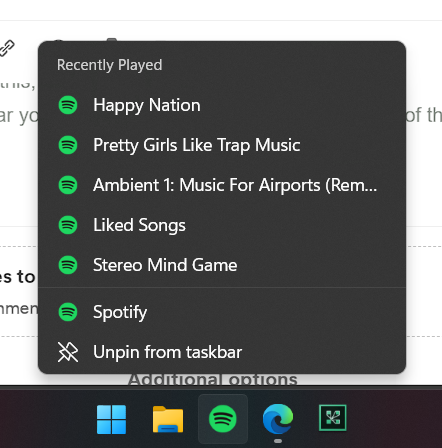
please fix this already this is driving me crazy lol

Same issue on both laptop at work and personal desktop

Getting this issue as well on win11.
Appears to only happen when "Close button should minimize Spotify window" is enabled.
Unable to open it via taskbar or start menu and only works via the system tray icons on the bottom right.
Reinstall did not work and the above workaround doesn't work as I don't get recently played options.
Also happening on Windows 11.