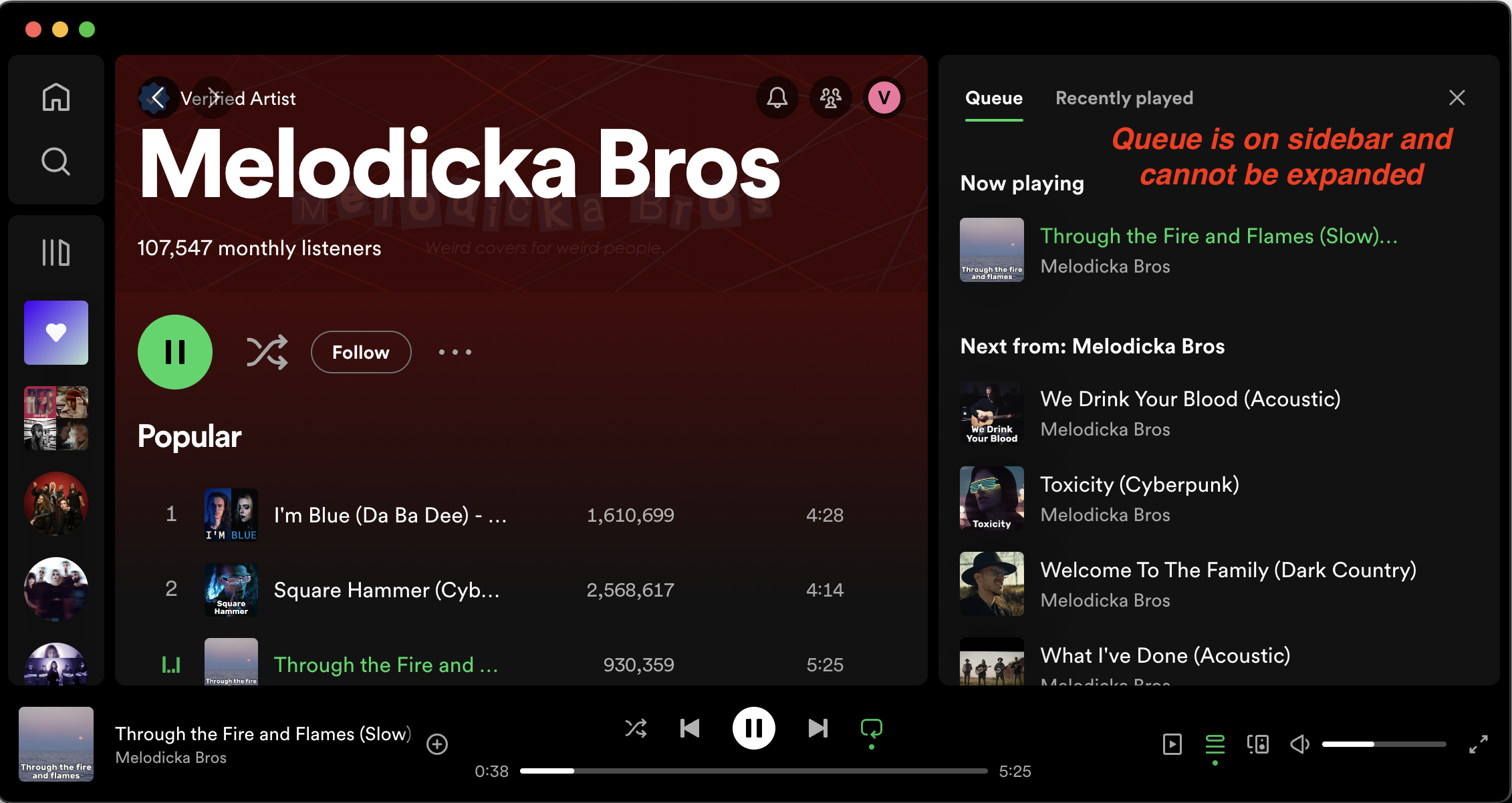
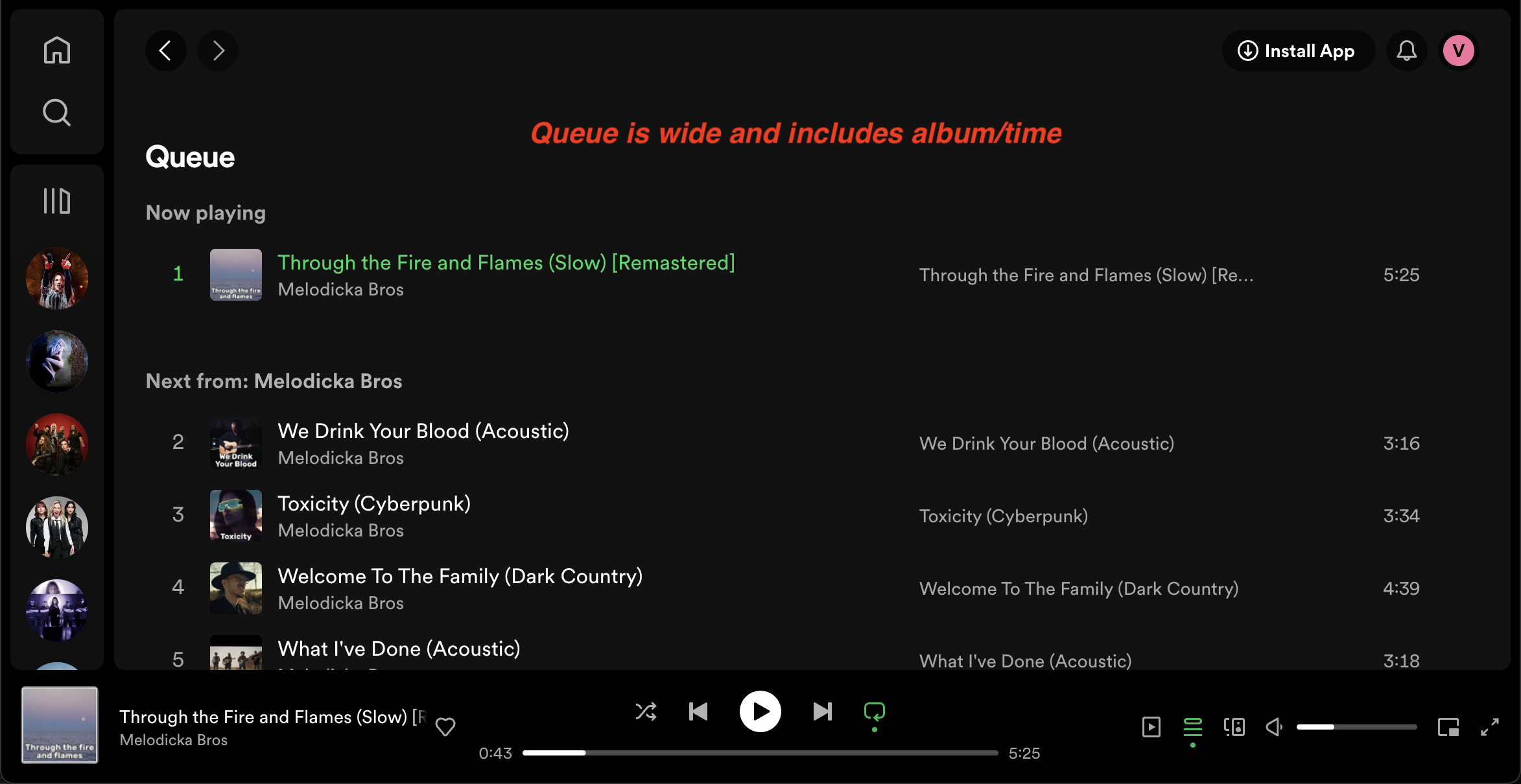
My playlist queue used to be in the center column on the desktop app. Now it has moved to the right column and I really hate it there. How do I move it back to the center?THIS IS NOT, IN ANY WAY, "SOLVED".
Hey folks!
Sometimes, you or others might notice something different within the app—this could be because Spotify is always testing things to see how these changes improve the overall experience. It's possible that some of you have gotten access to one of these features, which might not be available to others.
If you need help with anything else, do not hesitate to ask in the Community!
Happy Listening! 🙂🎵
So am I unable to have my now playing (Large Cover Art) and upcoming songs at the same time anymore? They now occupy the same area on the right side of the PC app. This UI is honestly terrible. So the actual playlist I am listening to just sits in the center doing nothing. I used to be able to have my queue in the center and my now playing on the right.
Who thought this was better? Whats the benefit?
Plan
Premium Family
Country
US
Operating System
Windows 11
My Question or Issue
i can't move it back...it really sucks, i don't see time of tracks anymore! Please enable option to bring old view back!!!
Free
(Windows 10)
they were separate queue was in the middle and now playing was at the right side now both are on the right and can't view both at the same time anymore.
Hey @Mear_Night, thanks for asking in the Community!
Could you share a screenshot of the same so I can take a closer look?
If you are talking about the new now-playing view on the right, it does contain a queue section. But it only shows the next track. You can click open queue or the queue icon on the bottom player to open it in the middle view as before.
You can read about the new now-playing view here.
Let me know if that helps.
Right, I hate this change too... Please change it back!
Before when i clicked on queue was in the middle of the screen below release radar now it's on the right,and i could have both now playing and queue up at the same time now i can't after i restated the app earlier today it changed.
I hate this too give us a option to switch it back.
After a recent update, the queue is now only visible as a sidebar. I don't dislike this change completely, as it does make it easier to place songs into a specific place in my queue. But what I do dislike is that there is no option to maximize the queue to the full window. The sidebar doesn't have enough room to show the full names of all tracks, and it doesn't show the duration of songs or podcasts either. This is very helpful information that users need the ability to see.
Allowing users to maximize the queue sidebar to the full window provides maximum utility of the feature.
EDIT: My post was moved from Ideas to Help. I don't know why, as my post was an Idea to improve upon this feature. Spotify, please restore this as an Idea.
@SPOTIFY, new UI is terrible! I always use my queue when playing spotify and I rearrange it during listening!
It should be in the center and show tracks duration!
I am so angry at this I sierosly consider changing service after so many years with spotify! ;(
this does not help.
Premium
Windows 10
Recently I updated the Spotify app for windows 10 and I hate the new arrangement of the home and queue window. Before the update my app looked like the web player looks now. Is there any way that I download the previous version of the program or get the before update looks (like the current web player).
Thanks for help!
@Amayy clicking "open queue" or the queue icon does not work. The queue stays in a sidebar. It is possible you are running an old version of Spotify.
This is an awful "improvement". Please please please revert this or make it optional in the Windows version. I need my queue in the main view, including durations.Not the default **bleep** which is pretty useless.
The new updated changed the style of queue adjustment we want the old way back not to side tab we need to be able to fully adjust like it was
Well, if this was a test, it failed miserably...
I hate this change too. 99% of the time I'm using spotify on PC I have the queue opened and now I can barely read what it says because it's so small
I just downloaded the last version without this ridiculous change, so if it's a big issue for you, you can do that too. (version 1.2.31.1205)
please, keep showing the length of the songs while on queue
From what website did you download version 1.2.31.1205? Is it legit?
Hi,
Really appreciate the fact that you try to resolve the problem, but from your text it looks like you havent't read the comments properly. At least for me it's 100 % obvious what the issue is without any screen shots or other additional info. It's all there - just read the text!
Trying to summarize: Before the last update (1st of March?) the queue panel was located in the middle main panel. To the right was the now playing panel, that shows album artwork etc. This made it possible to see both the current queue and the details of the currently playing track.But after the last update, the queue panel has been moved to the right panel, i.e. the same panel as the now playing details. This means that it's no longer possible to see both the queue and the details of the currently playing track - because they share the same panel and you have to switch between them. Meanwhile, the middle main panel shows whatever you've brought up there, but if you're not currently looking for something, reading artist details etc, then the middle panel just sits there doing nothing, i.e. being of zero use.
The old layout was a lot more useful 99 % of the time. We, who are complaining in this thread, all agree on this.
So, please revert the layout change - move the queue back to the main middle panel.
Looks like it's a new version. I have two computers and the other one still has the old version and layout. See attached screen dumps, where you can see where the queue appears in each version, and I have the about box open in both dumps so you can see the versions.
So, what we all want in this thread is to revert the change introduced in version 1.2.32.997.g4c6498b6 and revert to the way it was in version 1.2.29.605.g66a43ceb.
If this is a test shot by Spotify and the old layout is still available in latest version, but in som other release channel or variant, then please enable us, your (paying in my case) users to choose the old layout.
The new layout has no obvious benefit but it does have downsides. Revert. Please.
Spotify version
Spotify for macOS (Apple Silicon)1.2.32.997.g4c6498b6
Near week ago user interface on desktop app for MacOS was changed. So, I cannot expand queue section (aka playing now list) to be full-width and show additional info like album or song length (now it's displaying just basic info like artist and track title).
On web version it's working as expected:
Could you please help - can I return back "wide" queue section as it was before? As current desktop implementation is not convenient for me.
Hi @Eternal_, thanks for writing.
That's odd - I also use the Apple desktop app and my current version is exactly the same as yours, but my queue is expanded.
Maybe you should try some basic troubleshooting, like logging out/back in, or even reinstalling the app to see if it helps.
Let me know how it goes!
Hi @Bittencourt
Unfortunately it didn't help, I've already tried logging out and complete reinstall using this guide https://community.spotify.com/t5/FAQs/How-can-I-perform-a-clean-reinstall-of-the-app/ta-p/4746485
Same issue here! Help please! GIve me back now playing in the middle!
I am on Windows store version on Windows 10. Same problem. Big step backwards for Spotify...
Hey @p_salva, @Eternal_ and @SOULESNE
Spotify is always trying ways to improve the app and the user's experience. This means you might see something on the app your friend doesn’t, or get a new feature to try temporarily.
The desktop and web player are getting a redesign to provide a richer listening experience with more context and make it easier for listeners to explore, browse, and organize their Spotify libraries.
I understand that not every change is convenient to all, so to make a suggestion or leave feedback, you can always go to the Ideas section.
Let me know if you have any other questions!
I am on web player until this is resolved.
Left as idea in https://community.spotify.com/t5/Live-Ideas/Return-expanded-queue-view-not-only-sidebar-for-desktop-as-it/idi-p/5924728#M283914
So please vote if you want it back as well 😊