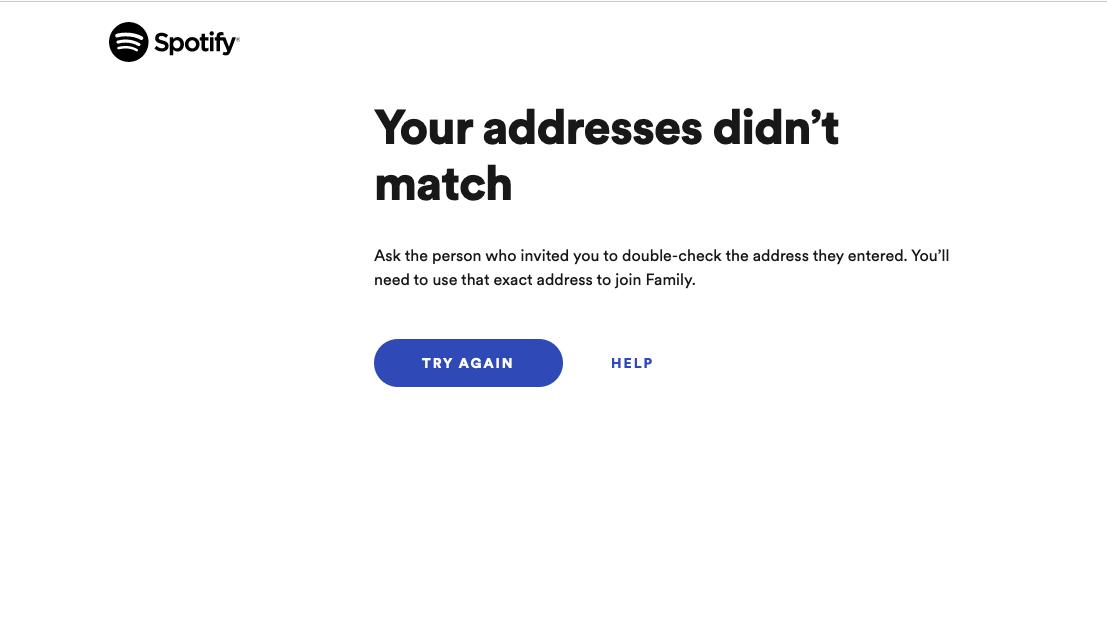
"Your addresses didn't match" on the family plan.

I accepted an invitation to join a family plan. I obviously live at the same address and I was trying to do this while staying there too actually. When I typed the address it said it didn´t match. I decided to literally copy the address from the master account and paste, didn´t work. I tried several devices, phones, desktop, laptops. Doesn´t work. Please help, it´s really not a cheap service to be this ridiculously buggy as I´ve seen it´s an extremely common issue.
The email address for the account I am trying to join from is **bleep**, the master account is at **bleep**
Accepted answers
All comments

Did you by any chance move countries recently?
I had the exact same issue. I moved between countries and even after I changed my address to my current address my family members could not join.
When i went to the "Manage Profile" section in Setting I noticed that although my Address and country where shown correctly in the landing page of the spotify settings. In Manage Profiles it was still given the old country. The reason for this was that I used a Credit Card from the old country and you can only change the country of residence once you enter a local method of payment.

Hey folks,
Thank you for reaching out to the Community and welcome.
As @ManaSecure mentioned, it's important to make sure that both accounts are registered in the same country to meet the plan requirements.
If you've already checked this info and the country in both accounts matches, we'd recommend reaching out to us privately through here, and we'd be happy to review your individual account and help you further.
Lastly, keep in mind that posts in the Community are public and personal information should not be shared here. The web page will mask it with a "Bleep", but it's better to not include this type of info for security reasons.
Hope this helps. If anything else comes up, the Community will be here for you.


Hello I'm having the same issue regarding my Family Plan. I got a premium Family account and sent the link invites to my family members but my dad cannot complete the process as the addresses aren't matching. We have tried it a thousand times already and we have made sure that the addresses entered are the same. There should really be another way to join Premium plans other than matching the addresses. Please look into the matter and suggest a solution.
P.S. I am the plan manager and I opened the account on my android phone and my dad has an apple phone, could that be a reason? I'm grasping at straws here.

Hey there,
Thanks for posting in the Community.
If you've made sure your accounts have matching country settings as described here and still can't invite members due to the addresses not matching, you can forego the entering of the house number and use only the street name. Make sure to amend the Family manager's account address first as well.
Let us know how that went,
Cheers!

I joined spotify family today. I can't enter address, it never approve.
Why I can't find my address. all are correct
I try so many times. please fix

Hey @SaraMaxPro,
Thanks for getting in touch about this.
First up, make sure that your and the owner's account have the same country set and that this matches with the address given. Then, make sure the address is entered exactly as it is on the owner's account.
If all the info is correct, we suggest that you try accepting the invite again from an incognito window and a different device.
Let us know how it goes.

I am the account manager of my family plan, and I have been trying to add my dad to the plan for hours now. It keeps saying the address doesn't match when I know it does, because I copied and pasted the address from my account and sent it to my dad's phone and copied it from his texts and pasted it onto the prompt, and it still doesn't work. I have tried everything the moderators on this board mentioned and they have yet to work. The only one I have not tried is changing the address only to street name because this is going to later ask every single member to reenter the address and I don't want the other member to run through same issue. PLEASE FIX THIS!
Hey @1251103653,
Welcome to the Community and thank you for joining the conversation.
If you've already verified that the address is the exact same one, and if you make sure the countries match as mentioned previously by @Eni, it's possible that your dad's account could have a restriction. If the account has changed group plans (Duo or Family) more than once in the last 12 months, they'll not be able to join another plan.
However, since we don't have access to users' accounts from the Community, we'd recommend contacting our Customer Support directly, so they can check your account and help you further.
Hope this helps. If anything else comes up, don't hesitate to ask.

Hi,
were you ever able to find a solution? Having same issue right now with my dad.

Hey @Lizabe859,
Thank you for your reply in this thread.
If you've tried all troubleshooting listed here and you're still having this issue - we'd suggest that you reach out to our teams directly. As @Oscar mentioned - they should be able to provide personal private assistance and give you more details in your specific case.
As much as we'd like to help you further - we can't make any account related actions here in the Community since the necessary tools for looking into this are not available for us(Moderatos).
Hope this helps. Take care 🙂

Hi,
I'm unable to join the family account after adding the exact same address. I've tried logging in through all other devices and via an incognito route. Still not able to log in. Kindly

Also having the same problem again years later after upgrading account, even though all addresses match exactly and all country settings are the same.
Spotify why have you never fixed the problem

Hey @Ericksontx!
What you can try is asking the plan owner to update the address on their Family page. Once they do that, they can send you a new invite where you can enter the newly updated address to see if that does the trick.
Cheers!


I have Family Premium and I am trying to invite my son who lives with me, but Spotify says that the address is not the same

You’d think after almost two years this would be solved. I’ve tried everything suggested here and nothing works. The only thing I haven’t done is change the address on my premium account because then I have to send an updated address to 5 separate people.
I’m having this issue today. I tried incognito, a desktop, a cellphone, and you also can’t just type half an address. It auto populates the full address as soon as you press enter. And you can’t not hit enter because then the address that Google suggests is blocking the “Find Address” button when you type in the street address. So it’s either click the full suggested address, or press enter and still select the full suggested address… So suggesting to change the address to just the street name wouldn’t even work either now that I think about it.
I need help and hopefully I’m just looking at this wrong???
Even typing in just the street address and tabbing to “Find Address” doesn’t work, it still auto populates the full Google address. City, state and zip.

Hi @Shellbelle,
Thanks for your reply in this thread.
In this case, we can only recommend updating the address on your account from this link. That doesn't mean you have to enter a different address, you can enter the same one if you still live there. Once done, you can send a new invite and the user should be able to join your play.
The other members of the plan won't be removed, but they might receive a notification asking them to confirm the address. You can just let them know they might need to do that. It won't take them more than 2 minutes to do so.
We'll be here in case you need us.

Can you explain to me why the address has to be the same? I am paying for 6 users and only use 2 accounts, my wife and i, I should still be able to add my parents and siblings (4 unused accounts because they live at different addresses). Having 6 people in one household is rare nowadays and if they are in the same location why would they listen to different music on multiple devices in the same location? "Household" plan is not the same as family plan. Address should not be a condition. And if I am paying for 6 accounts and want to share access to 5 friends it should be irrelevant if they are family, neighbors or live in another country. I AM PAYING FOR 6 ACCOUNTS and get to use 2. I should get a 4/6 refund for the last 6 years.

I want to use duo plan with my father even though we are going to live in the different house because I will enter the university at the different prefecture. Why does Spotify prohibit using Duo or Family plan for family members living apart?Yes, I know that it is because non-family members might use service too, but please think deeply about the fact that people like me want to use family plan too!

This is dumb. I have been trying to confirm my address and it auto populates an address that is incorrect and won't allow me to join. I know my address, google does not!

It doesn't help. You repeat the same, but we all here have the same problem. I spent today 4 hours chatting with 4 different agents, who all repeated the same and couldn't help. It is, as you see, many of us. How can this be resolved? I pay for 6 people and could not add more then one. How can i resolve this, if your support couldn't help in chat? Is there any other way?

Hey folks!
As @Dian has pointed out, first make sure all of your country settings match.
In case you're using any VPN connections, disable them for this process.
It's also not a bad call to use a desktop PC with a LAN internet connection if possible.
Should the issue persist - check if using a general address in your vicinity would make a difference.
Hope this helps! Keep us posted.

I have had this issue for about a week, unable to join the family plan and have gone to Spotify helpline several times and NOTHING has helped.
Hey @Lizziewalker,
Sorry to see you feel this way; we understand where the frustration is coming from.
Could you let us know which troubleshooting steps you've tried so far?
We'd be happy to help 🙂

Plan
Free/Premium
Country
Device
(iPhone 8, Samsung Galaxy 9, Macbook Pro late 2016)
Operating System
(iOS 10, Android Oreo, Windows 10,etc.)
My Question or Issue
I changed my plan from a Family plan to a Duo plan in March. I've changed it back to a Family plan in May. None of my 3 family members can join the plan as it states that the address is incorrect even though I've gone through it with each of them and the address is exactly the same as mine as the main account holder. Does anyone know what's going on and how to fix this please?

I had this issue and I'll share what fixed it, though it might not be the same for everyone. The core issue was that when you are logged into your account, there is an address under the "Address" tab, and a separate address under the "Manage members" tab. These addresses can be different. The address you should be using is the one in the "Manage members" tab. The other address won't work.

I recently changed from Duo (with no issue) to Family plan, google maps assigned an address that is pretty close to my home address. My family members, when they tried the address EXACTLY like it appears on my spotify said “the address doesn’t match”.
I checked everyone’s country, they match. I am using the “Manage Members” address, but to clarify our billing address is also the same.
When I tried changing the address to see if that fixed the problem, there’s absolutely no addresses from Puerto Rico in the list.
I already told support this, but I will write it here, how is it that spotify know what tax to charge and the address from that state doesn’t appear on the list!?
I feel like this is an expensive monthly payment for such an inconvenience that I can see hasn’t been resolved completely for a few years.
Hey folks,
Thank you for reaching out to the Community and welcome.
As @ManaSecure mentioned, it's important to make sure that both accounts are registered in the same country to meet the plan requirements.
If you've already checked this info and the country in both accounts matches, we'd recommend reaching out to us privately through here, and we'd be happy to review your individual account and help you further.
Lastly, keep in mind that posts in the Community are public and personal information should not be shared here. The web page will mask it with a "Bleep", but it's better to not include this type of info for security reasons.
Hope this helps. If anything else comes up, the Community will be here for you.