Spotify friends activity empty/not updating

Plan
Premium
Country
Finland
Device
Pc
Operating System
Windows 10
My Question or Issue
For several months (pretty much years at this point), my Spotify friends feed has not been updating, it only shows 1 friend I have, while it should have a dozen others. This has been going on for far too long for it to be a problem on my end as I have changed my devices, settings, and other things to try and fix it. I have reinstalled Spotify and my OS but nothing helps. I also see no friends through my Facebook integration even after disconnecting and reconnecting my Facebook profile multiple times. All my settings are the same as my friends and he can see his friend activity but I can't. I already posted about this problem once, and was told it would fix itself but that was months ago. This is very infuriating as it has been going for so long.
Accepted answers
All comments

Hey @Papusvagyok and @gabeebaros. Happy to check for you, but can I confirm a few things please.
Firstly, that you have read this Solution and all the steps mentioned are TRUE for you BOTH.
If so, please confirm the following:
- @Papusvagyok you can't see @gabeebaros in your Friend Feed?
- @Papusvagyok can you see anyone in your Friend Feed?
- @Papusvagyok you are FOLLOWING @gabeebaros
@gabeebaros as per the Solution:
- You have "Share my listening activity on Spotify" toggled on.
- You have played more than 30 seconds of a track on iOS, Android or Desktop in the last 7 days.
- This wasn't a Private Session.
Once you confirm, we will look up your accounts and see what's happening. Thanks!
It would also be ideal @gabeebaros and @Papusvagyok if you can both toggle "Share my listening activity on Spotify" OFF AND BACK ON AGAIN.

Hello! I can confirm all three of your statements. I can't see gabeebaros in my Friend feed, I also can't see anyone else! I'm following gabeebaros!
Tried toggling Share my listening activity on Spotify OFF and then back to ON. Also read and followed the solution but it did not prove to be any help.

Hey, I can confirm all that you mentioned are correct.

my friend can see my activity
But it keeps showing me as
the "go to settings" page
and i've reinstalled and logged in and out
nothing works
@Papusvagyok can you share a screenshot of your empty Friend Feed please. I followed both of you, and can see both of you in my Feed. We will continue checking the back end in the meantime.

I could follow you and see your activity now. That wiped all the blocked and anonymous friend entries from my Spotify account that I had sitting there uselessly for over three years. I added you via username search as I do not use facebook. Thank you.
Spotify is lacking any edit followers options.

Hi,
I have tried all the solutions proposed without any luck. I only see the activity of 5 friends that I had since very very long ago (would guess around 2015) and no matter what I do or who I follow their listening history doesn't show up for me. I have tried to change all settings and asked friends to do the same and I pop up on their feed after a bit of hassle.
Can you please help? I would like to see and follow more than these 5 ancient Spotify friends to discuss and find new music.
Best,
Andreas

I have the same issue - Super annoying . .. .

Would be nice. Please and thank you.


Hi there @accrocate,
Thanks for reaching out!
Interesting. I'd recommend switching Hardware acceleration on/off in Settings to see if that does the trick. It's also worth installing Spotify from a different source: if you downloaded the app from our website, this time try the version from the Microsoft Store instead and vice versa. Just make sure to toggle Share my listening activity on Spotify back on from the app's settings.
If the issue persists, please share a short screen recording which captures the described behavior in action so we can take a direct look at what's happening on your end, along with the exact version of Spotify you're running.
As for your followers not seeing your activity, make sure that you're all following the steps mentioned in this reply.
Cheers 🤘

I've been experiencing the same problem since 2021 and I tried everything to get it to work but everything fail 😞
First of all, I tried multiple times to reinstall, delete the cache and methods like that. I have two different computers and the problem occurs in both of them, so my conclusion is that the problem is with my account! I've been using Spotify with this account for 10 years, am I restricted or something?
Today I tried something to prove further my point. I created another account with a secondary email. As you can see in the next picture, with that second account I can see the activity of my main account
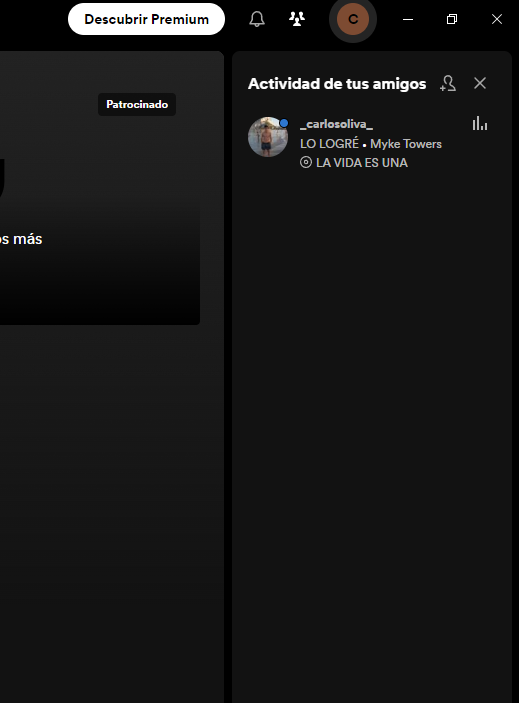
But... If check the activity in my main account, no one appears (not even that new account)
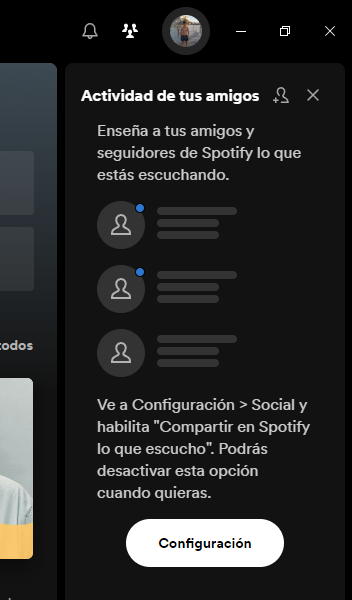
Can you guys help me, please? I've been premium for 4 years by now, and it doesn't seem fair to me not to have this functionality
Yeah i can see his activity but he cant see mine. Permission granted, you can look into my account too.

I also have the same problem.
I once was able to check activity but lately its just showing the info to activate the option of sharing activity but its already on

Plan
Premium
Country
England
Device
Samsung Laptop
Operating System
Windows 10
My Question or Issue
People on Spotify can't see what I'm listening to on the app itself but it works for other apps like discord and I have the setting saying people can see (under social saying 'Share my listening activity on Spotify') is turned on and even if I refresh or check other accounts it wont appear and I don't know what to do at this point

Hey @user-removed& @user-removed,
As requested we took a look at your profiles and found out that the issue stems from the profile of @user-removed, as we followed you both and the profile of @user-removedwas visible in the Friend Feed for us as well.
Keep in mind that, as outlined in this thread's solution, all of the below must be true for users to show in the Friend Feed:
- You must be following the friend whose activity you want to see.
- The friend must have enabled the setting to publish their activity.
- Share my listening activity on Spotify - toggled on.
- The friend must have played more than 30 seconds of a track on iOS, Android or Desktop in the last 7 days.
- This can’t be in a Private Session.
- Also you should both have restarted the App at some point recently.
@user-removedcould you confirm the above criteria is being fully met on your end, please?
Many thanks; we'll be on the lookout!
@Vasil can you please support with my request? I have been a premium customer for the last 10 years more or less and all necessary services included should work.

Hey!
@nord_a we would love to help you here. In all our research so far we try to locate an issue with the feature which causes users not to see all their friends despite both of them meeting all the requirements.
As you can see in earlier comments we are asking people get one of the friends they are not able to see and make sure that both of them have checked all the things listed in the floated reply in this thread. Everyone should keep in mind that these things should be enabled and checked for both you as the user and your friend. If you get a friend of yours to give us permission to check your accounts and send us screenshots of all enabled setting for both of you, we will take a closer look!
@user-removedawesome to hear it works now. When we checked your profiles we weren't able to see @user-removed and we needed their confirmation that all requirements are met in the form of screenshots before we could pass your case to the correct team, so we can confirm no changes have been made to your accounts. With this we recommend that sending this list to your other 5 friends which should help solve this:
- You must be following the friend whose activity you want to see.
- The friend must have enabled the setting to publish their activity.
- Share my listening activity on Spotify - toggled on.
- The friend must have played more than 30 seconds of a track on iOS, Android or Desktop in the last 7 days. This can’t be in a Private Session.
- Also you should both have restarted the app at some point recently.
Cheers!
Hi Elena,
Thanks for the elaborated response. Since I have this issue with everyone but the 5 I followed probably around 2015 I thought another solution was to look for. However, I and one friend have enabled everything. @agneßa is her username and she will respond and allow you to check as well.
I allow you do to whatever you want to fix this as I want to see my friends (in plural) activity.
Thanks,
Andreas

I've now followed both of you and I can only see Andreas, which means that all is in order with your account @nord_a. Also you have some really cool playlists 😄
@agnesa can you send us the same screenshot of your settings as Andreas has - showing that you have Listening activity toggled on, private session is off, recently played artists is on, etc - all the requirements I mentioned above. And if you could include a screenshot of the now playing view of a song that you're playing outside of a Private session would be great.
I really appreciate your cooperation here folks! Thank you!
hi Elena,
yes, here is the screenshot (it’s in german but you can see that private session is off, listening activity is on and recently played artist is on as well).
Hey hey!
Thanks you so much for the fast replies @agnesa! I checked my Friend Feed and I can see your listening activity now.

@nord_a can you take a look in your app and see if she appears for you as well? If not - you know the drill, send us a screenshot of what you see so we can investigate further!
Have a great day ahead, folks!
Dear Elena,
Yes, now it works and I can see her! I also tested with my sister and I can see her as well. So hopefully you solved the overall issue that I haven't been able to add new people to my friend feed.
Thanks a lot and happy labour day!
Andreas

Have the same problem since I created a new account. The old account was connected to Facebook, it worked fine. Then I hadn't been using it for long time and Spotify had deleted it. I created new account, tried to connect to Facebook, and nothing happens, Friend Activity is the same as on your screenshot. Maybe it is because Spotify links my Facebook account with the old Spotify account despite it was deleted, and can't process to relink with new account. Any news of your issue?


hello
my friends activity option hasnt been working i tried everything, the settings on social and display are on and private session is off, i have many followers, i restarted the app, deleted it and waited and downloaded again, its not working so i give you permission to look through my account, my username is <snip - moderatot edit> Hope you can fix it
We have seen the reports of people saying Friend Feed is not working for them, and we are happy to investigate specific cases, because as far as we are aware, there are no issues with Friend Feed working.
Firstly, it’s important to restate that ALL users had “Share my listening activity on Spotify” turned off as default - so users you followed and saw in your Friend Feed in the past, will no longer show in your Friend Feed, UNLESS they turned “Share my listening activity on Spotify” back on.
Also worth noting that you don’t need Facebook set up for Friend Feed to work.
Having said that, all of the below must be true for users to show in your Friend Feed:
If all of this is true for you and your friend and they don’t show up in your Friend Feed, then:
Once we have this we can do some checking. Thanks all.