Apple CarPlay - Audio Playback Stopping

Plan
Premium
Country
Australia
Device
IPhone 12
Operating System
17.3.1
My Question or Issue
Recent bug seems to have appeared when playing audio on Spotify via apple car play. Audio will randomly pause and the user will be unable to resume/play the audio. The UI will either display as ’playing’ with no audio or time progress appearing or it will not allow you to play.
The only fix is to open the mobile device, terminate the Spotify app and reopen it on the mobile device.
I have tried to understand the trigger of the bug but I am unsure, it appears to happen randomly.
I have checked mobile connection in all instances and 5G/4G is available. All other applications do not encounter this issue.
Accepted answers
All comments

Hey there @Jetsetcarwash,
Thanks for your reply.
No worries, that shouldn't affect the app's performance. Just to confirm, has this issue started happening when you changed phones?
If you're still experiencing this behavior after clearing the app's cache, could you give a different internet connection a go to see if that does the trick?
Keep us posted on how it goes.

I thought this was related to a network problem rather than Spotify. I reset network settings and it bought me a couple of days before it started happening again. We're back to looking at Spotify to get this sorted.
~S

Thanks for a solution if it works but there’s no way they can be correct, it’s only just started happening and seemingly to a lot of people, and there must be something wrong with the app if it only happens in certain situations and it never used to before. If I get in the car and play Spotify right away it works but if I play a podcast and Spotify after it doesn’t work. There’s something wrong with Spotify if that’s happening

Removing network settings seems a bit extreme. Are you saying this gets done once, and the problem goes away, or does it require to be completed every time there is an issue?

Resetting network settings did not solve the problem
Yep, I spoke too soon. Resetting the network settings bought me two days and then it started happening again. Back to looking at Spotify for answers. Sorry for the false hope.
~S

Hello Eni,
only happens in the car, so internet not applicable? Still happening despite cache clear.
A

Hey there,
thanks for keeping us in the loop @Jetsetcarwash!
To confirm, did you experience any similar issues while using Spotify in the car with your previous phone?
Also, I see you that mention using USB. Just to make sure we cover all bases, could you double-check so that the cable is compatible to your device? You can also give another USB cable a try.
Regarding the internet connection, if the issue should persist, it would be great if you could give another internet connection a shot (if possible). For example, if a friend or a family member have a mobile device available, they can create a hotspot on that device, and you can temporarily connect your own device to that connection, to see if it makes a difference.
Let us know how it goes.
Many thanks all, I’ve tried using a wireless CarPlay adapter as well as usb, no joy. I used Spotify for many years on iPhone 6 before upgrading to 15. Only now am I getting problems. I can cure the playback by disconnecting the usb, turning off phone and then back on? If it’s any help I also use an app that displays my blood glucose on CarPlay, and this sometimes doesn’t display?
Hey there @Jetsetcarwash,
Thanks for your reply.
We've merged your post into the main thread in order to have everything in one place and avoid any mix ups.
In this case, make sure to provide us with the info @MihailY asked for here along what I asked here so we can pass this info on to the right team to keep investigating.
Thanks!
Hi,
OS 17.4.1 on iPhone 15 pro.
car Audi A4 2016 (B9)
I recently tried using an aftermarket Bluetooth device to eliminate usb but no change. Works again if I turn off and back on iphone
Happens at random times (I’m in the UK

I may have a possible solution. I realized that Apple Music was auto playing even though I was not using it. Since disabling this I have not had an issue with Spotify not playing on Car Play. Here is what I did to disable it:
- Open the song
- Tap the Playing Next icon
- Scroll to the top of the Playing Next list and find the Autoplay icon
- Toggle the Autoplay icon off, turning it from highlighted to dimmed
I have just tried this thanks (not as easy on my version).
I have to say though it has been working faultlessly for the last week
let’s see what happens?!?

Hey folks,
Thanks for all your replies and for the info shared here.
We'd like to confirm, are you still experiencing this on your side? If yes, please send us the exact Spotify version you're running on your devices.
@Jetsetcarwash, that's great news! Please send us the exact Spotify version you're running on your device.
We'll be on the lookout!

I went to try this solution but I had already uninstalled Apple Music ages ago  . Still happening
8.9.38.455
iPhone 15 pro OS 17.4.1
Still happening! I’ve just updated to Spotify 8.9.40 (not sure if I’m on auto update? Not sure how?)
andrew
The problem seems resolved for me. This is not happening anymore for me with the following versions (FYI, I do not have Apple Music installed)
- Spotify 8.9.38.455
- iOS 17.5
- iPhone 13
Interesting, it didn’t work today as I left home but I live in a poor 3g area. 5 mins later it kicked into life?
I spoke too soon. It lasted for several days without exhibiting the problem and then did it again. 😞

The issue is with CarPlay its more widespread than just Spotify , problem is when the iPhone receives a notification of any kind the music is silenced but the progress bar of the song playing keeps going forcing one to exit CarPlay or disconnect/reconnect to resume , work around go to the in vehicle settings for Carplay from the touchscreen while connected in your vehicle and turn notifications off or try turning driving focus on, also if your car is equipped with Alexa try disabling it from your vehicle settings. menu.

I’ve had this issue for a while. Multiple iOS versions. Mine is wired only. If I unplug, then plug it back in Spotify will not play for 3-5 mins. Then after that it magically starts playing.
my wife now has CarPlay with wireless. She has worse issue. Like others mentioned if she gets a notification etc.. it interrupts play, and won’t allow ply again for 3+ minutes. Then it’s good again.

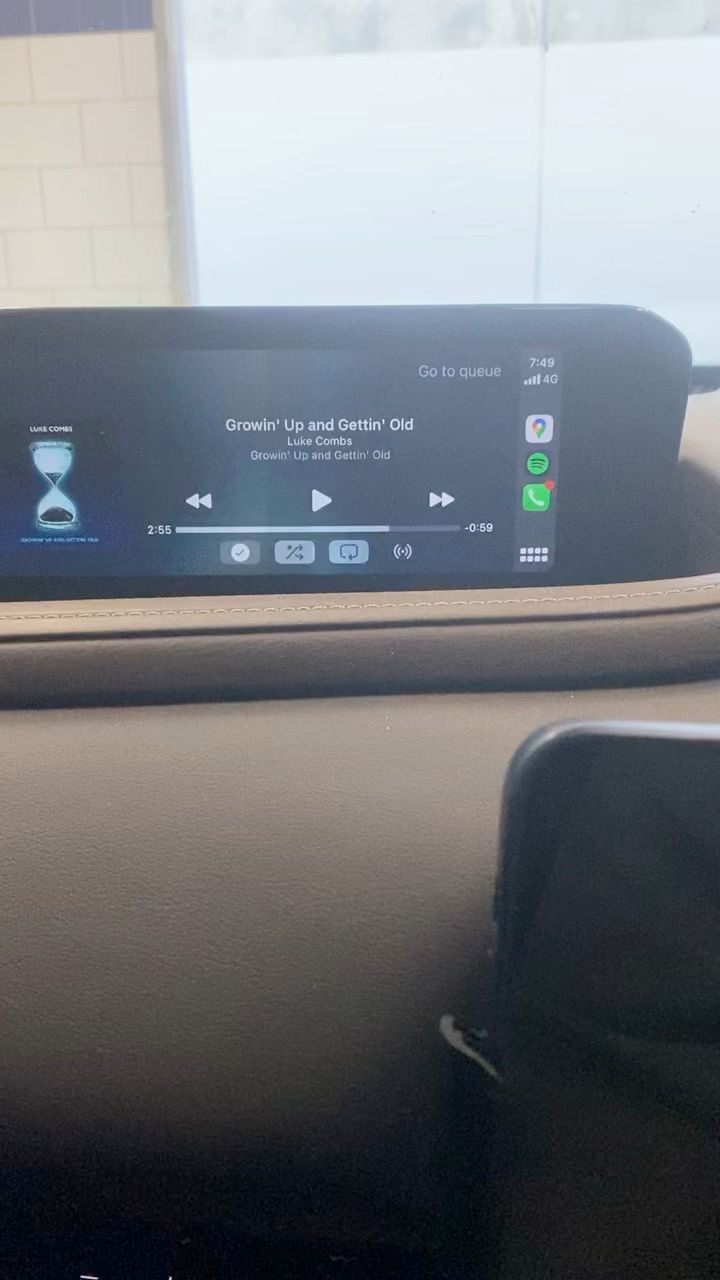


And there lies the issue, switching to Apple music is exactly what they want us to do! Strange how Spotify is riddled with problems and no issues with Apple Music 🤔 only saying.

have the same issue as well, iphone 15 and app is fully updated. not all the time but most mornings i have to open and close the app on my phone for spotify to work on carplay