Android Auto to enable Spotify to start play from car app

When connecting Spotify via Android Auto, we have to press play on our mobile devices to initiate Spotify on the car. I think it would be safer and easier if, once connected via a data cable or wirelessly, we could all initiate operation via the car app rather than our devices.
Accepted answers
All comments

Hi there @NicB69,
Welcome to the Spotify Community!
This should already be possible with Android Auto: you can toggle on Start music automatically in the Android Auto settings on your phone. In addition, Spotify will automatically start playing when a Bluetooth connection is established between your device and your car.
Cheers 🤘

Hey @NicB69,
Along with what Moderator @Yordan recommended, I have a recommendation of something you could try.
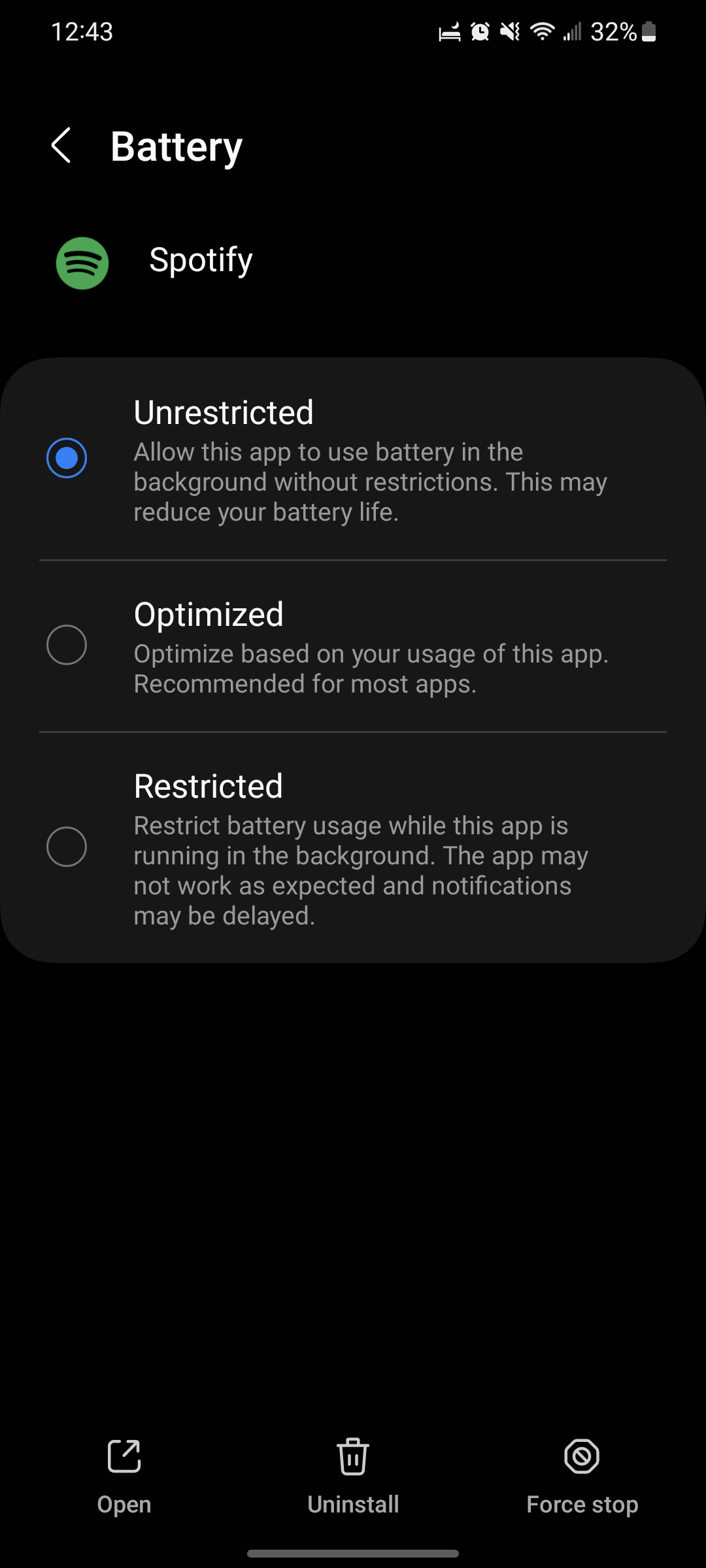
Spotify is supposed to immediately show up in Android Auto automatically, either on the dashboard view or in your (what I will call) 'taskbar.' I've had issues with this not working before. I fixed it by selecting Spotify from the applications list within my phone's native settings app, and setting Spotify's battery mode to "unrestricted." I've not noticed a significant increase in battery use. The steps and options may vary by device, but there should be a similar option.
Hi Jordan
Yeah I'd already done that and it doesn't work. I still have to press play on my mobile to get Spotify started. Once started I can operate from then operate it from the Android Auto screen 😕
Thanks. I will try this and let everyone know
Unfortunately the battery change has no affect either 😞
Hi again @NicB69,
Thanks for your reply!
Could you confirm if the app is already running when the Bluetooth connection is established? I'd also recommend making sure that Spotify is allowed to auto start: you can follow the steps in this article for more info on how to do that.
It's also worth checking for any pending updates and installing them to ensure you're running the latest versions of both Spotify and Android Auto.
We hope this helps, let us know how it goes.
Hi Yordan
Thanks for this latest tip. I have added Spotify to be one of my auto start apps. I will see if that makes a difference and let everyone know either way 😁
The "auto start" change works! Not sure if it would work on it's own or needs one or both previous steps, but all good thanks!
Hi again @NicB69,
Thanks for your reply!
Could you confirm if the app is already running when the Bluetooth connection is established? I'd also recommend making sure that Spotify is allowed to auto start: you can follow the steps in this article for more info on how to do that.
It's also worth checking for any pending updates and installing them to ensure you're running the latest versions of both Spotify and Android Auto.
We hope this helps, let us know how it goes.