[Connect] Option to deactivate Spotify Connect

I want to have the opption to turn it off. Please fix this, i wan't to listen to music and still be online without connect starts.
Please fix this.
Jag vill gärna kunna använda spotify på en telefon utan att den andra telefonen ska börja dra batteri för att ni kommit på denna tjänst utan en avstängningsfunktion. Då ni är Svenska som startat detta hoppas jag på att ni accepterar svensk text. Och en svensk meny till spotify hade varit trevligt. 🙂
Från en trogen användare sedan år tillbaka 🙂
Comments

Spotify, so let me get this right—you have 64 pages of comments from people annoyed by this stupid pop up, but you still mark it under "Not right now"? How does that qualify as "listening to your community"? The Desktop app is a steaming pile of bad UX decisions as it is, at least let us have this one.

Looking to disable spotify connect. My music keeps stopping because my children ask their speaker to play music. I have google voice match turned on, and each child is logged into a different spotify account but it still happens daily. I have 8 speakers in my home, so they are constantly being used. I am canceling our family plan because the feature can't be deactivated.

I'm not sure if this is the same problem but on Andriod you can hide certain notifications and I just happened to stumble upon this because I too am annoyed but the abrupt popup and music playing on different devices I'm not currently using at home while I'm listening at work.
1. On the Notifications Drop down Press and Hold until you get the option below. (I didnt screenshot before disabling)
2. Select "Notification Categories" at the bottom
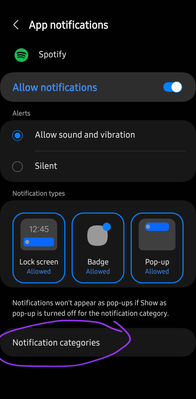
3. Select Spotify Connect and the banner to "connect to" device thats not being used disappears
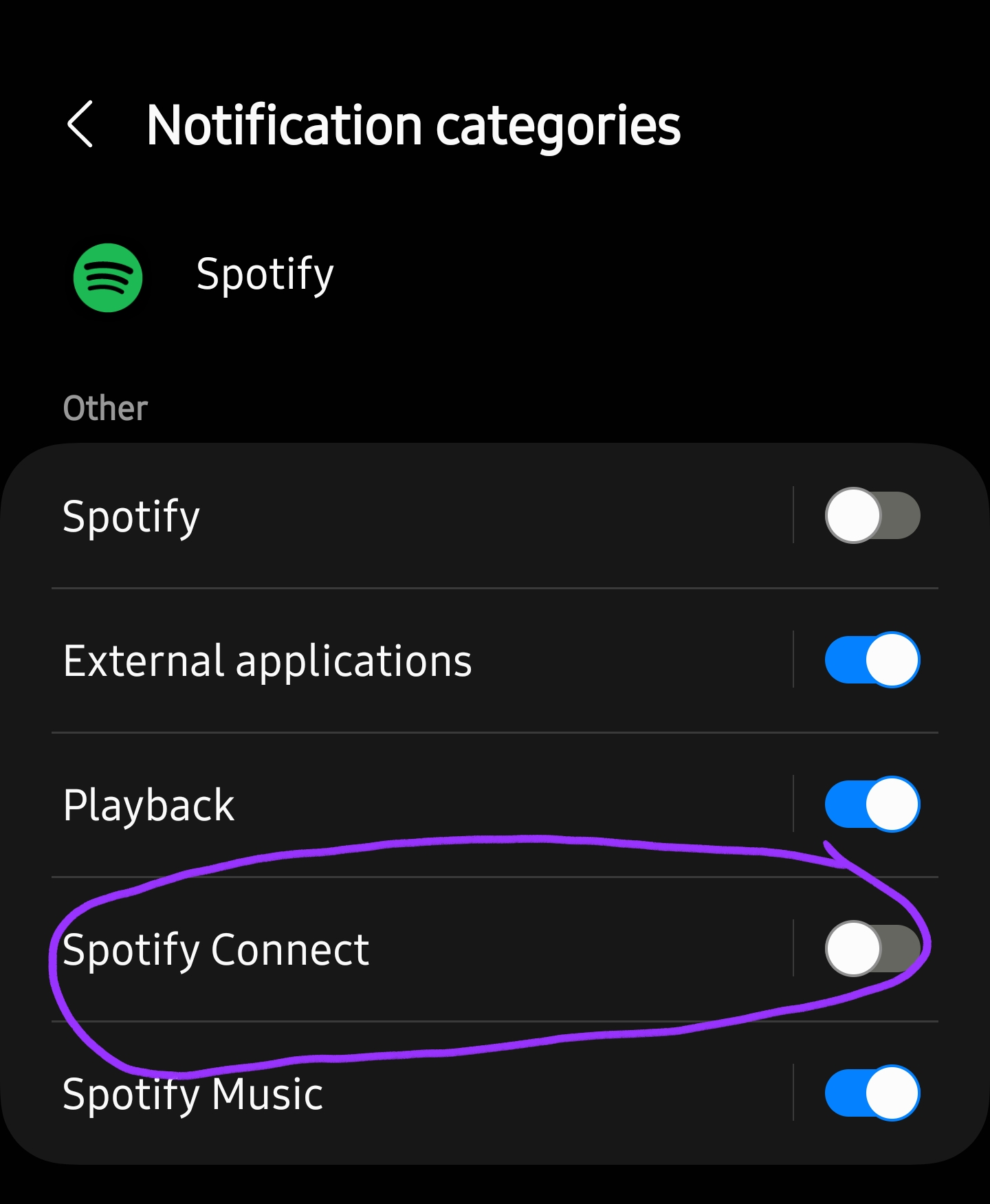 Unselect Spotify Connect

Adding my voice to the 64 pages of annoyed customers since 2014. Seriously Spotify, it's coming up on 10 years now.
It's doubly annoying because it doesn't even do it right for me. It syncs late and then forgets which songs were already played on the PC.
I'll be listening to music on my PC, then go for a drive and start playing music... and about 5 or 6 songs it is when it'll sync, and I'll notice that I'm listening to the same songs in the same order as I was 60 minutes ago on my PC.
I can see how this feature might be wanted by some people (assuming it works properly for them), but holy heck it's annoying for me.

Wow what a non-response. I am getting very sick of device sync like everyone else in this thread. Please get rid of this stupid feature or at least give us the option to disable it!
bothered me since!!

Plan
Premium
Country
USA
Device
SAMSUNG Galaxy Note 9
Operating System
Android 10
My Question or Issue
At some point in the last 6-8 months, whenever I play Spotify on my PC, it will also play the exact same song on my phone in the background.
I know this is NOT an issue with which device Spotify is set to play out of. The desktop app clearly states that the PC is where its playing music. All sound will play out of my PC with no issues. However my phone will still track exactly what I'm listening to on my PC, where I'm at in the song, and update it on the phones playback overlay as if I am actively listening on my phone.
I'm on the PC app every single day for over 12 hours a day. This absolutely DESTROYS my phone battery since my phone treats it like I'm streaming music on it every day for over 12 hours a day too.
I've tried to limit the phone apps' background activity and permissions, as well as change some settings with battery usage. While this worked, it also caused many new issues and is not a permanent fix at all.
So far the only way I've found to stop it without issues is to go into android settings>apps>spotify> and force stop the app every. single. time. I use spotify on PC or everytime I pause the music on PC for more than 5 minutes. This is unreasonable as **bleep** considering how much I use Spotify on PC.
Has anyone experienced the same issue and found a fix for it?
I'm extremely tired of dealing with this and assumed it would have been fixed by now since once of Spotify's updates obviously caused this.

My computer is hooked up to high quality studio monitors. I don't want to listen on my dinky Amazon Echo. Please stop showing this annoying**bleep**.

This feature is extremely obnoxious and even if it always worked properly the benefits are small. I'm tired of working on my car and my Garage PC streaming getting stolen by my head unit only to not switch back when I turn the car off. Rinse, repeat for hours... then I come inside when I'm done and try to play music on the Living Room PC and instead of playing music on the device I just opened the program on it starts playing in the garage and I have to manually switch. If I go take a shower and take my phone with me and try to play something it will instead try to control the living room.
I have only used this feature on purpose to harass my girlfriend by playing Kidz Bop when she's on the way home from work. Please stop actively making your service worse.
worry about Spotify connect since...

Running into issues with this myself now. Suddenly both personal phone and PC automatically select my work PC when I try to play something. All I would need is a setting like, "Always default playback to current device" and then behavior would be normal and predictable. I could still use your feature, but only when I make an active choice to do so.
I've never picked up my phone and thought, "I know, on my commute to work I'd like to play this podcast on my PC at work." Yet I can't make this stop.

I'm about ready to move away from Spotify due to not being able to turn off Spotify connect. It just causes problems:
* I only listen to music on my computer and only podcasts on my phone. Whenever I listen to a podcast it loses my place in my current music playlist.
* Spotify often decides to play on the other device, which I've *never* wanted. Yesterday I tried to listen to a podcast in my car and it decided to play on my computer at home... (which was especially a problem because I was driving so I couldn't just fix it)
I just don't want the notification telling me to connect to a speaker every time I start playback. It's really annoying.
Please just give us a way to disable irritating stuff that isn't useful like this.

I just left my computer idle, capturing a Wireshark log just for the heck of it, I use Arch Linux so I shouldn't expect to see much. 88.7% of packets were my phone spewing Multicast DNS packets querying "_spotify-social-listening._tcp.local", my phone sent 89975 MDNS packets over the course of 5669.404 seconds, or an average of 15.9 packets/second!! This cannot be good for battery life, I have "Spotify" > "Settings" > "Spotify Connect in background" disabled and I continue to see my phone going bananas. So, while it seems this issue was supposed to have been resolved, the toggle switch in Spotify settings does nothing. I do not need Spotify draining my battery checking for devices so often, heck I don't need it checking for devices at all, even just once every 15 or 30 seconds would be better than 15.9 packets/second!!


The Connect feature should be completely optional and by default turned off.
My wife has been driving and it transferred to the living room Google Home!
I've had the same and it was impossible to get it back, "this phone" was not present on my phone!
BUG!!!

PLEASE offer a disable option!!! I listen to Spotify in my car and at work. I do NOT want to continue playing what I was playing in the car when I get on my work laptop and vice versa. I can't imagine this being difficult to implement yet it would save soooooo many headaches! What if I want to listen to different playlists on different devices? As long as I'm not listening on the same account on multiple devices at the same time, what does it matter? Just give us the option to disable Spotify Connect! And no matter how many times I select "forget device" in hopes that it will stop automatically connecting, it just comes back again. UGH!!
The original "idea" was submitted back in 2014. It's 2024! TEN YEARS! Come on, please listen to people and give us the option already!

3251 people want this, and Spotify says "Not right now".
If 3251 people come here to vote, imagine the amount of people / customers that want this, may be dozens of thousands probably.
But Spotify does not care about customers.

I tried Spotify Premium once again but unfortunately this was still not workable and I've cancelled the subscription. I would like to permanently disable the Spotify Connect or remote features.
Actually it was decent before, but recently the Connect feature is controlling the phone volume from my PC and vice versa via the Spotify app, even sometimes when no music is playing on either device. Just confusing and annoying to use. I'd rather not.

I used to have a happy house; my daughter listened to her music on her Alexa and my son listened to his playlists on his, and I could listen downstairs and read. Now it's chaos. They are up and down the stairs switching devices on my phone. To prevent bloodshed we have to set time allowances for each device. The high monthly fee was worth it but if I can't disconnect from connect very soon I will have to find another way. Plus, when the kids are on school holiday I can't listen to podcasts on my commute without the phone ringing to switch it off as it's playing in the house and not the car. Who designed this?
My favorite is when Spotify decides to switch devices *in the middle of a song, without me ever pressing a button*

Spotify is unusable when I am using my student accommodation WiFi. All the time I am connected the app lags and crashes randomly. As soon as I connect to mobile data it works fine. If I open the Spotify connect menu and scroll the app instantly crashes as it attempts to show 800 Xboxes and smart TVs. Turning off the ability to connect to other devices on the same network would be great.

This is BS, and makes me want to cancel this stupid service. Give people control of their own devices. Your implementaion of this feature is trash. Guests who have access to my speakers, the app does not even show them as remote, or someone elses, they just show in the same list as if they are in the same house.
So if they have Sonos, and have a "Kitchen" speaker, guess what, its right next to my Kitchen speaker.. No explanation of which is which.
CONNECT IS TRASH - GIVE US THE OPTION TO CONTROL IT OR TURN IT OFF

Absolutely cannot believe this issue has been around for 10 years. Ridiculous.
I primarily listen on desktop. Recently I got a bluetooth enabled car (yes, I know, I'm 10+ years late to this technology) so I'd like to listen to Spotify while doing the school run. I don't want to lose my place in my desktop playlists though.
It's making me seriously look at Youtube Music as a total replacement. I love Spotify playlists, I really do. I've been a Spotify user for about a million years. The utter disregard for this highly requested feature is alarming.

I prefer spotify's user interface and music selection more than the competitors but I cannot stream on multiple devices even with the premium family plan. With a wife and 2 kids, this needs to be fixed or I will have to switch to another streaming service that allows multi-device streaming. WHO ELSE FEELS THIS WAY?

fr

10 years passed - not implemented yet, and most likely will never be

Thousands of people asking for a simple change and they couldn't care less. Get better.
So which issue is this talking about?
1 - Syncing your account/history across devices
2 - Playing something on once device forces it to be the next thing that plays on the next device wiping out where the last device was
Number 2 is what is annoying. Trying to only listen to a certain podcast on my PC then music on my phone later but then I lose were I was on the podcast when I switch back to the PC because what my phone was playing overwrites it.